

編輯:關於 Android 程式設計
Android 支援的資料格式
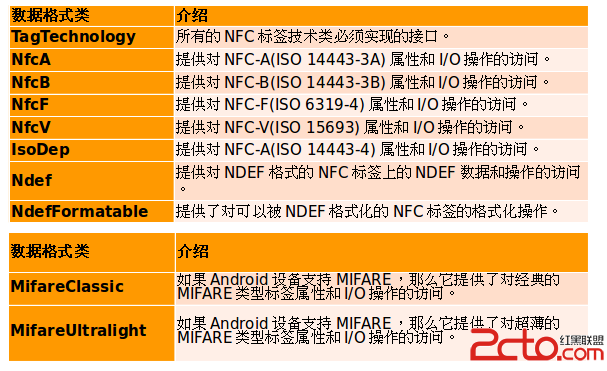
資料格式的 Intent filter
在 AndroidManifest.xml 中,要像下面範例那樣,於元素內的 <meta-data> 中指定你建立的資源檔:
......
nfc_tech_filter.xml(一個 Tag 只有在完全匹配 tech-list 元素中所有 tech 指定的 NFC 晶片時,才會被判定為匹配):
android.nfc.tech.IsoDep android.nfc.tech.NfcA android.nfc.tech.NfcB android.nfc.tech.NfcF android.nfc.tech.NfcV android.nfc.tech.Ndef android.nfc.tech.NdefFormatable android.nfc.tech.MifareClassic android.nfc.tech.MifareUltralight
也可以建立多個資源檔(多個資源檔之間是 OR 關係,每個資源檔中的晶片則是 AND 關係):
android.nfc.tech.NfcA android.nfc.tech.Ndef android.nfc.tech.NdefFormatable
或在同一個資源檔中建立多個 <tech-list> 元素(多個 <tech-list> 之間是 OR 關係,元素內的 <tech> 則是 AND 關係):
android.nfc.tech.NfcA android.nfc.tech.NfcB android.nfc.tech.MifareClassic
查看標籤支援資料格式的方法:
・透過 Tag.getTechList() 取得標籤支援的所有資料格式
・透過 Tag.getId() 取得標籤的唯一 ID 標識
・NfcAdapter == null:代表裝置不支援 NFC 硬體
・NfcAdapter.isEnabled():判斷 NFC 是否已開啟
綜合歸納:
一個 Tag 透過 getTechList() 取得它支援的所有標籤類型。若清單檔中某個 <tech-list> 資源檔裡所有 <tech> 的晶片都是該 Tag 支援標籤的子集,即判定為匹配。可以寫多個 <tech-list>,彼此獨立,只要其中任一個的所有晶片型別全部匹配,就算命中。記住:多個 <tech-list> 是 OR 關係,同一個 <tech-list> 內的多個 <tech> 是 AND 關係。
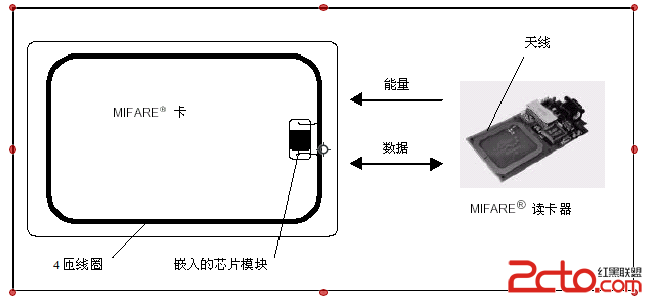
MifareClassic 標籤的外形結構
MifareClassic 標籤的資料結構
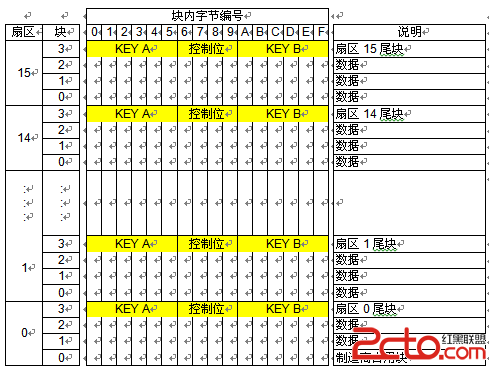
注意事項(以 1K 空間為例):
・第一扇區的第一塊通常保留給製造商使用
・0~15 共 16 個扇區,每個扇區對應 4 個塊,總共 64 個塊,序號 0~63。第一扇區對應 0~3 塊,第二扇區對應 4~7 塊,依此類推。
・每個扇區的最後一塊用來存放密碼或控制位,其餘為資料塊。一個塊佔 16 位元組,其中 keyA 佔 6 位元組、控制位佔 4 位元組、keyB 佔 6 位元組。
MifareClassic 類別的常用方法
get():根據 Tag 物件取得 MifareClassic 物件。
connect():允許對 MifareClassic 標籤進行 IO 操作。
getType():取得標籤的具體型別:TYPE_CLASSIC、TYPE_PLUS、TYPE_PRO、TYPE_UNKNOWN。
getSectorCount():取得標籤的扇區總數。
getBlockCount():取得標籤的塊總數。
getSize():取得標籤容量:SIZE_1K、SIZE_2K、SIZE_4K、SIZE_MINI。
authenticateSectorWithKeyA(int sectorIndex, byte[] key):驗證目前扇區的 KeyA 密碼,回傳 true 或 false。常用 KeyA 包括出廠預設密碼 KEY_DEFAULT、供貨商使用的 KEY_MIFARE_APPLICATION_DIRECTORY,以及格式化為 NDEF 格式的 KEY_NFC_FORUM。
getBlockCountInSector(int):取得目前扇區所含的塊數。
sectorToBlock(int):取得目前扇區第一塊的塊號。
writeBlock(int, data):把資料寫入目前塊。
readBlock(int):讀取目前塊的資料。
close():禁止對標籤的 IO 操作並釋放資源。
MifareClassic 標籤的讀寫流程
讀取資料:取得 Adapter → 取得 Tag → 取得 MifareClassic → connect()、readBlock()、close()。
寫入資料:取得 Adapter → 取得 Tag → 取得 MifareClassic → connect()、writeBlock()、close()。
範例程式(讀寫 MifareClassic):
package mobile.android.mifareultralight; import java.io.IOException; import java.nio.charset.Charset; import android.app.Activity; import android.app.PendingIntent; import android.content.Intent; import android.nfc.NfcAdapter; import android.nfc.Tag; import android.nfc.tech.MifareClassic; import android.os.Bundle; import android.util.Log; import android.widget.CheckBox; import android.widget.Toast; public class MifareultralightMainActivity extends Activity { private CheckBox mWriteData; private NfcAdapter mNfcAdapter; private PendingIntent mPendingIntent; @Override public void onCreate(Bundle savedInstanceState) { super.onCreate(savedInstanceState); setContentView(R.layout.activity_mifareultralight); mWriteData = (CheckBox) findViewById(R.id.checkbox_write); mNfcAdapter = mNfcAdapter.getDefaultAdapter(this); if (mNfcAdapter == null) { Toast.makeText(this, "設備不支持NFC!", Toast.LENGTH_LONG).show(); finish(); return; } if (!mNfcAdapter.isEnabled()) { Toast.makeText(this, "請在系統設置中先啟用NFC功能!", Toast.LENGTH_LONG).show(); finish(); return; } mPendingIntent = PendingIntent.getActivity(this, 0, new Intent(this, getClass()), 0); } @Override public void onResume() { super.onResume(); if (mNfcAdapter != null) mNfcAdapter.enableForegroundDispatch(this, mPendingIntent, null, null); } @Override public void onNewIntent(Intent intent) { Tag tag = intent.getParcelableExtra(mNfcAdapter.EXTRA_TAG); String[] techList = tag.getTechList(); boolean haveMifareUltralight = false; for (String tech : techList) { if (tech.indexOf("MifareClassic") >= 0) { haveMifareUltralight = true; break; } } if (!haveMifareUltralight) { Toast.makeText(this, "不支持MifareClassic", Toast.LENGTH_LONG).show(); return; } if (mWriteData.isChecked()) { writeTag(tag); } else { String data = readTag(tag); if (data != null) { Log.i(data, "ouput"); Toast.makeText(this, data, Toast.LENGTH_LONG).show(); } } } @Override public void onPause() { super.onPause(); if (mNfcAdapter != null) mNfcAdapter.disableForegroundDispatch(this); } public void writeTag(Tag tag) { MifareClassic mfc = MifareClassic.get(tag); try { mfc.connect(); boolean auth = false; short sectorAddress = 1; auth = mfc.authenticateSectorWithKeyA(sectorAddress, MifareClassic.KEY_NFC_FORUM); if (auth) { mfc.writeBlock(4, "1313838438000000".getBytes()); mfc.writeBlock(5, "1322676888000000".getBytes()); mfc.close(); Toast.makeText(this, "寫入成功", Toast.LENGTH_SHORT).show(); } } catch (IOException e) { e.printStackTrace(); } finally { try { mfc.close(); } catch (IOException e) { e.printStackTrace(); } } } private String bytesToHexString(byte[] src) { StringBuilder stringBuilder = new StringBuilder("0x"); if (src == null || src.length <= 0) { return null; } char[] buffer = new char[2]; for (int i = 0; i < src.length; i++) { buffer[0] = Character.forDigit((src[i] >>> 4) & 0x0F, 16); buffer[1] = Character.forDigit(src[i] & 0x0F, 16); stringBuilder.append(buffer); } return stringBuilder.toString(); } public String readTag(Tag tag) { MifareClassic mfc = MifareClassic.get(tag); boolean auth = false; try { String metaInfo = ""; mfc.connect(); int type = mfc.getType(); int sectorCount = mfc.getSectorCount(); String typeS = ""; switch (type) { case MifareClassic.TYPE_CLASSIC: typeS = "TYPE_CLASSIC"; break; case MifareClassic.TYPE_PLUS: typeS = "TYPE_PLUS"; break; case MifareClassic.TYPE_PRO: typeS = "TYPE_PRO"; break; case MifareClassic.TYPE_UNKNOWN: typeS = "TYPE_UNKNOWN"; break; } metaInfo += "卡片類型:" + typeS + "\n共" + sectorCount + "個扇區\n共" + mfc.getBlockCount() + "個塊\n存儲空間: " + mfc.getSize() + "B\n"; for (int j = 0; j < sectorCount; j++) { auth = mfc.authenticateSectorWithKeyA(j, MifareClassic.KEY_NFC_FORUM); int bCount; int bIndex; if (auth) { metaInfo += "Sector " + j + ":驗證成功\n"; bCount = mfc.getBlockCountInSector(j); bIndex = mfc.sectorToBlock(j); for (int i = 0; i < bCount; i++) { byte[] data = mfc.readBlock(bIndex); metaInfo += "Block " + bIndex + " : " + bytesToHexString(data) + "\n"; bIndex++; } } else { metaInfo += "Sector " + j + ":驗證失敗\n"; } } return metaInfo; } catch (Exception e) { e.printStackTrace(); } finally { if (mfc != null) { try { mfc.close(); } catch (IOException e) { e.printStackTrace(); } } } return null; } }清單檔:
 Android 布局與控件(三):TextView 屬性全解析
TextView 是界面設計中使用頻率最高的控件之一,同時也是 Button 等眾多控件的父類。可以說,把 TextView 玩透,界面排版就成功了一大半。 文字常用
 Android Service 教學:生命週期、startService 與 bindService
Service 是 Android 四大元件之一,適合執行不需要使用者介面的背景工作,例如音樂播放、檔案下載或長時間運算。 兩種啟動方式 startService:呼
 Android 性能優化:Splash 頁應該這樣設計
目前 SplashActivity 的設計 如今市面上大多數應用在啟動時都會先進入一個 SplashActivity 作為歡迎頁。為什麼要這樣設計?個人總結有三個優點:
 Arduino 藍牙小車(二):手機與 Arduino 的藍牙通信
在上一節中,我們開始接觸 Arduino 與 Android 的藍牙通信。本節將繼續深入,重點說明如何讓手機與 Arduino 之間完成穩定的數據收發,並分析官方 Blu