

編輯:關於 Android 程式設計
在用 Fragment 的時候,常常會碰到一個經典問題:Fragment 與 Activity 之間該怎麼互相通訊?下面就來記錄一下,如何透過「實作介面」的方式,讓 Activity 與 Fragment 雙向溝通。
一、Activity 向 Fragment 發出通訊
在 Activity 中這樣寫:
 private OnMainListener mainListener;

 // 綁定接口
 @Override
 public void onAttachFragment(Fragment fragment) {
 try {
 mainListener = (OnMainListener) fragment;
 } catch (Exception e) {
 throw new ClassCastException(this.toString() + " must implement OnMainListener");
 }
 super.onAttachFragment(fragment);
 }

 // 接口
 public interface OnMainListener {
 public void onMainAction();
 }
其中 onMainAction() 就是 Activity 向 Fragment 發出通訊的方法,需要傳參數的話直接加在方法簽名裡即可。要在哪裡發出通訊,就在對應的位置呼叫這個方法。
接著在對應的 Fragment 裡這樣實作:
public class MyFragment extends Fragment implements OnMainListener {

 @Override
 public void onMainAction() {
 //這裡是實現通信的接口
 }

 }
二、Fragment 向 Activity 發出通訊
做法與上面類似,只是方向相反:
 private OnFragmentListener mListener;

 @Override
 public void onAttach(Activity activity) {
 super.onAttach(activity);
 try {
 mListener = (OnFragmentListener) activity;
 } catch (ClassCastException e) {
 throw new ClassCastException(activity.toString() + " must implement OnFragmentListener");
 }
 }

 public interface OnFragmentListener {
 public void onFragmentAction(int flag);
 }
然後在 Activity 中實作這個介面:
public class MainActivity extends Activity implements OnFragmentListener {

 // 實現接口方法
 @Override
 public void onFragmentAction(int flag) {
 //實現通信的接口
 }
 }
兩者的核心都是「透過介面的實作來通訊」,而最關鍵的地方就在於分別於 onAttachFragment 和 onAttach 這兩個生命週期方法中完成介面綁定。
當然,通訊的方式不只有這一種,像是廣播、靜態 Handler 等也都能達到同樣目的,這裡就不再贅述了。
end~
 手機 SD 卡顯示「已損壞」?免格式化修復教學
手機用久了,有些人會突然看到「SD 卡已損壞,您可能需要重新格式化」的提示,卡片就此無法使用。身邊就有朋友遇到这种状况,直接格式化雖然省事,但裡面的照片和檔案也就跟著沒了
 Android 以 Intent 啟動 Activity:顯式與隱式
Intent 是 Android 元件之間溝通的核心:它負責「綁定」元件,也負責在應用彼此之間傳遞訊息。而 startActivity() 接收一個 Intent 參數,
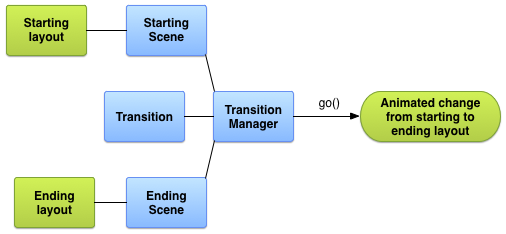 Android 官方開發文件中文版:動畫與轉場框架完整導覽
本文整理自 Android 官方開發文件 Training 系列中的 Transitions 單元,說明如何運用轉場框架,讓檢視的出現與消失變得流暢而連貫。 為什麼需要轉
 Android WebView 與 JavaScript 雙向互動實作
混合式 App 裡,WebView 與原生程式之間的溝通是基本功:網頁上的按鈕要能叫動原生功能,原生端也要能反過來控制網頁。本文用一個最小可行範例把雙向呼叫跑通。 一、