

編輯:關於 Android 程式設計
相機照片的解析度通常遠高於手機螢幕,若直接將原始圖片塞進 ImageView,容易讓應用程式占用過多記憶體,甚至引發 OutOfMemoryError。載入圖片前,先判斷實際顯示尺寸,再決定是否縮放,是避免 OOM 的第一步。
BitmapFactory 的各個 decode 方法都支援 Options 參數。將 inJustDecodeBounds 設為 true,可以在不真正建立 Bitmap 的情況下取得寬高與 MIME 類型。
BitmapFactory.Options options = new BitmapFactory.Options();
options.inJustDecodeBounds = true;
BitmapFactory.decodeResource(getResources(), R.id.myimage, options);
int imageWidth = options.outWidth;
int imageHeight = options.outHeight;取得原圖尺寸後,可依目標檢視大小計算 inSampleSize。若 ImageView 只需顯示縮圖,就沒有必要載入完整大圖。
public static int calculateInSampleSize(BitmapFactory.Options options, int reqWidth, int reqHeight) {
    final int height = options.outHeight;
    final int width = options.outWidth;
    int inSampleSize = 1;
    if (height > reqHeight || width > reqWidth) {
        final int heightRatio = Math.round((float) height / reqHeight);
        final int widthRatio = Math.round((float) width / reqWidth);
        inSampleSize = Math.min(heightRatio, widthRatio);
    }
    return inSampleSize;
}在 ListView、GridView 或 ViewPager 中,使用者滑動會不斷載入圖片。此時可將已載入的 Bitmap 放入 LruCache,讓最近使用的圖片保留在記憶體中,減少重複解碼。
int maxMemory = (int) (Runtime.getRuntime().maxMemory() / 1024);
int cacheSize = maxMemory / 8;
LruCache memoryCache = new LruCache(cacheSize) {
    protected int sizeOf(String key, Bitmap bitmap) {
        return bitmap.getByteCount() / 1024;
    }
};
搭配背景執行緒載入與快取命中判斷,才能在大量圖片場景下兼顧流暢度與穩定性。
 Android 屏幕適配實戰:多分辨率下的布局與圖片方案
對剛接觸 Android 的開發者來說,功能做完之後最大的挑戰往往不是邏輯,而是適配——同一份布局,在不同分辨率的機型上顯示效果千差萬別。 先學會查官方文檔 其實 An
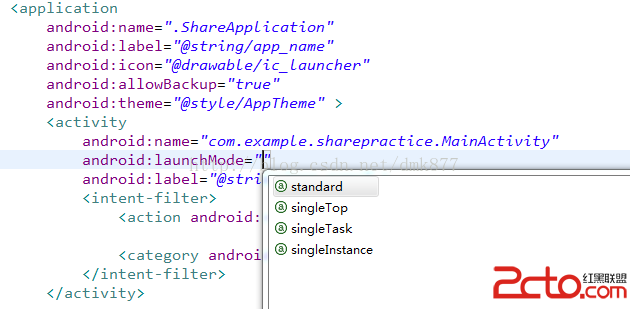 Android Activity 四種啟動模式深度解析:standard、singleTop、singleTask、singleInstance
原以為 Activity 的啟動模式是個簡單知識點,結果花了一整個下午加晚上才真正弄明白。這篇文章把四種模式的行為、任務棧變化過程以及容易混淆的細節都梳理一遍,歡迎留言討
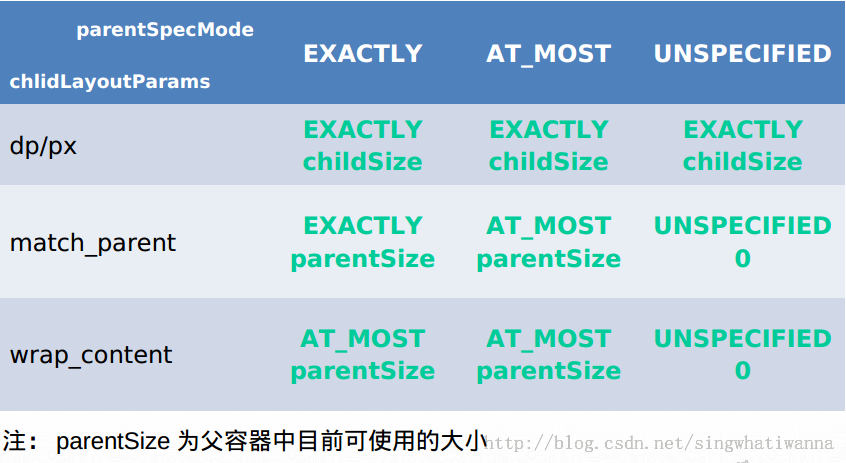 自訂控制元件前必讀:View 的繪製流程
寫自訂控制元件之前,先把 View 的繪製流程理清楚,這是基本功。網路上相關好文很多,但用自己的話整理一遍,思路才真的屬於自己。 從「畫一隻雞」說起 打開手機刷社群軟體時
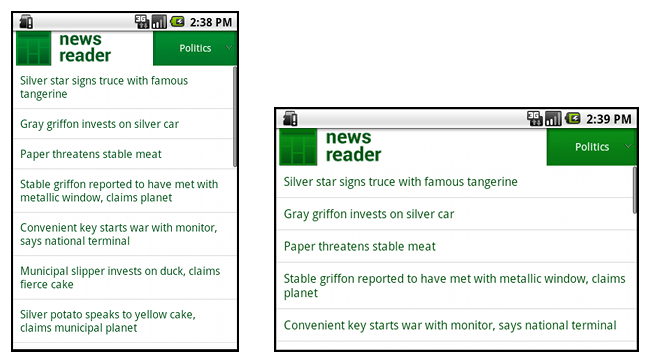 打造自適應介面:Android 如何優雅地支援各種螢幕尺寸
原文地址:https://android.xsoftlab.net/training/multiscreen/index.html 為什麼要為不同螢幕尺寸做設計 Andr