

編輯:關於 Android 程式設計
本文說明如何透過 Intent 調用系統郵件元件,並釐清 Intent 的匹配流程。
程式碼如下:
public class MainActivity extends Activity {
    private View vClick;
    @Override
    protected void onCreate(Bundle savedInstanceState) {
        super.onCreate(savedInstanceState);
        setContentView(R.layout.activity_main);
        initView();
        setClickListener();
    }
    private void initView() {
        vClick = findViewById(R.id.tv_click);
    }
    private void setClickListener() {
        vClick.setOnClickListener(new OnClickListener() {
            @Override
            public void onClick(View v) {
                sendMail();
            }
        });
    }
    protected void sendMail() {
        Intent intent = new Intent();
        intent.setAction(Intent.ACTION_SENDTO);
        intent.setData(Uri.parse("mailto:pzfpang451@163.com"));
        startActivity(intent);
    }
}
清單檔的 intent-filter 配置:
<intent-filter>
    <category android:name="android.intent.category.LAUNCHER" />
</intent-filter>
<intent-filter>
    <data android:scheme="mailto"/>
    <category android:name="android.intent.category.APP_BROWSER"/>
    <category android:name="android.intent.category.DEFAULT"/>
</intent-filter>
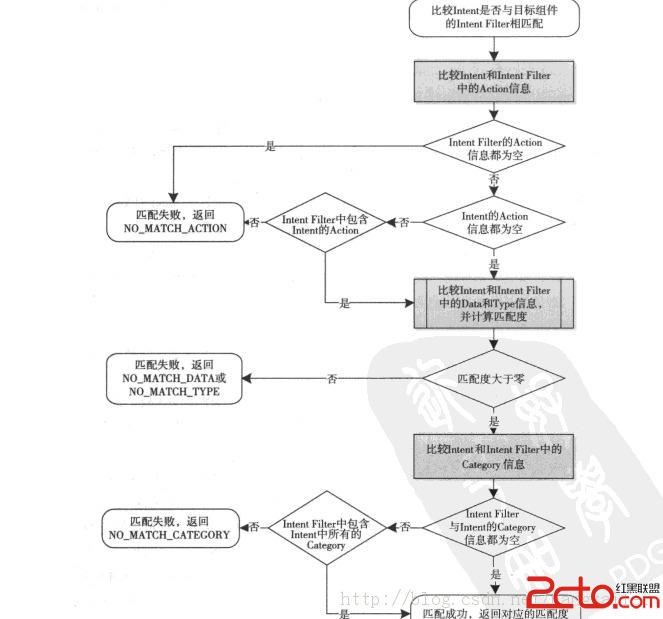
調用郵件元件的關鍵在於 Intent 的匹配知識:
<category android:name="android.intent.category.DEFAULT" />,因此一般開發不會出錯;若需其他種類則必須在清單檔配置,否則會匹配失敗(NO_MATCH_CATEGORY)。匹配總結:
這些 NO_MATCH 返回值都是十六進位值,一般最高位為 0 表示成功。
 鵬保寶安卓版查看加密文件圖解 一步步教你打開
鵬保寶是一款免費加密軟件,支援批量加密。可加密的文件類型相當廣泛:視頻方面支援avi、mp4、wmv、3gp、rmvb、mpg等格式;辦公文檔涵蓋word、excel、p
 Android Studio 1.x 常見問題整理
Android Studio 是 Google 在 2013 年 I/O 大會上推出的開發環境,基於 IntelliJ IDEA。如同 Eclipse ADT 的角色,它
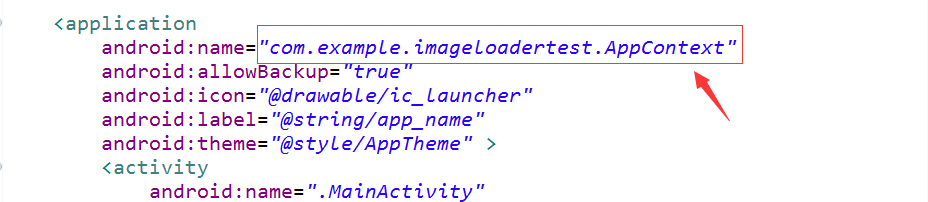 Android 使用 ImageLoader 載入網路圖片
在 Android 中載入網路圖片,常會遇到延遲、重複下載、記憶體不足與列表滑動卡頓等問題。Universal ImageLoader 提供了一套成熟的解法,將非同步下載
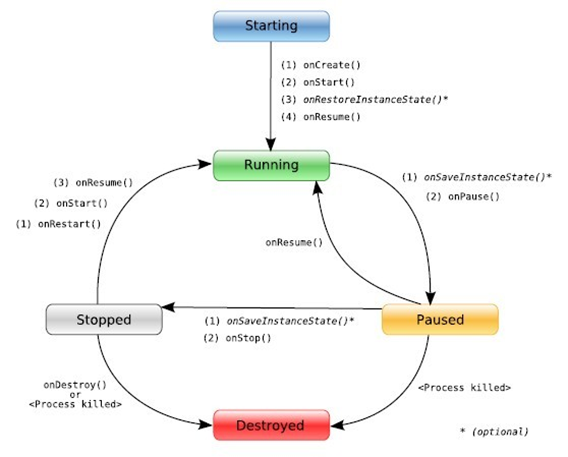 Android 學習筆記(四):Activity 全景解析——生命週期、通信、啟動模式與系統調用
一、Activity 是什麼 Activity 是 Android 四大組件之一,用於承載 View、提供用戶交互入口。它本身並不繪製界面,而是創建一個窗口,在其上進行繪