

編輯:關於 Android 程式設計
上一篇關於「取得符合預設簡訊應用」的作法思路正確,但仍不夠完善。這套規範本質上是 Google 定下的標準,那麼究竟哪些應用才符合資格?答案就藏在 Android 原始碼裡。
關鍵在於 SmsApplication 中的 SmsApplicationData,裡面有個方法叫 getApplicationCollection(Context context),這正是 Android 4.4 系統用來取得符合預設簡訊應用條件的應用資訊的程式碼。根據註解,要成為簡訊應用需滿足:
核心實作如下:
public static Collection<SmsApplicationData> getApplicationCollection(Context context) {
    PackageManager packageManager = context.getPackageManager();

    // 取得註冊了 SMS 的應用
    Intent intent = new Intent(Intents.SMS_DELIVER_ACTION);
    List<ResolveInfo> smsReceivers = packageManager.queryBroadcastReceivers(intent, 0);
    HashMap<String, SmsApplicationData> receivers = new HashMap<String, SmsApplicationData>();

    for (ResolveInfo resolveInfo : smsReceivers) {
        final ActivityInfo activityInfo = resolveInfo.activityInfo;
        if (activityInfo == null) continue;
        if (!permission.BROADCAST_SMS.equals(activityInfo.permission)) continue;
        final String packageName = activityInfo.packageName;
        if (!receivers.containsKey(packageName)) {
            final String applicationName = resolveInfo.loadLabel(packageManager).toString();
            final SmsApplicationData smsApplicationData = new SmsApplicationData(
                    applicationName, packageName, activityInfo.applicationInfo.uid);
            smsApplicationData.mSmsReceiverClass = activityInfo.name;
            receivers.put(packageName, smsApplicationData);
        }
    }

    // 更新 mms receiver class
    intent = new Intent(Intents.WAP_PUSH_DELIVER_ACTION);
    intent.setDataAndType(null, "application/vnd.wap.mms-message");
    List<ResolveInfo> mmsReceivers = packageManager.queryBroadcastReceivers(intent, 0);
    for (ResolveInfo resolveInfo : mmsReceivers) {
        final ActivityInfo activityInfo = resolveInfo.activityInfo;
        if (activityInfo == null) continue;
        if (!permission.BROADCAST_WAP_PUSH.equals(activityInfo.permission)) continue;
        final String packageName = activityInfo.packageName;
        final SmsApplicationData smsApplicationData = receivers.get(packageName);
        if (smsApplicationData != null) {
            smsApplicationData.mMmsReceiverClass = activityInfo.name;
        }
    }

    // 更新 respond via message service class
    intent = new Intent(TelephonyManager.ACTION_RESPOND_VIA_MESSAGE, Uri.fromParts("smsto", "", null));
    List<ResolveInfo> respondServices = packageManager.queryIntentServices(intent, 0);
    for (ResolveInfo resolveInfo : respondServices) {
        final ServiceInfo serviceInfo = resolveInfo.serviceInfo;
        if (serviceInfo == null) continue;
        if (!permission.SEND_RESPOND_VIA_MESSAGE.equals(serviceInfo.permission)) continue;
        final String packageName = serviceInfo.packageName;
        final SmsApplicationData smsApplicationData = receivers.get(packageName);
        if (smsApplicationData != null) {
            smsApplicationData.mRespondViaMessageClass = serviceInfo.name;
        }
    }

    // 更新 send to
    intent = new Intent(Intent.ACTION_SENDTO, Uri.fromParts("smsto", "", null));
    List<ResolveInfo> sendToActivities = packageManager.queryIntentActivities(intent, 0);
    for (ResolveInfo resolveInfo : sendToActivities) {
        final ActivityInfo activityInfo = resolveInfo.activityInfo;
        if (activityInfo == null) continue;
        final String packageName = activityInfo.packageName;
        final SmsApplicationData smsApplicationData = receivers.get(packageName);
        if (smsApplicationData != null) {
            smsApplicationData.mSendToClass = activityInfo.name;
        }
    }

    // 移除未找齊所有必要 intent 的項目
    for (ResolveInfo resolveInfo : smsReceivers) {
        final ActivityInfo activityInfo = resolveInfo.activityInfo;
        if (activityInfo == null) continue;
        final String packageName = activityInfo.packageName;
        final SmsApplicationData smsApplicationData = receivers.get(packageName);
        if (smsApplicationData != null) {
            if (!smsApplicationData.isComplete()) {
                receivers.remove(packageName);
            }
        }
    }
    return receivers.values();
}
由此可見,先前的思路是正確的,只是沒有讓所有條件同時滿足。由於這些是隱藏的類別與方法,直接存取不到、用反射又相當麻煩,因此把實作原封不動地拷出來使用不失為良策。若要判斷某個應用是否完全符合預設簡訊應用的要求,只要呼叫 SmsApplicationData.isComplete() 即可。
 Android 字串格式化:用 String.format 動態組裝 string.xml 資源
一、需求場景 專案裡經常會遇到這樣的畫面:一行文案中夾雜著人數、百分比、稱號與等級,而這些值都要等到執行期才拿得到。 要做出這種效果,一般有兩條路可以走。 方案一:用
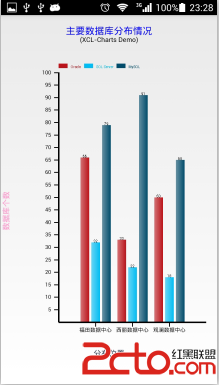 XCL-Charts:以原生 Canvas 打造 Android 開源圖表庫
專案概要 XCL-Charts 是一套以 Android 原生 Canvas 繪製的開源圖表庫,支援柱形圖、餅圖、堆疊圖、面積圖、折線圖、曲線圖、環形圖、玫瑰圖與儀表板等
 Android MediaPlayer 完全指南:音頻源、控制方法與實戰 Demo
Android 提供了常見的音頻、視頻編碼解碼機制。借助多媒體類 MediaPlayer,開發人員可以很方便地在應用中播放音頻與視頻。本篇聚焦「如何播放一個音頻文件」,內
 Android VectorDrawable 與 SVG:動手做兩個炫酷的向量動畫
Android 從 5.0 開始提供了新的 API VectorDrawable,讓我們可以直接使用向量圖 SVG。在 XML 檔中,透過 <vector>、