

編輯:關於 Android 程式設計
1、GET 是從伺服器獲取資料,POST 是向伺服器傳送資料。
2、在客戶端,GET 方式透過 URL 提交資料,資料在 URL 中可以看到;POST 方式則把資料放在 HTML HEADER 內提交。
3、對於 GET 方式,伺服器端用 Request.QueryString 獲取變數的值;對於 POST 方式,伺服器端用 Request.Form 獲取提交的資料。
4、GET 方式提交的資料最多只能有 1024 位元組,而 POST 則沒有此限制。
5、安全性問題。正如第 2 點所述,使用 GET 時參數會顯示在網址列上,而 POST 不會。所以,如果資料是中文且屬於非敏感資料,可以使用 GET;如果使用者輸入的資料不是中文字元且包含敏感內容,那麼還是使用 POST 為宜。
1、標準的 Java 介面
2、標準的 Apache 介面
import java.io.ByteArrayOutputStream; import java.io.IOException; import java.io.InputStream; import java.io.OutputStream; import java.net.HttpURLConnection; import java.net.URL; import java.util.HashMap; import java.util.Map; public class http_get1 { // public static final String path = // "https://192.168.137.103:8080/MyHttp/servlet/LoginAction"; public static final String path = "https://localhost:8080/MyHttp/servlet/LoginAction"; public static String getStringFromStream(InputStream is) { String str = ""; ByteArrayOutputStream bos = new ByteArrayOutputStream(); int len = 0; byte[] data = new byte[1024]; if(is!=null){ try { while ((len = is.read(data)) != -1) { bos.write(data, 0, len); } str = new String(bos.toByteArray(), "utf-8"); } catch (IOException e) { // TODO Auto-generated catch block e.printStackTrace(); } } return str; } public static InputStream useGetMethod(Map map, String encode) { InputStream is = null; StringBuffer sb = new StringBuffer(path); sb.append("?"); if (map != null && !map.isEmpty()) { for (Map.Entry entry : map.entrySet()) { sb.append(entry.getKey()).append("=").append(entry.getValue()) .append("&"); } sb.deleteCharAt(sb.length() - 1); System.out.println(sb.toString()); URL url = null; OutputStream os = null; try { url = new URL(sb.toString()); if (url != null) { HttpURLConnection con = (HttpURLConnection) url .openConnection(); con.setRequestMethod("GET"); con.setConnectTimeout(3000); con.setDoInput(true); con.setDoOutput(true); os = con.getOutputStream(); os.write(sb.toString().getBytes(encode)); os.close(); if (con.getResponseCode() == 200) { is = con.getInputStream(); } } } catch (Exception e) { } } return is; } public static void main(String[] args) { // TODO Auto-generated method stub Map map = new HashMap(); map.put("username", "admin"); map.put("password", "1243"); String str = getStringFromStream(useGetMethod(map, "utf-8")); System.out.println(str); } }
import java.io.IOException; import java.io.InputStream; import java.io.OutputStream; import java.net.HttpURLConnection; import java.net.MalformedURLException; import java.net.URL; import java.util.HashMap; import java.util.Map; public class http_post1 { // 使用POST請求與GET請求的區別就是POST請求不需要封裝請求路徑,只需要封裝請求參數 public static InputStream usePostMethod(Map map, String encode) { StringBuffer buffer = new StringBuffer(); InputStream is = null; OutputStream os = null; if (map != null && !map.isEmpty()) { for (Map.Entry entry : map.entrySet()) { try { buffer.append(entry.getKey()).append("=") .append(entry.getValue()) // .append(URLEncoder.encode(entry.getValue(), // encode)) .append("&"); } catch (Exception e) { // TODO Auto-generated catch block e.printStackTrace(); } } buffer.deleteCharAt(buffer.length() - 1); System.out.println(buffer.toString()); } try { URL url = new URL(http_get1.path); if (url != null) { HttpURLConnection con = (HttpURLConnection) url .openConnection(); con.setDoInput(true); con.setDoOutput(true); con.setRequestMethod("POST"); con.setConnectTimeout(3000); byte[] tdata = buffer.toString().getBytes(); // con.setRequestProperty("Content-Type", // "application/x-www-form-urlencoded"); // con.setRequestProperty("Content-Length", // String.valueOf(tdata.length)); os = con.getOutputStream(); os.write(tdata); os.close(); if (con.getResponseCode() == 200) { is = con.getInputStream(); } } } catch (MalformedURLException e) { // TODO Auto-generated catch block e.printStackTrace(); } catch (IOException e) { // TODO Auto-generated catch block e.printStackTrace(); } return is; } public static void main(String[] args) { Map map = new HashMap(); map.put("username", "admin"); map.put("password", "123"); System.out.println(http_get1.getStringFromStream(usePostMethod(map, "utf-8"))); } }
import java.io.InputStream; import java.util.ArrayList; import java.util.HashMap; import java.util.List; import java.util.Map; import org.apache.http.HttpResponse; import org.apache.http.NameValuePair; import org.apache.http.client.entity.UrlEncodedFormEntity; import org.apache.http.client.methods.HttpPost; import org.apache.http.impl.client.DefaultHttpClient; import org.apache.http.message.BasicNameValuePair; public class http_myapache { public static InputStream useApacheMethod(Map map, String encode) { InputStream is = null; List list = new ArrayList(); for (Map.Entry entry : map.entrySet()) { list.add(new BasicNameValuePair(entry.getKey(), entry.getValue())); } try { // 封裝請求參數 UrlEncodedFormEntity entity = new UrlEncodedFormEntity(list, encode); // 設置請求參數 HttpPost post = new HttpPost(http_get1.path); post.setEntity(entity); // 執行請求 DefaultHttpClient client = new DefaultHttpClient(); HttpResponse response = client.execute(post); // 獲取狀態碼 if (response.getStatusLine().getStatusCode() == 200) { is = response.getEntity().getContent(); } } catch (Exception e) { // TODO: handle exception } return is; } public static void main(String[] args) { Map map = new HashMap(); map.put("username", "admin"); map.put("password", "123"); System.out.println(http_get1.getStringFromStream(useApacheMethod(map, "utf-8"))); } }
對於普通的 HTTP 編程,可以選擇 GET 方式或 POST 方式;但對於要求更高的 HTTP 編程場景,Apache 提供的標準介面則更加靈活。
附:Apache 編程時需要用到的 JAR 包,以及 XMLPull 解析時需要用到的 JAR 包,可參考原文提供的下載連結。
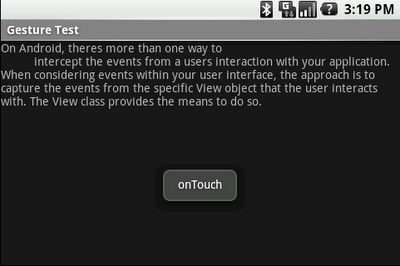 Android 手勢識別實作全流程:從 onTouch 到 GestureDetector
在行動裝置上,Fling(快速滑動)、Scroll(捲動)這類手勢操作往往是體驗的分水嶺。瀏覽器靠 Scroll 滾動頁面,閱讀器靠 Fling 翻頁,使用者幾乎不需要思
 Android 官方測試教程筆記(二):打造本地單元測試
建構本地單元測試 如果你的測試沒有外部依賴,或只牽涉到簡單的 Android 相依性,那麼最合適的做法是直接在開發機上跑。這種方式效率極高:你不必把 App 和測試程式碼
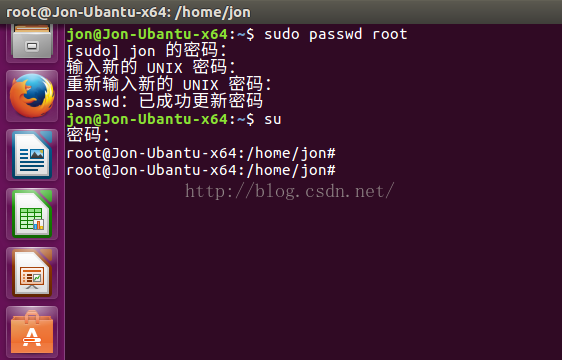 Android 源碼編譯詳解(三):Ubuntu 伺服器的搭建與配置
配置 Ubuntu 系統伺服器,需要在「終端」中輸入指定命令來安裝程式並完成對應操作,類似 Windows 的命令行。因此在開始後續配置前,請先搜索並打開「終端」程式。
 Android 簡訊驗證碼整合實作(Eclipse 版)
許多 App 都需要透過簡訊驗證碼確認手機號碼,例如註冊、登入或帳號綁定。以 Eclipse 專案為例,整合簡訊驗證碼 SDK 通常包含四個步驟:取得 SDK、導入專案、