

編輯:關於 Android 程式設計
編譯新版 andengine 的 lib 之後,会发现 RepeatingSpriteBackground 的建構子變了:
public RepeatingSpriteBackground(final float pCameraWidth,
        final float pCameraHeight,
        final ITextureRegion pTextureRegion,
        final VertexBufferObjectManager pVertexBufferObjectManager)
        throws IllegalArgumentException {
    this(pCameraWidth, pCameraHeight, pTextureRegion,
         SCALE_DEFAULT, pVertexBufferObjectManager);
}
網路上抄來的老範例是這樣呼叫的:
this.background = new RepeatingSpriteBackground(
        CAMERA_WIDTH, CAMERA_HEIGHT,
        getTextureManager(), AssetBitmapTextureAtlasSource.create(
        this.getAssets(), "background.png"),
        getVertexBufferObjectManager());
參數型別對不上,編譯自然不通。研究原始碼並實測之後,可以改成先自行準備好 TextureRegion 再傳進去。
private TextureRegion getBackGround() {
    // create by danielinbiti
    AssetBitmapTexture mBitmapTexture = null;
    try {
        mBitmapTexture = new AssetBitmapTexture(
            mEngine.getTextureManager(), this.getAssets(),
            "background.png",
            BitmapTextureFormat.RGB_565,
            TextureOptions.REPEATING_BILINEAR);
    } catch (IOException e) {
        e.printStackTrace();
    }
    mBitmapTexture.load();
    return TextureRegionFactory.extractFromTexture(mBitmapTexture);
}
關鍵在 TextureOptions.REPEATING_BILINEAR:唯有把貼圖的 wrap 模式設為 REPEATING,後面的 RepeatingSpriteBackground 才能正確平鋪,否則邊緣會出現黑邊或接縫。
@Override
public void onCreateResources(OnCreateResourcesCallback arg0) throws IOException {

    BitmapTextureAtlas mTexture = new BitmapTextureAtlas(
        getTextureManager(), 64, 32,
        TextureOptions.BILINEAR_PREMULTIPLYALPHA);

    mFaceTextureRegion = BitmapTextureAtlasTextureRegionFactory
        .createTiledFromAsset(mTexture, this,
            "face_circle_tiled.png", 0, 0, 2, 1);

    this.background = new RepeatingSpriteBackground(
        CAMERA_WIDTH * 1f, CAMERA_HEIGHT * 1f,
        this.getBackGround(),
        getVertexBufferObjectManager());

    mTexture.load();
    arg0.onCreateResourcesFinished();
}
mTexture 是記憶體中放置貼圖資源的容器;64、32 是這張圖要求的寬與高,必須是 2 的 n 次方(2、4、8、16、32、64、128、512、1024…),並且要大於等於原圖尺寸,這是 OpenGL ES 1.x 的限制。createTiledFromAsset() 相當於從 mTexture 這個圖集裡「摳圖」:後面的 0、0 是裁切起點座標,2 與 1 分別代表這張圖在貼圖中排成 2 欄 1 列。RepeatingSpriteBackground 的前兩個參數是相機(Camera)的寬高,決定可見範圍;第三個是能反覆貼上的 TextureRegion;最後是 VertexBufferObjectManager。第一,AssetBitmapTexture 的建構子會丟 IOException,範例裡只 printStackTrace 就繼續往下走,實際上檔案不存在時後續會拿到 null 而崩潰,正式程式應該要中止或改用預設背景。
第二,andengine 的 API 在 2.x 各個 commit 之間變動頻繁,遇到編譯錯誤時,最快的解法永遠是打開對應的原始碼確認建構子簽名,而不是繼續找舊教學。
 Unity3D 數字模型製作規範
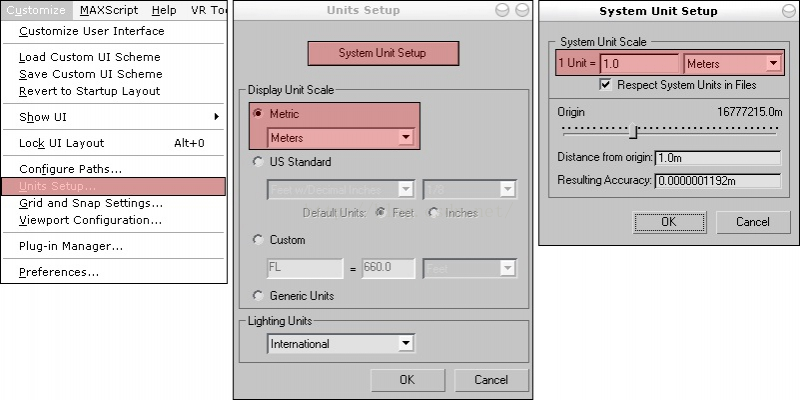
本文所述的數字模型製作均以 3ds Max 完成。即便最終驅動引擎不同,對模型的基本要求是大體一致的。一個 VR 模型交付時,其場景尺寸與單位、模型歸類與塌陷、命名、節點
 Android 界面編程(四):四種對話框控件的用法與實戰
2.5 對話框控件 對話框是用來提示用戶做決策或補充輸入信息的小窗口。它不會填滿屏幕,通常用於那些必須等用戶響應才能繼續的流程節點。Android 中與對話框相關的常用控
 Android API 指南詳解:OpenGL ES 圖形編程入門
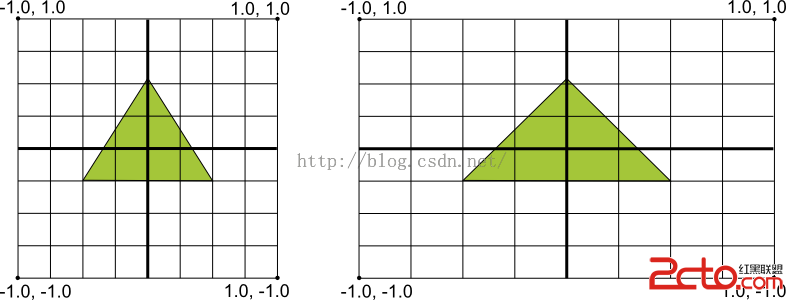
OpenGL ES 是 Android 提供的高性能 2D 與 3D 圖形開放圖形庫。OpenGL 是一個跨平台的圖形 API,用於為 3D 圖形處理硬件指定標準的軟件接
 榮耀Note8怎麼裝SIM卡 雙卡與單卡安裝圖解
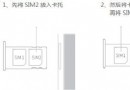
華為榮耀於8月1日下午發表了6.6吋大屏的榮耀Note8。剛拿到新機的朋友可能會疑惑:SIM卡該怎麼裝?下面就隨小編一起看示範。 華為榮耀Note8裝SIM卡步驟 雙SI