

編輯:關於 Android 程式設計
行動裝置產生的資料越來越多,照片、語音、日誌檔往往都需要回傳到後端。在 Android 上最不需要額外相依套件的上傳方式,就是直接利用 HttpURLConnection 手動組出 multipart/form-data 的請求本文。這篇文章把整個流程拆開來講,讓你明白每一段位元組到底在做什麼。
表單上傳本質上是把「文字欄位」與「檔案內容」拼在同一個請求本文裡,再用一段絕不會出現在資料中的字串作為分隔界標,也就是 boundary。伺服器收到後依序切開,就能分別取得欄位值與檔案位元組。界標通常用 UUID 隨機產生,避免碰撞。
public class PostFile {
    private static final String TAG = "uploadFile";
    private static final int TIME_OUT = 10 * 1000;   // 逾時時間
    private static final String CHARSET = "utf-8";  // 編碼

    /**
     * 上傳檔案到伺服器
     * @param file      要上傳的檔案
     * @param params    附帶的表單欄位
     * @param RequestURL 請求網址
     * @return 伺服器回應內容
     */
    public static String uploadFile(File file, Map<String, String> params, String RequestURL) {
        String result = null;
        String BOUNDARY = UUID.randomUUID().toString(); // 隨機邊界標識
        String PREFIX = "--", LINE_END = "\r\n";
        String CONTENT_TYPE = "multipart/form-data";

        try {
            URL url = new URL(RequestURL);
            HttpURLConnection conn = (HttpURLConnection) url.openConnection();
            conn.setReadTimeout(TIME_OUT);
            conn.setConnectTimeout(TIME_OUT);
            conn.setDoInput(true);
            conn.setDoOutput(true);
            conn.setUseCaches(false);
            conn.setRequestMethod("POST");
            conn.setRequestProperty("Charset", CHARSET);
            conn.setRequestProperty("connection", "keep-alive");
            conn.setRequestProperty("Content-Type", CONTENT_TYPE + ";boundary=" + BOUNDARY);

            DataOutputStream dos = new DataOutputStream(conn.getOutputStream());

            if (file != null) {
                // 1. 先寫入檔案本體
                InputStream is = new FileInputStream(file);
                byte[] bytes = new byte[1024];
                int len;
                while ((len = is.read(bytes)) != -1) {
                    dos.write(bytes, 0, len);
                }
                is.close();

                // 2. 組出表單欄位
                StringBuilder sbs = new StringBuilder();
                for (Map.Entry<String, String> entry : params.entrySet()) {
                    sbs.append(PREFIX).append(BOUNDARY).append(LINE_END);
                    sbs.append("Content-Disposition: form-data; name=\"" + entry.getKey() + "\"")
                       .append(LINE_END).append(LINE_END);
                    sbs.append(entry.getValue()).append(LINE_END);
                }
                sbs.append(PREFIX).append(BOUNDARY).append(LINE_END);
                sbs.append("Content-Disposition: form-data; name=\"filelength\"")
                   .append(LINE_END).append(LINE_END);
                sbs.append(file.length()).append(LINE_END);

                dos.write(sbs.toString().getBytes());
                dos.write(LINE_END.getBytes());

                // 3. 收尾邊界
                byte[] end_data = (PREFIX + BOUNDARY + PREFIX + LINE_END).getBytes();
                dos.write(end_data);
                dos.flush();

                // 4. 讀取回應,200 代表成功
                int res = conn.getResponseCode();
                Log.i(TAG, "response code:" + res);
                if (res == 200) {
                    InputStream input = conn.getInputStream();
                    byte[] bs = new byte[input.available()];
                    input.read(bs);
                    result = new String(bs, "GBK");
                    Log.i(TAG, "result : " + result);
                } else {
                    Log.i(TAG, "request error");
                }
            }
        } catch (MalformedURLException e) {
            e.printStackTrace();
        } catch (IOException e) {
            e.printStackTrace();
        }
        return result;
    }
}
NetworkOnMainThreadException,請搭配 AsyncTask、Thread 或 Kotlin 協程。InputStream、DataOutputStream 建議改用 try-with-resources 或 finally 收尾,避免連線洩漏。android.permission.INTERNET。如果只是專案內部使用,OkHttp 的 MultipartBody 與 Retrofit 能把上面幾十行收斂成幾行宣告,並自動處理重試、連線池與串流上傳。手寫版本的好處是零相依、可控性高,適合需要微調封包的場景;兩者取決於你的專案規模與維護成本考量。
 Android 線上 Bug 熱修復深度解析:從 ClassLoader 到 dexElements
App 線上修復目前已有好幾種方案,開源社群裡同一個思路往往有多種實作。重複造輪子看似浪費,但把每個方案背後的技術演變梳理清楚,這些「輪子」其實很值得研究。 什麼是 H
 深入解析 Android 圖片資源、記憶體佔用與 drawable 目錄之間的關係
自從完成上一篇《Android 螢幕適配全攻略》之後,常有朋友問我一個問題:「能不能只用一套切圖就搞定所有解析度?」我認為這個話題值得單獨寫一篇文章好好探討,於是便有了
 Android 下拉刷新完整解析:自製 RefreshableView,三步接入專案
ListView 的下拉刷新幾乎是每個列表頁的標配。網路上現成的實作不少,但實際用起來常有各種狀況:有的功能不全、有的有 Bug、有的接入方式太複雜。與其逐一試錯,不如自
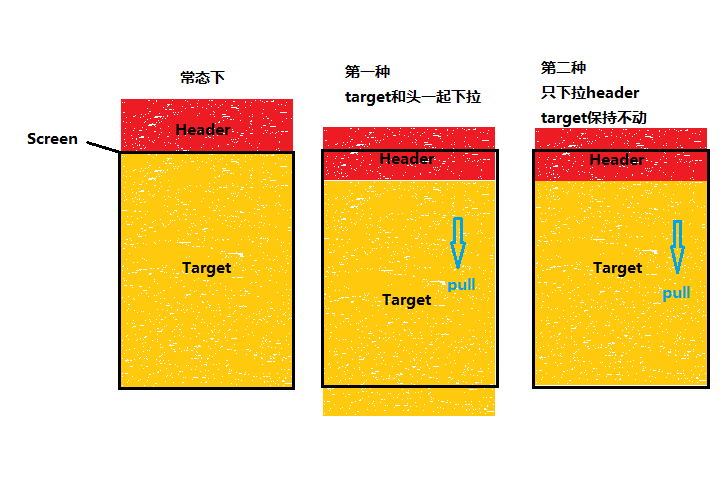 打造支援任意 View 的通用下拉刷新控件
下拉刷新幾乎是每個 App 必備的功能。早期多數人使用的是 chrisbanes 的 PullToRefresh,或修改自該框架的其他庫;如今選擇已相當多元,GitHub