

編輯:關於 Android 程式設計
幾乎每一款在地圖應用裡,「取得使用者目前位置」都是所有 LBS 功能的起點。本文以百度定位 SDK 為例,示範如何在 Android 上取得裝置的經緯度、精度半徑,甚至進一步拿到地址描述。
百度定位 SDK 的邏輯其實相當清爽,主要圍繞三個角色運作:
LocationClient 負責真正執行定位;LocationClientOption 用來描述「怎麼定位」;而 BDLocationListener 則是接收結果的回呼(callback)。只要把這三者串起來,定位流程就完成了。
在開始定位之前,我們會透過 LocationClientOption 決定幾個關鍵參數:
setOpenGps(true) 允許使用 GPS;setCoorType("bd09ll") 指定採用百度的 bd09ll 座標系;setPriority(NetWorkFirst) 讓定位在網路優先模式下進行,兼顧速度與耗電;setScanSpan(5000) 則代表每 5 秒定時定位一次。
package location.demo;

import com.baidu.location.BDLocation;
import com.baidu.location.BDLocationListener;
import com.baidu.location.LocationClient;
import com.baidu.location.LocationClientOption;

import android.app.Activity;
import android.os.Bundle;
import android.view.View;
import android.view.View.OnClickListener;
import android.widget.Button;
import android.widget.TextView;

public class main extends Activity {

    private LocationClient mLocationClient = null;
    private Button mStartBtn = null;
    private TextView mTextView = null;

    @Override
    public void onCreate(Bundle savedInstanceState) {
        super.onCreate(savedInstanceState);
        setContentView(R.layout.main);

        mStartBtn = (Button) findViewById(R.id.button1);
        mTextView = (TextView) findViewById(R.id.textview1);

        mLocationClient = new LocationClient(this);
        LocationClientOption option = new LocationClientOption();
        option.setOpenGps(true);                                 // 打開 GPS
        option.setCoorType("bd09ll");                            // 座標類型設為 bd09ll
        option.setPriority(LocationClientOption.NetWorkFirst);   // 網路優先
        option.setProdName("locSDKDemo2");                       // 產品線名稱
        option.setScanSpan(5000);                                // 每 5 秒定位一次
        mLocationClient.setLocOption(option);

        mLocationClient.registerLocationListener(new BDLocationListener() {
            @Override
            public void onReceiveLocation(BDLocation location) {
                if (location == null)
                    return;
                StringBuffer sb = new StringBuffer(256);
                sb.append("time : ").append(location.getTime());
                sb.append("\nerror code : ").append(location.getLocType());
                sb.append("\nlatitude : ").append(location.getLatitude());
                sb.append("\nlontitude : ").append(location.getLongitude());
                sb.append("\nradius : ").append(location.getRadius());
                if (location.getLocType() == BDLocation.TypeGpsLocation) {
                    sb.append("\nspeed : ").append(location.getSpeed());
                    sb.append("\nsatellite : ").append(location.getSatelliteNumber());
                } else if (location.getLocType() == BDLocation.TypeNetWorkLocation) {
                    sb.append("\naddr : ").append(location.getAddrStr());
                }
                sb.append("\nsdk version : ").append(mLocationClient.getVersion());
                mTextView.setText(sb.toString());
            }

            public void onReceivePoi(BDLocation location) {
            }
        });

        mStartBtn.setOnClickListener(new OnClickListener() {
            @Override
            public void onClick(View v) {
                if (mLocationClient == null) return;
                if (mLocationClient.isStarted()) {
                    mLocationClient.stop();
                    mStartBtn.setText("開始");
                } else {
                    mLocationClient.start();
                    mStartBtn.setText("關閉");
                }
            }
        });
    }

    @Override
    public void onDestroy() {
        if (mLocationClient != null && mLocationClient.isStarted()) {
            mLocationClient.stop();
            mLocationClient = null;
        }
        super.onDestroy();
    }
}
在 onReceiveLocation 裡,我們可以透過 getLocType() 判斷這次結果是來自 GPS 還是網路。若是 GPS 定位,就能額外取得速度與衛星數量;若是網路定位,則能拿到較完整的地址字串(getAddrStr())。
另外別忘了生命週期的處理:在 onDestroy() 中呼叫 stop() 並釋放資源,避免定位服務在背景持續耗電。按下按鈕時則用 isStarted() 做切換,讓同一顆按鈕同時肩負「開始」與「關閉」兩個角色。
 Android 網路編程入門(一):用 URLConnection 下載圖片
URL(Uniform Resource Locator,統一資源定位器)物件代表一個指向網際網路資源的指標。它由四個部分組成: protocol://host:por
 Android 入門筆記:SQLite 資料庫操作與單元測試實作
今天來認識一個輕輕輕量級的資料庫——SQLite。之所以要說三次「輕」,是因為它真的很輕。 SQLite 是專為嵌入式裝置設計的輕量級資料庫,麻雀雖小五臟俱全,功能一點都
 Android 簡單實現圓盤抽獎轉盤界面
閒來無事,做了一個簡單的抽獎轉盤 UI 實現,分享出來供大家參考。 自定義 HalfCircle 控件 這個轉盤的核心是自定義一個 HalfCircle 視圖,通過
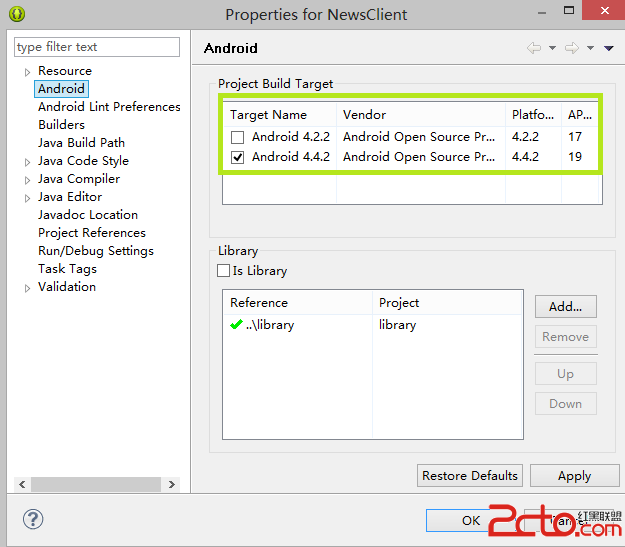 Android 出現 ClassNotFoundException 的原因與解法
在 Android 專案編譯或執行時,若出現 ClassNotFoundException,通常代表系統在執行階段找不到指定的類別。本例中的錯誤訊息為找不到 com.ex