

編輯:關於 Android 程式設計
前面看過檔案儲存的原理,這篇就把它包成一個可以隨處呼叫的工具類。設計目標很簡單:一支 class 同時支援「內部儲存空間」與「SD 卡」兩種目的地,讀寫各一對方法,內部共用同一個位元組串流讀取邏輯。
package com.xiazdong.file.util;

import java.io.ByteArrayOutputStream;
import java.io.File;
import java.io.FileInputStream;
import java.io.FileOutputStream;
import java.io.IOException;
import java.io.InputStream;

import android.content.Context;
import android.os.Environment;

public class FileUtil {

    /**
     * 存檔到內部儲存空間
     */
    public static void saveTextInMemory(Context context, String filename,
            String content, int mode) throws Exception {
        try {
            FileOutputStream out = context.openFileOutput(filename, mode);
            out.write(content.getBytes("UTF-8"));
            out.close();
        } catch (Exception e) {
            throw new Exception();
        }
    }

    /**
     * 存檔到 sdcard
     */
    public static void saveTextInSdcard(String filename, String content) throws Exception {
        try {
            File f = new File(Environment.getExternalStorageDirectory(), filename);
            FileOutputStream out = new FileOutputStream(f);
            out.write(content.getBytes("UTF-8"));
            out.close();
        } catch (Exception e) {
            throw new Exception();
        }
    }

    /**
     * 從 sdcard 讀檔
     */
    public static String loadTextFromSdcard(String filename) throws Exception {
        try {
            File f = new File(Environment.getExternalStorageDirectory(), filename);
            FileInputStream in = new FileInputStream(f);
            byte[] data = read2byte(in);
            return new String(data, "UTF-8");
        } catch (Exception e) {
            throw new Exception();
        }
    }

    /**
     * 從內部儲存空間讀檔
     */
    public static String loadTextFromMemory(Context context, String filename) throws Exception {
        try {
            FileInputStream in = context.openFileInput(filename);
            byte[] data = read2byte(in);
            return new String(data, "UTF-8");
        } catch (Exception e) {
            throw new Exception();
        }
    }

    /**
     * 共用:把串流讀成位元組陣列
     */
    private static byte[] read2byte(InputStream in) throws IOException {
        byte[] data;
        ByteArrayOutputStream bout = new ByteArrayOutputStream();
        byte[] buf = new byte[1024];
        int len = 0;
        while ((len = in.read(buf)) != -1) {
            bout.write(buf, 0, len);
        }
        data = bout.toByteArray();
        return data;
    }
}
// 將 "hello" 存到 /mnt/sdcard/1.txt
FileUtil.saveTextInSdcard("1.txt", "hello");
// 讀取 /mnt/sdcard/1.txt
String content = FileUtil.loadTextFromSdcard("1.txt");

// 將 hello 存到 /data/data/package/files/1.txt
FileUtil.saveTextInMemory(MainActivity.this, "1.txt", "hello", Context.MODE_PRIVATE);
// 讀取 /data/data/package/files/1.txt
String content2 = FileUtil.loadTextFromMemory(MainActivity.this, "1.txt");
把模式當參數傳入。saveTextInMemory() 沒有寫死 MODE_PRIVATE,而是開放呼叫端決定,這樣同一個方法就能同時處理私有檔案與追加寫入(MODE_APPEND)。
統一用 UTF-8。寫入與讀取都明確指定編碼,避免在不同裝置、不同系統語言環境下出現中文亂碼。這是跨平台或跨版本 App 最容易忽略的一點。
把讀流邏輯抽成 read2byte()。兩個 load 方法最終都只需要一個 InputStream,共用同一段迴圈可以避免重複程式碼,日後要改成 StringBuilder 或加長緩衝區也只需改一處。
這是教學用的骨架,正式專案建議補上幾件事:
其一,catch (Exception e) { throw new Exception(); } 把原始例外整個丟掉了,除錯時完全不知道發生什麼事。應該改成 throw new IOException("讀檔失敗:" + filename, e),保留原因鏈。
其二,串流沒有放在 finally 區塊關閉,一旦中途出錯就會漏掉檔案描述符。Java 7 之後請直接用 try-with-resources:
try (FileOutputStream out = new FileOutputStream(f)) {
    out.write(content.getBytes(StandardCharsets.UTF_8));
}
其三,SD 卡相關操作應該先檢查 Environment.getExternalStorageState() 是否為 MEDIA_MOUNTED,並在 AndroidManifest.xml 註冊 WRITE_EXTERNAL_STORAGE 權限(Android 6.0 以上還要執行期請求)。
其四,方法名中的 Memory 容易誤導——內部儲存空間是閃存而非記憶體,命名為 saveTextToInternal() 會更貼切。
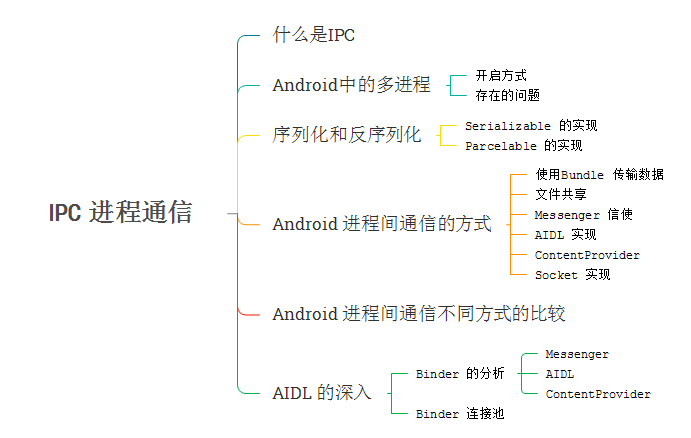 Android IPC 進程間通訊完全指南:從開啟多進程到六大通訊方案
本文脈絡 一、先把三個基礎概念說清楚 IPC 是 Inter-Process Communication 的縮寫,指的是兩個處於不同進程中的程序之間交換數據的過程。要
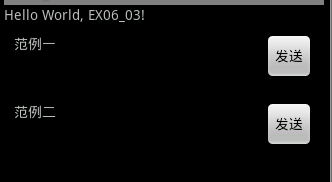 LinearLayout中嵌套RelativeLayout:左右對齊布局的解法
需求很常見:一個畫面上,左邊放文字標籤、右邊放按鈕,而且要多列堆疊。如果你也試過只用 android:gravity 與 android:layout_gravity 硬
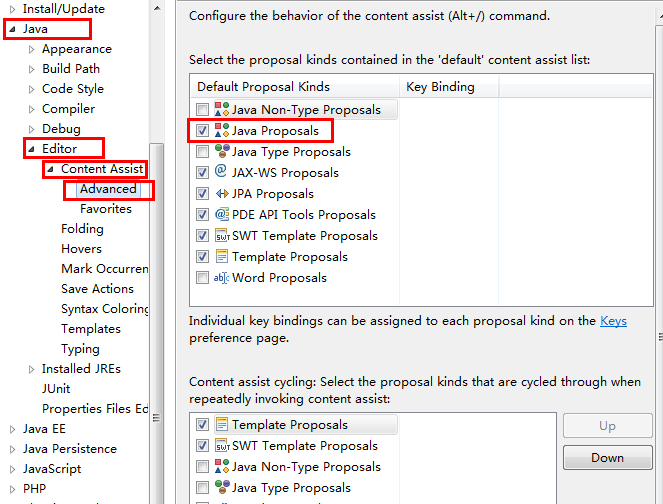 Eclipse 裡 Alt+/ 自動提示失效?五個方法逐一排查搞定
在 Eclipse 中開發 Android 時,Alt+/ 的內容自動提示(Content Assist)堪稱提效神器,可一旦它突然「啞火」,敲代碼的效率立刻大打折扣。別
 Android 自定義 View:仿 QQ 健康運動介面
QQ 健康中的運動介面具有圓弧進度、步數排名、好友平均步數與底部波紋等元素。這類介面可以通過自定義 View 完成,既能展示數據,也能呈現豐富的視覺效果。 自定義 Vi