編輯:關於 Android 程式設計
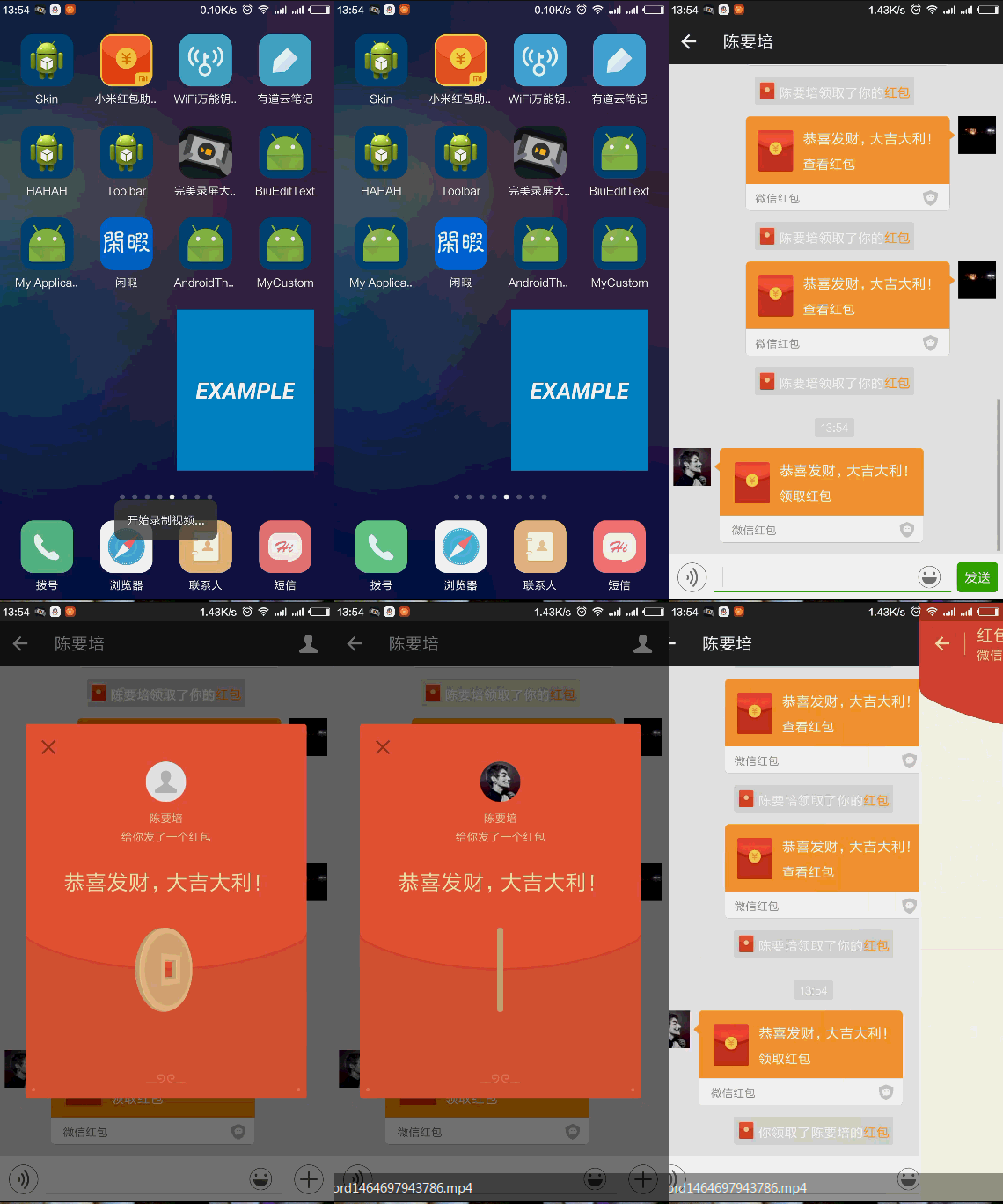
搶紅包,先看效果圖~
實現自動搶紅包,要解決兩個問題:
一、如何實時監聽發紅包的事件
二、如何在紅包到來時自動進入頁面並自動點擊紅包
為了獲取紅包到來時狀態欄的變化,我們要用到一個類:Accessibility
許多 Android 使用者因為各種情況,需要以不同的方式與手機互動。
這包括有些用戶由於視力、身體、年齡上的問題,無法看清完整螢幕或使用觸屏,也包括無法很好接收語音信息和提示、聽力較弱的用戶。
Android 提供了 Accessibility 功能和服務,幫助這些用戶更簡單地操作設備,包括文字轉語音(不支持中文)、觸覺反饋、手勢操作、軌跡球和手柄操作。
了解這一點後,接下來就順利多了。首先來看看 Accessibility 以及 AccessibilityService 的使用。
新建一個類繼承 AccessibilityService,並在 AndroidManifest 文件裡註冊它:
在子類 QiangHongBaoService 裡實現幾個重要的重載方法:
onServiceConnected() - 可選。系統會在成功連接上你的服務時呼叫這個方法,在這裡你可以做一些初始化工作,例如設備的聲音震動管理,也可以呼叫 setServiceInfo() 進行配置。
onAccessibilityEvent() - 必須。透過這個函數可以接收系統發送來的 AccessibilityEvent,接收到的 AccessibilityEvent 是經過過濾的,過濾是在配置工作時設置的。
onInterrupt() - 必須。系統想要中斷 AccessibilityService 返回的響應時會呼叫,在整個生命週期裡會被呼叫多次。
onUnbind() - 可選。系統將要關閉這個 AccessibilityService 時會被呼叫,在這裡進行一些釋放資源的工作。
然後在 /res/xml/accessibility_service_config.xml 中進行配置。
在 onAccessibilityEvent 方法中監聽狀態欄的變化,主要有:AccessibilityEvent.TYPE_NOTIFICATION_STATE_CHANGED、AccessibilityEvent.TYPE_WINDOW_STATE_CHANGED、AccessibilityEvent.TYPE_WINDOW_CONTENT_CHANGED。
在響應窗體及窗體內容變化時處理相關邏輯,獲取帶微信消息時,以下程式碼可打開消息:
//將微信的通知欄消息打開 Notification notification = (Notification) event.getParcelableData(); PendingIntent pendingIntent = notification.contentIntent; try { pendingIntent.send(); } catch (PendingIntent.CanceledException e) { e.printStackTrace(); }
具體程式碼網上有很多,一般都是透過 findAccessibilityNodeInfosByText、findAccessibilityNodeInfosByViewId 查找文本或資源節點進行點擊操作。但新版微信的開紅包頁面進行了處理,沒有文本信息;而如果採用下圖中 resources-id 這種形式,就可能出現這種情況:
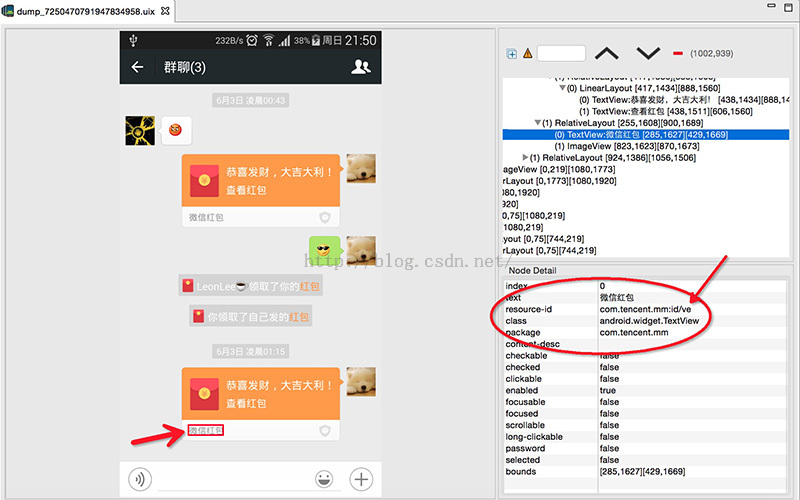
在了解整個核心後,獲取事件不外乎是透過文本與 id 判斷,那麼就可以將文本改為圖標方式,將 id 改為動態 id(每次顯示都是隨機生成),這樣一來就可以提高外掛的門檻。
如何進行規避呢?目前我想的是,既然開紅包頁面的文本和 ID 都有可能變,那我們能不能找個不變的進行判斷呢?考慮過後,我覺得最可能不變的地方就是開紅包這個按鈕的位置,也就是圖中的 bounds,於是有了下面的處理:
for (int i = 0; i < nodeInfo.getChildCount(); i++) { //Log.e("TAG", "getViewIdResourceName :"+nodeInfo.getChild(i).getViewIdResourceName()); Rect outBounds = new Rect(); nodeInfo.getChild(i).getBoundsInScreen(outBounds); int left_dp = px2dip(this, 400); int top_dp = px2dip(this, 1035); int right_dp = px2dip(this, 682); int bottom_dp = px2dip(this, 1320); int left_px = dip2px(this, left_dp); int top_px = dip2px(this, top_dp); int right_px = dip2px(this, right_dp); int bottom_px = dip2px(this, bottom_dp); Rect mStandar = new Rect(left_px,top_px,right_px,bottom_px); if(mStandar.contains(outBounds)){ Log.e("TAG", "outBounds.left :"+outBounds.left+";outBounds.top :"+outBounds.top+";outBounds.right :"+outBounds.right+";outBounds.bottom :"+outBounds.bottom); nodeInfo.getChild(i).performAction(AccessibilityNodeInfo.ACTION_CLICK); break; } }
這裡取的矩形區域要比按鈕區域稍大一點,然後判斷開紅包頁面的按鈕是否在我們預先設置的區域內,如果在,我們直接進行點擊開紅包操作:AccessibilityNodeInfo.ACTION_CLICK。其他比如如何防止重複搶等細節問題,也是要處理的。好了,直接放下關鍵程式碼,僅供參考:
package com.zkhb.weixinqinghongbao.service; import java.util.Date; import java.util.List; import android.accessibilityservice.AccessibilityService; import android.annotation.SuppressLint; import android.annotation.TargetApi; import android.app.KeyguardManager; import android.app.KeyguardManager.KeyguardLock; import android.app.Notification; import android.app.NotificationManager; import android.app.PendingIntent; import android.content.Context; import android.content.Intent; import android.graphics.Rect; import android.os.Build; import android.os.Handler; import android.os.PowerManager; import android.os.PowerManager.WakeLock; import android.util.Log; import android.view.accessibility.AccessibilityEvent; import android.view.accessibility.AccessibilityManager; import android.view.accessibility.AccessibilityNodeInfo; import android.widget.Toast; import com.zkhb.weixinqinghongbao.MainActivity; import com.zkhb.weixinqinghongbao.R; import com.zkhb.weixinqinghongbao.entity.HongBaoInfo; import com.zkhb.weixinqinghongbao.util.DateFormatUtils; import com.zkhb.weixinqinghongbao.util.LogUtil; /** * * 搶紅包服務 */ @SuppressLint("NewApi") public class QiangHongBaoService extends AccessibilityService { // static final String TAG = "QiangHongBao"; /** 微信的包名*/ static final String WECHAT_PACKAGENAME = "com.tencent.mm"; /** 紅包消息的關鍵字*/ static final String HONGBAO_TEXT_KEY = "[微信紅包]"; /** 紅包消息的關鍵字*/ static final String HONGBAO_TEXT_KEY1 = "微信紅包"; private static final int ENVELOPE_RETURN = 0; private static final String LOCK_TAG = "屏幕"; Handler handler = new Handler(); /** 是否在搶紅包界面裡*/ // public boolean isInMM=false; /** 是否可以點擊*/ // public boolean ISCLICKED=false; /** 是否進入過拆紅包界面*/ public static boolean ISCOMINQIANGCHB=false; //真正的 public static boolean ISCOMINQIANGCHB2=false; //真正的判斷 public static boolean ISCOMINQIANGCHB3=false; /** 是否來自通知欄*/ private static boolean ISCOMNOTIFY=false; private PowerManager pm; //點亮屏幕 private WakeLock mWakeLock; //解鎖鎖定屏幕 private KeyguardLock keyguardLock; /**判斷之前用戶是否鎖屏 */ private static boolean islock=false; /**通知服務 */ private NotificationManager n_manager; public void unlock(){ if(pm==null){ pm = (PowerManager) getApplication().getSystemService(Context.POWER_SERVICE); } boolean isScreenOn = pm.isScreenOn();//如果為true,則表示屏幕“亮”了,否則屏幕“暗”了。 if(!isScreenOn){ islock=true; KeyguardManager keyguardManager = (KeyguardManager)getSystemService(KEYGUARD_SERVICE); keyguardLock = keyguardManager.newKeyguardLock(LOCK_TAG); keyguardLock.disableKeyguard(); mWakeLock = pm.newWakeLock(PowerManager.FULL_WAKE_LOCK | PowerManager.ACQUIRE_CAUSES_WAKEUP, LOCK_TAG); mWakeLock.acquire(); } } public void lock(){ if(islock){ //釋放屏幕常亮鎖 if(null != mWakeLock) { mWakeLock.release(); } //屏幕鎖定 if(keyguardLock!=null){ keyguardLock.reenableKeyguard(); } } } @Override public void onAccessibilityEvent(AccessibilityEvent event) { final int eventType = event.getEventType(); LogUtil.info("事件---->" + event); //通知欄事件 if(eventType == AccessibilityEvent.TYPE_NOTIFICATION_STATE_CHANGED) { unlock(); List texts = event.getText(); if(!texts.isEmpty()) { for(CharSequence t : texts) { String text = String.valueOf(t); if(text.contains(HONGBAO_TEXT_KEY)) { ISCOMNOTIFY=true; ISCOMINQIANGCHB=false; openNotify(event); break; } } } } else if(eventType == AccessibilityEvent.TYPE_WINDOW_STATE_CHANGED) { unlock(); openHongBao(event); // AccessibilityNodeInfo nodeInfo = getRootInActiveWindow(); // List findAccessibilityNodeInfosByText = nodeInfo.findAccessibilityNodeInfosByText("領取紅包"); // if(findAccessibilityNodeInfosByText.isEmpty()){ // isInMM=false; // }else{ // isInMM=true; // } // List text = event.getText(); // if(text.size()>=0){ // CharSequence charSequence = text.get(0); //// if(charSequence.equals("微信")){ //// isInMM=true; //// }else{ //// isInMM=false; //// } // } }else if(eventType==AccessibilityEvent.TYPE_WINDOW_CONTENT_CHANGED && ISCOMNOTIFY){ unlock(); openHongBao(event); List InfoText = getRootInActiveWindow().findAccessibilityNodeInfosByText("領取紅包"); if(!InfoText.isEmpty()){ checkKey2(); ISCOMNOTIFY=false; } } } /*@Override protected boolean onKeyEvent(KeyEvent event) { //return super.onKeyEvent(event); return true; }*/ @Override public boolean onUnbind(Intent intent) { Toast.makeText(this, "斷開搶紅包服務", Toast.LENGTH_SHORT).show(); ISCOMINQIANGCHB=false; islock=false; ISCOMINQIANGCHB2=false; ISCOMINQIANGCHB3=false; ISCOMNOTIFY=false; setNotification("已關閉搶紅包小助手服務~~",Notification.FLAG_AUTO_CANCEL,"已關閉搶紅包小助手服務~~~"); return super.onUnbind(intent); } @Override public void onInterrupt() { Toast.makeText(this, "中斷搶紅包服務", Toast.LENGTH_SHORT).show(); } @Override protected void onServiceConnected() { super.onServiceConnected(); ISCOMINQIANGCHB=false; ISCOMINQIANGCHB2=false; ISCOMINQIANGCHB3=false; islock=false; ISCOMNOTIFY=false; setNotification("已開啟搶紅包小助手服務~~",Notification.FLAG_NO_CLEAR,"已開啟搶紅包小助手服務~~~"); Toast.makeText(this, "連接搶紅包服務", Toast.LENGTH_SHORT).show(); } private void setNotification(String content,int flags,String title) { if(n_manager==null){ n_manager = (NotificationManager) getApplicationContext().getSystemService(Context.NOTIFICATION_SERVICE); } n_manager.cancelAll(); Notification notification=new Notification(R.drawable.ic_launcher, content, System.currentTimeMillis()); // notification.defaults |= Notification.DEFAULT_VIBRATE; // long[] vibrate = {0,100,200,300}; //0毫秒後開始振動,振動100毫秒後停止,再過200毫秒後再次振動300毫秒 // notification.vibrate=vibrate; notification.flags |= flags; //表明在點擊了通知欄中的"清除通知"後,此通知不清除, Intent notificationIntent = new Intent(this,MainActivity.class); //點擊該通知後要跳轉的Activity PendingIntent contentIntent = PendingIntent.getActivity(getApplicationContext(),0,notificationIntent,0); notification.setLatestEventInfo(getApplicationContext(), title, "進入微信搶紅包~~", contentIntent); n_manager.notify(0, notification); } private void sendNotifyEvent(){ AccessibilityManager manager= (AccessibilityManager)getSystemService(ACCESSIBILITY_SERVICE); if (!manager.isEnabled()) { return; } AccessibilityEvent event=AccessibilityEvent.obtain(AccessibilityEvent.TYPE_NOTIFICATION_STATE_CHANGED); event.setPackageName(WECHAT_PACKAGENAME); event.setClassName(Notification.class.getName()); CharSequence tickerText = HONGBAO_TEXT_KEY; event.getText().add(tickerText); manager.sendAccessibilityEvent(event); } /** 打開通知欄消息*/ @TargetApi(Build.VERSION_CODES.JELLY_BEAN) private void openNotify(AccessibilityEvent event) { if(event.getParcelableData() == null || !(event.getParcelableData() instanceof Notification)) { return; } //將微信的通知欄消息打開 Notification notification = (Notification) event.getParcelableData(); PendingIntent pendingIntent = notification.contentIntent; try { pendingIntent.send(); } catch (PendingIntent.CanceledException e) { e.printStackTrace(); } } @TargetApi(Build.VERSION_CODES.JELLY_BEAN) private void openHongBao(AccessibilityEvent event) { if("com.tencent.mm.plugin.luckymoney.ui.LuckyMoneyReceiveUI".equals(event.getClassName())) { //點中了紅包,下一步就是去拆紅包 ISCOMINQIANGCHB=true; ISCOMINQIANGCHB2=true; checkKey1(); } else if("com.tencent.mm.plugin.luckymoney.ui.LuckyMoneyDetailUI".equals(event.getClassName())) { //拆完紅包後看詳細的紀錄界面 LogUtil.info("事件---->com.tencent.mm.plugin.luckymoney.ui.LuckyMoneyDetailUI"); //nonething // if(ISCOMINQIANGCHB){ // ISCOMINQIANGCHB=false; // } if(ISCOMINQIANGCHB2){ ISCOMINQIANGCHB3=true; }else{ ISCOMINQIANGCHB3=false; } checkKey3(); ISCOMINQIANGCHB=true; ISCOMINQIANGCHB2=false; performGlobalAction(AccessibilityService.GLOBAL_ACTION_BACK); if(getSharedPreferences("config", Context.MODE_PRIVATE).getBoolean("auto", false)){ performGlobalAction(AccessibilityService.GLOBAL_ACTION_HOME); } lock(); } else if("com.tencent.mm.ui.LauncherUI".equals(event.getClassName())) { // isInMM=true; //在聊天界面,去點中紅包 LogUtil.info("事件---->com.tencent.mm.ui.LauncherUI"); checkKey2(); } } @SuppressLint("NewApi") @TargetApi(Build.VERSION_CODES.JELLY_BEAN) private void checkKey3() { AccessibilityNodeInfo nodeInfo = getRootInActiveWindow(); if(nodeInfo == null) { LogUtil.info("rootWindow為空333"); return; } //TODO List findAccessibilityNodeInfosByText = nodeInfo.findAccessibilityNodeInfosByText("元"); if(findAccessibilityNodeInfosByText.size()>=0){ AccessibilityNodeInfo accessibilityNodeInfo2 = findAccessibilityNodeInfosByText.get(0).getParent(); CharSequence money = accessibilityNodeInfo2.getChild(2).getText(); CharSequence name = accessibilityNodeInfo2.getChild(0).getText(); if(ISCOMINQIANGCHB3){ HongBaoInfo info=new HongBaoInfo(); info.setStrDateTime(DateFormatUtils.format("yyyy-MM-dd HH:mm:ss", new Date())); info.setStrMoney(money+""); info.setStrName(name+""); info.save(); } Toast.makeText(getApplicationContext(), money+":::"+name, 0).show(); } // List findAccessibilityNodeInfosByViewId = nodeInfo.findAccessibilityNodeInfosByViewId("com.tencent.mm:id/aw8"); // AccessibilityNodeInfo accessibilityNodeInfo = findAccessibilityNodeInfosByViewId.get(0); // CharSequence text = accessibilityNodeInfo.getText(); } private void checkKey1() { AccessibilityNodeInfo nodeInfo = getRootInActiveWindow(); if(nodeInfo == null) { LogUtil.info("rootWindow為空11111"); return; } for (int i = 0; i < nodeInfo.getChildCount(); i++) { Log.e("TAG", "getViewIdResourceName :"+nodeInfo.getChild(i).getViewIdResourceName()); Rect outBounds = new Rect(); nodeInfo.getChild(i).getBoundsInScreen(outBounds); int left_dp = px2dip(this, 400); int top_dp = px2dip(this, 1035); int right_dp = px2dip(this, 682); int bottom_dp = px2dip(this, 1320); int left_px = dip2px(this, left_dp); int top_px = dip2px(this, top_dp); int right_px = dip2px(this, right_dp); int bottom_px = dip2px(this, bottom_dp); Rect mStandar = new Rect(left_px,top_px,right_px,bottom_px); if(mStandar.contains(outBounds)){ Log.e("TAG", "outBounds.left :"+outBounds.left+";outBounds.top :"+outBounds.top+";outBounds.right :"+outBounds.right+";outBounds.bottom :"+outBounds.bottom); nodeInfo.getChild(i).performAction(AccessibilityNodeInfo.ACTION_CLICK); break; } // nodeInfo.performAction(action)//[405,1042][675,1312] } //List list = nodeInfo.findAccessibilityNodeInfosByText("拆紅包"); // List list = nodeInfo.findAccessibilityNodeInfosByViewId("com.tencent.mm:id/b5d"); // for(AccessibilityNodeInfo n : list) { // n.performAction(AccessibilityNodeInfo.ACTION_CLICK); // } } private void checkKey2() { AccessibilityNodeInfo nodeInfo = getRootInActiveWindow(); if(nodeInfo == null) { LogUtil.info("rootWindow為空222222"); return; } List list = nodeInfo.findAccessibilityNodeInfosByText("領取紅包"); if(list.isEmpty()) { list = nodeInfo.findAccessibilityNodeInfosByText(HONGBAO_TEXT_KEY); for(AccessibilityNodeInfo n : list) { LogUtil.info("-->微信紅包:" + n); n.performAction(AccessibilityNodeInfo.ACTION_CLICK); break; } } else { //最新的紅包領起 AccessibilityNodeInfo parent = list.get(list.size() - 1).getParent(); // Log.w(TAG, "ISCLICKED::"+ISCLICKED)!ISCLICKED; if(parent != null && !ISCOMINQIANGCHB) { parent.performAction(AccessibilityNodeInfo.ACTION_CLICK); } // for(int i = list.size() - 1; i >= 0; i --) { // AccessibilityNodeInfo parent = list.get(i).getParent(); // Log.i(TAG, "-->領取紅包:" + parent); // if(parent != null && parent.isClickable()) { // parent.performAction(AccessibilityNodeInfo.ACTION_CLICK); // break; // } // } // performGlobalAction(AccessibilityService.GLOBAL_ACTION_BACK); } } /** * @param info 當前節點 * @param matchFlag 需要匹配的文字 * @param type 操作的類型 */ @SuppressLint("NewApi") public void recycle(AccessibilityNodeInfo info, String matchFlag, int type) { if (info != null) { if (info.getChildCount() == 0) { CharSequence desrc = info.getContentDescription(); switch (type) { case ENVELOPE_RETURN://返回 if (desrc != null && matchFlag.equals(info.getContentDescription().toString().trim())) { if (info.isCheckable()) { info.performAction(AccessibilityNodeInfo.ACTION_CLICK); } else { performGlobalAction(AccessibilityService.GLOBAL_ACTION_BACK); } } break; } } else { int size = info.getChildCount(); for (int i = 0; i < size; i++) { AccessibilityNodeInfo childInfo = info.getChild(i); if (childInfo != null) { LogUtil.info("index: " + i + " info" + childInfo.getClassName() + " : " + childInfo.getContentDescription()+" : "+info.getText()); recycle(childInfo, matchFlag, type); } } } } } @Override public void onDestroy() { super.onDestroy(); lock(); } /** * 根據手機的分辨率從 dip 的單位 轉成為 px(像素) */ public static int dip2px(Context context, float dpValue) { final float scale = context.getResources().getDisplayMetrics().density; return (int) (dpValue * scale + 0.5f); } /** * 根據手機的分辨率從 px(像素) 的單位 轉成為 dp */ public static int px2dip(Context context, float pxValue) { // final float scale = context.getResources().getDisplayMetrics().density; return (int) (pxValue / 3 + 0.5f); //3是本人手機的設備密度 } }
AccessibilityService 還可以用在智能安裝、虛擬按鍵等方面,都有很多應用。這樣的實踐只是給我們提供解決問題的另一種思路——問題嘛,總還是要解決的。
 Android 學習筆記(三):第一次接觸 Activity
Activity 是 Android 系統中用來承載 UI 元件的容器。若要找個類比的說法,它相當接近 MFC 裡的 CFrame——一個負責裝載控制項、接收訊息並協調畫
 自定義 View 實戰(二):用複合控件封裝一個可復用的 TopBar
複合控件:把「一組控件」變成「一個控件」 自定義 View 的第二條路徑是創建複合控件。它的核心思路並不複雜:挑一個合適的 ViewGroup 作為父容器,把若干功能明確
 Android ExpandableListView 詳解
一、ExpandableListView 介紹 ExpandableListView 是一個垂直滾動、可顯示兩個層級(Child 子項、Group 分組)列表項的視圖,其
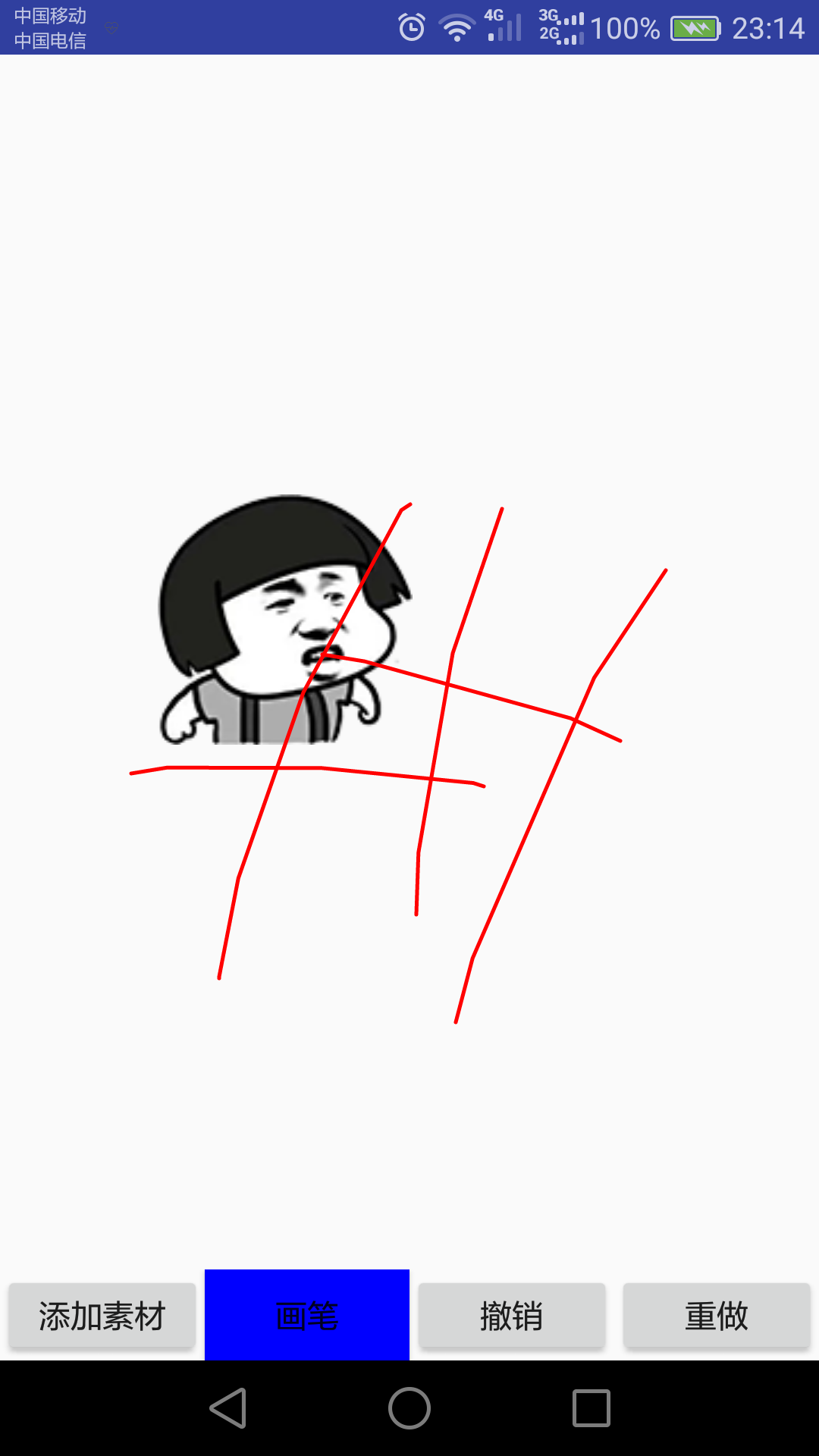 Android 圖片處理框架(三):重做、撤銷與架構重構
本篇是圖片處理框架系列的重點之一,主要說明如何在加入圖片與手繪筆跡的基礎上,實作重做與撤銷功能,並透過重新規劃類別職責,讓整體架構更清楚。架構調整早期做法容易讓 Pain