

編輯:關於 Android 程式設計
Fragment 重疊大概每個做過 Tab 切換的人都碰過,多數人也都在網上抄到過解法。但前陣子公司專案突然冒出這個 bug,我決定不再「照抄了事」——為什麼會重疊?為什麼這樣改就能解決?這樣改會不會有副作用?帶著這三個問題,我寫了个 Demo 逐一把每種方案的原理與代價拆開來看。
Demo 是最典型的 Fragment Tab 切換,切換時用 show/hide:顯示某個 Fragment 前,先把其他幾個隱藏。

private void setTabSelection(int index) {
    clearSelection();
    FragmentTransaction transaction = fragmentManager.beginTransaction();
    hideFragments(transaction);

    switch (index) {
        case 0:
            if (messageFragment == null) {
                messageFragment = new NormalListFragment();
                transaction.add(R.id.content, messageFragment);
            } else {
                transaction.show(messageFragment);
            }
            break;
        // 其餘 case 結構相同
    }
    transaction.commit();
}
這個 bug 有個惱人的特性:常規操作下死活重現不出來。關鍵在开发者选项里的「不保留活动」——打開它,離開 Activity 時系統就會立即銷毀,異常重建的場景才被逼出來。

操作路徑:在第一個 Tab(NormalListFragment)點進詳情頁 → 宿主 Activity 被銷毀 → 返回時 Activity 重建。把這段過程的生命週期日誌抓下來:
FragmentMainActivity onSaveInstanceState Bundle[{... android:support:fragments=FragmentManagerState@696715}]
NormalListFragment onDestroyView
NormalListFragment onDestroy
NormalListFragment onDetach
FragmentMainActivity onDestroy
...
NormalListFragment onAttach
NormalListFragment onCreate
FragmentMainActivity onCreate Bundle[{... android:support:fragments=FragmentManagerState@e7e75b8}]
NormalListFragment onCreateView   ← 第一次(系統恢復的)
NormalListFragment onActivityCreated
NormalListFragment onAttach       ← 第二次(我程式碼 new 出來的)
NormalListFragment onCreate
NormalListFragment onCreateView null
NormalListFragment onActivityCreated null
每個回呼都走了兩遍,意味著同時存在兩個 NormalListFragment 實例:一個是我在程式碼裡主動 new 的,另一個是上次 Activity 異常銷毀時被系統保存、這次自動恢復的。而恢復出來的那一個,我的程式碼並沒有拿到它的引用——所以後續的 hide/show 全都操作不到它,它就永遠掛在那裡。這正是重疊的根源。
先看 Activity.onSaveInstanceState:
protected void onSaveInstanceState(Bundle outState) {
    outState.putBundle(WINDOW_HIERARCHY_TAG, mWindow.saveHierarchyState());
    Parcelable p = mFragments.saveAllState();
    if (p != null) {
        outState.putParcelable(FRAGMENTS_TAG, p);
    }
    getApplication().dispatchActivitySaveInstanceState(this, outState);
}
它呼叫 FragmentManager 的 saveAllState() 把 Fragment 狀態寫進 Bundle,鍵名正是日誌裡看到的 FRAGMENTS_TAG:
static final String FRAGMENTS_TAG = "android:support:fragments";
再看重建時的 Activity.onCreate:
protected void onCreate(@Nullable Bundle savedInstanceState) {
    ...
    if (savedInstanceState != null) {
        Parcelable p = savedInstanceState.getParcelable(FRAGMENTS_TAG);
        mFragments.restoreAllState(p,
            mLastNonConfigurationInstances != null
                ? mLastNonConfigurationInstances.fragments : null);
    }
    mFragments.dispatchCreate();
    ...
}
只要 savedInstanceState 不為 null,就會把先前保存的 Fragment 全部取出、重新實例化並綁定到新 Activity 上。而你的程式碼在 onCreate 裡又 new 了一個——兩個實例於是同台演出。
@Override
protected void onSaveInstanceState(Bundle outState) {
    // 不呼叫 super,只保存自己需要的資料
    outState.putInt("variable", mCustomVariable);
}
不呼叫 super.onSaveInstanceState(),系統就不會保存 Fragment,重疊自然消失。但這個代價並不便宜:Activity 的 onSaveInstanceState 除了 Fragment,還負責保存目前取得焦點的 View 狀態、ActionBar 狀態,以及遍歷呼叫各 View 的 onSaveInstanceState。全部放掉,等於連旋轉螢幕後的輸入框內容、捲動位置一起犧牲。除非你的頁面確實沒有這些狀態,否則不建議。
android:background="@android:color/white"
android:clickable="true"
Fragment 預設背景透明,所以兩個疊在一起會透出下層。加上不透明背景後,視覺上只看得到上層那一個。clickable="true" 則是為了讓上層 Fragment 吃掉所有觸碰事件,避免下層那個「隱形」Fragment 誤觸。
這是視覺層面的止血,不是根治。同一個 Fragment 有兩個實例的客觀事實完全沒變。最典型的症狀是:某個網路介面明明該只呼叫一次,Log 卻打了兩次;或者使用者操作了半天,資料狀態莫名其妙對不上。這種 bug 排查起來非常痛苦。
private void setTabSelection2(int index) {
    clearSelection();
    FragmentTransaction transaction = fragmentManager.beginTransaction();
    switch (index) {
        case 0:
            if (messageFragment == null) messageFragment = new NormalListFragment();
            transaction.replace(R.id.content, messageFragment);
            break;
        // 其餘 case 結構相同
    }
    transaction.commit();
}
replace 的語義是「把容器中的 Fragment 全部清掉,再放入新的」,所以容器裡任何時刻都只有一個 Fragment。看源碼就很清楚:
case OP_REPLACE: {
    Fragment f = op.fragment;
    for (int i = 0; i < mManager.mAdded.size(); i++) {
        Fragment old = mManager.mAdded.get(i);
        if (f == null || old.mContainerId == f.mContainerId) {
            op.removed.add(old);
            mManager.removeFragment(old, mTransition, mTransitionStyle);
        }
    }
    if (f != null) {
        mManager.addFragment(f, false);
    }
}
代價是:每次切 Tab 都得重建 Fragment、重跑生命週期、重新拉一次資料。能不能接受,取決於業務是否允許每次重新載入。若某個 Tab 有昂貴的初始化作業(大量本地計算、一次性較重的網路請求),頻繁 replace 會有感卡頓;若各 Tab 本就是輕量列表,這反而最省心。
三種方案的取捨其實很清楚:解法一最徹底但副作用最大,除非你能保證頁面沒有需要保存的 View 狀態;解法二最省事但只是遮住症狀,資料層的隱患仍在;解法三語義最乾淨,代價是放棄 Fragment 狀態的跨切換保留。
如果專案已經深度依賴 show/hide 的「保留狀態」特性,比較務實的方向是在 Fragment 首次建立時就檢查是否存在被恢復的實例,取得引用後重複使用,而不是再 new 一個:
private Fragment getOrCreate(String tag, Supplier<Fragment> creator) {
    Fragment f = getSupportFragmentManager().findFragmentByTag(tag);
    return f != null ? f : creator.get();
}
理解「系統會幫你恢復 Fragment」這個前提,比記住任何一種解法都重要——它解釋了這個 bug 的一切。
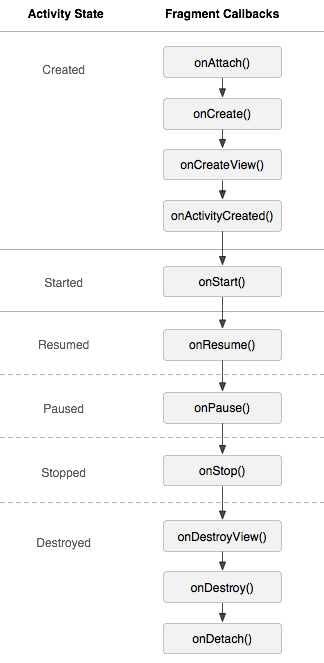 Fragment 多層嵌套下的跨層方法呼叫怎麼寫
先說 Fragment 是什麼 Android 跑的裝置五花八門,從小螢幕手機、平板到電視都有。過去面對尺寸落差,很多團隊的做法是先做手機版,再複製一份改布局去適配平板。
 Android 自定義列表切換動畫:模擬 iPhone 的翻頁刷新效果
我很喜歡在頁面切換時加上一點有意思的動畫。前陣子無意間看到幾個很不錯的轉場效果,於是動手復刻了一下——整體思路類似 iPhone 中 View 的切換動畫。下面把效果和程
 用貝塞爾曲線做 ScrollView 頂部下拉陰影回饋
本文記錄一個小效果:當 ScrollView 滑到頂部後,手指繼續下拉時出現的陰影回饋。實作難度不高,僅供學習參考,若要放進正式專案還請三思。 技術點一:用 Path 畫
 Android 讀取系統聯繫人:基於 Contacts 的完整實踐
讀取聯繫人是很多工具類應用的基礎能力。本文以一個可運行的例子,講解如何通過 ContactsContract 訪問系統通訊錄並把結果展示在列表裡。 先認識一下 Andr