

編輯:關於 Android 程式設計
Service 是 Android 四大元件之一,也是面試與實務中的高頻考點。本文把它系統性梳理一遍。
依執行位置:分為 Local Service(運行在主進程)與 Remote Service(運行在獨立進程)。
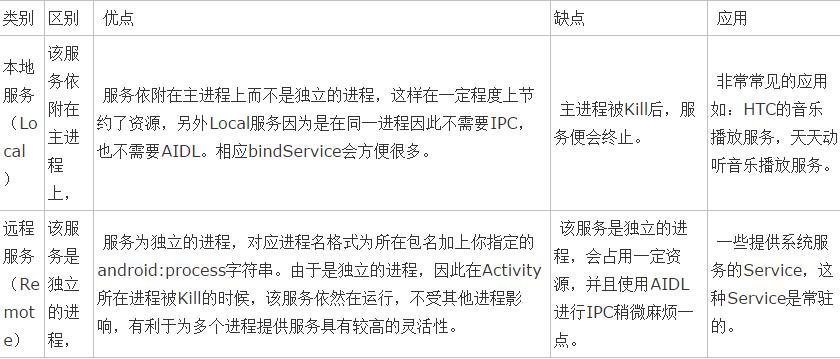
實務中 Remote Service 並不常見,多數是系統服務在用。
依運行型態:分為前台服務與背景服務。

這裡有個常見誤解:僅僅建立一個 ONGOING 的 Notification 並不等於前台服務。真正成為前台服務,必須在 API 2.0 之後呼叫 startForeground(),2.0 之前則是 setForeground()。這樣做的好處是,當服務被外部強制終止時,那條常駐通知也會被正確移除,不會殘留。
依使用方式:分為 startService 啟動、bindService 綁定,以及兩者混用。
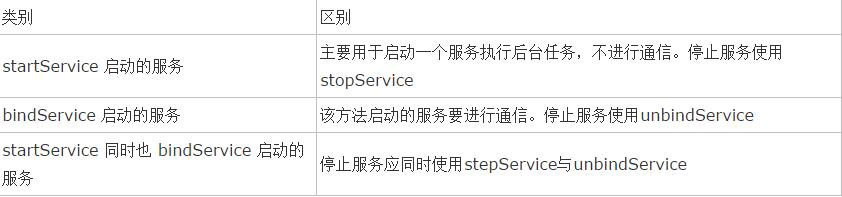
三種啟動方式的生命週期有差異,後文會說明。
很多人會問:既然開一條 Thread 就能跑背景任務,為什麼還要用 Service?這兩個概念完全不是一回事。
Thread 是程式執行的最小單元,也是 CPU 調度的基本單位,適合承載非同步運算。
Service 則是 Android 的一種元件機制。Local Service 運行在主進程的 main 執行緒上,onCreate、onStart 等回調都在該執行緒被觸發;Remote Service 則運行在獨立進程的 main 執行緒。所以不要把 Service 理解成執行緒,兩者沒有直接關係。
那為什麼要用 Service?關鍵在於生命週期與可控性。Thread 的存活獨立於 Activity:Activity finish 之後,若你沒有主動停止,Thread 還在跑,而你也不再持有它的參考;更麻煩的是,你無法在不同 Activity 之間控制同一條 Thread。
舉個實際例子:假設有一條 Thread 需要週期性連線伺服器做同步,即使 Activity 不在前台也要繼續運行。此時你在新開啟的 Activity 裡根本拿不到舊 Thread 的參考。合理做法是把 Thread 交給 Service 管理——任何 Activity 都能控制同一個 Service 實例,而系統也只會建立一個實例。
因此可以把 Service 想成一個訊息服務:在任何有 Context 的地方呼叫 startService、stopService、bindService、unbindService 都能控制它,也可以在 Service 中註冊 BroadcastReceiver,由外部發送廣播來驅動它。這些都是裸 Thread 做不到的。
核心回調:onCreate、onStart(後續版本為 onStartCommand)、onDestroy、onBind。
1)被啟動的服務
透過 startService 啟動後,無論是否有 Activity 綁定,服務都會在背景運行。多次呼叫 startService 時,onCreate 只會執行一次,onStart 則對應呼叫次數被觸發多次,系統也只維護一個實例(所以只需一次 stopService)。服務會持續運行,直到被 stopService 或自身呼叫 stopSelf,或者系統資源不足時被回收。
2)被綁定的服務
透過 bindService 綁定時,無論呼叫幾次,onCreate 只執行一次,onStart 完全不會被呼叫。連線建立後服務持續運行,直到呼叫 unbindService,或原先綁定的 Context 消失(例如 Activity finish),系統會自動停止服務並回呼 onDestroy。
3)既被啟動又被綁定的服務
這種情況下服務會一直在背景運行。onCreate 仍只執行一次,onStart 依 startService 次數觸發。此時呼叫 unbindService 並不會停止服務,必須再呼叫 stopService 或 stopSelf。
4)服務停止時的清理
當服務被終止(stopService、stopSelf,或不再有綁定連線且未曾被啟動)時,onDestroy 會被呼叫,應在此釋放 Thread、 unregister receiver、關閉資源等。
一、呼叫 bindService 之後,務必在某處配對呼叫 unbindService(雖然 Activity finish 時會自動解除,但不應依賴此行為)。
二、使用 startService 啟動後,一定要 stopService,無論是否 ALSO 用了 bindService。
三、同時使用兩者時,必須 unbindService 與 stopService 都呼叫過,服務才會真正終止。先 unbind 服務不會停,之後 stopService 才停;反之先 stopService 也不會停,要等 unbindService 或綁定 Context 消失後才會自動停止。
四、螢幕旋轉時 Activity 會重建,先前以 bindService 建立的連線隨之斷開(Context 已不存在),後續生命週期同上。
五、SDK 2.0 之後 onStart 已被 onStartCommand 取代,前者雖仍可用但應優先使用新 API。
不論 Local 還是 Remote,使用方式一樣簡單,別忘了在 AndroidManifest.xml 註冊 service。
public class LocalService1 extends Service {
    /** onBind 是抽象方法必須實作,回傳 null 表示不允許外部綁定 */
    @Override
    public IBinder onBind(Intent intent) {
        return null;
    }
    @Override public void onCreate() { super.onCreate(); }
    @Override public void onStart(Intent intent, int startId) { super.onStart(intent, startId); }
    @Override public void onDestroy() { super.onDestroy(); }
}
啟動與停止:
// 啟動服務
startService(new Intent(this, LocalService1.class));
// 停止服務
stopService(new Intent(this, LocalService1.class));
同樣記得先在清單檔註冊。
1)Local 服務綁定
在 Service 中實作 onBind,回傳一個實作 IBinder 介面的物件。實務上直接繼承 Binder 更省事,因為 Binder 已經實作了 IBinder。
public class LocalService extends Service {
    public class SimpleBinder extends Binder {
        /** 取得 Service 實例 */
        public LocalService getService() { return LocalService.this; }
        public int add(int a, int b) { return a + b; }
    }
    public SimpleBinder sBinder;

    @Override
    public void onCreate() {
        super.onCreate();
        sBinder = new SimpleBinder();
    }
    @Override
    public IBinder onBind(Intent intent) {
        return sBinder;
    }
}
關鍵在 onBind 回傳的物件,它就是 Activity 與 Service 溝通的橋樑。Activity 側如下:
public class Main extends Activity {
    private final static String TAG = "SERVICE_TEST";
    private ServiceConnection sc;
    private boolean isBind;

    @Override
    public void onCreate(Bundle savedInstanceState) {
        super.onCreate(savedInstanceState);
        setContentView(R.layout.main);
        sc = new ServiceConnection() {
            @Override public void onServiceDisconnected(ComponentName name) { }
            @Override public void onServiceConnected(ComponentName name, IBinder service) {
                LocalService.SimpleBinder sBinder = (LocalService.SimpleBinder) service;
                Log.v(TAG, "3 + 5 = " + sBinder.add(3, 5));
                Log.v(TAG, sBinder.getService().toString());
            }
        };
        findViewById(R.id.btnBind).setOnClickListener(new OnClickListener() {
            @Override public void onClick(View v) {
                bindService(new Intent(Main.this, LocalService.class), sc, Context.BIND_AUTO_CREATE);
                isBind = true;
            }
        });
        findViewById(R.id.btnUnbind).setOnClickListener(new OnClickListener() {
            @Override public void onClick(View v) {
                if (isBind) { unbindService(sc); isBind = false; }
            }
        });
    }
}
ServiceConnection 負責接收連線建立與意外斷線的回調。bindService 有三個參數:用於標識服務的 Intent、ServiceConnection 實例、以及 flag。flag 常用 BIND_AUTO_CREATE,另一個 BIND_DEBUG_UNBIND 主要用於除錯。unbindService 傳入先前那個 ServiceConnection。要注意重複 unbind 同一個連線會拋異常,因此實務上通常像上面那樣用一個 boolean 做保護。
執行結果:

2)Remote 服務綁定
Remote Service 運行在另一個進程,需要用到 Android 的 IPC 機制(AIDL),這是一個獨立的大主題,此處不展開。
補充:若 onBind 回傳 null,bindService 仍會啟動服務但不會建立連線,onServiceConnected 不會被回呼,但你依然需要呼叫 unbindService,服務才會停止。
前台服務的優勢前面提過。SDK 2.0 之後使用 startForeground / stopForeground,之前是 setForeground。若需要向下相容,通常得靠反射來呼叫新方法。下面是仿 ApiDemos 改寫的相容版本:
public class ForegroundService extends Service {
    private static final Class[] mStartForegroundSignature = new Class[] { int.class, Notification.class};
    private static final Class[] mStopForegroundSignature = new Class[] { boolean.class};
    private NotificationManager mNM;
    private Method mStartForeground;
    private Method mStopForeground;
    private Object[] mStartForegroundArgs = new Object[2];
    private Object[] mStopForegroundArgs = new Object[1];

    @Override public IBinder onBind(Intent intent) { return null; }

    @Override
    public void onCreate() {
        super.onCreate();
        mNM = (NotificationManager) getSystemService(Context.NOTIFICATION_SERVICE);
        try {
            mStartForeground = ForegroundService.class.getMethod("startForeground", mStartForegroundSignature);
            mStopForeground = ForegroundService.class.getMethod("stopForeground", mStopForegroundSignature);
        } catch (NoSuchMethodException e) {
            mStartForeground = mStopForeground = null;
        }
        // 前台服務的通知會自動帶上 FLAG_ONGOING_EVENT,無需手動設定
        Notification notification = new Notification(R.drawable.icon, "Foreground Service Started.", System.currentTimeMillis());
        PendingIntent contentIntent = PendingIntent.getActivity(this, 0, new Intent(this, Main.class), 0);
        notification.setLatestEventInfo(this, "Foreground Service", "Foreground Service Started.", contentIntent);
        // 注意:id 傳 0 通知不會顯示
        startForegroundCompat(1, notification);
    }

    @Override
    public void onDestroy() {
        super.onDestroy();
        stopForegroundCompat(1);
    }

    private void startForegroundCompat(int id, Notification n) {
        if (mStartForeground != null) {
            mStartForegroundArgs[0] = id;
            mStartForegroundArgs[1] = n;
            try {
                mStartForeground.invoke(this, mStartForegroundArgs);
                return;
            } catch (Exception e) { e.printStackTrace(); }
        }
        setForeground(true);
        mNM.notify(id, n);
    }

    private void stopForegroundCompat(int id) {
        if (mStopForeground != null) {
            mStopForegroundArgs[0] = Boolean.TRUE;
            try {
                mStopForeground.invoke(this, mStopForegroundArgs);
                return;
            } catch (Exception e) { e.printStackTrace(); }
        }
        // 先 cancel 再 setForeground(false),避免在兩者之間被回收導致通知永久殘留
        mNM.cancel(id);
        setForeground(false);
    }
}
再次提醒:startForeground 的 id 若為 0,通知不會顯示。
只是單純想跑一個長期背景任務,用 startService 即可。
若需要與運行中的 Service 頻繁溝通,有兩條路:一是廣播,二是 bindService。廣播的問題在於 BroadcastReceiver 的 onReceive 執行時間被嚴格限制,通訊頻繁時容易出問題,效能也不理想;bindService 沒有這些顧慮,因此更合適。這種情況下你其實同時在用 startService 與 bindService,在 Activity 中同步 Service 狀態時非常實用。
如果你的服務只是對外暴露一組遠端介面供客戶端呼叫,那甚至可以一開始不啟動服務,只用 bindService,等第一次綁定時才建立實例,能省下不少資源——尤其對 Remote Service 效果更明顯。代價是首次建立連線會有等待時間,這點要納入考量。
android:name —— 服務類名。
android:label —— 服務顯示名稱,不設定則顯示類名。
android:icon —— 服務圖示。
android:permission —— 宣告存取該服務所需的權限。
android:process —— 指定服務運行的進程,設定後會在包名後附加該字串作為進程名。
android:enabled —— 是否啟用該元件。
android:exported —— 是否允許其他應用控制或綁定此服務。
 自訂 View 繪製多等級信號強度指示器
等級式狀態指示器在 Android 系統中隨處可見:手機右上角那個經典的電池圖示就是最典型的例子,電量不同會呈現不同的填滿比例,快沒電時有些機型還會閃爍提醒使用者充電。地
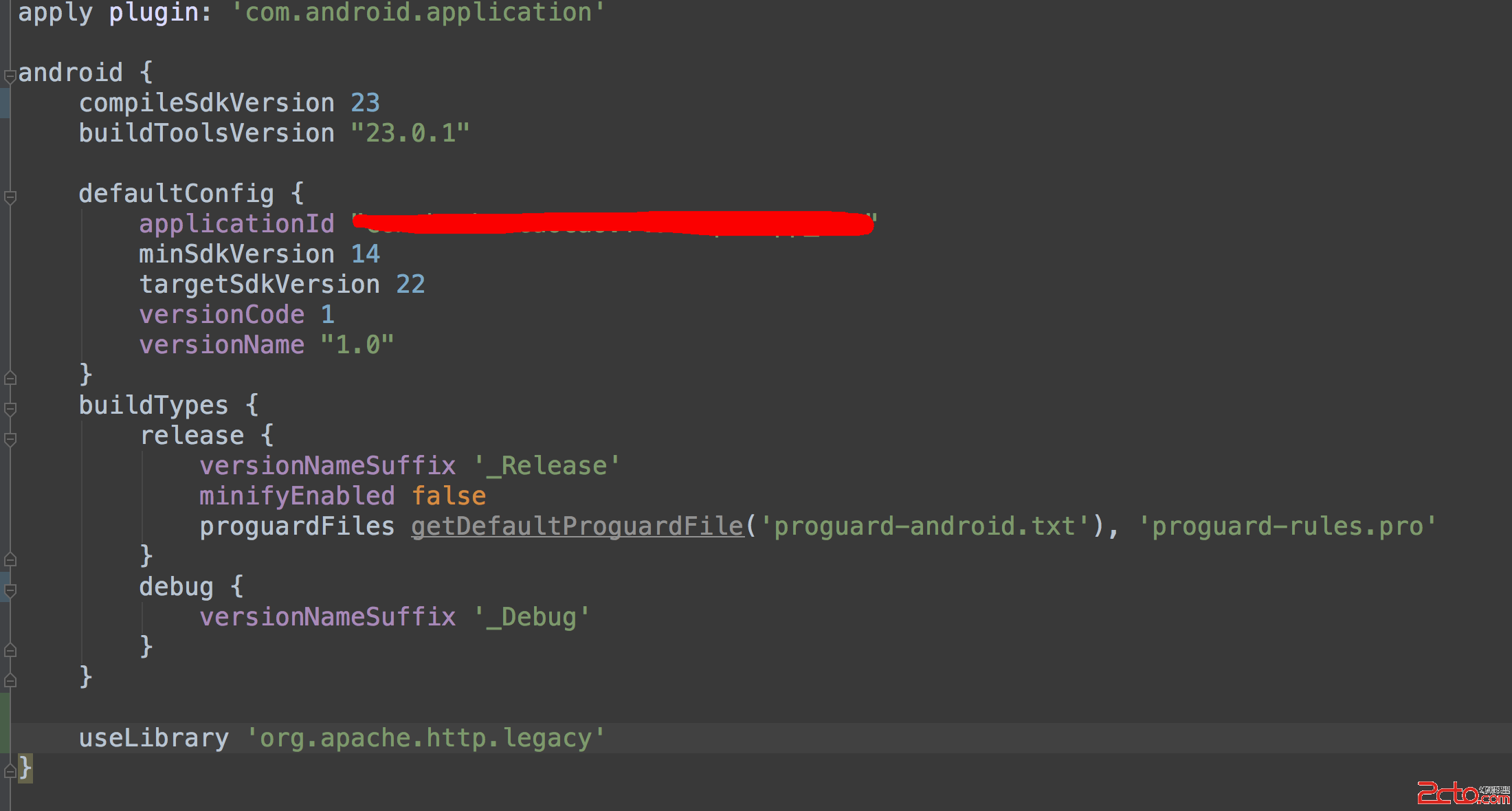 踩坑筆記:Android 6.0(API 23)不再內建 org.apache.http 的解法
使用 android-async-http 時,我把編譯目標升級到 API 23、build version 也改成 23 之後,就出現了找不到 org.apache.h
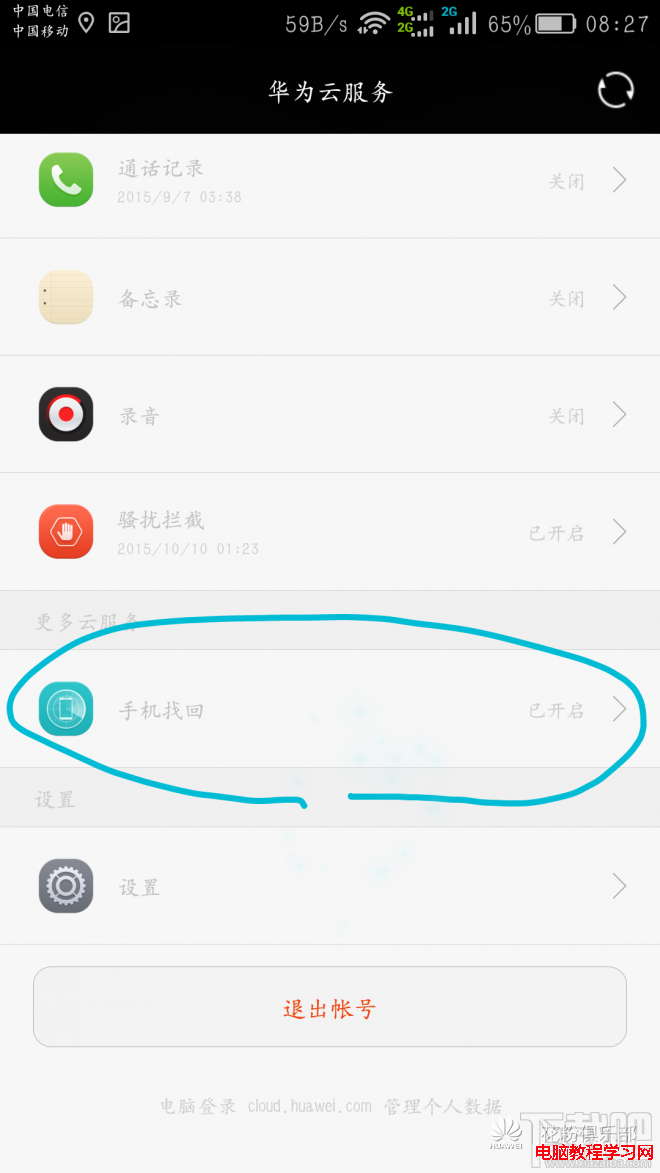 華為手機忘記鎖屏密碼?用雲服務找回不傷資料
華為手機忘記鎖屏密碼時,若指紋可用或已開啟手機找回,可用華為雲服務重置。先在雲服務開啟手機找回,再用電腦登入官方網站,選擇手機找回與鎖定手機,設定新密碼。 網頁端通常只能
 Android Notification 通知完全解析
使用步驟速覽 1. 獲取系統的通知管理器 NotificationManager; 2. 實例化通知構造器 Notification.Builder; 3. 通過 Bui