

編輯:關於 Android 開發
上一階段我們決定自己寫一個 ViewGroup 來實作多頁橫向切換。這一階段把 ScrollLayout 的核心寫完,重點在三件事:如何排列子 View、如何計算該停在哪一頁、如何處理手勢。
package com.teleca.robin;

import android.content.Context;
import android.util.AttributeSet;
import android.util.Log;
import android.view.MotionEvent;
import android.view.VelocityTracker;
import android.view.View;
import android.view.ViewConfiguration;
import android.view.ViewGroup;
import android.widget.Scroller;

/**
 * 仿 Launcher 中的 Workspace,可左右滑動切換螢幕的類別
 *
 * @author Yao.GUET
 * blog: https://blog.csdn.NET/Yao_GUET
 * date: 2011-05-04
 */
public class ScrollLayout extends ViewGroup {

    private static final String TAG = "ScrollLayout";

    private Scroller mScroller;
    private VelocityTracker mVelocityTracker;

    private int mCurScreen;                 // 目前頁
    private int mDefaultScreen = 0;         // 預設頁

    private static final int TOUCH_STATE_REST = 0;
    private static final int TOUCH_STATE_SCROLLING = 1;
    private static final int SNAP_VELOCITY = 600;   // 判定翻頁的速度門檻

    private int mTouchState = TOUCH_STATE_REST;
    private int mTouchSlop;                 // 判定為滑動的最小位移
    private float mLastMotionX;
    private float mLastMotionY;

    public ScrollLayout(Context context, AttributeSet attrs) {
        this(context, attrs, 0);
    }

    public ScrollLayout(Context context, AttributeSet attrs, int defStyle) {
        super(context, attrs, defStyle);
        mScroller = new Scroller(context);
        mCurScreen = mDefaultScreen;
        mTouchSlop = ViewConfiguration.get(getContext()).getScaledTouchSlop();
    }

    @Override
    protected void onLayout(boolean changed, int l, int t, int r, int b) {
        if (changed) {
            int childLeft = 0;
            final int childCount = getChildCount();
            for (int i = 0; i < childCount; i++) {
                final View childView = getChildAt(i);
                if (childView.getVisibility() != View.GONE) {
                    final int childWidth = childView.getMeasuredWidth();
                    // 每個子 View 依序往右排,形成一條水平長條
                    childView.layout(childLeft, 0, childLeft + childWidth,
                                     childView.getMeasuredHeight());
                    childLeft += childWidth;
                }
            }
        }
    }

    @Override
    protected void onMeasure(int widthMeasureSpec, int heightMeasureSpec) {
        Log.e(TAG, "onMeasure");
        super.onMeasure(widthMeasureSpec, heightMeasureSpec);

        final int width = MeasureSpec.getSize(widthMeasureSpec);
        final int widthMode = MeasureSpec.getMode(widthMeasureSpec);
        if (widthMode != MeasureSpec.EXACTLY) {
            throw new IllegalStateException("ScrollLayout can only run at EXACTLY mode!");
        }
        final int heightMode = MeasureSpec.getMode(heightMeasureSpec);
        if (heightMode != MeasureSpec.EXACTLY) {
            throw new IllegalStateException("ScrollLayout can only run at EXACTLY mode!");
        }

        // 所有子 View 都採用與 ScrollLayout 相同的尺寸
        final int count = getChildCount();
        for (int i = 0; i < count; i++) {
            getChildAt(i).measure(widthMeasureSpec, heightMeasureSpec);
        }

        scrollTo(mCurScreen * width, 0);
    }

    /**
     * 依目前捲動位置,對齊到最近的頁面
     */
    public void snapToDestination() {
        final int screenWidth = getWidth();
        final int destScreen = (getScrollX() + screenWidth / 2) / screenWidth;
        snapToScreen(destScreen);
    }

    public void snapToScreen(int whichScreen) {
        // 取出合法範圍內的頁
        whichScreen = Math.max(0, Math.min(whichScreen, getChildCount() - 1));
        if (getScrollX() != (whichScreen * getWidth())) {
            final int delta = whichScreen * getWidth() - getScrollX();
            mScroller.startScroll(getScrollX(), 0, delta, 0, Math.abs(delta) * 2);
            mCurScreen = whichScreen;
            invalidate();       // 觸發重繪,讓 computeScroll 接手
        }
    }

    public void setToScreen(int whichScreen) {
        whichScreen = Math.max(0, Math.min(whichScreen, getChildCount() - 1));
        mCurScreen = whichScreen;
        scrollTo(whichScreen * getWidth(), 0);
    }

    public int getCurScreen() {
        return mCurScreen;
    }

    @Override
    public void computeScroll() {
        if (mScroller.computeScrollOffset()) {
            scrollTo(mScroller.getCurrX(), mScroller.getCurrY());
            postInvalidate();
        }
    }

    @Override
    public boolean onTouchEvent(MotionEvent event) {
        if (mVelocityTracker == null) {
            mVelocityTracker = VelocityTracker.obtain();
        }
        mVelocityTracker.addMovement(event);

        final int action = event.getAction();
        final float x = event.getX();
        final float y = event.getY();

        switch (action) {
            case MotionEvent.ACTION_DOWN:
                Log.e(TAG, "event down!");
                if (!mScroller.isFinished()) {
                    mScroller.abortAnimation();     // 手一放下就中止動畫,避免互相打架
                }
                mLastMotionX = x;
                break;

            case MotionEvent.ACTION_MOVE:
                int deltaX = (int) (mLastMotionX - x);
                mLastMotionX = x;
                scrollBy(deltaX, 0);                // 跟手位移
                break;

            case MotionEvent.ACTION_UP:
                Log.e(TAG, "event : up");
                final VelocityTracker velocityTracker = mVelocityTracker;
                velocityTracker.computeCurrentVelocity(1000);
                int velocityX = (int) velocityTracker.getXVelocity();
                Log.e(TAG, "velocityX:" + velocityX);

                if (velocityX > SNAP_VELOCITY && mCurScreen > 0) {
                    // 速度足夠,往左翻一頁
                    Log.e(TAG, "snap left");
                    snapToScreen(mCurScreen - 1);
                } else if (velocityX < -SNAP_VELOCITY
                             && mCurScreen < getChildCount() - 1) {
                    // 速度足夠,往右翻一頁
                    Log.e(TAG, "snap right");
                    snapToScreen(mCurScreen + 1);
                } else {
                    // 速度不夠,對齊最近的頁
                    snapToDestination();
                }

                if (mVelocityTracker != null) {
                    mVelocityTracker.recycle();
                    mVelocityTracker = null;
                }
                mTouchState = TOUCH_STATE_REST;
                break;

            case MotionEvent.ACTION_CANCEL:
                mTouchState = TOUCH_STATE_REST;
                break;
        }
        return true;
    }

    @Override
    public boolean onInterceptTouchEvent(MotionEvent ev) {
        Log.e(TAG, "onInterceptTouchEvent-slop:" + mTouchSlop);
        final int action = ev.getAction();

        if ((action == MotionEvent.ACTION_MOVE) && (mTouchState != TOUCH_STATE_REST)) {
            return true;        // 已判定為橫向滑動,後續事件一律攔截
        }

        final float x = ev.getX();
        final float y = ev.getY();

        switch (action) {
            case MotionEvent.ACTION_MOVE:
                final int xDiff = (int) Math.abs(mLastMotionX - x);
                if (xDiff > mTouchSlop) {
                    mTouchState = TOUCH_STATE_SCROLLING;
                }
                break;

            case MotionEvent.ACTION_DOWN:
                mLastMotionX = x;
                mLastMotionY = y;
                mTouchState = mScroller.isFinished() ? TOUCH_STATE_REST : TOUCH_STATE_SCROLLING;
                break;

            case MotionEvent.ACTION_CANCEL:
            case MotionEvent.ACTION_UP:
                mTouchState = TOUCH_STATE_REST;
                break;
        }
        return mTouchState != TOUCH_STATE_REST;
    }
}
onMeasure 強制 EXACTLY。因為每一頁都要剛好等於螢幕寬度,捲動位置才能用「頁數 × 寬度」計算,所以這裡直接對不符合條件的測量模式丟例外——寧可早早崩潰,也不要留下難以追蹤的位移錯誤。
速度門檻決定翻頁。SNAP_VELOCITY 是關鍵參數:滑得夠快就翻頁,滑得不夠快就回最近的頁。這個值需要依實際手感調整,600 只是個起點。
攔截與跟手要分工。onInterceptTouchEvent 負責判斷「這是橫向翻頁手勢嗎」,一旦確認就把後續事件搶過來交給 onTouchEvent;否則子 View(例如清單、按鈕)要能正常收到事件。這個分工寫錯,典型症狀就是列表捲動時會誤觸翻頁。
 Android 資料庫 ORM 框架 greenDAO 學習與實戰指南
 簡介 根據官網的說法: greenDAO 是一個物件關聯映射(ORM)框架,它提供了一組介面,
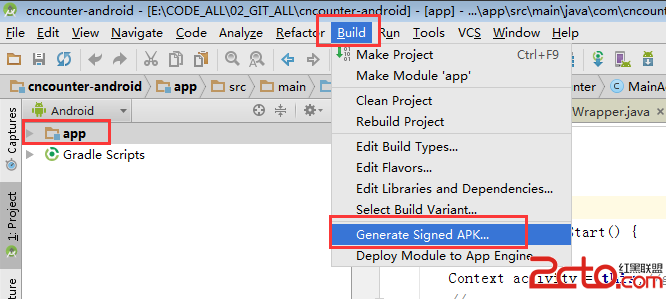 Android Studio 生成簽名 APK 完整流程
在 Android Studio 中打包正式安裝檔,需要透過 Generate Signed APK 建立或選擇簽
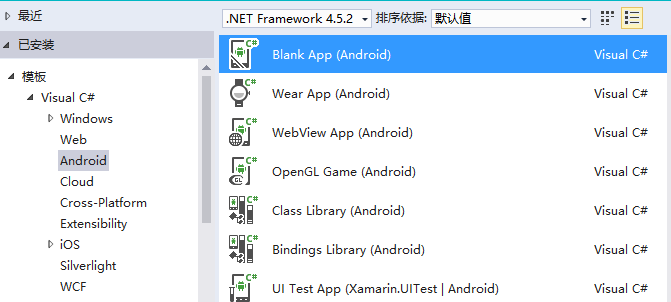 用 Visual Studio 2015 開發 Android:環境搭建與踩坑記錄
近來一連串新聞——甲骨文向谷歌求償、傳出谷歌有意在 Android 上放棄 Java、甚至考慮引入 Swift 作為「一等」開發語言——讓我意識到跨平台開發能力的重要性。
 解決Android打包時APK META-INF重複檔案錯誤
 在Android專案打包過程中,有時會遇到類似以下的錯誤訊息: * What went wrong: Exe