

編輯:關於 Android 開發
這次學到的是一個很實用的小功能:在清單裡往左滑,浮出刪除按鈕。先看效果。
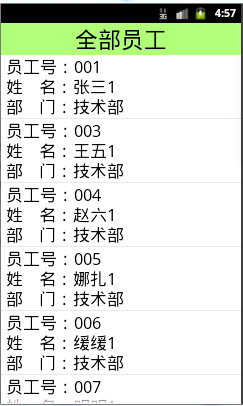
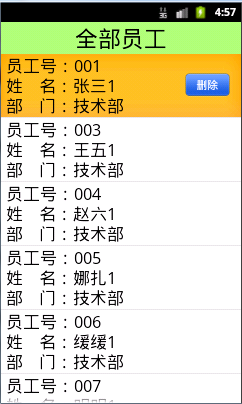
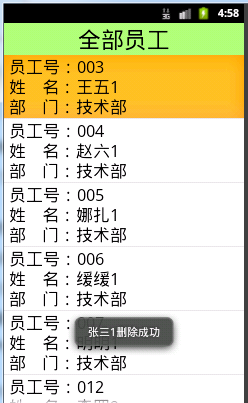
這個互動大家應該都不陌生,QQ 裡到處都是。俗話說好記性不如爛筆頭,為了以後的自己,也為了同樣在自學路上摸索的朋友,我把程式碼整理在下面。
整體做法不複雜:自訂一個繼承 ListView 的 DeleteListView,在 dispatchTouchEvent 攔截手勢判斷是否為「由右往左」的滑動,再用一個 PopupWindow 承載刪除按鈕,貼齊被滑動的那個 item 顯示出來,最後透過回呼介面把點擊位置交給 Activity 處理。
activity_lookstaff.xml
<RelativeLayout xmlns:android="https://schemas.android.com/apk/res/android" xmlns:tools="https://schemas.android.com/tools" android:layout_width="match_parent" android:layout_height="match_parent" > <TextView android:id="@+id/tv_title" style="@style/GTextView" android:text="全部員工" /> <com.rjxy.view.DeleteListView android:id="@+id/id_listview" android:layout_width="fill_parent" android:layout_height="wrap_content" android:layout_below="@+id/tv_title"> </com.rjxy.view.DeleteListView> </RelativeLayout>
delete_btn.xml
<?xml version="1.0" encoding="utf-8"?> <LinearLayout xmlns:android="https://schemas.android.com/apk/res/android" android:layout_width="wrap_content" android:layout_height="wrap_content" android:orientation="vertical" > <Button android:id="@+id/id_item_btn" android:layout_width="60dp" android:singleLine="true" android:layout_height="wrap_content" android:text="刪除" android:background="@drawable/d_delete_btn" android:textColor="#ffffff" android:paddingLeft="15dp" android:paddingRight="15dp" android:layout_alignParentRight="true" android:layout_centerVertical="true" android:layout_marginRight="15dp" /> </LinearLayout>
d_delete_btn.xml(按鈕的三種狀態背景)
<?xml version="1.0" encoding="utf-8"?> <selector xmlns:android="https://schemas.android.com/apk/res/android"> <item android:drawable="@drawable/btn_style_five_focused" android:state_focused="true"></item> <item android:drawable="@drawable/btn_style_five_pressed" android:state_pressed="true"></item> <item android:drawable="@drawable/btn_style_five_normal"></item> </selector>
DeleteListView.java(核心:手勢判定與 PopupWindow 定位)
package com.rjxy.view;

import com.rjxy.activity.R;
import android.content.Context;
import android.util.AttributeSet;
import android.view.Gravity;
import android.view.LayoutInflater;
import android.view.MotionEvent;
import android.view.View;
import android.view.ViewConfiguration;
import android.widget.Button;
import android.widget.LinearLayout;
import android.widget.ListView;
import android.widget.PopupWindow;

public class DeleteListView extends ListView {
    private static final String TAG = "DeleteListView";
    /** 用戶滑動的最小距離 */
    private int touchSlop;
    /** 是否響應滑動 */
    private boolean isSliding;
    private int xDown;   // 手指按下時的 x 坐標
    private int yDown;   // 手指按下時的 y 坐標
    private int xMove;   // 手指移動時的 x 坐標
    private int yMove;   // 手指移動時的 y 坐標

    private LayoutInflater mInflater;
    private PopupWindow mPopupWindow;
    private int mPopupWindowHeight;
    private int mPopupWindowWidth;
    private Button mDelBtn;
    /** 為刪除按鈕提供一個回調接口 */
    private DelButtonClickListener mListener;
    /** 當前手指觸摸的 View 與位置 */
    private View mCurrentView;
    private int mCurrentViewPos;

    public DeleteListView(Context context, AttributeSet attrs) {
        super(context, attrs);
        mInflater = LayoutInflater.from(context);
        touchSlop = ViewConfiguration.get(context).getScaledTouchSlop();
        View view = mInflater.inflate(R.layout.delete_btn, null);
        mDelBtn = (Button) view.findViewById(R.id.id_item_btn);
        mPopupWindow = new PopupWindow(view, LinearLayout.LayoutParams.WRAP_CONTENT,
                LinearLayout.LayoutParams.WRAP_CONTENT);
        /** 先調用下 measure,否則拿不到寬和高 */
        mPopupWindow.getContentView().measure(0, 0);
        mPopupWindowHeight = mPopupWindow.getContentView().getMeasuredHeight();
        mPopupWindowWidth = mPopupWindow.getContentView().getMeasuredWidth();
    }

    @Override
    public boolean dispatchTouchEvent(MotionEvent ev) {
        int action = ev.getAction();
        int x = (int) ev.getX();
        int y = (int) ev.getY();
        switch (action) {
        case MotionEvent.ACTION_DOWN:
            xDown = x;
            yDown = y;
            /** 如果當前 popupWindow 顯示,則直接隱藏,並屏蔽 ListView 的 touch 事件下傳 */
            if (mPopupWindow.isShowing()) {
                dismissPopWindow();
                return false;
            }
            // 獲得當前手指按下時的 item 位置與 View
            mCurrentViewPos = pointToPosition(xDown, yDown);
            mCurrentView = getChildAt(mCurrentViewPos - getFirstVisiblePosition());
            break;
        case MotionEvent.ACTION_MOVE:
            xMove = x;
            yMove = y;
            int dx = xMove - xDown;
            int dy = yMove - yDown;
            /** 判斷是否是從右到左的滑動 */
            if (xMove < xDown && Math.abs(dx) > touchSlop && Math.abs(dy) < touchSlop) {
                isSliding = true;
            }
            break;
        }
        return super.dispatchTouchEvent(ev);
    }

    @Override
    public boolean onTouchEvent(MotionEvent ev) {
        int action = ev.getAction();
        /** 只有從右到左的滑動才響應 */
        if (isSliding) {
            switch (action) {
            case MotionEvent.ACTION_MOVE:
                int[] location = new int[2];
                // 獲得當前 item 在屏幕上的位置
                mCurrentView.getLocationOnScreen(location);
                mPopupWindow.setAnimationStyle(R.style.popwindow_delete_btn_anim_style);
                mPopupWindow.update();
                mPopupWindow.showAtLocation(mCurrentView, Gravity.LEFT | Gravity.TOP,
                        location[0] + mCurrentView.getWidth(),
                        location[1] + mCurrentView.getHeight() / 2 - mPopupWindowHeight / 2);
                // 設置刪除按鈕的回調
                mDelBtn.setOnClickListener(new OnClickListener() {
                    @Override
                    public void onClick(View v) {
                        if (mListener != null) {
                            mListener.clickHappend(mCurrentViewPos);
                            mPopupWindow.dismiss();
                        }
                    }
                });
                break;
            case MotionEvent.ACTION_UP:
                isSliding = false;
            }
            // 滑動期間屏蔽 item 的 Click 事件,避免衝突
            return true;
        }
        return super.onTouchEvent(ev);
    }

    /** 隱藏 popupWindow */
    private void dismissPopWindow() {
        if (mPopupWindow != null && mPopupWindow.isShowing()) {
            mPopupWindow.dismiss();
        }
    }

    public void setDelButtonClickListener(DelButtonClickListener listener) {
        mListener = listener;
    }

    public interface DelButtonClickListener {
        public void clickHappend(int position);
    }
}
DeleteStaffActivity.java(拉取員工清單、處理刪除請求)
package com.rjxy.activity;

import java.io.IOException;
import java.io.InputStream;
import java.net.HttpURLConnection;
import java.net.URL;
import java.util.ArrayList;
import java.util.List;

import org.json.JSONArray;
import org.json.JSONException;
import org.json.JSONObject;

import com.rjxy.bean.Staff;
import com.rjxy.path.Path;
import com.rjxy.util.StreamTools;
import com.rjxy.view.DeleteListView;
import com.rjxy.view.DeleteListView.DelButtonClickListener;

import android.app.Activity;
import android.os.Bundle;
import android.os.Handler;
import android.view.View;
import android.view.Window;
import android.widget.AdapterView;
import android.widget.AdapterView.OnItemClickListener;
import android.widget.ArrayAdapter;
import android.widget.Toast;

public class DeleteStaffActivity extends Activity {
    private static final int CHANGE_UI = 1;
    private static final int DELETE = 3;
    private static final int SUCCESS = 2;
    private static final int ERROR = 0;

    private DeleteListView lv;
    private ArrayAdapter<String> mAdapter;
    private List<String> staffs = new ArrayList<String>();
    private Staff staff;
    String sno;

    // 主線程創建消息處理器
    private Handler handler = new Handler() {
        public void handleMessage(android.os.Message msg) {
            if (msg.what == CHANGE_UI) {
                try {
                    JSONArray arr = new JSONArray((String) msg.obj);
                    for (int i = 0; i < arr.length(); i++) {
                        JSONObject temp = (JSONObject) arr.get(i);
                        staff = new Staff();
                        staff.setSno(temp.getString("sno"));
                        staff.setSname(temp.getString("sname"));
                        staff.setDname(temp.getString("d_name"));
                        staffs.add("員工號:" + staff.getSno() + "\n姓 名:" + staff.getSname()
                                + "\n部 門:" + staff.getDname());
                    }
                    mAdapter = new ArrayAdapter<String>(DeleteStaffActivity.this,
                            android.R.layout.simple_list_item_1, staffs);
                    lv.setAdapter(mAdapter);
                    lv.setDelButtonClickListener(new DelButtonClickListener() {
                        @Override
                        public void clickHappend(final int position) {
                            String s = mAdapter.getItem(position);
                            String[] ss = s.split("\n");
                            String snos = ss[0];
                            String[] sss = snos.split(":");
                            sno = sss[1];
                            delete();
                            mAdapter.remove(mAdapter.getItem(position));
                        }
                    });
                    lv.setOnItemClickListener(new OnItemClickListener() {
                        @Override
                        public void onItemClick(AdapterView<?> parent, View view, int position, long id) {
                            Toast.makeText(DeleteStaffActivity.this,
                                    position + " : " + mAdapter.getItem(position), 0).show();
                        }
                    });
                } catch (JSONException e) {
                    e.printStackTrace();
                }
            } else if (msg.what == DELETE) {
                Toast.makeText(DeleteStaffActivity.this, (String) msg.obj, 1).show();
            }
        }
    };

    @Override
    protected void onCreate(Bundle savedInstanceState) {
        requestWindowFeature(Window.FEATURE_NO_TITLE);
        super.onCreate(savedInstanceState);
        setContentView(R.layout.activity_lookstaff);
        lv = (DeleteListView) findViewById(R.id.id_listview);
        select();
    }

    /** 查詢員工列表 */
    private void select() {
        new Thread() {
            public void run() {
                try {
                    URL url = new URL(Path.lookStaffPath);
                    HttpURLConnection conn = (HttpURLConnection) url.openConnection();
                    conn.setRequestMethod("POST");
                    conn.setRequestProperty("User-Agent",
                            "Mozilla/5.0(compatible;MSIE 9.0;Windows NT 6.1;Trident/5.0)");
                    conn.setRequestProperty("Content-Type", "application/x-www-form-urlencoded");
                    String data = "";
                    conn.setRequestProperty("Content-Length", data.length() + "");
                    conn.setDoOutput(true);
                    byte[] bytes = data.getBytes();
                    conn.getOutputStream().write(bytes);
                    int code = conn.getResponseCode();
                    if (code == 200) {
                        InputStream is = conn.getInputStream();
                        String result = StreamTools.readStream(is);
                        Message mas = Message.obtain();
                        mas.what = CHANGE_UI;
                        mas.obj = result;
                        handler.sendMessage(mas);
                    } else {
                        Message mas = Message.obtain();
                        mas.what = ERROR;
                        handler.sendMessage(mas);
                    }
                } catch (IOException e) {
                    Message mas = Message.obtain();
                    mas.what = ERROR;
                    handler.sendMessage(mas);
                }
            }
        }.start();
    }

    /** 刪除指定員工 */
    private void delete() {
        new Thread() {
            public void run() {
                try {
                    URL url = new URL(Path.deleteStaffPath);
                    HttpURLConnection conn = (HttpURLConnection) url.openConnection();
                    conn.setRequestMethod("POST");
                    conn.setRequestProperty("User-Agent",
                            "Mozilla/5.0(compatible;MSIE 9.0;Windows NT 6.1;Trident/5.0)");
                    conn.setRequestProperty("Content-Type", "application/x-www-form-urlencoded");
                    String data = "sno=" + sno;
                    conn.setRequestProperty("Content-Length", data.length() + "");
                    conn.setDoOutput(true);
                    byte[] bytes = data.getBytes();
                    conn.getOutputStream().write(bytes);
                    int code = conn.getResponseCode();
                    if (code == 200) {
                        InputStream is = conn.getInputStream();
                        String result = StreamTools.readStream(is);
                        Message mas = Message.obtain();
                        mas.what = DELETE;
                        mas.obj = result;
                        handler.sendMessage(mas);
                    } else {
                        Message mas = Message.obtain();
                        mas.what = ERROR;
                        handler.sendMessage(mas);
                    }
                } catch (IOException e) {
                    Message mas = Message.obtain();
                    mas.what = ERROR;
                    handler.sendMessage(mas);
                }
            }
        }.start();
    }
}
幾個實作時值得留意的點:touchSlop 取系統最小觸控距離,用來過濾誤觸;水平位移大於 touchSlop 且垂直位移較小時才判定為橫向滑動,避免與列表捲動打架;PopupWindow 在初始化時必須先 measure 一次,否則取不到寬高,也就無法拉出正確的定位。
 Java 七大 JSON 類庫實戰:物件與 JSON 的雙向轉換與效能橫評
 JSON(JavaScript Object Notation)是當今最普及的輕量級資料交換格
 Android 新手入門:用 Canvas 與 Paint 完成圖片顯示與繪圖
 在 Android 中,圖片顯示與繪圖經常需要 Bitmap、Canvas、Paint 等
 Android Socket 通訊實戰:客戶端與伺服器雙向傳輸的完整實作
用 Socket 打通 Android 客戶端與伺服器 在 Android 開發裡,除了常見的 HTTP 介面請求,Socket 依然是許多即時通訊、長連線推送與自訂協議
 消息總線 EventBus 基本用法(二十):組件解耦實戰
消息總線 EventBus 的基本使用(二十) 一、前言 專案持續更新,這一期講 EventBus 的基本用法,下一篇會從源碼角度剖析它的實現過程。 FastDev4A