

編輯:關於 Android 開發
使用 ViewPager 切換 Fragment 時,我最初採用系統自帶的 FragmentPagerAdapter,結果發現每次切換都會頻繁調用 onCreateView()。
翻閱 FragmentPagerAdapter 源碼後,發現兩個關鍵之處:在 instantiateItem 中,對於已存在的 Fragment 使用了 attach;而在 destroyItem 中,則使用了 detach。正是這對 attach/detach 的頻繁使用,導致了 onCreateView 被反覆觸發。
@Override public Object instantiateItem(ViewGroup container, int position) { if (mCurTransaction == null) { mCurTransaction = mFragmentManager.beginTransaction(); } final long itemId = getItemId(position); String name = makeFragmentName(container.getId(), itemId); Fragment fragment = mFragmentManager.findFragmentByTag(name); if (fragment != null) { //該處使用attach導致頻繁調用oncreatview mCurTransaction.attach(fragment); } else { fragment = getItem(position); mCurTransaction.add(container.getId(), fragment, makeFragmentName(container.getId(), itemId)); } if (fragment != mCurrentPrimaryItem) { fragment.setMenuVisibility(false); fragment.setUserVisibleHint(false); } return fragment; } @Override public void destroyItem(ViewGroup container, int position, Object object) { if (mCurTransaction == null) { mCurTransaction = mFragmentManager.beginTransaction(); } //該處使用detach導致頻繁調用oncreatview mCurTransaction.detach((Fragment)object); }找到「元兇」後就好辦了。思路很簡單:自定義一個適配器,把 attach 改為 show、把 detach 改為 hide,即可完美解決問題。

@Override public Object instantiateItem(ViewGroup container, int position) { if (mCurTransaction == null) { mCurTransaction = mFragmentManager.beginTransaction(); } final long itemId = getItemId(position); String name = makeFragmentName(container.getId(), itemId); Fragment fragment = mFragmentManager.findFragmentByTag(name); if (fragment != null) { //用show而不用attach,防止頻繁調用oncreatview mCurTransaction.show(fragment); } else { fragment = getItem(position); mCurTransaction.add(container.getId(), fragment, makeFragmentName(container.getId(), itemId)); } if (fragment != mCurrentPrimaryItem) { fragment.setMenuVisibility(false); fragment.setUserVisibleHint(false); } return fragment; } @Override public void destroyItem(ViewGroup container, int position, Object object) { if (mCurTransaction == null) { mCurTransaction = mFragmentManager.beginTransaction(); } //用hide而不用detach,防止頻繁調用oncreatview mCurTransaction.hide((Fragment) object); }
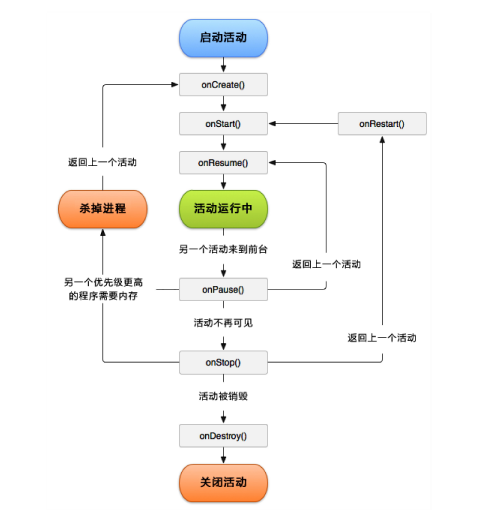 透徹理解 Android Activity 生命週期與七大回呼方法
 Activity 主要有以下七個回呼方法: 1、onCreate():在 Activity 第一次建
 LeanCloud Android 雲端資料庫快速入門
 LeanCloud 提供雲端資料庫與後端服務,Android 端只要整合 SDK,就能進行資料儲存與讀取。以下以
 hellocharts-android 開源圖表庫入門(一):打造你的第一張折線圖
 在 Android 應用裡呈現數據趨勢時,圖表往往比純文字更有說服力。hellocha
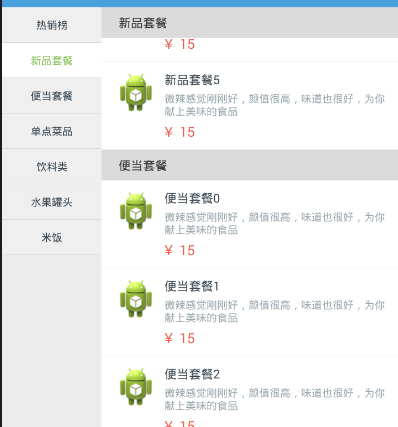 仿餓了么點餐界面:兩個 ListView 聯動實現
點餐類應用的經典交互是左右聯動:左側是分類菜單,右側是菜品列表,點左側切換右側內容,滑右側則左側高亮跟隨。本文記錄一個實現思路,同時也留下了一個尚未解決的問題,歡迎一起探