

編輯:關於 Android 開發
先看成果,整個流程包含更新提示、下載進度與安裝三個階段:
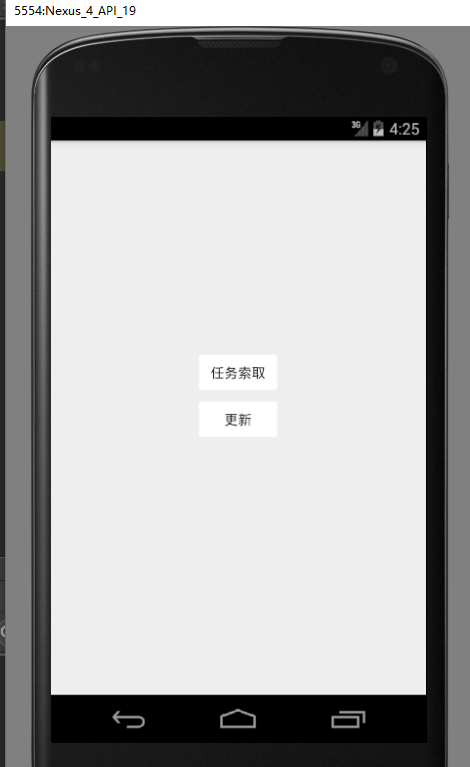
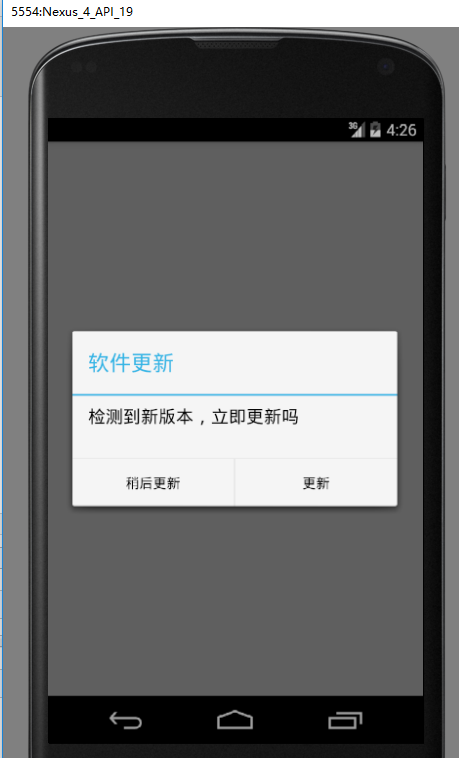
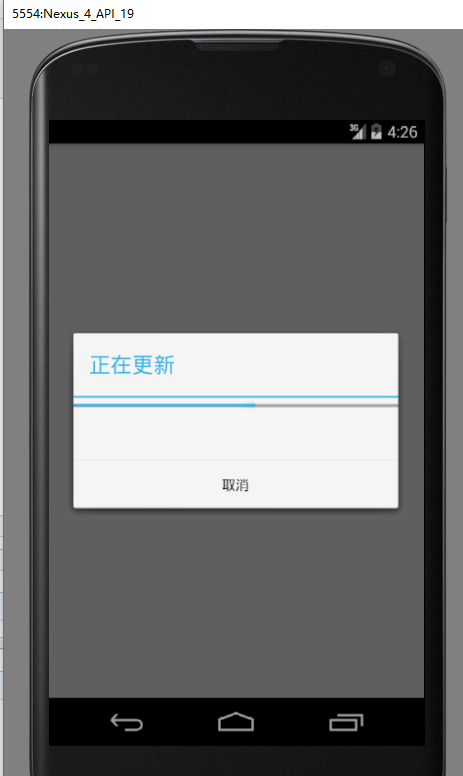
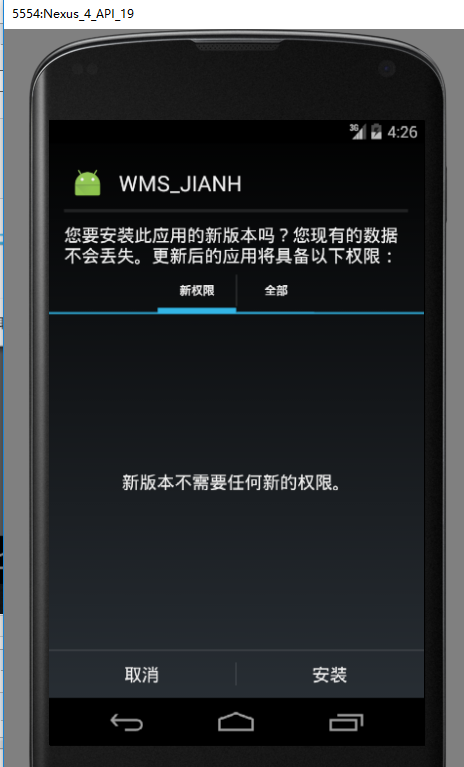
原理不複雜:向伺服器問版本號,比本地的 versionCode 大就提示更新,使用者確認後下載 APK 到本機,下載完再用 Intent 交給系統安裝程式。以下依檔案逐一說明,其中部分程式碼是我的測試用的,可以自行刪除。
<?xml version="1.0" encoding="utf-8"?>
<RelativeLayout xmlns:android="https://schemas.android.com/apk/res/android"
    xmlns:tools="https://schemas.android.com/tools"
    android:layout_width="match_parent"
    android:layout_height="match_parent"
    android:paddingBottom="@dimen/activity_vertical_margin"
    android:paddingLeft="@dimen/activity_horizontal_margin"
    android:paddingRight="@dimen/activity_horizontal_margin"
    android:paddingTop="@dimen/activity_vertical_margin"
    tools:context="com.example.fucm.wms_jianh.MainActivity">

    <Button
        android:id="@+id/btn_sq"
        android:layout_width="wrap_content"
        android:layout_height="wrap_content"
        android:layout_alignParentTop="true"
        android:layout_centerHorizontal="true"
        android:layout_marginTop="197dp"
        android:text="@string/btn_sq" />

    <ListView
        android:id="@+id/listView"
        android:layout_width="wrap_content"
        android:layout_height="wrap_content"
        android:layout_alignParentTop="true"
        android:layout_alignParentEnd="true"
        android:layout_toStartOf="@+id/btn_sq" />

    <Button
        android:id="@+id/button"
        android:layout_width="wrap_content"
        android:layout_height="wrap_content"
        android:layout_below="@+id/btn_sq"
        android:layout_centerHorizontal="true"
        android:text="更新" />
</RelativeLayout>
點擊「更新」按鈕時建立 SoftUpdate 並呼叫 checkUpdate()。另外這裡開了 StrictMode,目的是在開發階段把磁碟讀寫等問題印出來,正式專案可關掉。
package com.example.fucm.wms_jianh;

import android.app.Activity;
import android.os.Bundle;
import android.os.StrictMode;
import android.view.View;
import android.widget.Button;
import android.widget.ListView;

import MyClass.SoftUpdate;

public class MainActivity extends Activity {

    Button btn1, btn2;
    ListView listView;

    @Override
    protected void onCreate(Bundle savedInstanceState) {
        super.onCreate(savedInstanceState);
        StrictMode.setThreadPolicy(new StrictMode.ThreadPolicy.Builder()
                .detectDiskReads()
                .detectDiskWrites()
                .detectAll()
                .penaltyLog()
                .build());
        StrictMode.setVmPolicy(new StrictMode.VmPolicy.Builder()
                .detectLeakedSqlLiteObjects()
                .detectLeakedClosableObjects()
                .penaltyLog()
                .penaltyDeath()
                .build());

        setContentView(R.layout.activity_main);
        btn1 = (Button) findViewById(R.id.btn_sq);
        btn2 = (Button) findViewById(R.id.button);
        listView = (ListView) findViewById(R.id.listView);

        btn2.setOnClickListener(new View.OnClickListener() {
            @Override
            public void onClick(View v) {
                SoftUpdate manager = new SoftUpdate(MainActivity.this);
                manager.checkUpdate();   // 檢查軟體更新
            }
        });
    }
}
最精簡的 HTTP GET 包裝,加上 JSON 解析的小工具。順帶一提,Apache HttpClient 在 Android 6.0 已被移除,新專案請改用 HttpURLConnection 或 OkHttp。
package MyClass;

import org.apache.http.HttpResponse;
import org.apache.http.HttpStatus;
import org.apache.http.client.HttpClient;
import org.apache.http.client.methods.HttpGet;
import org.apache.http.impl.client.DefaultHttpClient;
import org.apache.http.params.BasicHttpParams;
import org.apache.http.params.HttpConnectionParams;
import org.apache.http.params.HttpParams;
import org.apache.http.util.EntityUtils;
import org.json.JSONArray;
import org.json.JSONObject;

import java.io.IOException;

public class HttpHelper {

    private static final int REQUEST_TIMEOUT = 15 * 1000;
    private static final int SO_TIMEOUT = 15 * 1000;

    public static String sendHttpRequest(String pUrl) {
        return doGet(pUrl);
    }

    public static String doGet(String url) {
        String result = null;
        HttpParams httpParams = new BasicHttpParams();
        HttpConnectionParams.setConnectionTimeout(httpParams, REQUEST_TIMEOUT);
        HttpConnectionParams.setSoTimeout(httpParams, SO_TIMEOUT);
        HttpClient httpClient = new DefaultHttpClient(httpParams);
        HttpGet httpGet = new HttpGet(url);
        try {
            HttpResponse response = httpClient.execute(httpGet);
            if (response.getStatusLine().getStatusCode() != HttpStatus.SC_OK) {
                return null;
            }
            result = EntityUtils.toString(response.getEntity(), "UTF-8");
        } catch (IOException e) {
            e.printStackTrace();
        }
        return result;
    }

    /** 取出 {"d":{"a":"..."}} 結構中的 a */
    public static String GetJsonListValue(String str) {
        try {
            JSONObject json1 = new JSONObject(str);
            JSONObject tmp = json1.getJSONObject("d");
            return tmp.getString("a");
        } catch (Exception e) {
            return e.toString();
        }
    }

    public static JSONArray GetJsonValue(String str) {
        try {
            return new JSONArray(str);
        } catch (Exception e) {
            return null;
        }
    }
}
這支類別負責四件事:比對版本、跳提示框、下載 APK(含進度條)、觸發安裝。
package MyClass;

import android.app.AlertDialog;
import android.app.Dialog;
import android.content.Context;
import android.content.DialogInterface;
import android.content.Intent;
import android.content.pm.PackageManager;
import android.net.Uri;
import android.os.Environment;
import android.os.Handler;
import android.os.Message;
import android.view.LayoutInflater;
import android.view.View;
import android.widget.ProgressBar;
import android.widget.Toast;

import com.example.fucm.wms_jianh.R;

import org.json.JSONArray;

import java.io.File;
import java.io.FileOutputStream;
import java.io.IOException;
import java.io.InputStream;
import java.net.HttpURLConnection;
import java.net.MalformedURLException;
import java.net.URL;

public class SoftUpdate {

    private static final int DOWNLOAD = 1;         // 下載中
    private static final int DOWNLOAD_FINISH = 2;  // 下載完成

    private Long str_version;
    private String str_appname;
    private String str_downurl;

    private String mSavePath;
    private int progress;
    private boolean cancelUpdate = false;

    private final Context mContext;
    private ProgressBar mProgress;
    private Dialog mDownloadDialog;

    public SoftUpdate(Context context) {
        this.mContext = context;
    }

    private Handler mHandler = new Handler() {
        public void handleMessage(Message msg) {
            switch (msg.what) {
                case DOWNLOAD:
                    mProgress.setProgress(progress);
                    break;
                case DOWNLOAD_FINISH:
                    installApk();
                    break;
                default:
                    break;
            }
        }
    };

    /** 檢測軟體更新 */
    public void checkUpdate() {
        if (isUpdate()) {
            showNoticeDialog();
        } else {
            Toast.makeText(mContext, R.string.soft_update_no, Toast.LENGTH_LONG).show();
        }
    }

    /** 向伺服器確認是否有新版本 */
    private boolean isUpdate() {
        int versionCode = getVersionCode(mContext);
        try {
            String str = HttpHelper.sendHttpRequest("https://127.0.0.1/Service1.svc/get_version");
            JSONArray json1 = HttpHelper.GetJsonValue(str);
            str_version = json1.getLong(0);
            str_appname = json1.getString(1);
            str_downurl = json1.getString(2);
            return str_version > versionCode;
        } catch (Exception e) {
            return false;
        }
    }

    /** 取得 App 版本號,對應 AndroidManifest.xml 的 android:versionCode */
    private int getVersionCode(Context context) {
        try {
            return context.getPackageManager()
                    .getPackageInfo("com.example.fucm.wms_jianh", 0).versionCode;
        } catch (PackageManager.NameNotFoundException e) {
            e.printStackTrace();
            return 0;
        }
    }

    /** 更新提示對話框 */
    private void showNoticeDialog() {
        AlertDialog.Builder builder = new AlertDialog.Builder(mContext);
        builder.setTitle(R.string.soft_update_title);
        builder.setMessage(R.string.soft_update_info);
        builder.setPositiveButton(R.string.soft_update_updatebtn, new DialogInterface.OnClickListener() {
            @Override
            public void onClick(DialogInterface dialog, int which) {
                dialog.dismiss();
                showDownloadDialog();
            }
        });
        builder.setNegativeButton(R.string.soft_update_later, new DialogInterface.OnClickListener() {
            @Override
            public void onClick(DialogInterface dialog, int which) {
                dialog.dismiss();
            }
        });
        builder.create().show();
    }

    /** 下載對話框(含進度條) */
    private void showDownloadDialog() {
        AlertDialog.Builder builder = new AlertDialog.Builder(mContext);
        builder.setTitle(R.string.soft_updating);

        LayoutInflater inflater = LayoutInflater.from(mContext);
        View v = inflater.inflate(R.layout.soft_update, null);
        mProgress = (ProgressBar) v.findViewById(R.id.update_progress);
        builder.setView(v);

        builder.setNegativeButton(R.string.soft_update_cancel, new DialogInterface.OnClickListener() {
            @Override
            public void onClick(DialogInterface dialog, int which) {
                dialog.dismiss();
                cancelUpdate = true;
            }
        });

        mDownloadDialog = builder.create();
        mDownloadDialog.show();
        downloadApk();
    }

    private void downloadApk() {
        new downloadApkThread().start();
    }

    /** 下載執行緒 */
    private class downloadApkThread extends Thread {
        @Override
        public void run() {
            try {
                if (Environment.getExternalStorageState().equals(Environment.MEDIA_MOUNTED)) {
                    String sdpath = Environment.getExternalStorageDirectory() + "/";
                    mSavePath = sdpath + "download";

                    URL url = new URL(str_downurl);
                    HttpURLConnection conn = (HttpURLConnection) url.openConnection();
                    conn.connect();
                    int length = conn.getContentLength();

                    InputStream is = conn.getInputStream();
                    File file = new File(mSavePath);
                    if (!file.exists()) {
                        file.mkdir();
                    }

                    File apkFile = new File(mSavePath, str_appname);
                    FileOutputStream fos = new FileOutputStream(apkFile);
                    int count = 0;
                    byte buf[] = new byte[1024];
                    do {
                        int numread = is.read(buf);
                        count += numread;
                        progress = (int) (((float) count / length) * 100);
                        mHandler.sendEmptyMessage(DOWNLOAD);
                        if (numread <= 0) {
                            mHandler.sendEmptyMessage(DOWNLOAD_FINISH);
                            break;
                        }
                        fos.write(buf, 0, numread);
                    } while (!cancelUpdate);   // 點取消即停止下載

                    fos.close();
                    is.close();
                }
            } catch (MalformedURLException e) {
                e.printStackTrace();
            } catch (IOException e) {
                e.printStackTrace();
            }
            mDownloadDialog.dismiss();
        }
    }

    /** 以系統安裝程式開啟 APK */
    private void installApk() {
        File apkfile = new File(mSavePath, str_appname);
        if (!apkfile.exists()) {
            return;
        }
        Intent i = new Intent(Intent.ACTION_VIEW);
        i.setDataAndType(Uri.parse("file://" + apkfile.toString()),
                "application/vnd.android.package-archive");
        mContext.startActivity(i);
    }
}
<?xml version="1.0" encoding="utf-8"?>
<LinearLayout xmlns:android="https://schemas.android.com/apk/res/android"
    android:layout_width="match_parent"
    android:layout_height="match_parent">

    <ProgressBar
        android:id="@+id/update_progress"
        style="?android:attr/progressBarStyleHorizontal"
        android:layout_width="match_parent"
        android:layout_height="wrap_content" />
</LinearLayout>
更新功能一定要的權限是網路與寫入外部儲存空間:
<?xml version="1.0" encoding="utf-8"?>
<manifest xmlns:android="https://schemas.android.com/apk/res/android"
    package="com.example.fucm.wms_jianh"
    android:versionCode="1"
    android:versionName="1.0">

    <uses-permission android:name="android.permission.INTERNET" />
    <uses-permission android:name="android.permission.WRITE_EXTERNAL_STORAGE" />

    <application
        android:allowBackup="true"
        android:icon="@mipmap/ic_launcher"
        android:label="@string/app_name"
        android:supportsRtl="true"
        android:theme="@style/AppTheme">

        <activity android:name=".MainActivity">
            <intent-filter>
                <action android:name="android.intent.action.MAIN" />
                <category android:name="android.intent.category.LAUNCHER" />
            </intent-filter>
        </activity>
    </application>
</manifest>
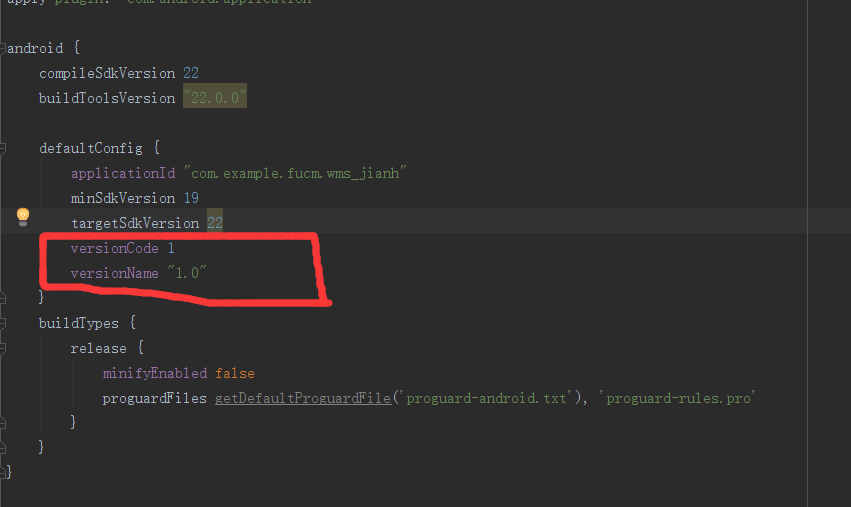
要補充的是:有些專案的版本資訊不在 Manifest,而是寫在 build.gradle 的 defaultConfig 裡,此時 getVersionCode() 讀到的值仍以最終打包設定為準。
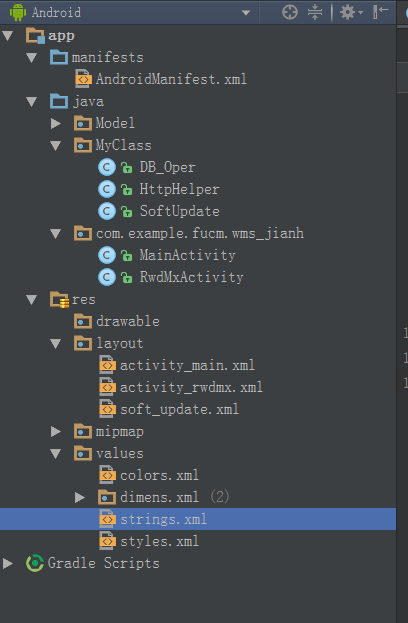
<resources>
    <string name="app_name">WMS_JIANH</string>
    <string name="btn_sq">任務索取</string>
    <string name="soft_update_no">已經是最新版本</string>
    <string name="soft_update_title">軟體更新</string>
    <string name="soft_update_info">檢測到新版本,立即更新嗎</string>
    <string name="soft_update_updatebtn">更新</string>
    <string name="soft_update_later">稍後更新</string>
    <string name="soft_updating">正在更新</string>
    <string name="soft_update_cancel">取消</string>
</resources>
原始碼下載:https://yunpan.cn/cBFKmGJKqiLct(提取碼 6e01)
最後提醒:Android 8.0 以後若要安裝「未知來源」的 APK,必須額外申請 REQUEST_INSTALL_PACKAGES 權限並引導使用者開啟該權限;直接以 file:// URI 啟動安裝也會被 FileUriExposedException 擋下,需改用 FileProvider。範例中的寫法適用於舊版系統,實作新專案時請一併調整。
 Android Toolbar 與 DrawerLayout 搭配筆記:讓 NavigationView 正確落在 Toolbar 下方
Android Toolbar 與 DrawerLayout 搭配筆記在 Android Studio 產生的 Navigation Drawer Activity 範本
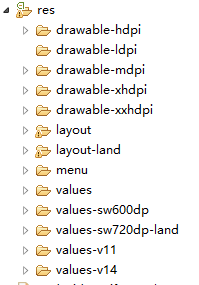 安卓 UI 適配完全指南:常用資源限定符一次搞懂
前言 同一套 App 要跑在尺寸、解析度、語言、版本都不同的裝置上,UI 適配一直是個額外負擔。限定符(qualifier)的出現,讓這件事變得單純許多:只要在 res
 Android 模擬 QQ 介面框架:歡迎頁、底部導覽與 Fragment 切換
整體架構這個範例以類似 QQ 的行動應用為靈感,實作歡迎頁、主頁面與底部導覽切換。畫面主要由 WelcomActivity 與 MainActivity 組成,並搭配多個
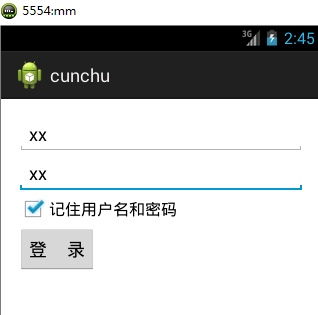 Android 資料儲存入門:內部儲存與外部儲存讀寫
 Android 應用常需要將資料持久化儲存。常見方式包括內部儲存空間與外部儲存空間,兩者都可透過 IO 流讀寫,但路