

編輯:關於 Android 開發
本文要透過 Android 內建的 MediaPlayer,實作一個能播放、暫停、重播與停止的音樂播放器,藉此熟悉多媒體播放相關的 API。
版面配置
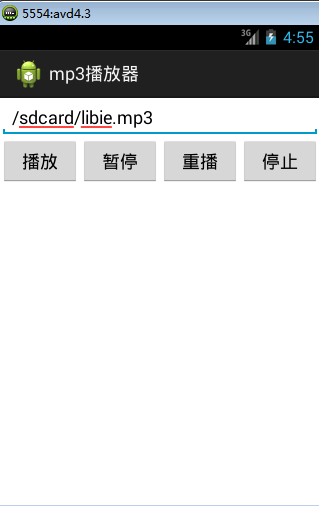
上方是一個輸入音樂檔案路徑的輸入框,下方則是一排「播放/暫停/重播/停止」四顆按鈕:
<LinearLayout xmlns:android="https://schemas.android.com/apk/res/android"
    xmlns:tools="https://schemas.android.com/tools"
    android:layout_width="match_parent"
    android:layout_height="match_parent"
    android:orientation="vertical"
    tools:context=".MainActivity" >

    <EditText
        android:id="@+id/et_path"
        android:layout_width="fill_parent"
        android:layout_height="wrap_content"
        android:hint="請輸入音樂文件的路徑" />

    <LinearLayout
        android:layout_width="fill_parent"
        android:layout_height="wrap_content"
        android:orientation="horizontal" >
        <Button android:id="@+id/bt_play" android:layout_width="0dip" android:layout_height="wrap_content" android:layout_weight="1" android:text="播放" />
        <Button android:id="@+id/bt_pause" android:layout_width="0dip" android:layout_height="wrap_content" android:layout_weight="1" android:text="暫停" />
        <Button android:id="@+id/bt_replay" android:layout_width="0dip" android:layout_height="wrap_content" android:layout_weight="1" android:text="重播" />
        <Button android:id="@+id/bt_stop" android:layout_width="0dip" android:layout_height="wrap_content" android:layout_weight="1" android:text="停止" />
    </LinearLayout>
</LinearLayout>
若想查閱更完整的 API 說明,可以打開本地 SDK 中的文件:
file:///……/sdk/docs/guide/topics/media/mediaplayer.html
程式邏輯
核心概念是:播放前先確認檔案存在且大小大於 0,接著設定音訊串流類型、資料來源,呼叫 prepare() 準備(這步驟可能較耗時,因為要緩衝),再 start() 開始播放;停止時則記得 release() 釋放資源,而「重播」是透過 seekTo(0) 回到開頭:
package com.wuyudong.mp3player;

import java.io.File;
import java.io.IOException;
import android.media.AudioManager;
import android.media.MediaPlayer;
import android.media.MediaPlayer.OnCompletionListener;
import android.net.Uri;
import android.os.Bundle;
import android.app.Activity;
import android.view.Menu;
import android.view.View;
import android.view.View.OnClickListener;
import android.widget.Button;
import android.widget.EditText;
import android.widget.Toast;

public class MainActivity extends Activity implements OnClickListener {
    private EditText et_path;
    private Button bt_play, bt_replay, bt_pause, bt_stop;
    private MediaPlayer mediaPlayer;

    @Override
    protected void onCreate(Bundle savedInstanceState) {
        super.onCreate(savedInstanceState);
        setContentView(R.layout.activity_main);
        et_path = (EditText) findViewById(R.id.et_path);
        bt_play = (Button) findViewById(R.id.bt_play);
        bt_replay = (Button) findViewById(R.id.bt_replay);
        bt_pause = (Button) findViewById(R.id.bt_pause);
        bt_stop = (Button) findViewById(R.id.bt_stop);
        bt_pause.setOnClickListener(this);
        bt_play.setOnClickListener(this);
        bt_replay.setOnClickListener(this);
        bt_stop.setOnClickListener(this);
    }

    @Override
    public void onClick(View v) {
        switch (v.getId()) {
            case R.id.bt_play:
                play();
                break;
            case R.id.bt_replay:
                replay();
                break;
            case R.id.bt_stop:
                stop();
                break;
            case R.id.bt_pause:
                pause();
                break;
            default:
                break;
        }
    }

    /** 暫停音樂 */
    private void pause() {
        if ("繼續".equals(bt_pause.getText().toString().trim())) {
            mediaPlayer.start();
            bt_pause.setText("暫停");
            return;
        }
        if (mediaPlayer != null && mediaPlayer.isPlaying()) {
            mediaPlayer.pause();
            bt_pause.setText("繼續");
            return;
        }
    }

    /** 重新播放 */
    private void replay() {
        if (mediaPlayer != null && mediaPlayer.isPlaying()) {
            mediaPlayer.seekTo(0);
            return;
        }
        play();
    }

    /** 停止播放音樂 */
    private void stop() {
        if (mediaPlayer != null && mediaPlayer.isPlaying()) {
            mediaPlayer.stop();
            mediaPlayer.release(); // 記得釋放資源
            mediaPlayer = null;
            bt_play.setEnabled(true);
        }
    }

    /** 播放音樂 */
    private void play() {
        String path = et_path.getText().toString().trim();
        File file = new File(path);
        if (file.exists() && file.length() > 0) {
            try {
                mediaPlayer = new MediaPlayer();
                mediaPlayer.setAudioStreamType(AudioManager.STREAM_MUSIC);
                mediaPlayer.setDataSource(path);
                mediaPlayer.prepare(); // might take long! (for buffering, etc)
                mediaPlayer.start();
                mediaPlayer.setOnCompletionListener(new OnCompletionListener() {
                    @Override
                    public void onCompletion(MediaPlayer mp) {
                        bt_play.setEnabled(true);
                    }
                });
                bt_play.setEnabled(false);
            } catch (Exception e) {
                Toast.makeText(this, "播放失敗", 0).show();
                e.printStackTrace();
            }
        } else {
            Toast.makeText(this, "文件不存在", 0).show();
        }
    }
}
執行前記得先把一份音訊檔案上傳到 sdcard,並在播放期間把「播放」鈕暫時停用,避免重複觸發。實際跑起來後,就能感受到 MediaPlayer 在音樂播放上的基本能力。
 Android 性能優化:Splash 頁應該這樣設計
目前 SplashActivity 的設計 市面上大多數應用在啟動時都會先啟動一個 SplashActivity 作為歡迎介面,這樣設計有三個優點: 1. 給用戶更好的體
 logcat 完全指南:命令參數、等級劃分與常見問題
 logcat 是 Android 自帶的命令行工具,用於獲取程序的日誌輸出。它看似簡單,但過濾語法和輸出格式的組合能
 Intent 隱式調用:輕鬆打開網頁與撥號盤
在上一節中,我們一起學習了 Intent 的顯式調用。這一節則要探討另一種更靈活的方式——隱式調用。掌握隱式 Intent,就
 Android 開發實戰(二十七):用 Sencha 打造 APK 局部模組化更新
忙裡偷閒,想跟大家聊聊這段時間摸索出來、自己也頗為得意的成果——「Android APK 局部模組化更新」。做這主題前我上網翻了不少資料,可惜多半是輾轉複製、缺乏新意。剛