

編輯:關於 Android 開發
EventBus 3.0 的改動幅度不小:它果斷拋棄了可讀性極差的 onEvent 前綴命名約定,改用注解來標記接收方法。
@Subscribe(sticky = true, threadMode = ThreadMode.MAIN, priority = 100)
public void test(String string) {
    Log.e("cat", "str:" + string);
}
既然用了注解,那查找接收方法是靠反射嗎?答案是:不必。EventBus 提供了一個 EventBusAnnotationProcessor,可以在編譯期透過注解產生檔案,思路與 Dagger2、ButterKnife 如出一轍——既省下了模板程式碼,又不必承受反射帶來的效能損失。當然,編譯期注解是可選的;若不採用,它就會退回反射方案,這一點後面的源碼會看得更清楚。
在看流程之前,先釐清幾個核心類別,免得後面混淆。
把接收方法上的注解資訊封裝起來:
public class SubscriberMethod {
    final Method method;
    final ThreadMode threadMode;
    final Class<?> eventType;
    final int priority;
    final boolean sticky;
    /** Used for efficient comparison */
    String methodString;
}把「訂閱者」與「訂閱的方法」綁成一個整體:
final class Subscription {
    final Object subscriber;
    final SubscriberMethod subscriberMethod;

    /**
     * Becomes false as soon as EventBus#unregister(Object) is called,
     * which is checked by queued event delivery
     * EventBus#invokeSubscriber(PendingPost) to prevent race conditions.
     */
    volatile boolean active;

    Subscription(Object subscriber, SubscriberMethod subscriberMethod) {
        this.subscriber = subscriber;
        this.subscriberMethod = subscriberMethod;
        active = true;
    }
}
之所以要為「一個訂閱者中的某個方法」單獨建立物件,是因為 EventBus 支援只解除訂閱者當中的某一個方法。
// 儲存線程資訊、訂閱者與事件,post 事件時會用到
/** For ThreadLocal, much faster to set (and get multiple values). */
final static class PostingThreadState {
    final List<Object> eventQueue = new ArrayList<>();
    boolean isPosting;
    boolean isMainThread;
    Subscription subscription;
    Object event;
    boolean canceled;
}// 把事件與訂閱者封裝成 PendingPost,主要在切換線程時使用
final class PendingPost {
private final static List<PendingPost> pendingPostPool = new ArrayList<>();
Object event;
Subscription subscription;
PendingPost next;
static PendingPost obtainPendingPost(Subscription subscription, Object event) { ... }
static void releasePendingPost(PendingPost pendingPost) { ... }
}// 把事件丟到主線程執行的 Handler
final class HandlerPoster extends Handler {
private final PendingPostQueue queue;
private final int maxMillisInsideHandleMessage;
private final EventBus eventBus;
private boolean handlerActive;
}// EventBus 內部維護一個 Executors.newCachedThreadPool 的線程池,
// 呼叫 BackgroundPoster.enqueue 時,事件會被丟進線程池執行。
// BackgroundPoster 是一個 Runnable,內部維護一個佇列,
// run 方法會不斷從佇列取出 PendingPost;佇列為空時至多等待 1 秒後跳出。
final class BackgroundPoster implements Runnable {
private final PendingPostQueue queue;
private final EventBus eventBus;
private volatile boolean executorRunning;
}// AsyncPoster 的實作與 BackgroundPoster 極為類似,
// 差別在於 run 方法中是否循環取出 PendingPost。
// 關鍵區別:asyncPost 確保每個任務都在不同線程中執行;
// 而 BackgroundPoster 若發送速度快、且接收事件都在 background 模式,
// 則會在同一條線程中連續執行。
class AsyncPoster implements Runnable {
private final PendingPostQueue queue;
private final EventBus eventBus;
}EventBus 支援 Builder 模式,但實務上多數情況直接用預設實例即可。它同時也是一個單例(實作太簡單,這裡略過)。
public EventBus() {
    this(DEFAULT_BUILDER);
}

EventBus(EventBusBuilder builder) {
    subscriptionsByEventType = new HashMap<>();
    // 以事件類型為 key,Subscription 清單為 value
    typesBySubscriber = new HashMap<>();
    // 以訂閱者為 key,其訂閱的事件類型清單為 value
    stickyEvents = new ConcurrentHashMap<>();
    // 以事件類型為 key,事件物件為 value

    mainThreadPoster = new HandlerPoster(this, Looper.getMainLooper(), 10);
    backgroundPoster = new BackgroundPoster(this);
    asyncPoster = new AsyncPoster(this);

    indexCount = builder.subscriberInfoIndexes != null
            ? builder.subscriberInfoIndexes.size() : 0; // 使用編譯期注解時才有值

    subscriberMethodFinder = new SubscriberMethodFinder(
            builder.subscriberInfoIndexes,      // 主要用來查找訂閱者方法
            builder.strictMethodVerification,
            builder.ignoreGeneratedIndex);

    logSubscriberExceptions = builder.logSubscriberExceptions;
    logNoSubscriberMessages = builder.logNoSubscriberMessages;
    sendSubscriberExceptionEvent = builder.sendSubscriberExceptionEvent;
    sendNoSubscriberEvent = builder.sendNoSubscriberEvent;
    throwSubscriberException = builder.throwSubscriberException;
    eventInheritance = builder.eventInheritance;
    // 是否啟用事件類型繼承:若為 true,
    // 參數宣告為 object 的方法也能收到 string 類型的事件
    executorService = builder.executorService; // 線程池,預設為 Executors.newCachedThreadPool()
}
屬性看起來不少,第一遍看不懂不要緊,有個大致印象即可。
public void register(Object subscriber) {
    Class<?> subscriberClass = subscriber.getClass();
    // 找出該訂閱者所有需要接收事件的方法
    List<SubscriberMethod> subscriberMethods =
            subscriberMethodFinder.findSubscriberMethods(subscriberClass);
    synchronized (this) {
        // 把事件類型、訂閱者、方法等關聯起來,同時處理 sticky 事件
        for (SubscriberMethod subscriberMethod : subscriberMethods) {
            subscribe(subscriber, subscriberMethod);
        }
    }
}List<SubscriberMethod> findSubscriberMethods(Class<?> subscriberClass) {
// 每次訂閱都會以「訂閱者」為 key、「其接收方法清單」為 value 存入 METHOD_CACHE,
// 命中快取就直接回傳。
List<SubscriberMethod> subscriberMethods = METHOD_CACHE.get(subscriberClass);
if (subscriberMethods != null) {
return subscriberMethods;
}
// 是否忽略編譯期注解產生的檔案
if (ignoreGeneratedIndex) {
subscriberMethods = findUsingReflection(subscriberClass);
} else {
subscriberMethods = findUsingInfo(subscriberClass);
}
if (subscriberMethods.isEmpty()) {
throw new EventBusException("Subscriber " + subscriberClass
+ " and its super classes have no public methods with the @Subscribe annotation");
} else {
METHOD_CACHE.put(subscriberClass, subscriberMethods);
return subscriberMethods;
}
}由於使用編譯期注解時後續流程就沒有分析意義了,以下只走反射這條路,直接點進 findUsingReflection()。
private List<SubscriberMethod> findUsingReflection(Class<?> subscriberClass) {
    // FindState 用來暫存找到的方法、當前處理的類別等資訊
    FindState findState = prepareFindState();
    findState.initForSubscriber(subscriberClass);

    // 真正的搜尋迴圈:父類中的接收方法也會一併被找出來(此行為可配置)
    while (findState.clazz != null) {
        findUsingReflectionInSingleClass(findState);
        findState.moveToSuperclass(); // 往父類移動,直到沒有父類為止
    }
    return getMethodsAndRelease(findState); // 回傳結果並清理 findState
}private void findUsingReflectionInSingleClass(FindState findState) {
Method[] methods;
try {
// findState.clazz 就是訂閱者或其父類
// getDeclaredMethods 比 getMethods 快,尤其是 Activity 這類方法特別多的類
methods = findState.clazz.getDeclaredMethods();
} catch (Throwable th) {
// 因 java.lang.NoClassDefFoundError 而採用的退路,見 issue #149
methods = findState.clazz.getMethods();
findState.skipSuperClasses = true;
}
for (Method method : methods) {
int modifiers = method.getModifiers();
// 必須是 public
if ((modifiers & Modifier.PUBLIC) != 0 && (modifiers & MODIFIERS_IGNORE) == 0) {
Class<?>[] parameterTypes = method.getParameterTypes();
// 必須且只能有一個參數
if (parameterTypes.length == 1) {
Subscribe subscribeAnnotation = method.getAnnotation(Subscribe.class);
if (subscribeAnnotation != null) {
Class<?> eventType = parameterTypes[0];
// 兩級去重:先以 eventType 為 key 檢查,
// 再以 method + eventType 組合出的 key 二次檢查
if (findState.checkAdd(method, eventType)) {
ThreadMode threadMode = subscribeAnnotation.threadMode();
findState.subscriberMethods.add(new SubscriberMethod(
method, eventType, threadMode,
subscribeAnnotation.priority(),
subscribeAnnotation.sticky()));
}
}
} else if (strictMethodVerification
&& method.isAnnotationPresent(Subscribe.class)) {
String methodName = method.getDeclaringClass().getName()
+ "." + method.getName();
throw new EventBusException("@Subscribe method " + methodName
+ " must have exactly 1 parameter but has " + parameterTypes.length);
}
} else if (strictMethodVerification
&& method.isAnnotationPresent(Subscribe.class)) {
String methodName = method.getDeclaringClass().getName()
+ "." + method.getName();
throw new EventBusException(methodName
+ " is a illegal @Subscribe method: must be public, non-static, and non-abstract");
}
}
}邏輯相當樸素:掃過每個方法,檢查修飾子與參數個數,通過校驗就封裝成 SubscriberMethod 放進 findState.subscriberMethods。搜尋完成後回到 register()。
private void subscribe(Object subscriber, SubscriberMethod subscriberMethod) {
    Class<?> eventType = subscriberMethod.eventType;

    // 把訂閱者與接收方法封裝成 Subscription
    Subscription newSubscription = new Subscription(subscriber, subscriberMethod);

    // 依事件類型取出對應的 Subscription 清單(後續判空與首次賦值略)
    CopyOnWriteArrayList<Subscription> subscriptions = subscriptionsByEventType.get(eventType);
    if (subscriptions == null) {
        subscriptions = new CopyOnWriteArrayList<>();
        subscriptionsByEventType.put(eventType, subscriptions);
    } else if (subscriptions.contains(newSubscription)) {
        throw new EventBusException("Subscriber " + subscriber.getClass()
                + " already registered to event " + eventType);
    }

    // 依 priority 由高到低插入,priority 大的排在前面
    int size = subscriptions.size();
    for (int i = 0; i <= size; i++) {
        if (i == size
                || subscriberMethod.priority > subscriptions.get(i).subscriberMethod.priority) {
            subscriptions.add(i, newSubscription);
            break;
        }
    }

    List<Class<?>> subscribedEvents = typesBySubscriber.get(subscriber);
    if (subscribedEvents == null) {
        subscribedEvents = new ArrayList<>();
        typesBySubscriber.put(subscriber, subscribedEvents);
    }
    subscribedEvents.add(eventType);

    // 處理 sticky 事件:stickyEvents 是在 postSticky 時寫入的
    if (subscriberMethod.sticky) {
        if (eventInheritance) {
            // 必須把 eventType 所有子類型的 sticky 事件都納入考慮。
            // 注意:事件類型很多時遍歷全部可能效率不佳,
            // 更好的資料結構是額外維護「父類 -> 子類清單」的映射。
            Set<Map.Entry<Class<?>, Object>> entries = stickyEvents.entrySet();
            for (Map.Entry<Class<?>, Object> entry : entries) {
                Class<?> candidateEventType = entry.getKey();
                if (eventType.isAssignableFrom(candidateEventType)) {
                    checkPostStickyEventToSubscription(newSubscription, entry.getValue());
                }
            }
        } else {
            Object stickyEvent = stickyEvents.get(eventType);
            checkPostStickyEventToSubscription(newSubscription, stickyEvent);
        }
    }
}
註冊流程到此結束。註冊完當然要發事件。
先看它,因為內部也會呼叫 post()。
public void postSticky(Object event) {
    synchronized (stickyEvents) {
        // 以事件類型為 key、事件物件為 value 存入 map。
        // 由此可知:若先後 postSticky 兩個同類型的 event,後者會覆蓋前者。
        stickyEvents.put(event.getClass(), event);
    }
    // 必須在 put 之後才 post,
    // 以防訂閱者在接收時立刻把它 remove 掉
    post(event);
}/** Posts the given event to the event bus. */
public void post(Object event) {
// PostingThreadState 透過 ThreadLocal 取得當前線程的狀態,
// 熟悉 Handler 機制的朋友對 ThreadLocal 應該不陌生。
PostingThreadState postingState = currentPostingThreadState.get();
List<Object> eventQueue = postingState.eventQueue;
eventQueue.add(event);
if (!postingState.isPosting) {
postingState.isMainThread = Looper.getMainLooper() == Looper.myLooper();
postingState.isPosting = true;
try {
while (!eventQueue.isEmpty()) {
postSingleEvent(eventQueue.remove(0), postingState);
}
} finally {
postingState.isPosting = false;
postingState.isMainThread = false;
}
}
}這裡有個值得注意的技巧:用 ThreadLocal + isPosting 旗標,讓同一條線程上的重複 post 直接併入既有的佇列處理,不必重複走一次派發流程。
private void postSingleEvent(Object event, PostingThreadState postingState) throws Error {
    Class<?> eventClass = event.getClass();
    boolean subscriptionFound = false;

    if (eventInheritance) {
        // 取出自身、所有父類與介面的類型
        List<Class<?>> eventTypes = lookupAllEventTypes(eventClass);
        int countTypes = eventTypes.size();
        for (int h = 0; h < countTypes; h++) {
            Class<?> clazz = eventTypes.get(h);
            subscriptionFound |= postSingleEventForEventType(event, postingState, clazz);
        }
    } else {
        subscriptionFound = postSingleEventForEventType(event, postingState, eventClass);
    }

    if (!subscriptionFound) {
        if (logNoSubscriberMessages) {
            Log.d(TAG, "No subscribers registered for event " + eventClass);
        }
        if (sendNoSubscriberEvent
                && eventClass != NoSubscriberEvent.class
                && eventClass != SubscriberExceptionEvent.class) {
            post(new NoSubscriberEvent(this, event));
        }
    }
}
也就是說,當 eventInheritance 為 true 時,訂閱「父類或介面類型事件」的方法也會收到子類事件。
private boolean postSingleEventForEventType(Object event,
        PostingThreadState postingState, Class<?> eventClass) {
    CopyOnWriteArrayList<Subscription> subscriptions;
    synchronized (this) {
        subscriptions = subscriptionsByEventType.get(eventClass);
    }

    if (subscriptions != null && !subscriptions.isEmpty()) {
        for (Subscription subscription : subscriptions) {
            postingState.event = event;
            postingState.subscription = subscription;

            boolean aborted = false;
            try {
                // 依該 subscription 指定的線程模式與當前線程,決定如何派發
                postToSubscription(subscription, event, postingState.isMainThread);
                aborted = postingState.canceled;
            } finally {
                postingState.event = null;
                postingState.subscription = null;
                postingState.canceled = false;
            }
            if (aborted) {
                break; // 事件被中途攔截,停止後續派發
            }
        }
        return true;
    }
    return false;
}
用 CopyOnWriteArrayList 存 Subscription,是為了在派發過程中允許並發的註冊與解除註冊而不影響當前遍歷。
private void postToSubscription(Subscription subscription, Object event, boolean isMainThread) {
    switch (subscription.subscriberMethod.threadMode) {
        case POSTING:
            // 接收與發送在同一條線程執行
            invokeSubscriber(subscription, event);
            break;
        case MAIN:
            // 當前不是主線程時,交給 mainThreadPoster
            // (它是一個綁定主線程 Looper 的 Handler)
            if (isMainThread) {
                invokeSubscriber(subscription, event);
            } else {
                mainThreadPoster.enqueue(subscription, event);
            }
            break;
        case BACKGROUND:
            // 當前是主線程時交給 backgroundPoster,進而丟進 EventBus 的線程池;
            // 否則直接在當前線程執行
            if (isMainThread) {
                backgroundPoster.enqueue(subscription, event);
            } else {
                invokeSubscriber(subscription, event);
            }
            break;
        case ASYNC:
            // 不論當前在哪條線程,一律交給 asyncPoster,
            // 確保每個任務都在不同線程中執行
            asyncPoster.enqueue(subscription, event);
            break;
        default:
            throw new IllegalStateException(
                    "Unknown thread mode: " + subscription.subscriberMethod.threadMode);
    }
}
這段正是官方文件裡「四種 ThreadMode」的實際落地方式,對照著看會很清楚。
整體流程就是:register() 找出並校驗帶 @Subscribe 的方法,封裝成 SubscriberMethod 與 Subscription,依事件類型與 priority 存進各個 Map/List;post() 時取出對應的 Subscription 清單,再按 ThreadMode 決定就地執行、丟給主線程 Handler,還是丟進線程池。
把 register 與 post 這兩條主線讀通之後,解除註冊那部分自然也不難理解——那些看似「沒什麼用」的 Map 與 List,正是為了解除註冊時能精準定位而準備的。
整體而言 EventBus 的源碼並不算複雜,讀之前大概也能猜到輪廓;但它在並發控制上的處理(ThreadLocal 狀態機、CopyOnWriteArrayList、PendingPost 物件池)頗有值得借鏡之處。
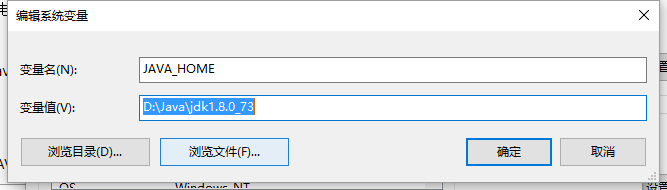 Android 環境搭建與編寫第一個 HelloWorld 程式
 一、設定 JDK 環境(學過 Java 者可略過) 1. 安裝 JDK。可到 Oracle 官網下載 J
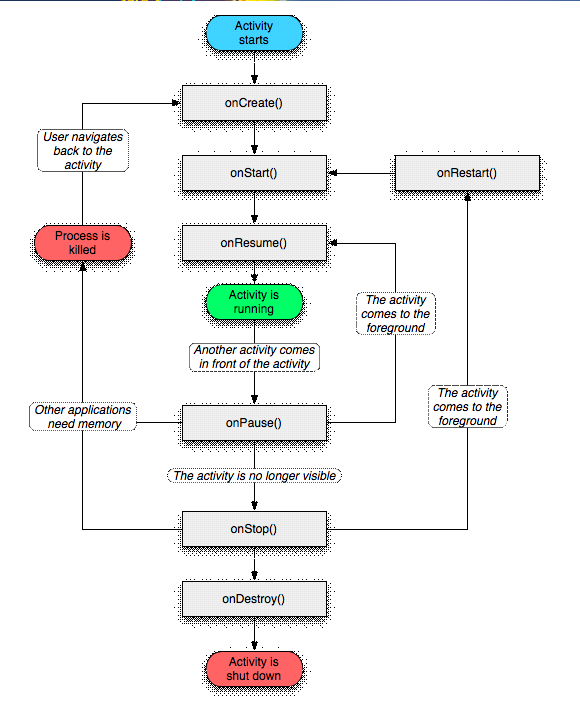 Android 現場保護:用 onSaveInstanceState 保住被系統回收前的資料
 我們都知道 Activity 有生命週期,而生命週期裡藏著一個風險:當 Ac
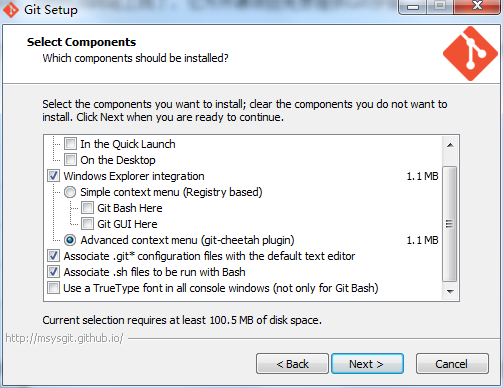 Git 版本控制工具(一):安裝 Git 與建立版本庫
Git 版本控制工具(一):安裝與建立版本庫 【聲明】歡迎轉載,但請保留文章原始出處。 一、初識 Git Git 是目前世界上最先進的分散式版本控制系統(沒有之一)。它的
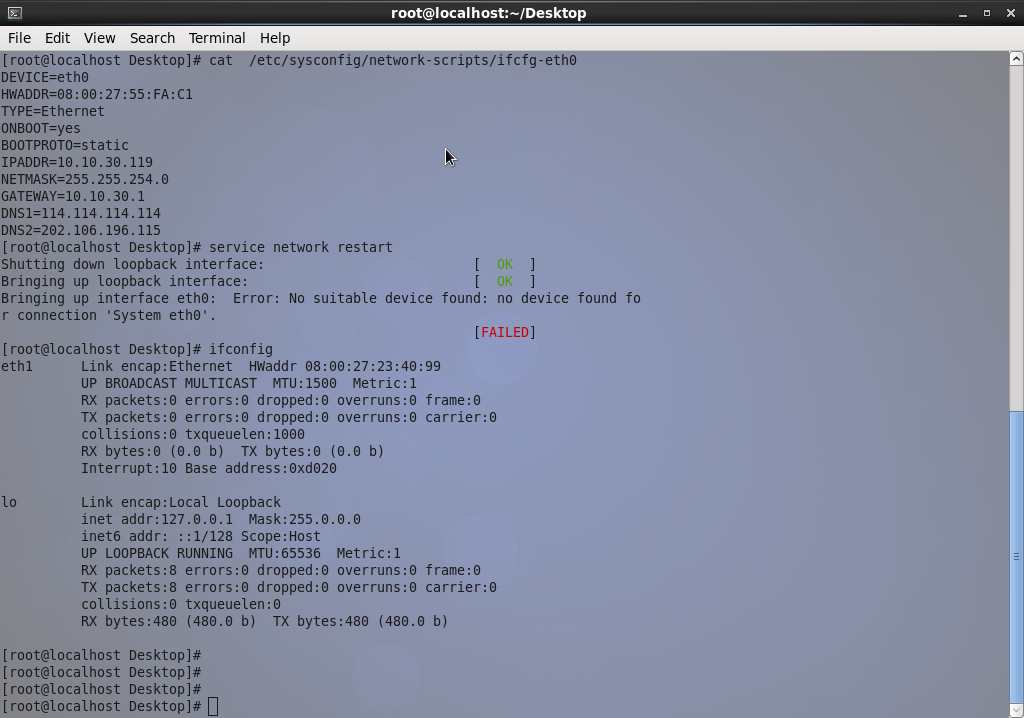 VirtualBox 上的 CentOS 6.7 網路不通?兩個關鍵設定一次修好
背景 需要一台 CentOS 虛擬機,同事推薦了體積小巧的 VirtualBox 取代「笨重」的 VMware,於是就在 VirtualBox 上裝了 CentOS 6.