

編輯:關於 Android 開發
在 Android 開發中,與伺服器互動時經常需要以 POST 方式送出資料。最常見的兩種格式分別是 JSON 與 Map(表單鍵值對),本文將透過 HttpURLConnection 示範這兩種做法,並附上可直接參考的程式碼。
當後端介面要求 Content-Type 為 application/json 時,我們需要把字串形式的 JSON 直接寫入輸出串流。以下程式碼展示了完整的請求流程,包含設定連線逾時、請求方法、寫入資料以及讀取回應:
public static String httpPost(String url, String json) {
    try {
        URL u = new URL(url);
        HttpURLConnection httpURLConnection = (HttpURLConnection) u.openConnection();
        httpURLConnection.setConnectTimeout(TIMEOUT);
        httpURLConnection.setDoInput(true);
        httpURLConnection.setDoOutput(true);
        httpURLConnection.setRequestMethod("POST");
        httpURLConnection.setUseCaches(false);
        httpURLConnection.setRequestProperty("Content-Type", "application/json");
        httpURLConnection.setRequestProperty("Content-Length",
                String.valueOf(json.getBytes().length));
        OutputStream outputStream = httpURLConnection.getOutputStream();
        outputStream.write(json.getBytes());

        int response = httpURLConnection.getResponseCode();
        if (response == HttpURLConnection.HTTP_OK) {
            InputStream inptStream = httpURLConnection.getInputStream();
            return dealResponseResult(inptStream);
        }
    } catch (Exception e) {
        e.printStackTrace();
    }
    return "";
}
而讀取回應資料的部分,可以獨立封裝成一個方法,透過位元組陣列逐段讀取串流,最後轉換為字串:
private static String dealResponseResult(InputStream inputStream) {
    String resultData = null;
    ByteArrayOutputStream byteArrayOutputStream = new ByteArrayOutputStream();
    byte[] data = new byte[1024];
    int len = 0;
    try {
        while ((len = inputStream.read(data)) != -1) {
            byteArrayOutputStream.write(data, 0, len);
        }
    } catch (IOException e) {
        e.printStackTrace();
    }
    resultData = new String(byteArrayOutputStream.toByteArray());
    return resultData;
}
如果傳送的並非 JSON,而是鍵值對形式的 Map,則應改用 application/x-www-form-urlencoded 的表單格式。這時需要先把 Map 拼接成 key=value&key=value 的字串,並對值進行 URL 編碼:
public static String httpPost(String url, Map<String, String> params) {
    byte[] data = getRequestData(params, "utf-8").toString().getBytes();
    try {
        URL u = new URL(url);
        HttpURLConnection httpURLConnection = (HttpURLConnection) u.openConnection();
        httpURLConnection.setConnectTimeout(TIMEOUT);
        httpURLConnection.setDoInput(true);
        httpURLConnection.setDoOutput(true);
        httpURLConnection.setRequestMethod("POST");
        httpURLConnection.setUseCaches(false);
        httpURLConnection.setRequestProperty("Content-Type",
                "application/x-www-form-urlencoded");
        httpURLConnection.setRequestProperty("Content-Length",
                String.valueOf(data.length));
        OutputStream outputStream = httpURLConnection.getOutputStream();
        outputStream.write(data);

        int response = httpURLConnection.getResponseCode();
        if (response == HttpURLConnection.HTTP_OK) {
            InputStream inptStream = httpURLConnection.getInputStream();
            return dealResponseResult(inptStream);
        }
    } catch (Exception e) {
        e.printStackTrace();
    }
    return "";
}
負責拼接表單資料的輔助方法如下,它會遍歷 Map 的每一筆資料,並移除最後多餘的 & 符號:
private static StringBuffer getRequestData(Map<String, String> params, String encode) {
    StringBuffer stringBuffer = new StringBuffer();
    try {
        for (Map.Entry<String, String> entry : params.entrySet()) {
            stringBuffer.append(entry.getKey())
                    .append("=")
                    .append(URLEncoder.encode(entry.getValue(), encode))
                    .append("&");
        }
        stringBuffer.deleteCharAt(stringBuffer.length() - 1); // 移除最後一個 "&"
    } catch (Exception e) {
        e.printStackTrace();
    }
    return stringBuffer;
}
小結:選擇哪一種取決於後端介面的規格。JSON 適合結構化、巢狀的資料,而 Map 表單則適合簡單的鍵值對,兩者在實作上的差異主要在於 Content-Type 與資料的編碼方式。
 Android 三維旋轉動畫實作與封裝:支援 X、Y、Z 三軸旋轉
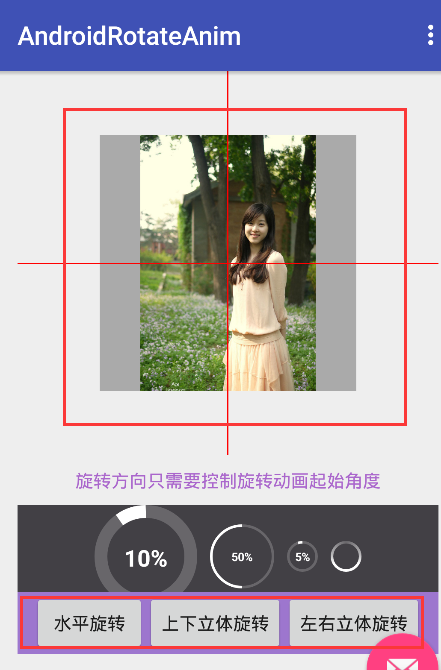
本文介紹如何在 Android 中實作 3D(立體)旋轉動畫,並把它封裝成一個可重複使用的自訂 Animation 類別。以下是我實作出來的成果: 一、立體旋轉的三種
 仿 QQ 好友列表左滑選單:SwipeMenuListView 置頂與刪除實作
帶手勢的列表選單,不用自己刻 先看一下要做的效果——列表項向左滑出「置頂/刪除」按鈕: SwipeMenuListView 是 GitHub 上的第三方開源專案(專案網
 提升 Android ListView 效能的關鍵技巧:View 回收與異步加載
 ListView 天生就是為高效能、可擴充的場景而設計的,它有兩個核心要求:盡可能少地建
 Fragment 開發實戰(一):Fragment 是什麼,又該怎麼用
Fragment 可以想成「一段模組化的 Activity」:它有自己的生命週期、會接收自己的輸入事件,也能在 Activity 執行期間被動態加入或移除。它通常作為宿主