

編輯:關於 Android 開發
項目需要 root 權限來安裝軟件,同時希望在合適的時機引導用戶去開啟 root,這就帶來一個需求:在不打擾用戶的前提下判斷手機是否已 root。這篇文章記錄了這個判斷的三種實現方案及其演進過程。
最直觀的思路是運行一條需要 root 權限的命令,根據返回結果判斷。核心邏輯非常簡短:
/**
 * 檢查是否具有 root 權限
 */
public static boolean checkRootPermission() {
    return execCommand("echo root", true, false).result == 0;
}
支撐它的 execCommand 方法通過 Runtime.getRuntime().exec() 啟動 shell 進程,把命令寫入輸入流,再讀取輸出:
public static CommandResult execCommand(String[] commands, boolean isRoot, boolean isNeedResultMsg) {
    int result = -1;
    if (commands == null || commands.length == 0) {
        return new CommandResult(result, null, null);
    }
    Process process = null;
    BufferedReader successResult = null;
    BufferedReader errorResult = null;
    StringBuilder successMsg = null;
    StringBuilder errorMsg = null;
    DataOutputStream os = null;
    try {
        process = Runtime.getRuntime().exec(isRoot ? COMMAND_SU : COMMAND_SH);
        os = new DataOutputStream(process.getOutputStream());
        for (String command : commands) {
            if (command == null) continue;
            // 不要用 os.writeBytes(),避免中文亂碼
            os.write(command.getBytes());
            os.writeBytes(COMMAND_LINE_END);
            os.flush();
        }
        os.writeBytes(COMMAND_EXIT);
        os.flush();
        result = process.waitFor();
        if (isNeedResultMsg) {
            successMsg = new StringBuilder();
            errorMsg = new StringBuilder();
            successResult = new BufferedReader(new InputStreamReader(process.getInputStream()));
            errorResult = new BufferedReader(new InputStreamReader(process.getErrorStream()));
            String s;
            while ((s = successResult.readLine()) != null) successMsg.append(s);
            while ((s = errorResult.readLine()) != null) errorMsg.append(s);
        }
    } catch (Exception e) {
        e.printStackTrace();
    } finally {
        // 依次關閉流並 destroy 進程
    }
    return new CommandResult(result, successMsg, errorMsg);
}
問題:每次執行這個判斷,系統都會彈出一個 root 授權請求框。用戶如果點了取消,部分機型會直接返回「非 root」。作為一個內部判斷邏輯,這種交互方式非常不友好,而且結果不可靠。


為了避免彈窗,換個思路:一般 root 過的手機都會在 /system/bin/su 或 /system/xbin/su 這類路徑下存放權限控制文件。只要其中一個存在,就認為已 root。
/**
 * 判斷是否具有 ROOT 權限
 * 此方法對部分機型無效,比如小米系列
 */
public static boolean isRoot() {
    try {
        if ((!new File("/system/bin/su").exists())
                && (!new File("/system/xbin/su").exists())) {
            return false;
        }
        return true;
    } catch (Exception e) {
        return false;
    }
}
問題:交互友好了,但出現了誤判。測試中發現部分國產機型(如小米系列)存在這個文件卻並未 root,原因是廠商有自己的權限控制體系。小米用戶量龐大,這個問題必須解決。
回到原理層面思考:小米手機無論是否 root,su 文件應該都是存在的。之所以無效,原因在於文件被設置了權限,普通用戶組無法執行。
因此判斷依據應該從「文件是否存在」轉為「文件是否可執行」。
先了解 Linux 的文件權限規則。用 ls -l 查看文件時,會得到類似這樣的輸出:
-rwsr-xr-x 1 root root 34064 2011-01-01 12:00 su
第一列的十個字符中,第 4 位是文件擁有者的執行權限標志:如果是 x 表示可執行,如果是 s 表示擁有 SetUID 權限(以文件擁有者身份執行)。未 root 的手機這一位置通常無法通過執行檢查。
在已 root 的設備上(測試機型三星 i9100,Android 4.4),該文件的權限標志為 s 或 x:

據此改寫的判斷邏輯:
/**
 * 判斷手機是否 root,不彈出 root 請求框
 */
public static boolean isRoot() {
    String binPath = "/system/bin/su";
    String xBinPath = "/system/xbin/su";
    if (new File(binPath).exists() && isExecutable(binPath)) return true;
    if (new File(xBinPath).exists() && isExecutable(xBinPath)) return true;
    return false;
}

private static boolean isExecutable(String filePath) {
    Process p = null;
    try {
        p = Runtime.getRuntime().exec("ls -l " + filePath);
        BufferedReader in = new BufferedReader(new InputStreamReader(p.getInputStream()));
        String str = in.readLine();
        if (str != null && str.length() >= 4) {
            char flag = str.charAt(3);
            if (flag == 's' || flag == 'x') return true;
        }
    } catch (IOException e) {
        e.printStackTrace();
    } finally {
        if (p != null) p.destroy();
    }
    return false;
}
優勢:交互友好,不彈任何窗,且覆蓋面廣,基本不會誤判。
方案一準確但打擾用戶,方案二安靜但有誤判,方案三結合了兩者的優點,是更成熟的實現。
需要補充說明的是,root 檢測本質上是一場持續的攻防。除了上述文件判斷,實踐中常見的輔助手段還包括:使用 RootBeer 這類成熟庫(它同時檢查 su 二進制、BusyBox、是否存在 Magisk 等框架路徑);檢查 PATH 環境變量中是否掛載了可疑目錄;嘗試 which su 命令。但這些方法都可能被定制化 ROM 或 Magisk 的隱藏功能繞過。
所以更穩妥的工程实践是:不要假檢測結果一定正確。真正的操作(比如需要 root 的安裝動作)執行失敗時,仍要有兜底處理和用戶提示,把檢測結果當作「提前引導」的依據,而不是唯一判據。
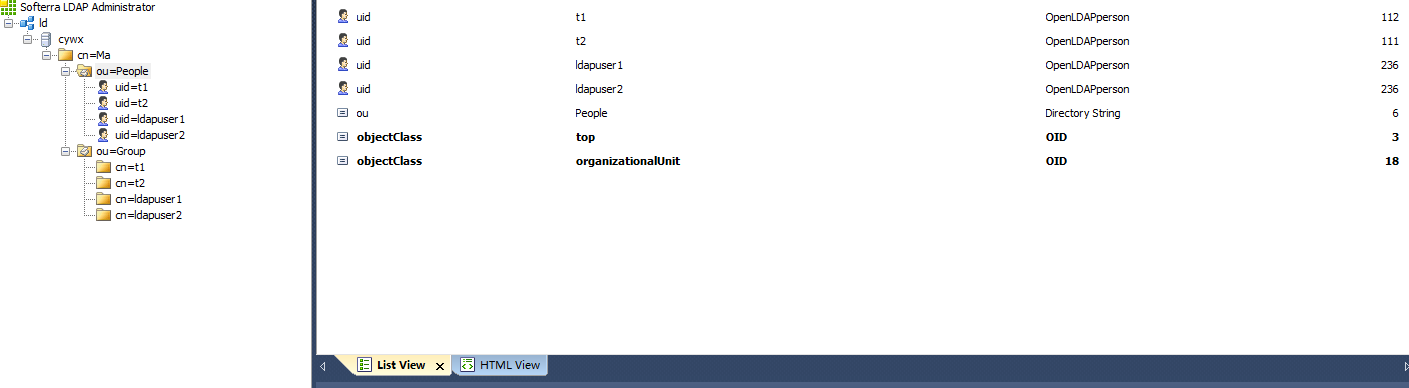 Redmine 整合 LDAP 認證:從 LDIF 資料準備到後台設定完整流程
 要把 Redmine 與 LDAP 帳號整合,第一步當然是先把 LDAP 環境設定好,否則
 Android 提高 21 篇之八:SQLite 分頁讀取與頁碼欄實作
Android 內建 SQLite,讓開發者能直接在裝置上進行關聯式資料存取。SQLite 支援多數 SQL92 標準語法,常見的查詢、插入、刪除都能使用。若應用需要跨平
 Android 專案實戰:從零打造 2048 遊戲
 《2048》是一款流傳很廣的數字遊戲,最早在 2014 年 3 月 20 日發行。原作者 Gabriele Cirul
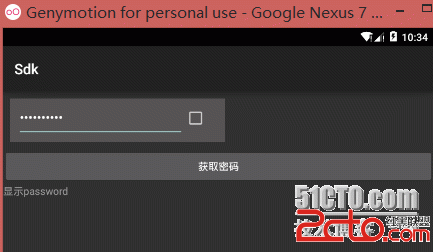 自定義 Android 組件:用組合方式打造可切換明文的密碼輸入框
兩條自定義控件的路,選組合這條比較省力 Android 裡所有控件都繼承自 android.view.View,而 android.view.ViewGroup 是 Vi