編輯:Android編程入門
一,簡述線程池:
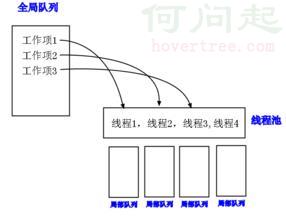
線程池是如何工作的:一系列任務出現後,根據自己的線程池安排任務進行。
如圖:
線程池的好處:
線程池的具體實現為ThreadPoolExeutor,其接口為Executor。
ThreadPoolExecutor提供了一系列的參數用於配置線程池。
   public ThreadPoolExecutor(int corePoolSize,
                              int maximumPoolSize,
                              long keepAliveTime,
                              TimeUnit unit,
                              BlockingQueue<Runnable> workQueue,
                              ThreadFactory threadFactory) {
        this(corePoolSize, maximumPoolSize, keepAliveTime, unit, workQueue,
             threadFactory, defaultHandler);
    }
參數含義如下:
其執行任務時大致遵顼如下規則:
二,線程池的相關類結構解析
看一下線程池的類結構圖:
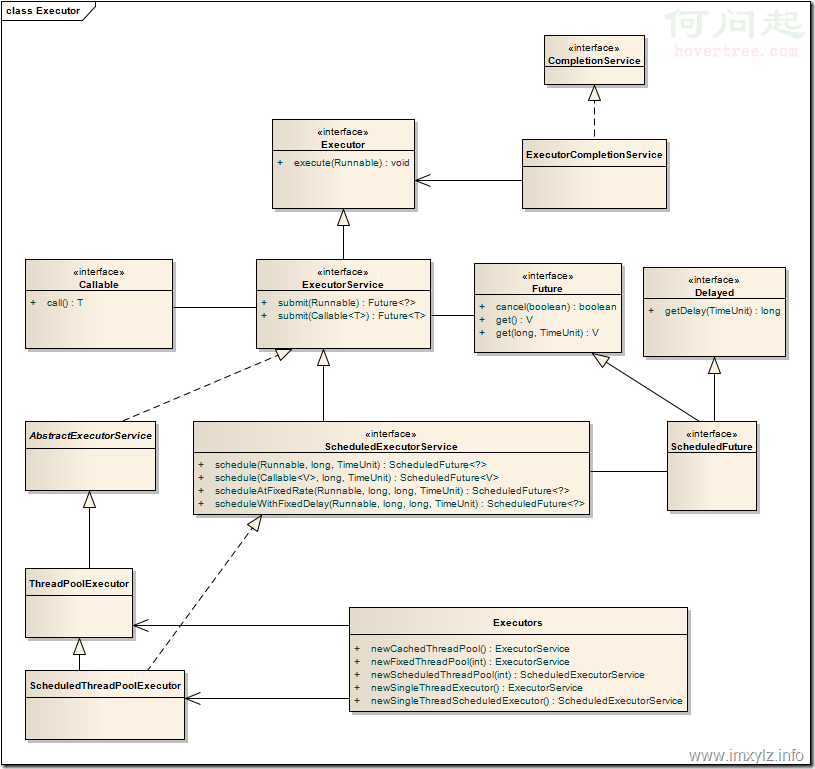
說以下這幾點:
這是一個抽象工廠模式!
Executor和Executors的區別:
Executor僅僅是一個接口,其只有一個方法,execute()方法(執行方法)。
public interface Executor {


    void execute(Runnable command);
}
而Executors是一個沒有繼承任何類的方法,其作為一個工廠方法類,用於創建形形色色的線程池等對象。如:FixedThreadPool、defaultThreadFactory(下面會具體講),而這些具體的線程池方案(FixedThreadPool)亦或者自定義的線程池方案(ThreadPoolExeutor)都是來自ExecutorService接口,這個接口也是繼承於Executor接口。通過類結構圖可以很清楚的看到。
如,Executors生產出ExecutorService對象,源碼如下
public static ExecutorService newSingleThreadExecutor(ThreadFactory threadFactory) {
        return new FinalizableDelegatedExecutorService
            (new ThreadPoolExecutor(1, 1,
                                    0L, TimeUnit.MILLISECONDS,
                                    new LinkedBlockingQueue<Runnable>(),
                                    threadFactory));
    }
說到工廠模式,ThreadPoolExeutor的參數threadFactory是一個接口,僅有newThread方法,代碼如下
public interface ThreadFactory {

    Thread newThread(Runnable r);
}
其作用和executor接口類似,體現面向接口編程思想。其中例如如下兩個方法,是工廠方法類Executors所生成的ThreadFactory對象。
 public static ThreadFactory defaultThreadFactory() {
        return new DefaultThreadFactory();
    }

       public static ThreadFactory privilegedThreadFactory() {
        return new PrivilegedThreadFactory();
    }
defaultThreadFactory是這樣創建線程的,如果要自定義不妨參照一下。
static class DefaultThreadFactory implements ThreadFactory {
        private static final AtomicInteger poolNumber = new AtomicInteger(1);
        private final ThreadGroup group;
        private final AtomicInteger threadNumber = new AtomicInteger(1);
        private final String namePrefix;

        DefaultThreadFactory() {
            SecurityManager s = System.getSecurityManager();
            group = (s != null) ? s.getThreadGroup() :
                                  Thread.currentThread().getThreadGroup();
            namePrefix = "pool-" +
                          poolNumber.getAndIncrement() +
                         "-thread-";
        }

        public Thread newThread(Runnable r) {
            Thread t = new Thread(group, r,
                                  namePrefix + threadNumber.getAndIncrement(),
                                  0);
            if (t.isDaemon())
                t.setDaemon(false);
            if (t.getPriority() != Thread.NORM_PRIORITY)
                t.setPriority(Thread.NORM_PRIORITY);
            return t;
        }
    }
三 具體線程池的使用
說了那麼多,要具體看看系統提供的線程池,主要是這四個:
例子:這裡設置了4個runnable和2個核心線程。
  Runnable runnable = new Runnable() {
            @Override
            public void run() {
                Log.d("hello","sleep前");
                SystemClock.sleep(3000);
                Log.d("hello", "sleep後");
            }
        };
......

   ExecutorService executorService = Executors.newFixedThreadPool(2);
        executorService.execute(runnable);
        executorService.execute(runable1);
        executorService.execute(runable2);
        executorService.execute(runable3);
輸出如下,
06-24 15:49:47.962 12462-12497/? D/hello: sleep1前
06-24 15:49:47.962 12462-12496/? D/hello: sleep前
06-24 15:49:50.962 12462-12497/com.example.hang.myapplication D/hello: sleep1後
06-24 15:49:50.962 12462-12497/com.example.hang.myapplication D/hello: sleep2前
06-24 15:49:50.972 12462-12496/com.example.hang.myapplication D/hello: sleep後
06-24 15:49:50.972 12462-12496/com.example.hang.myapplication D/hello: sleep3前
06-24 15:49:53.962 12462-12497/com.example.hang.myapplication D/hello: sleep2後
06-24 15:49:53.972 12462-12496/com.example.hang.myapplication D/hello: sleep3後
可以看到,每次僅有兩個線程去執行,當其中一個執行完畢後才輪到下一個。
當 核心線程數量改為 4 時,則會一次性執行完這4個runnable。
例子,修改為將上述的 ExecutorService executorService = Executors.newFixedThreadPool(2);替換為
ExecutorService executorService = Executors.newCachedThreadPool();,輸出如下,一次性執行4個線程,且線程順序不定。
06-24 15:53:08.582 16801-16873/com.example.hang.myapplication D/hello: sleep2前
06-24 15:53:08.582 16801-16872/com.example.hang.myapplication D/hello: sleep1前
06-24 15:53:08.582 16801-16871/com.example.hang.myapplication D/hello: sleep前
06-24 15:53:08.582 16801-16875/com.example.hang.myapplication D/hello: sleep3前
06-24 15:53:11.582 16801-16873/com.example.hang.myapplication D/hello: sleep2後
06-24 15:53:11.582 16801-16872/com.example.hang.myapplication D/hello: sleep1後
06-24 15:53:11.582 16801-16871/com.example.hang.myapplication D/hello: sleep後
06-24 15:53:11.582 16801-16875/com.example.hang.myapplication D/hello: sleep3後
例子:這裡是延遲2000ms後開始執行
 ScheduledExecutorService scheduledExecutorService = Executors.newScheduledThreadPool(3);
        scheduledExecutorService.schedule(runnable,2000, TimeUnit.MILLISECONDS);
        scheduledExecutorService.schedule(runable1, 2000, TimeUnit.MILLISECONDS);
        scheduledExecutorService.schedule(runable2, 2000, TimeUnit.MILLISECONDS);
        scheduledExecutorService.schedule(runable3, 2000, TimeUnit.MILLISECONDS);
例子:延遲10ms後開始每1000ms執行一次runnable。
scheduledExecutorService.scheduleAtFixedRate(runnable,10,1000,TimeUnit.MILLISECONDS);
這裡就不做例子了,就是4個排著隊依次執行,且不會亂序。
06-24 16:05:02.782 32057-32125/com.example.hang.myapplication D/hello: sleep前
06-24 16:05:05.782 32057-32125/com.example.hang.myapplication D/hello: sleep後
06-24 16:05:05.782 32057-32125/com.example.hang.myapplication D/hello: sleep1前
06-24 16:05:08.782 32057-32125/com.example.hang.myapplication D/hello: sleep1後
06-24 16:05:08.782 32057-32125/com.example.hang.myapplication D/hello: sleep2前
06-24 16:05:11.782 32057-32125/com.example.hang.myapplication D/hello: sleep2後
06-24 16:05:11.782 32057-32125/com.example.hang.myapplication D/hello: sleep3前
06-24 16:05:14.782 32057-32125/com.example.hang.myapplication D/hello: sleep3後
 ListView實現加載不同Item布局
大家好,今天總結一片ListView加載不同Item布局的博客,在Android的app開發當中ListView貌似是基本配置,一般我們的ListView主要是作為列表類
 java/android線程池詳解
一,簡述線程池:線程池是如何工作的:一系列任務出現後,根據自己的線程池安排任務進行。如圖: 線程池的好處:重用線程池中的線程,避免因為線程的創建和銷毀所帶來的性能開銷。能
 Android學習筆記之ConnectivityManager+NetWorkInfo
PS:眼看就要開學了,該收收心了. 學習內容:1.ConnecivityManager2.NetWorkInfo Connectivit
 Android Studio 單元測試
單元測試(unit testing),是指對軟件中的最小可測試單元進行檢查和驗證。 針對Android開發,目前網上有很多在Eclipse環境下進行單元測試的教程,然而