編輯:Android編程入門
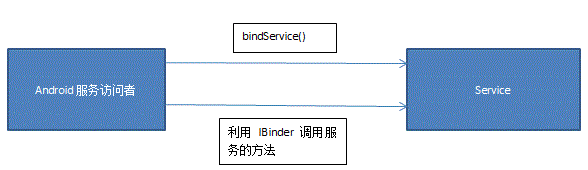
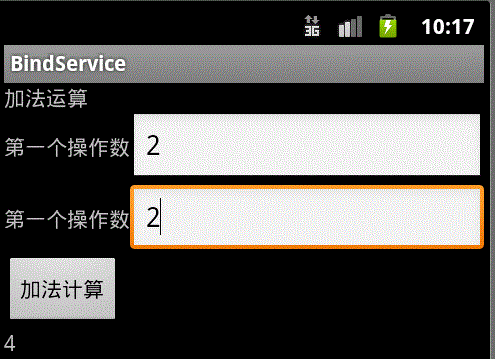 MainActivity.java
package com.xiazdong.bindservice;

import android.app.Activity;
import android.content.ComponentName;
import android.content.Intent;
import android.content.ServiceConnection;
import android.os.Bundle;
import android.os.IBinder;
import android.view.View;
import android.view.View.OnClickListener;
import android.widget.Button;
import android.widget.EditText;
import android.widget.TextView;

public class MainActivity extends Activity {
	private EditText op1,op2;
	private Button button;
	private TextView result;
	private IAddOp binder ;//使用接口IAddOp
	private ServiceConnection conn = new AddOpServiceConnection();
	private OnClickListener listener = new OnClickListener(){
		@Override
		public void onClick(View v) {
			int number = binder.addOpService(Integer.parseInt(op1.getText().toString()), Integer.parseInt(op1.getText().toString()));
			result.setText("result="+number+"");
		}
	};
	@Override
    public void onCreate(Bundle savedInstanceState) {
        super.onCreate(savedInstanceState);
        setContentView(R.layout.main);
        op1 = (EditText)this.findViewById(R.id.op1);
        op2 = (EditText)this.findViewById(R.id.op2);
        result = (TextView)this.findViewById(R.id.result);
        button = (Button)this.findViewById(R.id.button);
        button.setOnClickListener(listener);
        Intent service = new Intent(this,AddOpService.class);
        this.bindService(service, conn, BIND_AUTO_CREATE);
    }
	private class AddOpServiceConnection implements ServiceConnection{
		@Override
		public void onServiceConnected(ComponentName name, IBinder service) {//綁定服務時調用
			binder = (IAddOp)service;
		}
		@Override
		public void onServiceDisconnected(ComponentName name) {//解綁定服務時調用
			binder = null;
		}
	}
}
package com.xiazdong.bindservice;

import android.app.Service;
import android.content.Intent;
import android.os.Binder;
import android.os.IBinder;

public class AddOpService extends Service {
	private IBinder binder = new AddOpBinder();

	public int add(int a,int b){		//服務提供的方法
		return a+b;
	}
	@Override
	public IBinder onBind(Intent intent) {
		return binder;
	}

	private class AddOpBinder extends Binder implements IAddOp{
		public int addOpService(int a, int b) {	//binder對外暴露一個API調用服務提供的方法
			return add(a,b);
		}
	}
}
package com.xiazdong.bindservice;

public interface IAddOp {
	public int addOpService(int a,int b);
}
 Android進度條控制圖片透明度
xml<?xml version=1.0 encoding=utf-8?><LinearLayout xmlns:android=http://sche
 Android Activity生命周期與啟動模式
Activity的完整生命周期如下圖:Activity的加載模式有四種:standard: 標准模式,默認的加載模式,每次通過這種模式啟動目標Acitivity,都創建一
 Android Touch事件傳遞機制
1、基礎知識(1) 所有Touch事件都被封裝成了MotionEvent對象,包括Touch的位置、時間、歷史記錄以及第幾個手指(多指觸摸)等。 (2) 事件類
 android ipc通信機制之二序列化接口和Binder
IPC的一些基本概念,Serializable接口,Parcelable接口,已經Binder。此核心為最後的IBookManager.java類!!!Serializa