編輯:關於Android編程
本文開發一個基於Service的音樂播放器,音樂由後台運行的Service負責播放,當後台的播放狀態發生變化時,程序將會通過發送廣播通知前台Activity更新界面;當點擊Activity的界面按鈕時,系統將通過發送廣播通知後台Service來改變播放狀態。
前台Activity界面有兩個按鈕,分別用於控制播放/暫停、停止,另外還有兩個文本框,用於顯示正在播放的歌曲名、歌手名。前台Activity的代碼如下:
public class MainActivity extends AppCompatActivity implements View.OnClickListener{

  private ImageButton mStart;
  private ImageButton mStop;
  private TextView mMusicName;
  private TextView mSongerName;
  private ActivityReceiver mActivityReceiver;
  public static final String CTL_ACTION = "com.trampcr.action.CTL_ACTION";
  public static final String UPDATE_ACTION = "com.trampcr.action.UPDATE_ACTION";

  //定義音樂播放狀態,0x11代表沒有播放,0x12代表正在播放,0x13代表暫停
  int status = 0x11;
  String[] musicNames = new String[]{"完美生活", "那一年", "故鄉"};
  String[] songerNames = new String[]{"許巍", "許巍", "許巍"};


  @Override
  protected void onCreate(Bundle savedInstanceState) {
    super.onCreate(savedInstanceState);
    setContentView(R.layout.activity_main);

    mStart = (ImageButton) findViewById(R.id.start);
    mStop = (ImageButton) findViewById(R.id.stop);
    mMusicName = (TextView) findViewById(R.id.music_name);
    mSongerName = (TextView) findViewById(R.id.songer_name);

    mStart.setOnClickListener(this);
    mStop.setOnClickListener(this);

    mActivityReceiver = new ActivityReceiver();
    //創建IntentFilter
    IntentFilter filter = new IntentFilter();
    //指定BroadcastReceiver監聽的Action
    filter.addAction(UPDATE_ACTION);
    //注冊BroadcastReceiver
    registerReceiver(mActivityReceiver, filter);

    Intent intent = new Intent(MainActivity.this, MusicService.class);
    //啟動後台Service
    startService(intent);
  }

  public class ActivityReceiver extends BroadcastReceiver {
    @Override
    public void onReceive(Context context, Intent intent) {
      //獲取Intent中的update消息,update代表播放狀態
      int update = intent.getIntExtra("update", -1);
      //獲取Intent中的current消息,current代表當前正在播放的歌曲
      int current = intent.getIntExtra("current", -1);
      if (current >= 0){
        mMusicName.setText(musicNames[current]);
        mSongerName.setText(songerNames[current]);
      }
      switch (update){
        case 0x11:
          mStart.setBackgroundResource(R.drawable.play);
          status = 0x11;
          break;
        //控制系統進入播放狀態
        case 0x12:
          //在播放狀態下設置使用暫停圖標
          mStart.setBackgroundResource(R.drawable.pause);
          status = 0x12;
          break;
        case 0x13:
          //在暫停狀態下設置使用播放圖標
          mStart.setBackgroundResource(R.drawable.play);
          status = 0x13;
          break;
      }
    }
  }

  @Override
  public void onClick(View v) {
    Intent intent = new Intent(CTL_ACTION);
    switch (v.getId()){
      case R.id.start:
        intent.putExtra("control", 1);
        break;
      case R.id.stop:
        intent.putExtra("control", 2);
        break;
    }
    //發送廣播,將被Service中的BroadcastReceiver接收到
    sendBroadcast(intent);
  }
}
ActivityReceiver()用於響應後台Service所發出的廣播,該程序將會根據廣播Intent裡的消息來改變播放狀態,並更新程序界面中按鈕的圖標。
onClick中根據點擊的按鈕發送廣播,發送廣播時會把所按下的按鈕標識發送出來。
接下來是後台Service,會在播放狀態發生改變時對外發送廣播。代碼如下:
public class MusicService extends Service {

  MyReceiver serviceReceiver;
  AssetManager mAssetManager;
  String[] musics = new String[]{"prefectLife.mp3", "thatYear.mp3", "country.mp3"};
  MediaPlayer mMediaPlayer;
  int status = 0x11;
  int current = 0; // 記錄當前正在播放的音樂

  @Nullable
  @Override
  public IBinder onBind(Intent intent) {
    return null;
  }

  @Override
  public void onCreate() {
    super.onCreate();
    mAssetManager = getAssets();
    serviceReceiver = new MyReceiver();
    //創建IntentFilter
    IntentFilter filter = new IntentFilter();
    filter.addAction(MainActivity.CTL_ACTION);
    registerReceiver(serviceReceiver, filter);
    //創建MediaPlayer
    mMediaPlayer = new MediaPlayer();
    //為MediaPlayer播放完成事件綁定監聽器
    mMediaPlayer.setOnCompletionListener(new MediaPlayer.OnCompletionListener() {
      @Override
      public void onCompletion(MediaPlayer mp) {
        current++;
        if (current >= 3) {
          current = 0;
        }
        //發送廣播通知Activity更改文本框
        Intent sendIntent = new Intent(MainActivity.UPDATE_ACTION);
        sendIntent.putExtra("current", current);
        //發送廣播,將被Activity中的BroadcastReceiver接收到
        sendBroadcast(sendIntent);
        //准備並播放音樂
        prepareAndPlay(musics[current]);
      }
    });
  }

  public class MyReceiver extends BroadcastReceiver {
    @Override
    public void onReceive(Context context, Intent intent) {
      int control = intent.getIntExtra("control", -1);
      switch (control){
        case 1: // 播放或暫停
          //原來處於沒有播放狀態
          if (status ==0x11){
            //准備播放音樂
            prepareAndPlay(musics[current]);
            status = 0x12;
          }
          //原來處於播放狀態
          else if (status == 0x12){
            //暫停
            mMediaPlayer.pause();
            status = 0x13; // 改變為暫停狀態
          }
          //原來處於暫停狀態
          else if (status == 0x13){
            //播放
            mMediaPlayer.start();
            status = 0x12; // 改變狀態
          }
          break;
        //停止聲音
        case 2:
          //如果原來正在播放或暫停
          if (status == 0x12 || status == 0x13){
            //停止播放
            mMediaPlayer.stop();
            status = 0x11;
          }
      }
      //廣播通知Activity更改圖標、文本框
      Intent sendIntent = new Intent(MainActivity.UPDATE_ACTION);
      sendIntent.putExtra("update", status);
      sendIntent.putExtra("current", current);
      //發送廣播,將被Activity中的BroadcastReceiver接收到
      sendBroadcast(sendIntent);
    }
  }

  private void prepareAndPlay(String music) {
    try {
      //打開指定的音樂文件
      AssetFileDescriptor assetFileDescriptor = mAssetManager.openFd(music);
      mMediaPlayer.reset();
      //使用MediaPlayer加載指定的聲音文件
      mMediaPlayer.setDataSource(assetFileDescriptor.getFileDescriptor(), assetFileDescriptor.getStartOffset(), assetFileDescriptor.getLength());
      mMediaPlayer.prepare(); // 准備聲音
      mMediaPlayer.start(); // 播放
    } catch (IOException e) {
      e.printStackTrace();
    }
  }
}
MyReceiver用於接收前台Activity所發出的廣播,並根據廣播的消息內容改變Service的播放狀態,當播放狀態改變時,該Service對外發送一條廣播,廣播消息將會被前台Activity接收,前台Activity將會根據廣播消息更新界面。
為了讓該音樂播放器能按順序依次播放歌曲,程序為MediaPlayer增加了OnCompletionListener監聽器,當MediaPlayer播放完成後將自動播放下一首歌曲。
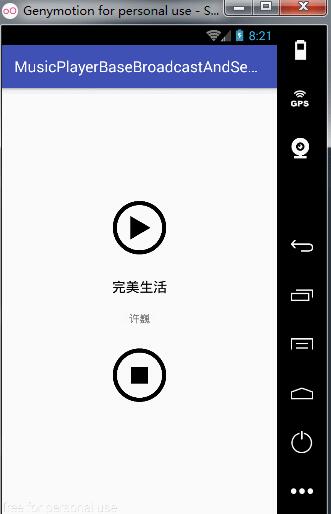
運行程序,效果圖如下:
以上就是本文的全部內容,希望對大家的學習有所幫助,也希望大家多多支持本站。
 Android Studio生成.so庫
簡介通過android studio生成so庫的實踐。上一篇記錄的是通過eclipse生成so的方法eclipse生成so庫實踐,這裡記錄一下通過android stud
 Android系統聯系人全特效實現(上)分組導航和擠壓動畫(附源碼)
記得在我剛接觸Android的時候對系統聯系人中的特效很感興趣,它會根據手機中聯系人姓氏的首字母進行分組,並在界面的最頂端始終顯示一個當前的分組。如下圖所示:
 Android中使用Expandablelistview實現微信通訊錄界面
之前的博文《Android 中使用ExpandableListView 實現分組的實例》我簡單介紹了使用ExpandableListView實現簡單的好友分組功能,今天我
 Android fragment 使用replace並保存狀態
Fragment的地位在開發中可是舉足輕重的,掌握它的的生命周期以及使用特性是非常重要的,例如在開發中常使用的模板: FragmentTransaction tran