編輯:關於Android編程
public boolean dispatchTouchEvent(MotionEvent ev) {
        if (!onFilterTouchEventForSecurity(ev)) {
            return false;
        }

        final int action = ev.getAction();
	//獲取事件的坐標
        final float xf = ev.getX();
        final float yf = ev.getY();
        final float scrolledXFloat = xf + mScrollX;
        final float scrolledYFloat = yf + mScrollY;
        final Rect frame = mTempRect;

 	//disallowIntercept 默認是false,
	//可以通過requestDisallowItercepctTouchEvent來設置參數
	//被設置成true後,ViewGroup無法攔截除ACTION_DOWN以外的事件(只能攔截Down)
        boolean disallowIntercept = (mGroupFlags & FLAG_DISALLOW_INTERCEPT) != 0;

 	//這裡是ACTION_DOWN的處理邏輯
        if (action == MotionEvent.ACTION_DOWN) {
            if (mMotionTarget != null) {
                // this is weird, we got a pen down, but we thought it was
                // already down!
                //We should probably send an ACTION_UP to the current target
                mMotionTarget = null;
            }
            // If we're disallowing intercept or if we're allowing and we didn't
            // intercept
		//默認情況下disallowIntercept為false,表示允許攔截,
              //默認情況ViewGroup的onInterceptTouchEvent返回false
            if (disallowIntercept || !onInterceptTouchEvent(ev)) {
                // reset this event's action (just to protect ourselves)
                ev.setAction(MotionEvent.ACTION_DOWN);
                // We know we want to dispatch the event down, find a child
                // who can handle it, start with the front-most child.
                final int scrolledXInt = (int) scrolledXFloat;
                final int scrolledYInt = (int) scrolledYFloat;
                final View[] children = mChildren;
                final int count = mChildrenCount;
                for (int i = count - 1; i >= 0; i--) {//遍歷子View
                    final View child = children[i];
			//判斷子元素是否可以接收到事件,兩條件決定
			//條件一:子View是VISIBLE或者在播動畫
			//條件二:點擊坐標落在子View區域內(體現在內嵌的if)
                    if ((child.mViewFlags & VISIBILITY_MASK) == VISIBLE
                            || child.getAnimation() != null) {
                        child.getHitRect(frame);
                       //判斷是否點擊坐標落在子控件區域內
                        if (frame.contains(scrolledXInt, scrolledYInt)) {
                            final float xc = scrolledXFloat - child.mLeft;
                            final float yc = scrolledYFloat - child.mTop;
                            ev.setLocation(xc, yc);
                            child.mPrivateFlags &= ~CANCEL_NEXT_UP_EVENT;
                            //將事件派發給子View,返回true表示子View處理該事件,
                            if (child.dispatchTouchEvent(ev))  {
                                // Event handled, we have a target now.
                                mMotionTarget = child;//將處理事件的目標View保存在變量
                                return true;
                            }
                            // The event didn't get handled, try the next view.
                            // Don't reset the event's location, it's not
                            // necessary here.
                        }
                    }
                }
            }
        }

        boolean isUpOrCancel = (action == MotionEvent.ACTION_UP) ||
                (action == MotionEvent.ACTION_CANCEL);

        if (isUpOrCancel) {
           //重置mGroupFlags,
	//使得在下一個事件ACTION_DOWN來臨時disallowIntercept為false
            mGroupFlags &= ~FLAG_DISALLOW_INTERCEPT;
        }

        // The event wasn't an ACTION_DOWN, dispatch it to our target if
        // we have one.
        final View target = mMotionTarget;
        if (target == null) {//沒有找到可以處理事件的子View
            // We don't have a target, this means we're handling the
            // event as a regular view.
            ev.setLocation(xf, yf);
            if ((mPrivateFlags & CANCEL_NEXT_UP_EVENT) != 0) {
                ev.setAction(MotionEvent.ACTION_CANCEL);
                mPrivateFlags &= ~CANCEL_NEXT_UP_EVENT;
            }
            //子控件不處理,所以此處判斷一下自己是否處理
	    //此時ViewGroup調用的是父類View的dispatchTouchEvent
            return super.dispatchTouchEvent(ev);
        }

        // if have a target, see if we're allowed to and want to intercept its
        // events
	//允許並且想要攔截事件
        if (!disallowIntercept && onInterceptTouchEvent(ev)) {
            final float xc = scrolledXFloat - (float) target.mLeft;
            final float yc = scrolledYFloat - (float) target.mTop;
            mPrivateFlags &= ~CANCEL_NEXT_UP_EVENT;
            ev.setAction(MotionEvent.ACTION_CANCEL);
            ev.setLocation(xc, yc);
            if (!target.dispatchTouchEvent(ev)) {
                // target didn't handle ACTION_CANCEL. not much we can do
                // but they should have.
            }
            // clear the target
            mMotionTarget = null;
            // Don't dispatch this event to our own view, because we already
            // saw it when intercepting; we just want to give the following
            // event to the normal onTouchEvent().
            return true;
        }

        if (isUpOrCancel) {
            mMotionTarget = null;
        }

        // finally offset the event to the target's coordinate system and
        // dispatch the event.
        final float xc = scrolledXFloat - (float) target.mLeft;
        final float yc = scrolledYFloat - (float) target.mTop;
        ev.setLocation(xc, yc);

        if ((target.mPrivateFlags & CANCEL_NEXT_UP_EVENT) != 0) {
            ev.setAction(MotionEvent.ACTION_CANCEL);
            target.mPrivateFlags &= ~CANCEL_NEXT_UP_EVENT;
            mMotionTarget = null;
        }

        return target.dispatchTouchEvent(ev);
    }
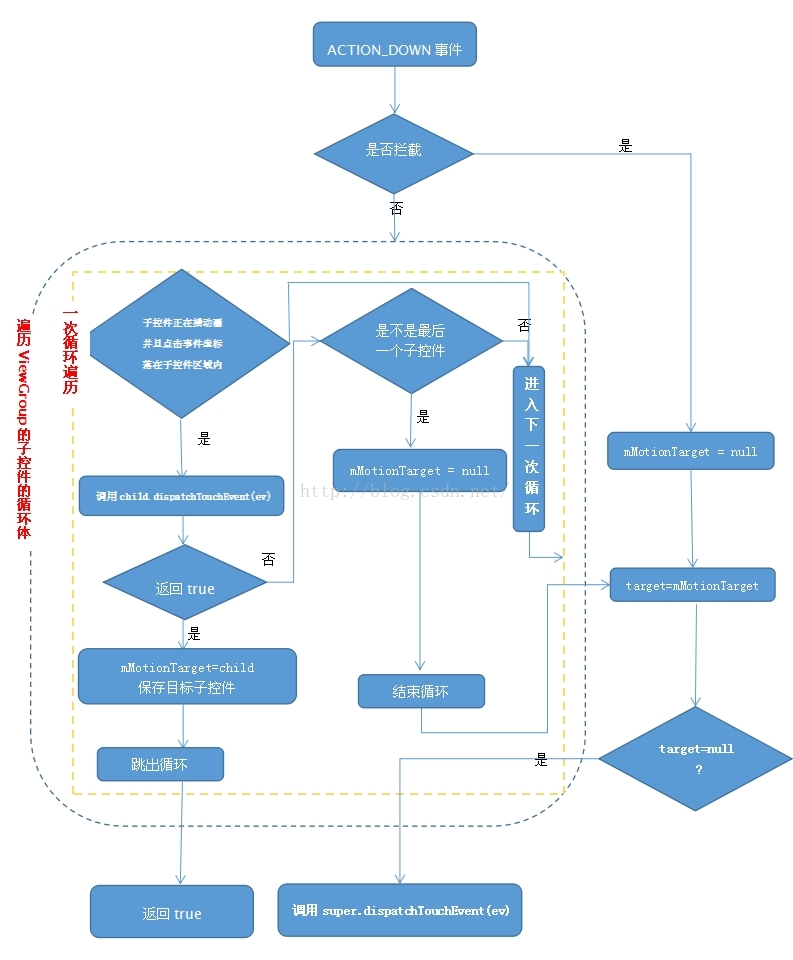
我們知道一些操作會產生事件,比方說在屏幕上滑動一下,這樣會產生一系列事件,但這些事件是屬於同一序列,它以ACTION_DOWN事件開始,中間有若干個ACTION_MOVE事件,以ACTION_UP事件結束。
ACTION_DOWN事件用流程圖表示如下:
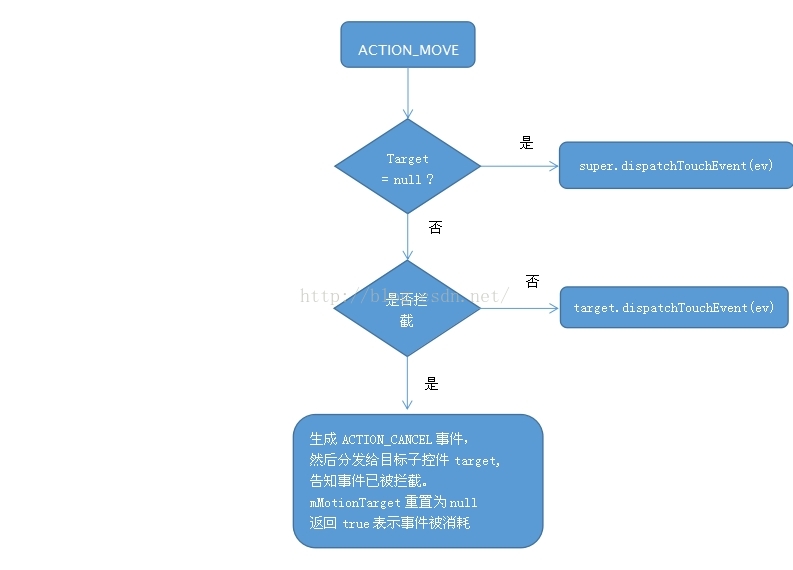
ACTION_MOVE事件被分發到ViewGroup的時候,從第81行可以看到首先會判斷target是否等於null,若等於null,表示子控件均不能消耗事件,則調用super.dispatchTouchEvent即View的dispatchTouchEvent來處理事件。若不等於空,此時會來到第97行,此時通過條件(!disallowIntercept&&onInterceptTouchEvent(ev))判斷是否攔截,若條件不成立表示不攔截則執行第131行代碼,調用target.dispatchTouchEvent將事件分發給目標子控件處理,如果攔截則首先生成ACTION_CANCEL事件(見第101行)並分發給目標子控件target(見第103行),告知事件已被攔截,之後執行第108行將mMotionTarget重置為null,目的是讓接下來的ACTION_UP事件直接能給ViewGroup自己處理,最後在第112行返回true表示事件被消耗。
ACTION_MOVE事件用流程圖表示如下:
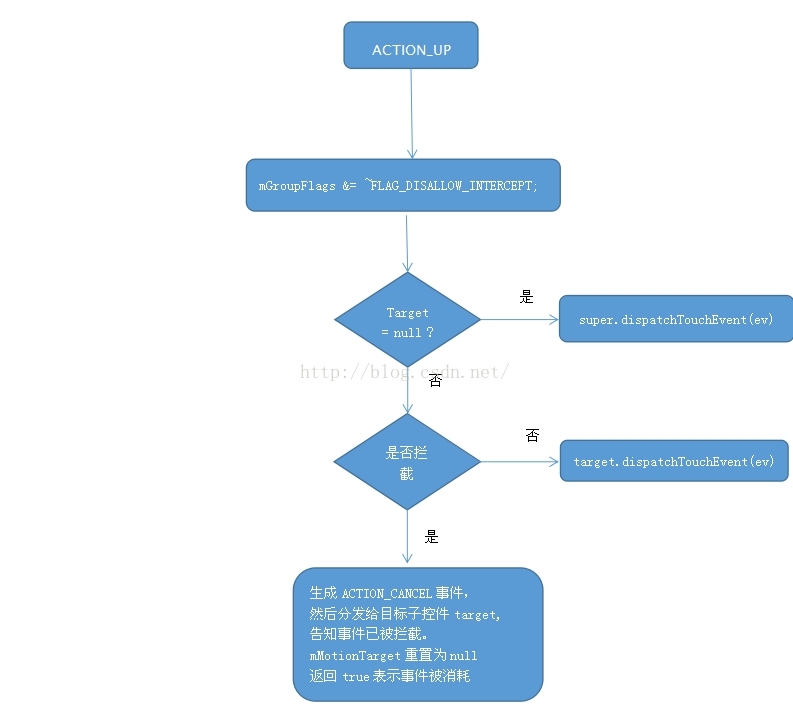
ACTION_UP分發到ViewGroup的時候,首先會通過執行mGrouFlags & = ~FALG_DISALLOW_INTERCEPT使得下一個ACTION_DOWN事件來臨時disallowIntecept重置為默認的false,之後的處理邏輯和ACTION_MOVE基本一致,這裡不再重復
ACTION_UP事件用流程圖表示如下:
 手機刷機精靈怎麼刷機
root精靈作為一款電腦端操作的手機最高權限獲取工具,它采用簡單的一鍵操作方式,無論你是新手用戶,還是老手用戶,用起來都是非常的方便快捷。 1、下載安裝刷
 Android學會屬性動畫的基本用法(中)ValueAnimator與ObjectAnimator用法
ValueAnimator的高級用法在上篇文章中介紹補間動畫缺點的時候有提到過,補間動畫是只能對View對象進行動畫操作的。而屬性動畫就不再受這個限制,它可以對任意對象進
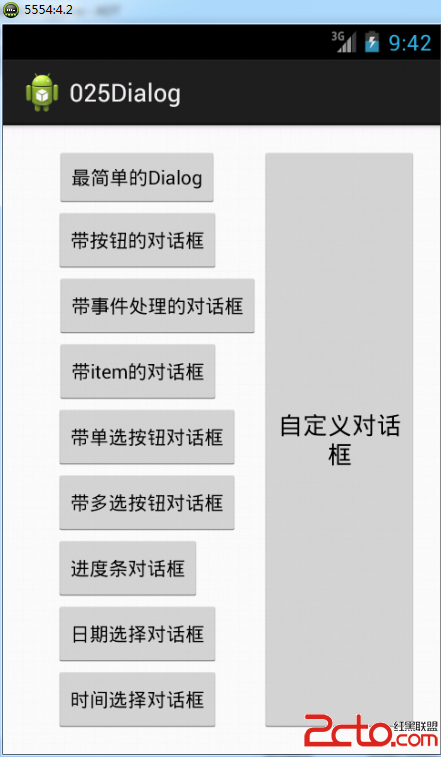 從零開始學android(Dialog對話框.二十五.)
在圖形界面之中,對話框也是人機交互的一種重要形式,程序可以通過對話框對用戶進行一些信息的提示,而用戶也可以通過對話框的和程序進行一些簡單的交互操作。 在Android的開
 Android 你不知道的自定義View(一)
說起Android 自定義View,網上的博客、視頻很多。鴻洋的博客和視頻還是很值得推薦的。本文打算結合Sdk源碼,來講解如何自定義一個View。本文結合TextView