

編輯:Android 開發實例
通知是 Android 裡相當特別的一塊設計:它讓那些「看不見」的元件——BroadcastReceiver、Service、或退到背景的 Activity——也能跟使用者說上話。App 沒有開著,甚至完全在後台,只要有事情需要使用者注意,一則通知就是最好的通路。
先建立專案,這裡以 minSdkVersion 11、targetSdkVersion 19 為例,也就是最低支援到 Android 3.0。接著別忘了在 AndroidManifest.xml 加上震動權限,少了這行,通知的震動效果不會作用:
<uses-permission android:name="android.permission.VIBRATE"/>
為了把幾種常見樣式一次比完,我在 activity_main.xml 放了一個垂直 LinearLayout,裡頭排四顆按鈕,分別對應舊式通知、大圖樣式文字、大圖樣式圖片,以及帶進度條的通知。
<LinearLayout xmlns:android="https://schemas.android.com/apk/res/android" xmlns:tools="https://schemas.android.com/tools" android:layout_width="match_parent" android:layout_height="match_parent" android:paddingBottom="@dimen/activity_vertical_margin" android:paddingLeft="@dimen/activity_horizontal_margin" android:paddingRight="@dimen/activity_horizontal_margin" android:paddingTop="@dimen/activity_vertical_margin" android:orientation="vertical" tools:context=".MainActivity" > <Button android:id="@+id/btn_01" android:layout_width="match_parent" android:layout_height="wrap_content" android:text="3.0以前版本的notification,用新的吧" android:onClick="click" /> <Button android:id="@+id/btn_02" android:layout_width="match_parent" android:layout_height="wrap_content" android:text="大視圖文本通知" android:onClick="click" /> <Button android:id="@+id/btn_03" android:layout_width="match_parent" android:layout_height="wrap_content" android:text="大視圖圖片通知" android:onClick="click" /> <Button android:id="@+id/btn_04" android:layout_width="match_parent" android:layout_height="wrap_content" android:text="進度條通知" android:onClick="click" /> </LinearLayout>
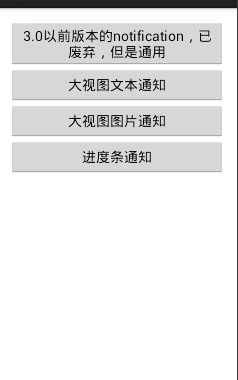
核心概念只有兩個角色:Notification 負責描述「長什麼樣」,NotificationManager 負責「把它送出去」。四個分支各自示範一種樣式的組合方式。
package com.xin.day__notificationdemo; import java.util.Timer; import java.util.TimerTask; import android.app.Activity; import android.app.Notification; import android.app.NotificationManager; import android.app.PendingIntent; import android.content.Intent; import android.graphics.BitmapFactory; import android.os.Bundle; import android.support.v.app.NotificationCompat; import android.support.v.app.NotificationCompat.BigPictureStyle; import android.support.v.app.NotificationCompat.BigTextStyle; import android.support.v.app.NotificationCompat.Builder; import android.util.Log; import android.view.View; public class MainActivity extends Activity { //通知的唯一標識,在一個應用程序中不同的通知要區別開來 private static final int NO = x; private static final int NO = x; private static final int NO = x; private static final int NO = x; //進度條要用 private int progress = ; @Override protected void onCreate(Bundle savedInstanceState) { super.onCreate(savedInstanceState); setContentView(R.layout.activity_main); } //click方法,和xml文件中的各個按鈕的onClick屬性的值要一致 public void click(View view) { //創建NotificationManager final NotificationManager manager = (NotificationManager) getSystemService(NOTIFICATION_SERVICE); //用switch語句控制四個控件 switch (view.getId()) { case R.id.btn_: { Notification notification = new Notification(); notification.icon = R.drawable.ic_launcher; notification.tickerText = "有消息了。。。"; Intent intent = new Intent(this, MainActivity.class); PendingIntent pendingIntent = PendingIntent.getActivity(this, , intent, PendingIntent.FLAG_UPDATE_CURRENT); notification.setLatestEventInfo(this, ".以前的通知", "試試而已", pendingIntent); notification.when = System.currentTimeMillis(); notification.defaults = Notification.DEFAULT_ALL; notification.flags = Notification.FLAG_AUTO_CANCEL; notification.number = ; notification.vibrate = new long[]{, }; manager.notify(NO, notification); } break; case R.id.btn_:{ //大視圖文本通知 //創建消息構造器,在擴展包 NotificationCompat.Builder builder = new NotificationCompat.Builder(this); //設置當有消息是的提示,圖標和提示文字 builder.setSmallIcon(R.drawable.ic_launcher).setTicker("有新消息了"); //需要樣式 BigTextStyle style = new BigTextStyle(); style.setBigContentTitle("上課通知");//通知的標題 style.bigText("今天下午要在綜B上jsp");//通知的文本內容 //大視圖文本具體內容 style.setSummaryText("這是正常的課程安排,請各位同學按時上課"); builder.setStyle(style); //顯示消息到達的時間,這裡設置當前時間 builder.setWhen(System.currentTimeMillis()); //獲取一個通知對象 Notification notification = builder.build(); notification.flags = Notification.FLAG_AUTO_CANCEL; //發送(顯示)通知 //notify()第一個參數id An identifier for this notification unique within your application //get?意思說,這個通知在你的應用程序中唯一的標識符 manager.notify(NO, notification); } break; case R.id.btn_:{ //大視圖圖片通知 NotificationCompat.Builder builderPic = new Builder(this); builderPic.setSmallIcon(R.drawable.ic_launcher).setTicker("新浪體育提醒"); //進行設置 BigPictureStyle pictureStyle = new BigPictureStyle(); pictureStyle.setBigContentTitle("新浪體育 快船VS騎士 "); pictureStyle.bigPicture(BitmapFactory.decodeResource(getResources(), R.drawable.ic_game)); pictureStyle.setSummaryText(" 快船VS騎士 天王山之戰!!!");//不要在意文字 //設置樣式 builderPic.setStyle(pictureStyle); //設置顯示的時間 builderPic.setWhen(System.currentTimeMillis()); Notification notification = pictureStyle.build(); notification.flags = Notification.FLAG_AUTO_CANCEL; // manager.notify(NO, notification); } break; case R.id.btn_:{ //進度條通知 final NotificationCompat.Builder builderProgress = new NotificationCompat.Builder(this); builderProgress.setSmallIcon(R.drawable.ic_launcher).setTicker("進度條通知"); builderProgress.setProgress(, progress, false); final Notification notification = builderProgress.build(); //發送一個通知 manager.notify(NO, notification); //創建一個計時器 Timer timer = new Timer(); timer.schedule(new TimerTask(){ @Override public void run() { Log.i("progress",progress+""); while(progress <= ){ progress ++; try { Thread.sleep(); } catch (InterruptedException e) { // TODO Auto-generated catch block e.printStackTrace(); } //更新進度條 builderProgress.setProgress(, progress, false); //再次通知 manager.notify(NO, builderProgress.build()); } //計時器退出 this.cancel(); //進度條退出 manager.cancel(NO); return;//結束方法 } }, ); } break; default: break; } } }
通知 ID 是身分證。manager.notify(id, notification) 的第一個參數決定這則通知的歸屬。同一個 id 重複送出會「覆蓋更新」而不是疊加新通知——進度條通知正是靠這個特性,反覆送出同一個 id 就能讓條子往前走。不同用途的通知務必給不同 id,否則會互相踩到。
PendingIntent 是「授權的Intent」。通知本身不能跳轉,真正被觸發的是使用者點擊後由系統代為執行的 PendingIntent。它需要明確的 requestCode 與 flag,FLAG_UPDATE_CURRENT 是最常用的選擇。
FLAG_AUTO_CANCEL 讓通知可點擊消失。不加這個旗標,使用者點開後通知還會賴在通知欄裡。
用 NotificationCompat.Builder。支援套件提供的 Builder 能讓同一份程式碼在新舊系統上都長得體面,BigTextStyle 與 BigPictureStyle 則負責處理「展開後」的樣式。
執行結果:在 4.0(API 19)的模擬器上,按住通知往左或往右滑,就能把它滑掉。
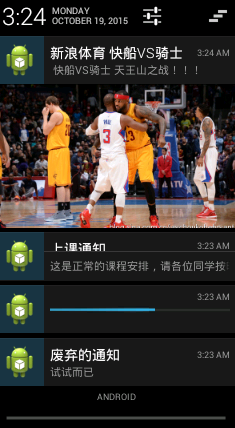
範例中用 Timer 搭配 while 迴圈與 Thread.sleep() 來推進度,能跑,但不算好示範:它長時間佔用一條背景執行緒,而且進度條通知應該在真正有進度變化時才更新。實務上更乾淨的做法是把工作交給 Handler 或協程,按實際下載/上傳的回呼推進度,並在完成時把樣式改成不可取消的「已完成」狀態,停留一段時間後再自行收掉。
另外,Android 8.0 之後通知必須綁定通知渠道(NotificationChannel),Android 13 起還需要 POST_NOTIFICATIONS 執行期權限。上面這份程式碼寫於舊版時代,套用到今日的專案時,記得把這兩塊補上。
 Android JSON 解析教學:用 JSONObject 讀懂天氣 API 回傳的資料
JSON(JavaScript Object Notation,JavaScript 物件符號法)是一種以純文字為基礎、與程式語言無關的資料交換格式。因為結構輕量、可讀性
 Android MediaPlayer:打造可播放、暫停與快轉的音樂播放器
MediaPlayer 的角色 Android 提供 MediaPlayer 類別,用來控制音訊與影片播放。最簡單的用法是透過靜態 create 方法載入 res/raw
 Android 中顯示 GIF 動畫的實作程式碼詳解
本文為大家分享 Android 中顯示 GIF 動畫的實作程式碼,值得參考,具體如下:GIF 動畫在 Android 中還算常見,像新浪微博裡就有大量 GIF 圖片,而且
 Android 讀取網路 JSON:從字串到可用物件的三個步驟
行動裝置上的資料多半來自網路,而網路上的資料多半是 JSON。JSON 的全名是 JavaScript Object Notation,是一種不依附任何平台的純文字資料格