

編輯:Android 開發實例
多數 Android ROM 上,文字被選取時的背景色是清爽的鮮綠色,視覺上不難看。但某些三星機型卻是藍色,和整體介面放在一起格外突兀。好消息是,這個顏色完全可以透過程式自訂。
android:textColorHighlight — Color of the text selection highlight.
顧名思義,它控制的正是選取範圍的高亮底色。
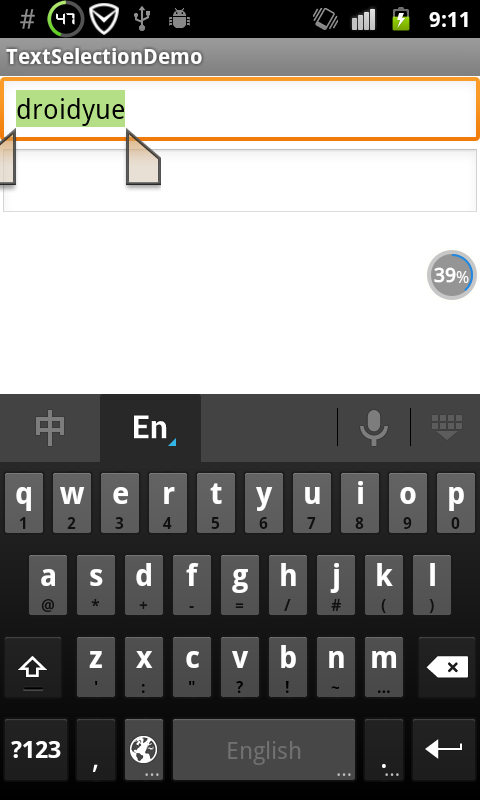
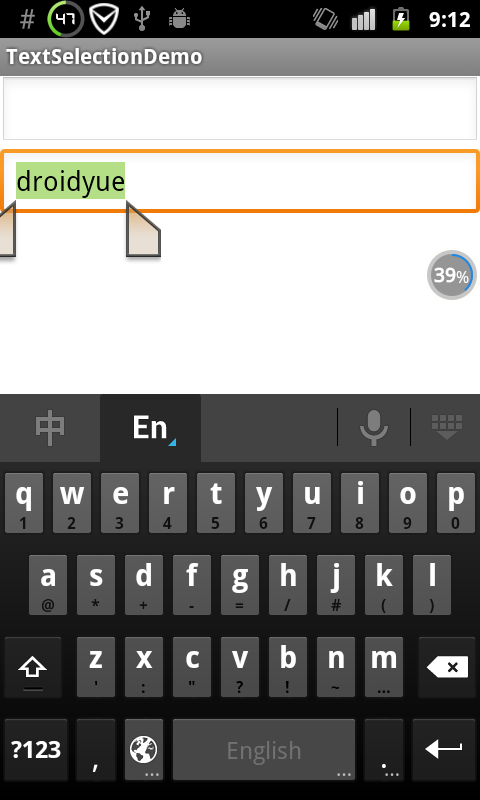
直接在 XML 中加上 android:textColorHighlight 即可,兩種控件寫法完全一樣:
<?xml version="1.0" encoding="utf-8"?>
<LinearLayout xmlns:android="https://schemas.android.com/apk/res/android"
    android:layout_width="match_parent"
    android:layout_height="match_parent"
    android:orientation="vertical" >
    <EditText
        android:id="@+id/et_inputBox"
        android:layout_height="wrap_content"
        android:layout_width="match_parent"
        android:textColorHighlight="#B4DF87"
        />

    <AutoCompleteTextView
        android:id="@+id/act_input"
        android:layout_below="@id/et_inputBox"
        android:layout_width="fill_parent"
        android:layout_height="wrap_content"
        android:textColorHighlight="#B4DF87"
        />
</LinearLayout>
若希望在樣式中統一管理,也可以把這個屬性收進自訂 style,讓全 App 的選取色保持一致,不必逐頁設定。
 Android 本地化實作:讓應用自動切換語系
Android 應用常會在不同語言環境中執行。若希望應用更親切,就必須進行本地化,讓文字、數字與其他資源能依使用者地區自動調整。 建立本地化字串 在 res 目錄下建立
 Android JSON 解析入門:從天氣 API 擷取資料
JSON 是應用程式之間常見的資料交換格式,因為結構清楚、易於閱讀,也方便在 Android 中處理。當 App 需要從網路取得資料時,通常會先取得 JSON 字串,再解
 Android 四大組件實戰:來電攔截與通話錄音
一、需求描述本實例借助 BroadcastReceiver 與 Service 兩大組件,實現兩個實用功能:1. 當手機有來電時,自動啟動監聽服務,對通話進行錄音。2.
 LinearLayout 與 RelativeLayout 搭配實現精準版面:padding、margin、gravity 一次搞懂
四個最容易混淆的概念 padding 和 margin 都叫「邊距」,關鍵差別在於「相對誰」: · padding:控件內容相對控件自身邊緣的距離。· margin:控件