

編輯:Android 開發實例
若想在自訂的 View 上顯示 Button 等控制項,可以善用 FrameLayout 的層疊特性。以下分兩步完成。
注意這裡要覆寫的是「兩個參數」的建構子:
public class MyView2 extends View{
  public MyView2(Context context,AttributeSet att) { super(context,att); }
  public void onDraw(Canvas c) { // 在此繪製你要的內容 }
}
<?xml version="1.0" encoding="utf-8"?>
<FrameLayout xmlns:android="https://schemas.android.com/apk/res/android"
  android:orientation="vertical"
  android:layout_width="fill_parent"
  android:layout_height="fill_parent">
  <com.lovose.MyView2
  android:id="@+id/View01"
  android:layout_width="fill_parent"
  android:layout_height="fill_parent">
  </com.lovose.MyView2>
  <AbsoluteLayout android:id="@+id/AbsoluteLayout01" android:layout_width="wrap_content" android:layout_height="wrap_content">
  <Button android:text="Button01" android:id="@+id/Button01" android:layout_width="wrap_content" android:layout_height="wrap_content" android:layout_x="100dip" android:layout_y="100dip"></Button>
  </AbsoluteLayout>
</FrameLayout>
// 這樣,你就能任意定義 UI 的顯示了
FrameLayout 會讓子元件彼此重疊堆疊,因此自訂 View 畫在底層,Button 等控制項疊在上層,就能實現自繪圖形與互動元件共存的複合介面。
 Android AlertDialog 教學:用正負按鈕分流頁面跳轉
當程式需要使用者先確認「是」或「否」,又不想切換畫面時,警告對話框(Alert Dialog)是最合適的選擇。它會疊在目前 Activity 之上,等待使用者做出決定後再
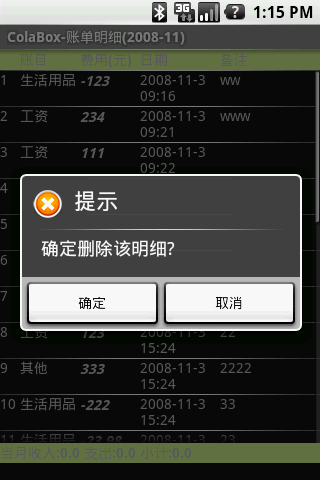 Android 理財 App 實作(六):帳單明細的查詢與刪除
上一節把帳單明細的顯示做完了,這一篇來收尾:把程式碼整理乾淨,補上查詢與刪除功能。具體目標有兩個——按 Menu 鍵彈出月份選擇視窗,可切換要檢視的月份;在 ListVi
 Android 登入畫面範例:帳號密碼與錯誤次數限制
登入畫面常用來驗證使用者身份。實作時通常需要兩個輸入欄位:使用者名稱與密碼,並加上登入按鈕。為了避免暴力嘗試,還可以限制錯誤次數。 建立輸入欄位 <EditText
 Android 登入頁面實作:帳密驗證與錯誤次數限制
登入頁面是許多應用的入口。它通常包含使用者名稱、密碼與登入按鈕,也需要處理錯誤次數,避免有心人士不斷嘗試。 建立輸入欄位 使用者名稱使用一般 EditText,密碼則要將