

編輯:Android 開發實例
做多語言版本時,日期時間的格式處理特別容易踩坑——同一個時間戳,在中國大陸、美國、歐洲要用完全不同的寫法展示。好在 Android 提供了 DateFormat,可以依據指定的 Locale 直接套用當地默認格式,不必自己拼字符串。
核心做法是:先判斷目標時間屬於「今天 / 昨天 / 本週 / 本年 / 更早」哪一檔,再對應選擇只顯示時間、顯示星期、顯示日期或顯示完整日期時間。所有格式化都交給 java.text.DateFormat 的 getTimeInstance、getDateInstance、getDateTimeInstance,並把 Locale 傳進去,格式自然就當地化了。
public static CharSequence formatTimeInListForOverSeaUser(
        final Context context, final long time, final boolean simple,
        Locale locale) {
    final GregorianCalendar now = new GregorianCalendar();
    // special time
    if (time < MILLSECONDS_OF_HOUR) {
        return "";
    }
    // today
    final GregorianCalendar today = new GregorianCalendar(
            now.get(GregorianCalendar.YEAR),
            now.get(GregorianCalendar.MONTH),
            now.get(GregorianCalendar.DAY_OF_MONTH));
    final long in24h = time - today.getTimeInMillis();
    if (in24h > 0 && in24h <= MILLSECONDS_OF_DAY) {
        java.text.DateFormat df = java.text.DateFormat.getTimeInstance(
                java.text.DateFormat.SHORT, locale);
        return "" + df.format(time);
    }
    // yesterday
    final long in48h = time - today.getTimeInMillis() + MILLSECONDS_OF_DAY;
    if (in48h > 0 && in48h <= MILLSECONDS_OF_DAY) {
        return simple ? context.getString(R.string.fmt_pre_yesterday)
                : context.getString(R.string.fmt_pre_yesterday)
                + " "
                + java.text.DateFormat.getTimeInstance(
                        java.text.DateFormat.SHORT, locale).format(time);
    }
    final GregorianCalendar target = new GregorianCalendar();
    target.setTimeInMillis(time);
    // same week
    if (now.get(GregorianCalendar.YEAR) == target.get(GregorianCalendar.YEAR)
            && now.get(GregorianCalendar.WEEK_OF_YEAR) == target.get(GregorianCalendar.WEEK_OF_YEAR)) {
        java.text.SimpleDateFormat sdf = new java.text.SimpleDateFormat("E", locale);
        final String dow = "" + sdf.format(time);
        return simple ? dow : dow
                + java.text.DateFormat.getTimeInstance(
                        java.text.DateFormat.SHORT, locale).format(time);
    }
    // same year
    if (now.get(GregorianCalendar.YEAR) == target.get(GregorianCalendar.YEAR)) {
        return simple ? java.text.DateFormat.getDateInstance(
                java.text.DateFormat.SHORT, locale).format(time)
                : java.text.DateFormat.getDateTimeInstance(
                        java.text.DateFormat.SHORT,
                        java.text.DateFormat.SHORT, locale).format(time);
    }
    return simple ? java.text.DateFormat.getDateInstance(
            java.text.DateFormat.SHORT, locale).format(time)
            : java.text.DateFormat.getDateTimeInstance(
                    java.text.DateFormat.SHORT, java.text.DateFormat.SHORT,
                    locale).format(time);
}
第一,這裡用的是 java.text.DateFormat,而不是 android.text.format.DateFormat。後者無法指定 Locale,在多語言場景下會直接失效,這是常見的踩坑點。
第二,simple 參數控制精簡與完整兩種展示粒度,列表場景通常傳 true 以節省空間,詳情頁則傳 false。
官方文檔可參考:https://developer.android.com/reference/java/text/DateFormat.html
 Android記事本範例剖析(一):入口、清單與 Intent 匹配機制
這是 Android 記事本範例系列的第一篇。與其直接背誦 API,不如從一個完整的小程式開始,觀察入口、列表、Intent 與 ContentProvider 如何串起
 Android手機衛士(十七):用自訂屬性擴充設定項
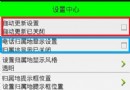
前面已完成設定中心第一欄,接下來要讓其他設定欄也能重複使用。做法是為自訂 SettingItemView 宣告可配置屬性。宣告自訂屬性在 res/values/attrs
 Android 面試常考:gravity 與 layout_gravity 到底差在哪
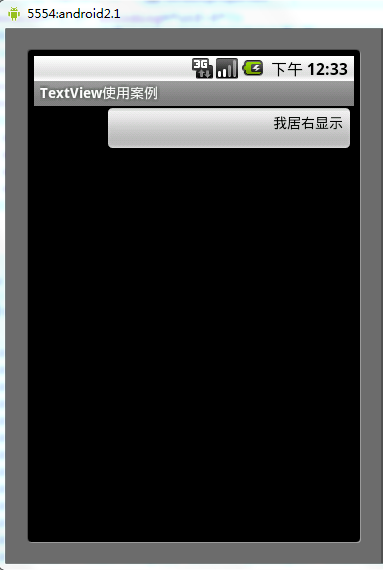
這兩個屬性名字只差一個前綴,作用卻完全不同,是初學者最容易混淆的一組: android:gravity:決定控制項內部內容的對齊方式。例如按鈕裡那行文字要貼左、居中還是
 Android 天氣查詢範例:JSON 解析與畫面更新
範例目標這個範例以天氣查詢為主題,示範如何讓使用者輸入城市名稱,再由程式連線取得 JSON 資料,最後把國家、溫度、濕度與氣壓顯示在畫面上。實作步驟建立專案後,先設計輸入