

編輯:Android 開發實例
核心原理:先用手機訊號讀出目前連接的基站資訊,再把這組資訊丟給第三方公開服務,換回該基站的經緯度與地址(也就是大概位置)。整個流程拆成「取資料 → 組請求 → 發請求 → 解析回應」四步。
TelephonyManager mTelephonyManager =
        (TelephonyManager) getSystemService(Context.TELEPHONY_SERVICE);

// 回傳值是 MCC + MNC 串接
String operator = mTelephonyManager.getNetworkOperator();
mcc = Integer.parseInt(operator.substring(0, 3));
mnc = Integer.parseInt(operator.substring(3));

// 中國移動與中國聯通取得 LAC、CID 的方式
GsmCellLocation location = (GsmCellLocation) mTelephonyManager.getCellLocation();
lac = location.getLac();
cid = location.getCid();

Log.i(TAG, "MCC = " + mcc + "\t MNC = " + mnc + "\t LAC = " + lac + "\t CID = " + cid);/**
* 取得 JSON 形式的基站資訊
*
* @param mcc 行動國家代碼(中國為 460)
* @param mnc 行動網路碼(中國移動 0、中國聯通 1、中國電信 2)
* @param lac 位置區域碼
* @param cid 基站編號
* @return JSON 字串
*/
private String getJsonCellPos(int mcc, int mnc, int lac, int cid) throws JSONException {
JSONObject jsonCellPos = new JSONObject();
jsonCellPos.put("version", "1.1.0");
jsonCellPos.put("host", "maps.google.com");
JSONArray array = new JSONArray();
JSONObject json1 = new JSONObject();
json1.put("location_area_code", "" + lac);
json1.put("mobile_country_code", "" + mcc);
json1.put("mobile_network_code", "" + mnc);
json1.put("age", 0);
json1.put("cell_id", "" + cid);
array.put(json1);
jsonCellPos.put("cell_towers", array);
return jsonCellPos.toString();
}POST https://www.minigps.net/minigps/map/google/location
200 OK
Content-Type: application/json; charset=UTF-8
X-Requested-With: XMLHttpRequest
Referer: https://www.minigps.net/map.html
{"cell_towers":[{"mobile_network_code":"1","location_area_code":"43018","cell_id":"11152773","age":0,"mobile_country_code":"460"}],"host":"maps.google.com","version":"1.1.0"}/**
* 呼叫第三方公開 API,依基站資訊查詢經緯度與地址
*/
public String httpPost(String url, String jsonCellPos) throws IOException {
byte[] data = jsonCellPos.getBytes();
URL realUrl = new URL(url);
HttpURLConnection conn = (HttpURLConnection) realUrl.openConnection();
conn.setConnectTimeout(6 * 1000);
conn.setDoOutput(true);
conn.setDoInput(true);
conn.setUseCaches(false);
conn.setRequestMethod("POST");
conn.setRequestProperty("Accept", "application/json, text/javascript, */*; q=0.01");
conn.setRequestProperty("Accept-Charset", "GBK,utf-8;q=0.7,*;q=0.3");
conn.setRequestProperty("Accept-Language", "zh-CN,zh;q=0.8");
conn.setRequestProperty("Connection", "Keep-Alive");
conn.setRequestProperty("Content-Length", String.valueOf(data.length));
conn.setRequestProperty("Content-Type", "application/json; charset=UTF-8");
conn.setRequestProperty("Host", "www.minigps.net");
conn.setRequestProperty("Referer", "https://www.minigps.net/map.html");
conn.setRequestProperty("X-Requested-With", "XMLHttpRequest");
DataOutputStream out = new DataOutputStream(conn.getOutputStream());
out.write(data);
out.flush();
out.close();
if (conn.getResponseCode() == HttpURLConnection.HTTP_OK) {
InputStream in = conn.getInputStream();
return new String(read(in));
}
return null;
}/**
* 讀取 IO 串流並以 byte[] 形式回傳
*/
public byte[] read(InputStream inputStream) throws IOException {
ByteArrayOutputStream outStream = new ByteArrayOutputStream();
byte[] buffer = new byte[1024];
int len = -1;
while ((len = inputStream.read(buffer)) != -1) {
outStream.write(buffer, 0, len);
}
outStream.close();
inputStream.close();
return outStream.toByteArray();
}{
"cell_towers": [
{
"mobile_network_code": "1",
"location_area_code": "43018",
"cell_id": "11152773",
"age": 0,
"mobile_country_code": "460"
}
],
"host": "maps.google.com",
"version": "1.1.0"
}{
"location": {
"latitude": "31.211389541625977",
"longitude": "121.60332489013672",
"address": {
"city": "上海市浦東新區居裡路432號;浦東新區光啟安老院、第一三共制藥上海公司、SUNPLUS[附近]",
"country": "", "country_code": "", "county": "",
"postal_code": "", "region": "", "street": "", "street_number": ""
}
},
"access_token": "dummytoken"
}package com.easipass.test;
import java.io.ByteArrayOutputStream;
import java.io.DataOutputStream;
import java.io.IOException;
import java.io.InputStream;
import java.net.HttpURLConnection;
import java.net.URL;
import org.json.JSONArray;
import org.json.JSONException;
import org.json.JSONObject;
import android.app.Activity;
import android.content.Context;
import android.os.Bundle;
import android.telephony.TelephonyManager;
import android.telephony.gsm.GsmCellLocation;
import android.util.Log;
import android.view.View;
/**
* 單基站定位
*/
public class GSMCellLocationActivity extends Activity {
private static final String TAG = "GSMCellLocationActivity";
private int mcc;
private int mnc;
private int lac;
private int cid;
@Override
public void onCreate(Bundle savedInstanceState) {
super.onCreate(savedInstanceState);
setContentView(R.layout.main);
// 取得基站資訊
findViewById(R.id.button1).setOnClickListener(new View.OnClickListener() {
@Override
public void onClick(View v) {
TelephonyManager mTelephonyManager =
(TelephonyManager) getSystemService(Context.TELEPHONY_SERVICE);
// 回傳值為 MCC + MNC
String operator = mTelephonyManager.getNetworkOperator();
mcc = Integer.parseInt(operator.substring(0, 3));
mnc = Integer.parseInt(operator.substring(3));
// 中國移動與中國聯通取得 LAC、CID 的方式
GsmCellLocation location =
(GsmCellLocation) mTelephonyManager.getCellLocation();
lac = location.getLac();
cid = location.getCid();
Log.i(TAG, "MCC = " + mcc + "\t MNC = " + mnc
+ "\t LAC = " + lac + "\t CID = " + cid);
new Thread() {
@Override
public void run() {
try {
String json = getJsonCellPos(mcc, mnc, lac, cid);
Log.i(TAG, "request = " + json);
String url = "https://www.minigps.net/minigps/map/google/location";
String result = httpPost(url, json);
Log.i(TAG, "result = " + result);
} catch (Exception e) {
e.printStackTrace();
}
}
}.start();
}
});
}
/**
 * 呼叫第三方公開 API,依基站資訊查詢經緯度與地址
 */
public String httpPost(String url, String jsonCellPos) throws IOException {
    byte[] data = jsonCellPos.getBytes();
    URL realUrl = new URL(url);
    HttpURLConnection conn = (HttpURLConnection) realUrl.openConnection();

    conn.setConnectTimeout(6 * 1000);
    conn.setDoOutput(true);
    conn.setDoInput(true);
    conn.setUseCaches(false);
    conn.setRequestMethod("POST");
    conn.setRequestProperty("Accept", "application/json, text/javascript, */*; q=0.01");
    conn.setRequestProperty("Accept-Charset", "GBK,utf-8;q=0.7,*;q=0.3");
    conn.setRequestProperty("Accept-Language", "zh-CN,zh;q=0.8");
    conn.setRequestProperty("Connection", "Keep-Alive");
    conn.setRequestProperty("Content-Length", String.valueOf(data.length));
    conn.setRequestProperty("Content-Type", "application/json; charset=UTF-8");
    conn.setRequestProperty("Host", "www.minigps.net");
    conn.setRequestProperty("Referer", "https://www.minigps.net/map.html");
    conn.setRequestProperty("X-Requested-With", "XMLHttpRequest");

    DataOutputStream out = new DataOutputStream(conn.getOutputStream());
    out.write(data);
    out.flush();
    out.close();

    if (conn.getResponseCode() == HttpURLConnection.HTTP_OK) {
        InputStream in = conn.getInputStream();
        return new String(read(in));
    }
    return null;
}
/**
* 取得 JSON 形式的基站資訊
*/
private String getJsonCellPos(int mcc, int mnc, int lac, int cid) throws JSONException {
JSONObject jsonCellPos = new JSONObject();
jsonCellPos.put("version", "1.1.0");
jsonCellPos.put("host", "maps.google.com");
JSONArray array = new JSONArray();
JSONObject json1 = new JSONObject();
json1.put("location_area_code", "" + lac);
json1.put("mobile_country_code", "" + mcc);
json1.put("mobile_network_code", "" + mnc);
json1.put("age", 0);
json1.put("cell_id", "" + cid);
array.put(json1);
jsonCellPos.put("cell_towers", array);
return jsonCellPos.toString();
}
/**
 * 讀取 IO 串流並以 byte[] 形式回傳
 */
public byte[] read(InputStream inputStream) throws IOException {
    ByteArrayOutputStream outStream = new ByteArrayOutputStream();
    byte[] buffer = new byte[1024];
    int len = -1;
    while ((len = inputStream.read(buffer)) != -1) {
        outStream.write(buffer, 0, len);
    }
    outStream.close();
    inputStream.close();
    return outStream.toByteArray();
}
}<uses-permission android:name="android.permission.ACCESS_COARSE_LOCATION" />
<uses-permission android:name="android.permission.INTERNET" />測試網址:https://www.minigps.net/map.html
Google 原本的 https://www.google.com/loc/json(或 .com.hk 版本)早已停用,直接拜訪會得到 404,官方相關說明可參考 Gears 頁面。這也是為什麼本文改用第三方相容服務的原因。
參考:https://www.fengfly.com/plus/view-212249-1.html
原文轉自:https://blog.csdn.net/android_ls/article/details/8672856
 Android MediaPlayer 教學:打造可快轉的音樂播放器
要在 Android 上播放音訊或影片,最直接的方式就是使用 MediaPlayer 類別。它是內建媒體播放服務的入口,音訊、影片與串流格式都能 handle。 取得 M
 Android 源碼中的組合模式:以 ViewGroup 與 View 為例
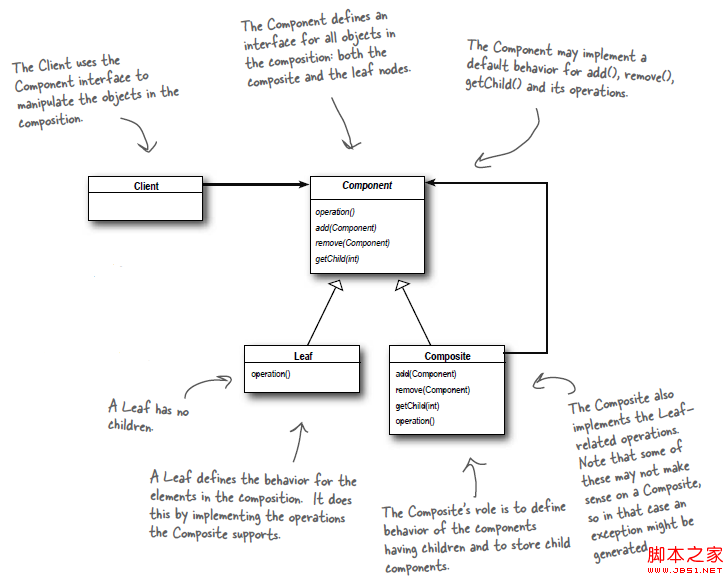
定義 Compose objects into tree structures to represent part-whole hierarchies. Composit
 ListView 選中項持續高亮的正確做法
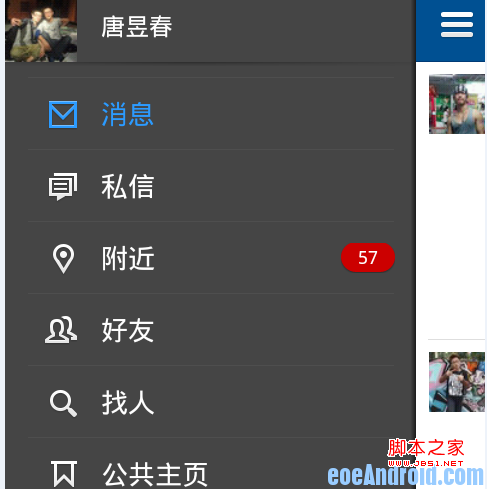
很多客戶端的左側導航欄都有這樣的效果:點擊某一行後,該行會持續保持高亮(比如文字變色),而不是只在按下的一瞬間有反饋;再點別的行,高亮就整行搬過去。下面記錄實現過程與一個
 Android 端如何解析 JSON:以天氣查詢 App 為例
行動應用要顯示即時資訊,幾乎都得向伺服器要資料,而回傳格式十之八九是 JSON。它源自 JavaScript 的物件語法,但早已是語言中立的文字格式,任何平台都能讀。相比