

編輯:Android 資訊
WebService 基於 SOAP 協定實現主機與主機之間的通信。由於 SOAP 以 XML 傳送資料,具備平台無關性,因此成為解決異構系統整合的重要方案,例如讓 Java 平台與 .NET 平台互通。正因如此,它在 Web 應用中佔有舉足輕重的地位——許多機構都在各自平台上對外發布了 WebService,例如天氣預報、航班資訊、股市行情等,讓任何平台的客戶端都能取用(當然部分服務是付費的)。
Android 端調用 WebService 有兩條路。一是自己寫:透過 HttpURLConnection 建立連線,手動做 I/O 讀寫收發資料,再自行解析 XML,過程繁瑣且容易出錯。二是使用第三方組件,最常見的就是 ksoap2-android。
ksoap2-android 是一個開源組件,針對 Android 平台提供了輕量高效的 SOAP 類庫,能讓 Android 端與 WebService 之間的通信變得相當省事。
專案位址:https://code.google.com/p/ksoap2-android/,下載最新版 jar 並加入專案即可。本文使用的是 ksoap2-android-assembly-2.5.4-jar-with-dependencies.jar。
(1)準備 Web 服務參數
// webservice 服務位址
String url = "https://webservice.webxml.com.cn/WebServices/MobileCodeWS.asmx";
// web 服務的命名空間
String namespace = "https://WebXml.com.cn/";
// 請求服務的方法名稱
String methodName = "getMobileCodeInfo";
// soap 請求位址
String soapActionAddress = "https://WebXml.com.cn/getMobileCodeInfo";
(2)建立 HttpTransportSE,負責送出請求
HttpTransportSE transport = new HttpTransportSE(url);
(3)建立 SoapObject 並加入要傳送的資料
SoapObject soapObject = new SoapObject(namespace, methodName);
soapObject.addProperty(name, value);   // 加入資料
// ...
(4)建立 SoapSerializationEnvelope,指定 XML 版本與 request body
SoapSerializationEnvelope envelope = new SoapSerializationEnvelope(SoapEnvelope.VER11);
envelope.bodyOut = soapObject;
envelope.setOutputSoapObject(soapObject);
(5)送出請求,調用 WebService 方法
httpTransportSE.call(soapActionAddress, envelope);
// 服務傳回的資訊會放在 envelope 的 bodyIn 屬性中
(6)取得回傳資料
SoapObject object = (SoapObject) envelope.bodyIn;
運行效果如下:
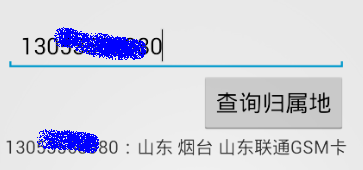
完整程式碼:
public class MainActivity extends Activity {

    // 手機歸屬地 Webservice 的參數資訊
    private static final String nameSpaceAddress  = "https://WebXml.com.cn/";
    private static final String urlAddress        = "https://webservice.webxml.com.cn/WebServices/MobileCodeWS.asmx";
    private static final String methodNameAddress = "getMobileCodeInfo";
    private static final String soapActionAddress = "https://WebXml.com.cn/getMobileCodeInfo";

    private TextView telAddress = null;
    private EditText tel = null;
    private Button btnAddress = null;
    private String txtAddress = null;

    @Override
    protected void onCreate(Bundle savedInstanceState) {
        super.onCreate(savedInstanceState);
        setContentView(R.layout.activity_main);

        btnAddress  = (Button) this.findViewById(R.id.btnSearchAddress);
        telAddress  = (TextView) this.findViewById(R.id.telAddress);
        tel         = (EditText) this.findViewById(R.id.telNo);

        btnAddress.setOnClickListener(new Button.OnClickListener() {
            @Override
            public void onClick(View v) {
                // 網路請求必須放在子執行緒
                new Thread(new Runnable() {
                    public void run() {
                        getTelAddress();
                    }
                }).start();
            }
        });
    }

    /** 請求 WebService 並取得手機號碼歸屬地 */
    public void getTelAddress() {
        SoapObject soapObject = new SoapObject(nameSpaceAddress, methodNameAddress);

        // 這些屬性會透過 SOAP 協定傳送給伺服器
        soapObject.addProperty("mobileCode", tel.getText().toString());
        soapObject.addProperty("userId", "");

        SoapSerializationEnvelope envelope =
                new SoapSerializationEnvelope(SoapEnvelope.VER11);
        envelope.bodyOut = soapObject;
        envelope.dotNet = true;                     // 服務端是 .NET 平台時需要設為 true
        envelope.setOutputSoapObject(soapObject);

        HttpTransportSE httpTransportSE = new HttpTransportSE(urlAddress);
        try {
            httpTransportSE.call(soapActionAddress, envelope);
        } catch (Exception e) {
            e.printStackTrace();
        }

        // 取得回傳資料
        SoapObject object = (SoapObject) envelope.bodyIn;
        txtAddress = object.getProperty(0).toString();

        // 通知主執行緒更新 UI
        handlerAddress.sendEmptyMessage(0);
    }

    Handler handlerAddress = new Handler() {
        public void handleMessage(Message msg) {
            telAddress.setText(txtAddress);
            Toast.makeText(MainActivity.this,
                    "獲取號碼歸屬地成功" + txtAddress, Toast.LENGTH_LONG).show();
        }
    };
}
這裡有兩個實務上很容易忽略的細節:一是網路請求一定要放在子執行緒,否則在較新版本的 Android 上會直接拋出 NetworkOnMainThreadException;二是 envelope.dotNet = true 這行,只有當服務端是 .NET 平台時才需要設定,漏掉它可能導致回傳的資料結構解析不出來。
手機歸屬地服務
https://webservice.webxml.com.cn/WebServices/MobileCodeWS.asmx天氣預報 Web 服務(資料來源:中國氣象局)
https://www.webxml.com.cn/WebServices/WeatherWebService.asmxIP 位址查詢
https://www.webxml.com.cn/WebServices/IpAddressSearchWebService.asmx中英雙向翻譯 Web 服務
https://www.webxml.com.cn/WebServices/TranslatorWebService.asmx火車時刻表
https://www.webxml.com.cn/WebServices/TrainTimeWebService.asmx航班查詢服務
https://webservice.webxml.com.cn/webservices/DomesticAirline.asmx中國股票行情資料 Web 服務
https://www.webxml.com.cn/WebServices/ChinaStockWebService.asmx中國電視節目預告
https://www.webxml.com.cn/webservices/ChinaTVprogramWebService.asmx
 Android 緩存利器 DiskLruCache 學習筆記
DiskLruCache 是一個十分好用的 Android 緩存工具,可以從 GitHub 下載源碼:https://github.com/JakeWharton/Dis
 Android 注解入門:從 Override 到編譯期處理
注解是 Android 開發中常見的工具,最典型的例子就是 @Override。它會在編譯期檢查方法是否正確重寫父類,也能提升程式碼可讀性。注解的價值除了標記用途,注解還
 Android CardView 開發中容易踩的五個坑
2014 年 Google 端出 Material Design 設計語言,也一併推出了新的 v7 支援庫,其中就包含卡片概念的官方實作——CardView。這麼長時間過
 Android 開發的 40 條實用優化建議
以下幾點,是展開 Android 編程的好方法: 1、找一些與你想開發的功能相似的代碼; 2、調整它,嘗試讓它變成你想要的; 3、回顧開發中遇到的問題; 4、使用 Sta