

編輯:關於 Android 程式設計
一、需求描述
系統預設的側滑操作只會出現一個「刪除」按鈕。本文要做的,是在同一個側滑菜單裡放入「刪除」、「置頂」、「更多」三個按鈕,讓列表互動更貼近實際產品的需要。
二、實現思路
滑動某個聯絡人或某則訊息時出現一排操作按鈕,這種互動現在很常見。在 iOS 8 之前,這一切都要自己動手實作;從 iOS 8 開始,系統已經把基礎能力內建好了,只要一個代理方法加上一個 UITableViewRowAction 類就能搞定。
關鍵在 UITableViewDelegate 新增的 tableView:editActionsForRowAtIndexPath: 方法,它的回傳值是一個陣列。我們在方法內部建立好各個按鈕,裝進陣列再回傳即可,而每個按鈕都由 UITableViewRowAction 來描述。
透過 UITableViewRowAction,我們可以設定按鈕的樣式、顯示文字、背景色,以及點擊後要執行的行為(行為寫在 handler 這個 Block 裡)。
在代理方法中建立多個按鈕並放入陣列時要注意順序:最先放進陣列的按鈕顯示在最右側,最後放進的顯示在最左側。
另外有一點容易踩坑:一旦自己設定了任何一個或多個按鈕,系統內建的刪除按鈕就會消失,需要自行補上。
三、程式碼實現
- (NSArray *)tableView:(UITableView *)tableView editActionsForRowAtIndexPath:(NSIndexPath *)indexPath {
    // 建立「刪除」按鈕
    UITableViewRowAction *deleteRowAction = [UITableViewRowAction rowActionWithStyle:UITableViewRowActionStyleDestructive title:@"刪除" handler:^(UITableViewRowAction *action, NSIndexPath *indexPath) {
        NSLog(@"點擊了「刪除」");
        // 1. 更新資料來源
        // 2. 更新 UI
        // [tableView deleteRowsAtIndexPaths:@[indexPath] withRowAnimation:UITableViewRowAnimationAutomatic];
    }];

    // 建立「置頂」按鈕
    UITableViewRowAction *topRowAction = [UITableViewRowAction rowActionWithStyle:UITableViewRowActionStyleDefault title:@"置頂" handler:^(UITableViewRowAction *action, NSIndexPath *indexPath) {
        NSLog(@"點擊了「置頂」");
        // 1. 更新資料來源
        // 2. 更新 UI
        // NSIndexPath *firstIndexPath = [NSIndexPath indexPathForRow:0 inSection:indexPath.section];
        // [tableView moveRowAtIndexPath:indexPath toIndexPath:firstIndexPath];
    }];
    topRowAction.backgroundColor = [UIColor blueColor];

    // 建立「更多」按鈕
    UITableViewRowAction *moreRowAction = [UITableViewRowAction rowActionWithStyle:UITableViewRowActionStyleNormal title:@"更多" handler:^(UITableViewRowAction *action, NSIndexPath *indexPath) {
        NSLog(@"點擊了「更多」");
        [tableView reloadRowsAtIndexPaths:@[indexPath] withRowAnimation:UITableViewRowAnimationMiddle];
    }];
    moreRowAction.backgroundEffect = [UIBlurEffect effectWithStyle:UIBlurEffectStyleDark];

    // 依序放入陣列回傳,越前面越靠右
    return @[deleteRowAction, topRowAction, moreRowAction];
}
三個按鈕的樣式各有差異:「刪除」使用 Destructive 帶出系統紅色、「置頂」自訂藍色、「更多」則加上毛玻璃模糊效果,視覺層次就出來了。
延伸閱讀
· 詳解 iOS 開發中 UITableView 頂部留白的多種處理方式
· iOS 中讓 UITableView 滾動到指定位置的實作
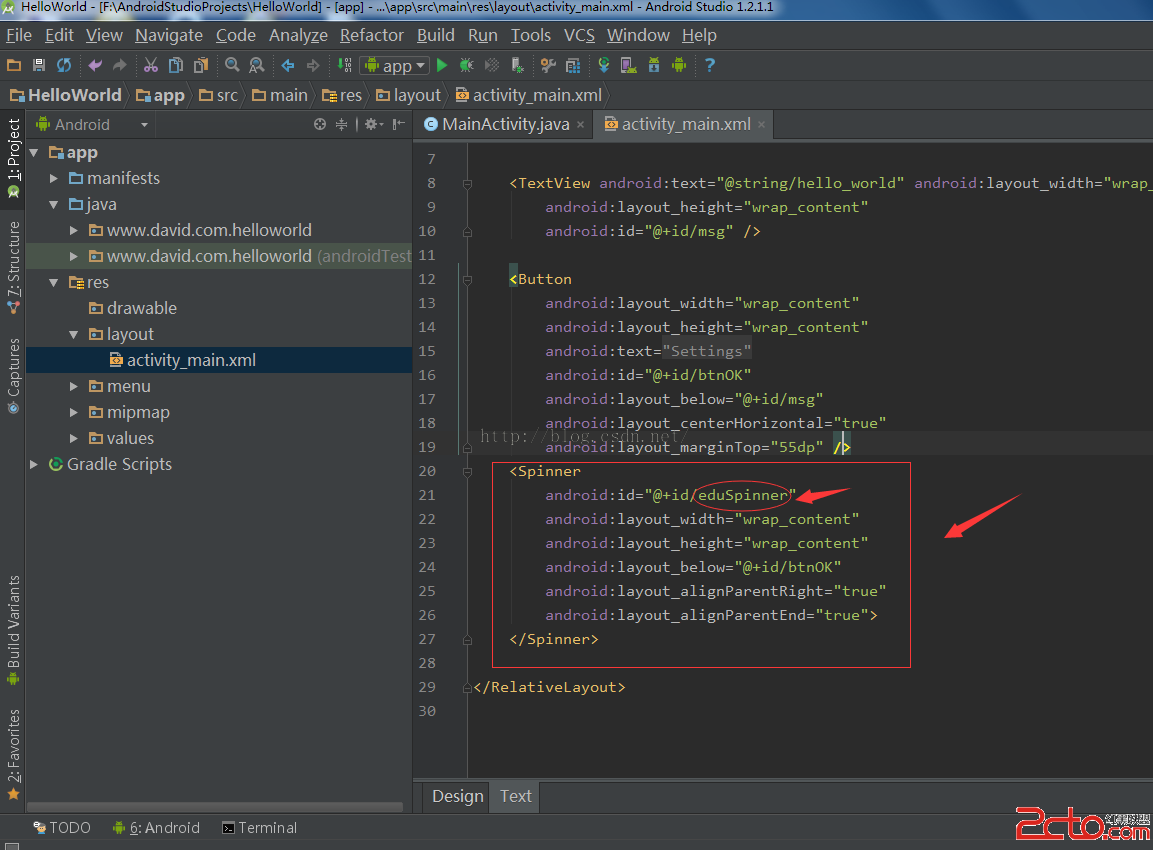 Android Studio 中 Spinner 控件的數據綁定實現
這裡介紹如何在程序中借助集合為 Spinner 控件設置數據源,具體步驟如下。 第一步,在 Android Studio 界面中選擇「Project」,展開 app →
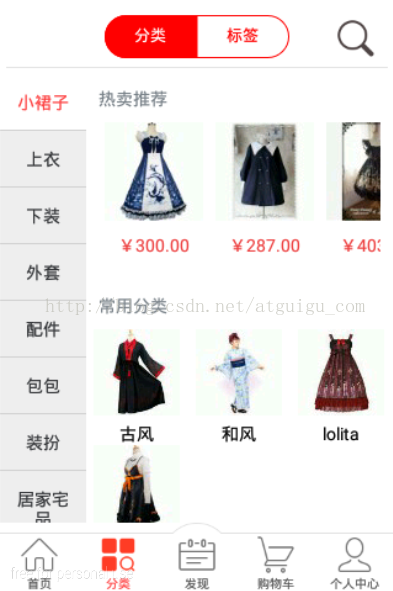 硅谷商城源码解析(四):分类页面的实现思路与核心技术
一、前言 上一篇我们梳理了硅谷商城首页的关键技术点,这一篇把镜头转向分类页。分类页看起来朴素,其实集中了不少实战中高频出现的技巧:标签与分类栏的联动切换、屏幕自适应、左右
 Android 倒計時功能實作:Timer 與 CountDownTimer 兩種寫法
倒計時是相當常見的需求——限時答題、活動倒數、驗證碼有效期限等等。Android 提供了 CountDownTimer 這個現成類別可以直接使用,但仍有不少人習慣用 Ti
 深入解析 Android 自訂 ProgressDialog 的實作細節
SDK 雖然提供了 ProgressDialog,但實際開發時常會遇到兩個問題:外觀與 App 整體設計語言不搭,而且可客製的幅度有限。這時候就得自己動手做一個。 從源碼