

編輯:關於 Android 程式設計
在 Android 中隱藏標題欄主要有兩種做法,一種是通過代碼設置,另一種是通過清單文件配置。
方法一,在代碼中調用:
requestWindowFeature(Window.FEATURE_NO_TITLE);
方法二,在清單文件 AndroidManifest.xml 中為 Activity 指定主題:
android:theme="@android:style/Theme.NoTitleBar"
下面分別給出兩種方式的完整示例代碼。
第一種:代碼方式
MainActivity.java package com.lingdududu.test; import android.app.Activity; import android.os.Bundle; import android.view.Window; public class MainActivity extends Activity { /** Called when the activity is first created. */ private boolean catchHomeKey = false; public void onCreate(Bundle savedInstanceState) { super.onCreate(savedInstanceState); this.requestWindowFeature(Window.FEATURE_NO_TITLE); setContentView(R.layout.main); } } 第二種:清單文件方式
AndroidManifest.xml <?xml version="1.0" encoding="utf-8?> <manifest xmlns:android="https://schemas.android.com/apk/res/android" package="com.lingdududu.test" android:versionCode="1" android:versionName="1.0"> <uses-sdk android:minSdkVersion="10" /> <application android:icon="@drawable/icon" android:label="@string/app_name"> <activity android:name=".MainActivity" android:label="@string/app_name" android:theme="@android:style/Theme.NoTitleBar" > <intent-filter> <action android:name="android.intent.action.MAIN" /> <category android:name="android.intent.category.LAUNCHER" /> </intent-filter> </activity> </application> </manifest>
效果圖:
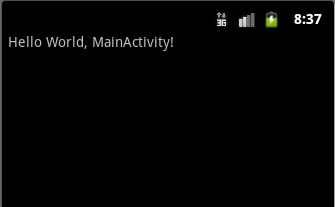
如果需要讓窗口全屏顯示:
只要把下面這兩段代碼分別替換掉上面隱藏標題欄的對應設置即可。
getWindow().setFlags(WindowManager.LayoutParams. FLAG_FULLSCREEN , WindowManager.LayoutParams. FLAG_FULLSCREEN); android:theme="@android:style/Theme.NoTitleBar.Fullscreen"
效果圖:
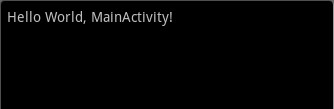
以上就是 Android 全屏與隱藏標題欄效果的代碼示例和效果展示,希望能對大家有所幫助。
 Android 實作自訂「圖片+文字」Button 的三種方法
本文以實例說明如何在 Android 中實作同時帶有文字與圖片的 Button,供需要的朋友參考,分析如下。 在 Android 開發中,經常需要用到同時包含文字與圖片的
 Android NDK 開發環境建置完整指南
什麼是 NDK? NDK 的全名是 Native Development Kit(原生開發套件),它為開發者提供了一整套工具,能協助我們快速開發以 C 或 C++ 撰寫的
 Android RocooFix 熱修復框架詳解
本文從熱修復技術的由來講起,回顧 Facebook 的 Dalvik 補丁經驗與 dex 分包方案,最後聚焦到 QQ 空間的熱補丁思路與 RocooFix 框架的實際使用
 Fresco 進階用法(二):進度條、縮放焦點、Controller 與漸進式 JPEG
上一篇談了 Fresco 的基本接入,這篇接著處理實務上一定會碰到的幾個進階需求:載入進度、縮放模式、Controller 相關的建構元件,以及漸進式 JPEG 與動圖播