

編輯:關於 Android 程式設計
本文以 HttpURLConnection 為例,示範四種最常見的 HTTP 情境:直接抓取網頁內容、以 GET 帶參數、以 POST 送出表單,以及下載並顯示網路圖片。所有範例都可在 Android 4.0 以上環境運行,並附完整的 AndroidManifest 與版面配置。
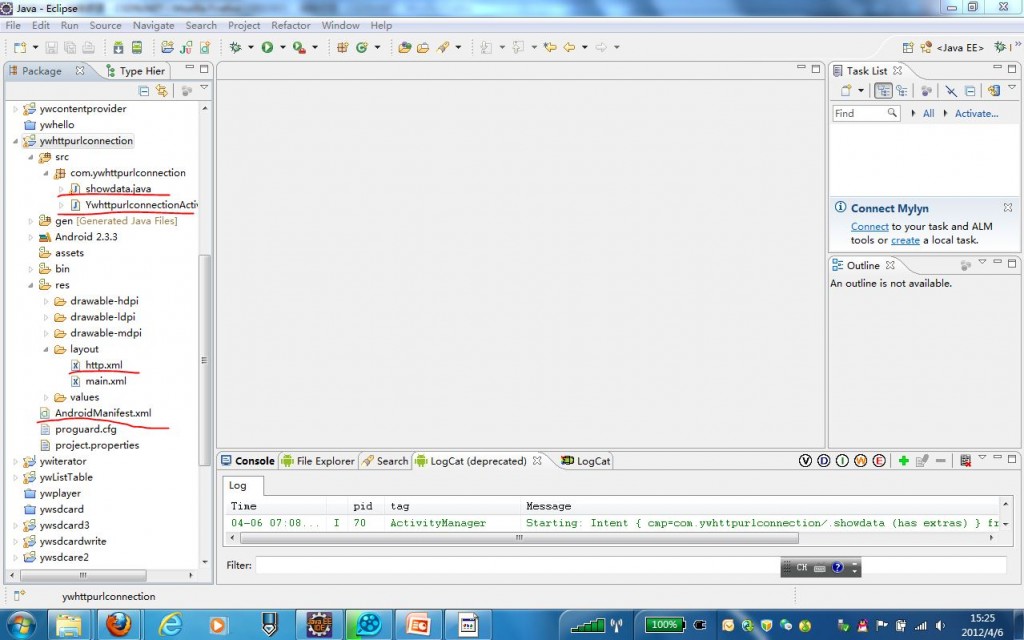
用 Bundle 帶一個 id 跳轉到顯示頁,讓顯示頁決定要執行哪一種請求:
package com.ywhttpurlconnection;

import android.app.Activity;
import android.content.Intent;
import android.os.Bundle;
import android.view.View;
import android.widget.Button;

public class YwhttpurlconnectionActivity extends Activity {
    private Button btn1 = null; // 直接獲取數據
    private Button btn2 = null; // GET 方式傳遞
    private Button btn3 = null; // POST 方式傳遞
    private Button btn4 = null; // 獲取圖片

    @Override
    public void onCreate(Bundle savedInstanceState) {
        super.onCreate(savedInstanceState);
        setContentView(R.layout.main);
        btn1 = (Button) this.findViewById(R.id.Button01);
        btn2 = (Button) this.findViewById(R.id.Button02);
        btn3 = (Button) this.findViewById(R.id.Button03);
        btn4 = (Button) this.findViewById(R.id.Button04);

        btn1.setOnClickListener(new Button.OnClickListener() {
            public void onClick(View v) {
                Intent intent = new Intent();
                intent.setClass(YwhttpurlconnectionActivity.this, showdata.class);
                Bundle b = new Bundle();
                b.putInt("id", 1);
                intent.putExtras(b);
                startActivity(intent);
            }
        });
        btn2.setOnClickListener(new Button.OnClickListener() {
            public void onClick(View v) {
                Intent intent = new Intent();
                intent.setClass(YwhttpurlconnectionActivity.this, showdata.class);
                Bundle b = new Bundle();
                b.putInt("id", 2);
                intent.putExtras(b);
                startActivity(intent);
            }
        });
        btn3.setOnClickListener(new Button.OnClickListener() {
            public void onClick(View v) {
                Intent intent = new Intent();
                intent.setClass(YwhttpurlconnectionActivity.this, showdata.class);
                Bundle b = new Bundle();
                b.putInt("id", 3);
                intent.putExtras(b);
                startActivity(intent);
            }
        });
        btn4.setOnClickListener(new Button.OnClickListener() {
            public void onClick(View v) {
                Intent intent = new Intent();
                intent.setClass(YwhttpurlconnectionActivity.this, showdata.class);
                Bundle b = new Bundle();
                b.putInt("id", 4);
                intent.putExtras(b);
                startActivity(intent);
            }
        });
    }
}
package com.ywhttpurlconnection;

import java.io.BufferedReader;
import java.io.DataOutputStream;
import java.io.IOException;
import java.io.InputStream;
import java.io.InputStreamReader;
import java.io.OutputStream;
import java.net.HttpURLConnection;
import java.net.MalformedURLException;
import java.net.URL;
import java.net.URLEncoder;

import android.app.Activity;
import android.content.Intent;
import android.graphics.Bitmap;
import android.graphics.BitmapFactory;
import android.os.Bundle;
import android.util.Log;
import android.widget.ImageView;
import android.widget.TextView;

public class showdata extends Activity {
    private TextView tv = null;
    private ImageView iv = null;
    private Bitmap mBitmap = null;

    @Override
    public void onCreate(Bundle savedInstanceState) {
        super.onCreate(savedInstanceState);
        setContentView(R.layout.http);
        Intent intent = this.getIntent();
        Bundle b = intent.getExtras();
        int id = b.getInt("id");
        tv = (TextView) this.findViewById(R.id.TextView_HTTP);
        iv = (ImageView) this.findViewById(R.id.ImageView01);

        if (id == 1) {
            // ===== 直接獲取數據 =====
            String httpUrl = "https://www.jb-aptech.com.cn";
            URL url = null;
            try {
                url = new URL(httpUrl);
            } catch (MalformedURLException e) {
                e.printStackTrace();
            }
            if (url != null) {
                try {
                    // 打開連接,此處只是創建一個實例,並沒有真正的連接
                    HttpURLConnection urlConn = (HttpURLConnection) url.openConnection();
                    urlConn.connect(); // 連接
                    InputStream input = urlConn.getInputStream();
                    InputStreamReader inputReader = new InputStreamReader(input);
                    BufferedReader reader = new BufferedReader(inputReader);
                    String inputLine = null;
                    StringBuffer sb = new StringBuffer();
                    while ((inputLine = reader.readLine()) != null) {
                        sb.append(inputLine).append("\n");
                    }
                    reader.close();
                    inputReader.close();
                    input.close();
                    urlConn.disconnect();
                    tv.setText(sb != null ? sb.toString() : "讀取的內容:NULL");
                } catch (IOException e) {
                    e.printStackTrace();
                }
            } else {
                Log.i("TAG", "url is null");
            }
        } else if (id == 2) {
            // ===== GET 方式傳遞參數 =====
            String httpUrl = "https://liveat.acewill.cn/liveat/?cmd=1&uid=xiaoming";
            URL url = null;
            try {
                url = new URL(httpUrl);
            } catch (MalformedURLException e) {
                e.printStackTrace();
            }
            if (url != null) {
                try {
                    HttpURLConnection urlConn = (HttpURLConnection) url.openConnection();
                    urlConn.setDoInput(true);
                    urlConn.setDoOutput(true);
                    urlConn.connect();
                    InputStream input = urlConn.getInputStream();
                    InputStreamReader inputReader = new InputStreamReader(input);
                    BufferedReader reader = new BufferedReader(inputReader);
                    String inputLine = null;
                    StringBuffer sb = new StringBuffer();
                    while ((inputLine = reader.readLine()) != null) {
                        sb.append(inputLine).append("\n");
                    }
                    reader.close();
                    inputReader.close();
                    input.close();
                    urlConn.disconnect();
                    tv.setText(sb != null ? sb.toString() : "讀取的內容:NULL");
                } catch (IOException e) {
                    e.printStackTrace();
                }
            } else {
                Log.i("TAG", "url is null");
            }
        } else if (id == 3) {
            // ===== POST 方式傳遞參數 =====
            String httpUrl = "https://www.jb-aptech.com.cn";
            URL url = null;
            try {
                url = new URL(httpUrl);
            } catch (MalformedURLException e) {
                e.printStackTrace();
            }
            if (url != null) {
                try {
                    HttpURLConnection urlConn = (HttpURLConnection) url.openConnection();
                    urlConn.setDoInput(true);
                    urlConn.setDoOutput(true);
                    urlConn.setRequestMethod("POST");
                    urlConn.setUseCaches(false);          // post 請求不能使用緩存
                    urlConn.setInstanceFollowRedirects(true); // 是否自動重定向
                    urlConn.connect();
                    OutputStream out = urlConn.getOutputStream();
                    DataOutputStream data = new DataOutputStream(out);
                    data.writeBytes("par=" + URLEncoder.encode("hk", "GBK"));
                    data.flush();
                    data.close();
                    out.close();
                    InputStream input = urlConn.getInputStream();
                    InputStreamReader inputReader = new InputStreamReader(input);
                    BufferedReader reader = new BufferedReader(inputReader);
                    String inputLine = null;
                    StringBuffer sb = new StringBuffer();
                    while ((inputLine = reader.readLine()) != null) {
                        sb.append(inputLine).append("\n");
                    }
                    reader.close();
                    inputReader.close();
                    input.close();
                    urlConn.disconnect();
                    tv.setText(sb != null ? sb.toString() : "讀取的內容:NULL");
                } catch (IOException e) {
                    e.printStackTrace();
                }
            } else {
                Log.i("TAG", "url is null");
            }
        } else if (id == 4) {
            // ===== 下載並顯示圖片 =====
            String httpUrl = "https://www.google.com.hk/intl/zh-CN/images/logo_cn.gif";
            URL url = null;
            try {
                url = new URL(httpUrl);
            } catch (MalformedURLException e) {
                e.printStackTrace();
            }
            if (url != null) {
                try {
                    HttpURLConnection urlConn = (HttpURLConnection) url.openConnection();
                    urlConn.connect();
                    InputStream input = urlConn.getInputStream();
                    mBitmap = BitmapFactory.decodeStream(input);
                    if (mBitmap != null) {
                        iv.setImageBitmap(mBitmap);
                    }
                } catch (IOException e) {
                    e.printStackTrace();
                }
            } else {
                Log.i("TAG", "url is null");
            }
        }
    }
}
網路請求一定要記得加 INTERNET 權限,這是最常見的「程式碼明明沒錯卻拿不到資料」的原因:
<?xml version="1.0" encoding="utf-8"?>
<manifest xmlns:android="https://schemas.android.com/apk/res/android"
    package="com.ywhttpurlconnection"
    android:versionCode="1"
    android:versionName="1.0" >

    <uses-sdk android:minSdkVersion="10" />
    <uses-permission android:name="android.permission.INTERNET"/>

    <application android:icon="@drawable/ic_launcher" android:label="@string/app_name" >
        <activity android:label="@string/app_name" android:name=".YwhttpurlconnectionActivity" >
            <intent-filter >
                <action android:name="android.intent.action.MAIN" />
                <category android:name="android.intent.category.LAUNCHER" />
            </intent-filter>
        </activity>
        <activity android:name=".showdata"></activity>
    </application>
</manifest>
http.xml(結果顯示頁):
<?xml version="1.0" encoding="utf-8"?>
<LinearLayout xmlns:android="https://schemas.android.com/apk/res/android"
    android:layout_width="match_parent"
    android:layout_height="match_parent"
    android:orientation="vertical" >

    <TextView
        android:id="@+id/TextView_HTTP"
        android:layout_width="fill_parent"
        android:layout_height="wrap_content" />

    <ImageView
        android:id="@+id/ImageView01"
        android:layout_width="172dp"
        android:layout_height="307dp" >
    </ImageView>
</LinearLayout>
main.xml(功能選單):
<?xml version="1.0" encoding="utf-8"?>
<LinearLayout xmlns:android="https://schemas.android.com/apk/res/android"
    android:layout_width="fill_parent"
    android:layout_height="fill_parent"
    android:orientation="vertical" >

    <TextView
        android:layout_width="fill_parent"
        android:layout_height="wrap_content"
        android:text="@string/hello" />

    <Button android:text="直接獲取數據" android:id="@+id/Button01"
        android:layout_width="fill_parent" android:layout_height="wrap_content"></Button>
    <Button android:text="GET方式傳遞" android:id="@+id/Button02"
        android:layout_width="fill_parent" android:layout_height="wrap_content"></Button>
    <Button android:text="POST方式傳遞" android:id="@+id/Button03"
        android:layout_width="fill_parent" android:layout_height="wrap_content"></Button>
    <Button android:text="獲取圖片" android:id="@+id/Button04"
        android:layout_width="fill_parent" android:layout_height="wrap_content"></Button>
</LinearLayout>
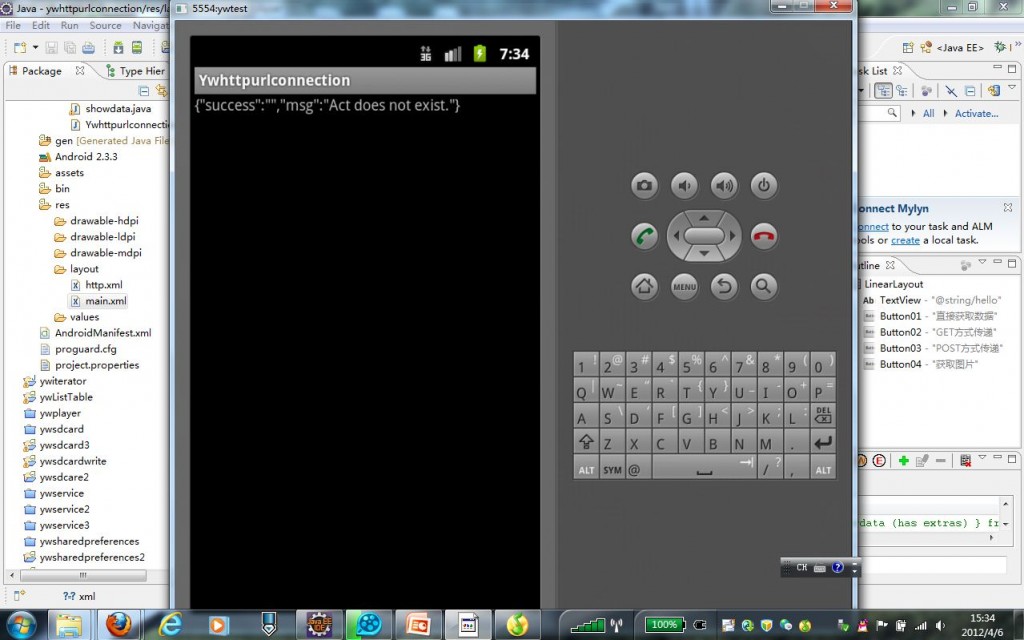
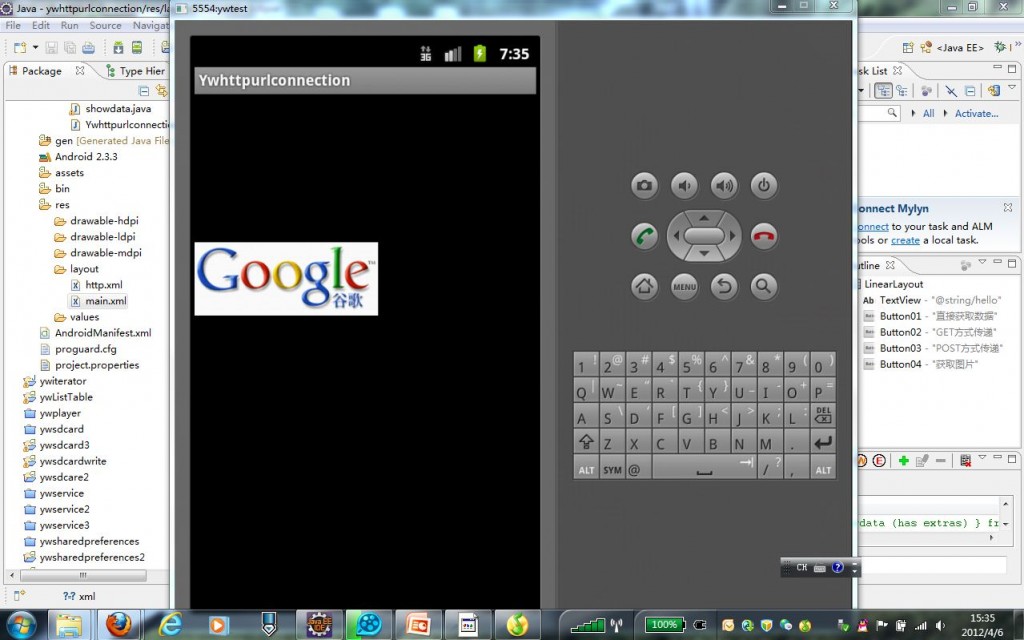
作為教學範例它足夠清楚,但直接搬進產品會遇到幾個問題,這裡誠實指出:
NetworkOnMainThreadException。請改用 ExecutorService、Kotlin 協程,或至少把請求包在背景執行緒裡,完成後用 runOnUiThread() 更新畫面。GBK 編碼中文,讀取時卻沒有指定 charset,容易出現亂碼。建議統一走 UTF-8,並在 InputStreamReader 明確帶上編碼名稱。ByteArrayOutputStream 串流處理。setConnectTimeout() 與 setReadTimeout(),否則網路異常時會無限期卡住。理解 HttpURLConnection 的原始流程,是為了知道框架背後到底做了什麼——這樣在遇到問題時,你才判斷得出是哪一層出了差錯。
 Android 權限機制解析:如何宣告與使用自訂權限
Android 權限機制用於保護敏感資源與功能。若應用要撥打電話、讀取聯絡人、存取相機或網路,通常需要在 AndroidManifest 中宣告對應權限。 系統權限 例
 Android 開發系列(八):用 Pull 解析器讀寫 XML 內容
有些時候,App 的資料是以 XML 檔的形式存放的,因此我們需要知道怎麼把這些資料讀出來。Android 中可以用 SAX、DOM、Pull 三種方式解析 XML,本篇
 Android UI 系列:ScrollView 與 HorizontalScrollView 詳解
本篇將講解 Android 中兩個常用的滾動容器——ScrollView 與 HorizontalScrollView。顧名思義,ScrollView 是一個可垂直滾動的
 自定義 View 實戰:用像素判斷做出電視遙控式環形按鈕(上)
這篇的目標很明確:用最樸素的方式,做出下圖這種環形排列的按鈕效果,並且把每一步都講清楚。 老規矩,先看效果: 這是一個點餐界面,六種菜品意味著六個按鈕。點擊「開始點餐」