

編輯:關於 Android 程式設計
本文實例演示如何從圖庫(Gallery)中讀取圖像,並用 ImageView 將它顯示出來,供大家參考。運行本示例前,建議先用相機拍攝幾張照片放進圖庫,以便測試。
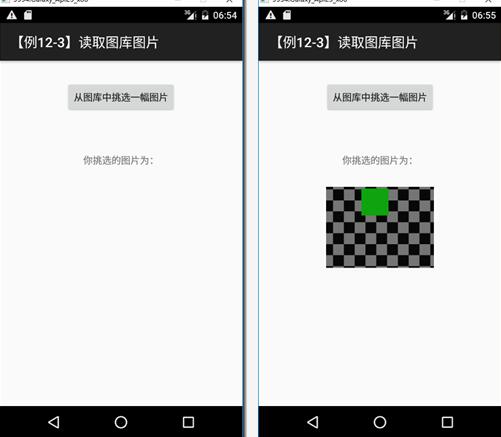
步驟一:新增佈局檔 ch1203_ReadGallery.axml
<?xml version="1.0" encoding="utf-8"?> <LinearLayout xmlns:android="https://schemas.android.com/apk/res/android" android:orientation="vertical" android:layout_width="fill_parent" android:layout_height="fill_parent"> <Button android:id="@+id/btn1" android:layout_width="wrap_content" android:layout_height="wrap_content" android:layout_margin="30dp" android:layout_gravity="center" android:text="從圖庫中挑選一幅圖片" /> <TextView android:text="你挑選的圖片為:" android:layout_width="wrap_content" android:layout_height="wrap_content" android:id="@+id/textView1" android:layout_gravity="center" android:layout_margin="30dp" /> <ImageView android:id="@+id/myImageView" android:layout_gravity="center" android:layout_width="wrap_content" android:layout_height="wrap_content" /> </LinearLayout>
步驟二:新增 ch1203ReadGallery.cs
using Android.App; using Android.Content; using Android.OS; using Android.Runtime; using Android.Widget; namespace MyDemos.SrcDemos { [Activity(Label = "【例12-3】讀取圖庫圖片")] public class ch1203ReadGallery : Activity { protected override void OnCreate(Bundle savedInstanceState) { base.OnCreate(savedInstanceState); SetContentView(Resource.Layout.ch1203_ReadGallery); var btn1 = FindViewById<Button>(Resource.Id.btn1); btn1.Click += delegate { var imageIntent = new Intent(); imageIntent.SetType("image/*"); imageIntent.SetAction(Intent.ActionGetContent); StartActivityForResult( Intent.CreateChooser(imageIntent, "選擇的圖片:"), 0); }; } protected override void OnActivityResult(int requestCode, [GeneratedEnum] Result resultCode, Intent data) { base.OnActivityResult(requestCode, resultCode, data); if (resultCode == Result.Ok) { var imageView = FindViewById<ImageView>(Resource.Id.myImageView); imageView.SetImageURI(data.Data); } } } }
關鍵在於透過 Intent 設定 ActionGetContent 與 image/* 類型,呼叫系統的挑選器開啟圖庫,再利用 onActivityResult 回呼取得所選圖片的 URI,交給 ImageView 顯示即可。
以上就是本文的全部內容,希望對大家的學習有所幫助,也歡迎多多支持本站。
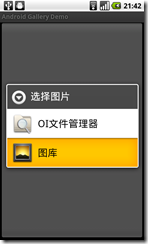 Android 從系統圖庫選圖並裁剪後回傳的實作
「從相冊挑一張圖、裁一塊下來、拿回自己的 App 用」——頭像上傳、商品封面、簽名背景都是這個流程。本文用一個最小範例把它跑通。 先來看效果 畫面上只有一顆大按鈕,點下
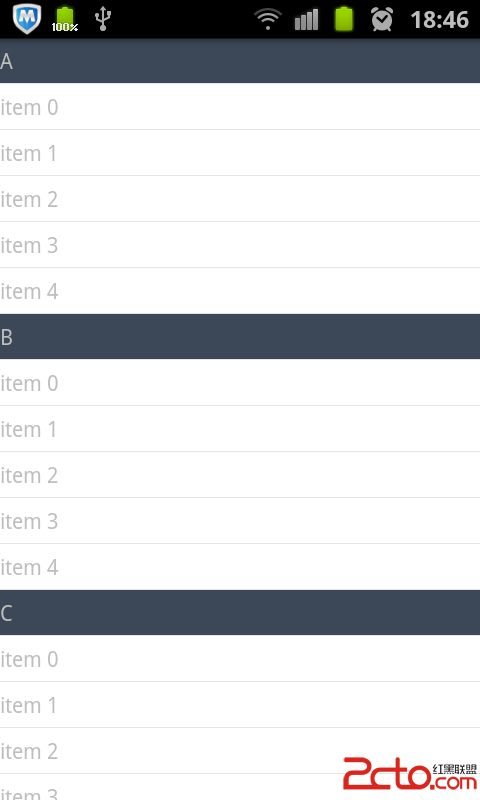 Android ListView 實現分類分隔欄效果(不用 ExpandableListView)
我們經常會遇到這樣的需求:一個 ListView 裡顯示的數據是有種類之分的。比如按春夏秋冬四季分組,每個季節下面再列出各自的條目;又比如通訊錄按 A、B、C 字母順序分
 Android 仿微信聊天界面實作分享
效果概述 微信聊天界面的視覺重點之一,是左右交錯的訊息氣泡。左側代表對方訊息,右側代表自己發送的訊息,再搭配時間與頭像,就能形成清楚的聊天視覺。 在 Android 中,
 Android Shape Drawable 形狀資源教學
什麼是 Shape DrawableShape Drawable 是 Android 中常見的形狀資源,可用 XML 定義矩形、圓角、漸層、邊框與內距等樣式。它非常適合用