

編輯:關於 Android 程式設計
為了讓不同應用之間能安全地交換資料,Android 提供了 ContentProvider。它是跨應用資料交換的標準 API:當一個應用願意把自己的資料對外公開時,就實作一個 ContentProvider;其他應用則透過 ContentResolver 來操作這些被公開的資料。這層間接設計的意義在於——存取權限由 provider 一方掌控,consumer 拿到的只是一個 URI 與一組操作語意,彼此並不互相侵入。
實作 ContentProvider 的步驟:
1)建立一個類別繼承 ContentProvider,並重寫其中的 CRUD 方法。
2)在 AndroidManifest.xml 中註冊 provider。
註冊時需要三個關鍵屬性:
android:name provider 的實作類別
android:authorities provider 的 URI 授權字串(全域唯一)
android:exported 是否開放給其他應用存取
ContentResolver 如何操作 ContentProvider:
1)呼叫 getContentResolver() 取得 ContentResolver。此方法來自 ContextWrapper,因此 Activity 與 Service 都能使用。
2)呼叫 CRUD 方法,並以 URI 參數指定要操作哪一個 provider。
main.xml:
 <RelativeLayout xmlns:android="https://schemas.android.com/apk/res/android"
    xmlns:tools="https://schemas.android.com/tools"
    android:layout_width="match_parent"
    android:layout_height="match_parent"
    tools:context=".Main" >

    <ListView android:id="@+id/listview"
        android:layout_width="match_parent"
        android:layout_height="wrap_content" />
</RelativeLayout>
MySQLiteOpenHelper 類別
 package com.app.dao;

import android.content.Context;
import android.database.sqlite.SQLiteDatabase;
import android.database.sqlite.SQLiteDatabase.CursorFactory;
import android.database.sqlite.SQLiteOpenHelper;

public class MySQLiteOpenHelper extends SQLiteOpenHelper {

    public MySQLiteOpenHelper(Context context, String name,
            CursorFactory factory, int version) {
        super(context, name, factory, version);
    }

    @Override
    public void onCreate(SQLiteDatabase db) {
        String create_sql =
                "create table tb_test(_id integer primary key autoincrement,name,gender,age)";
        db.execSQL(create_sql);
    }

    @Override
    public void onUpgrade(SQLiteDatabase db, int oldVersion, int newVersion) {
    }
}
MyContentProvider 類別
 package com.app.dao;

import android.content.ContentProvider;
import android.content.ContentValues;
import android.database.Cursor;
import android.net.Uri;

public class MyContentProvider extends ContentProvider {

    MySQLiteOpenHelper helper = null;

    @Override
    public int delete(Uri arg0, String arg1, String[] arg2) {
        return 0;
    }

    @Override
    public String getType(Uri arg0) {
        return null;
    }

    @Override
    public Uri insert(Uri arg0, ContentValues values) {
        String insert_sql = "insert into tb_test values(null,'wx','boy',17)";
        helper.getReadableDatabase().execSQL(insert_sql);
        return null;
    }

    @Override
    public boolean onCreate() {
        helper = new MySQLiteOpenHelper(this.getContext(), "test.db3", null, 1);
        return true;
    }

    @Override
    public Cursor query(Uri arg0, String[] arg1, String arg2,
            String[] arg3, String arg4) {
        String query_sql = "select * from tb_test";
        return helper.getReadableDatabase().rawQuery(query_sql, null);
    }

    @Override
    public int update(Uri arg0, ContentValues arg1, String arg2, String[] arg3) {
        return 0;
    }
}
ListView 的列樣式 show.xml
 <?xml version="1.0" encoding="utf-8"?>
<LinearLayout xmlns:android="https://schemas.android.com/apk/res/android"
    android:layout_width="match_parent"
    android:layout_height="match_parent"
    android:orientation="horizontal" >

    <TextView android:id="@+id/name"
        android:layout_width="wrap_content"
        android:layout_height="wrap_content" />
    <TextView android:id="@+id/gender"
        android:layout_width="wrap_content"
        android:layout_height="wrap_content"
        android:layout_marginLeft="60dp" />
    <TextView android:id="@+id/age"
        android:layout_width="wrap_content"
        android:layout_height="wrap_content"
        android:layout_marginLeft="60dp" />
</LinearLayout>
Main.java
 package com.app.main;

import android.annotation.SuppressLint;
import android.app.Activity;
import android.content.ContentResolver;
import android.database.Cursor;
import android.net.Uri;
import android.os.Bundle;
import android.support.v4.widget.CursorAdapter;
import android.widget.ListView;
import android.widget.SimpleCursorAdapter;

public class Main extends Activity {

    ContentResolver resolver = null;
    ListView lv = null;

    @SuppressLint("NewApi")
    @Override
    protected void onCreate(Bundle savedInstanceState) {
        super.onCreate(savedInstanceState);
        setContentView(R.layout.main);

        lv = (ListView) this.findViewById(R.id.listview);
        resolver = this.getContentResolver();

        String str = "content://com.app.test.db/";
        Uri uri = Uri.parse(str);

        resolver.insert(uri, null);   // 插入一筆
        Cursor cursor = resolver.query(uri, null, null, null, null);

        SimpleCursorAdapter adapter = new SimpleCursorAdapter(this, R.layout.show,
                cursor,
                new String[] { "name", "gender", "age" },
                new int[] { R.id.name, R.id.gender, R.id.age },
                CursorAdapter.FLAG_REGISTER_CONTENT_OBSERVER);
        lv.setAdapter(adapter);
    }
}
記得在 manifest 中註冊:
 <provider android:name="com.app.dao.MyContentProvider"
    android:authorities="com.app.test.db"
    android:exported="true" />
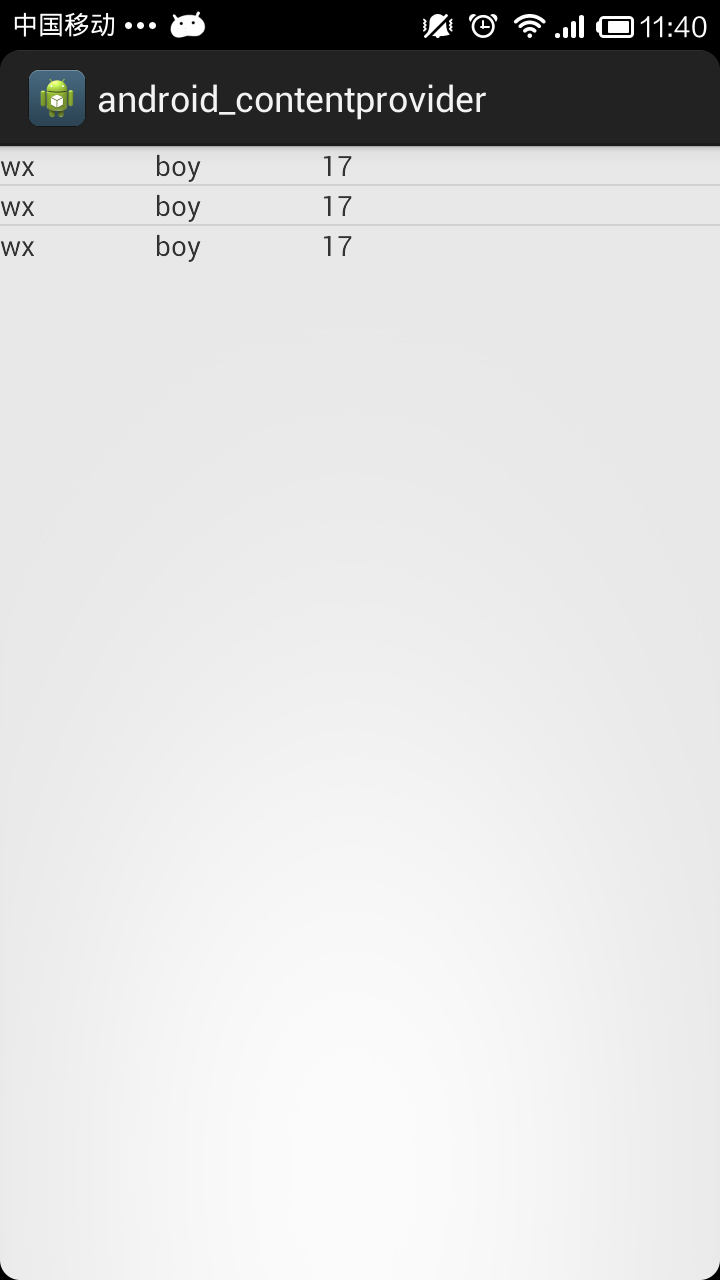
執行三次插入後的效果:
UriMatcher:對傳入的 URI 進行比對,決定要操作哪一張表、要對單筆還是多筆資料動手。
ContentUris:提供便捷方法產生帶 ID 的 URI,例如 withAppendedId 與 parseId。
ContentProvider 是四大元件之一,寫的時候應該同步補上單元測試,才能確定 CRUD 行為正確。
使用單元測試的前置設定:
1)加入 instrumentation(固定寫法,也可由 ADT 精靈產生):
 <instrumentation android:name="android.test.InstrumentationTestRunner"
    android:targetPackage="com.example.android_contentprovider" >
</instrumentation>
2)加入 uses-library(同樣是固定寫法):
<uses-library android:name="android.test.runner" />
MySQLiteOpenHelper
 package com.app.db;

import android.content.Context;
import android.database.sqlite.SQLiteDatabase;
import android.database.sqlite.SQLiteDatabase.CursorFactory;
import android.database.sqlite.SQLiteOpenHelper;

public class MySQLiteOpenHelper extends SQLiteOpenHelper {

    private static String DB_NAME = "test.db3";
    private static int VERSION = 1;

    public MySQLiteOpenHelper(Context context) {
        super(context, DB_NAME, null, VERSION);
    }

    @Override
    public void onCreate(SQLiteDatabase db) {
        String create_student = "create table student("
                + "_id integer primary key autoincrement,"
                + "name varchar(10),age integer,gender varchar(10))";
        db.execSQL(create_student);
        // 千萬不要在這裡呼叫 db.close()
    }

    @Override
    public void onUpgrade(SQLiteDatabase arg0, int arg1, int arg2) {
    }
}
MyContentProvider
 package com.app.contentprovider;

import com.app.db.MySQLiteOpenHelper;

import android.content.ContentProvider;
import android.content.ContentUris;
import android.content.ContentValues;
import android.content.UriMatcher;
import android.database.Cursor;
import android.database.sqlite.SQLiteDatabase;
import android.net.Uri;
import android.util.Log;

public class MyContentProvider extends ContentProvider {

    MySQLiteOpenHelper helper = null;

    private static UriMatcher matcher = new UriMatcher(UriMatcher.NO_MATCH);
    private static final int student = 1;   // 單筆記錄
    private static final int students = 2;  // 多筆記錄

    static {
        matcher.addURI("com.app.wx", "student/#", student);
        matcher.addURI("com.app.wx", "student", students);
    }

    @Override
    public int delete(Uri uri, String selection, String[] selectionArgs) {
        SQLiteDatabase db = helper.getWritableDatabase();
        int action = matcher.match(uri);
        switch (action) {
            case student: {
                long id = ContentUris.parseId(uri);   // 取出單筆的 id
                String delete_id = "_id=" + id;
                if (selection != null) {
                    delete_id += " and " + selection;
                }
                db.delete("student", delete_id, selectionArgs);
                break;
            }
            case students:
                db.delete("student", selection, selectionArgs);
                break;
        }
        return 0;
    }

    /** 與 Intent 的 MIME 比對有關 */
    @Override
    public String getType(Uri uri) {
        int code = matcher.match(uri);
        switch (code) {
            case student:
                return "vnd.android.cursor.item/student_item";
            case students:
                return "vnd.android.cursor.dir/students";
            default:
                return null;
        }
    }

    @Override
    public Uri insert(Uri uri, ContentValues values) {
        SQLiteDatabase db = helper.getWritableDatabase();
        int action = matcher.match(uri);
        switch (action) {
            case students: {
                long id1 = db.insert("student", "_id", values);
                Log.i("--------", ContentUris.withAppendedId(uri, id1).toString());
                return ContentUris.withAppendedId(uri, id1);
            }
        }
        return null;
    }

    @Override
    public boolean onCreate() {
        helper = new MySQLiteOpenHelper(this.getContext());
        return true;
    }

    @Override
    public Cursor query(Uri uri, String[] projection, String selection,
            String[] selectionArgs, String orderBy) {
        SQLiteDatabase db = helper.getWritableDatabase();
        Cursor cursor = null;
        int action = matcher.match(uri);
        switch (action) {
            case students:
                cursor = db.query("student", projection, selection,
                        selectionArgs, null, null, orderBy);
                break;
        }
        return cursor;
    }

    @Override
    public int update(Uri uri, ContentValues values, String selection,
            String[] arg3) {
        int count = -1;
        SQLiteDatabase db = helper.getWritableDatabase();
        int action = matcher.match(uri);
        switch (action) {
            case student: {
                long id = ContentUris.parseId(uri);
                String id_selection = "_id=" + id;
                if (selection != null && !selection.equals("")) {
                    id_selection = id_selection + " and " + selection;
                }
                count = db.update("student", values, id_selection, arg3);
                break;
            }
        }
        return count;
    }
}
這個類別很長,但每個方法都是常見的 CRUD 樣板,真正的重點在 UriMatcher 的路徑比對與 ContentUris 的 id 解析。
 package com.app.contentprovider;

import android.content.ContentResolver;
import android.content.ContentValues;
import android.database.Cursor;
import android.net.Uri;
import android.test.AndroidTestCase;
import android.util.Log;

public class Test extends AndroidTestCase {

    public void insert() {
        ContentResolver resolver = this.getContext().getContentResolver();
        String str = "content://com.app.wx/student";
        ContentValues values = new ContentValues();
        values.put("name", "wzq");
        values.put("age", 18);
        values.put("gender", "boy");
        resolver.insert(Uri.parse(str), values);
    }

    public void update() {
        ContentResolver resolver = this.getContext().getContentResolver();
        String str = "content://com.app.wx/student/2";
        ContentValues values = new ContentValues();
        values.put("name", "哈哈");
        resolver.update(Uri.parse(str), values, null, null);
    }

    public void query() {
        ContentResolver resolver = this.getContext().getContentResolver();
        String str = "content://com.app.wx/student";
        Uri uri = Uri.parse(str);
        Cursor cursor = resolver.query(uri,
                new String[] { "_id", "name", "age", "gender" },
                null, null, "_id desc");
        Log.d("------count", cursor.getCount() + "");
    }

    public void delete() {
        ContentResolver resolver = this.getContext().getContentResolver();
        String str = "content://com.app.wx/student/2";
        Uri uri = Uri.parse(str);
        resolver.delete(uri, null, null);
    }
}
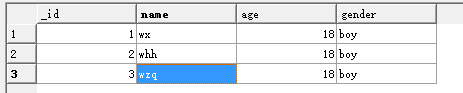
執行 insert(三次)之後:
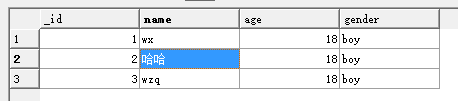
執行 update 之後:
執行 query 之後:

執行 delete 之後:

selection 與 values 字串拼接在一起當條件,這顯然是筆誤,正確應是 id_selection + " and " + selection,並把 selectionArgs 正確傳入。這也說明了為什麼 CRUD 一定要有測試覆蓋。values 做 insert,並回傳带 ID 的 URI,這樣呼叫方才拿得到新資料的位置。android:exported;而對外開放資料時,建議搭配 android:grantUriPermissions 與 FileProvider 做最小權限的臨時授權。以上就是 ContentProvider 從基本用法、UriMatcher 路由到單元測試的完整說明,希望對大家有所幫助。
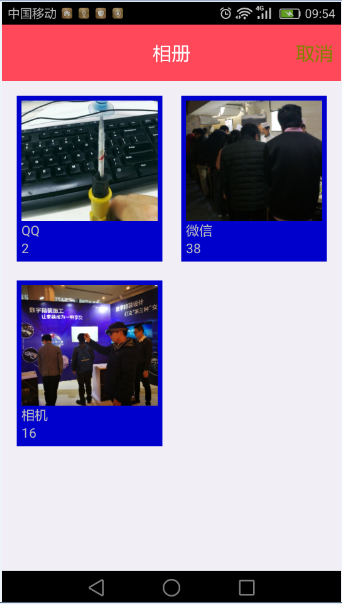 仿微信的圖片拍攝與選擇界面實現
插件運行後的畫面如下: 下圖按照片來源進行篩選(分別來自QQ、微信和相機): 點擊某個文件夾後,可以查看該文件夾下的所有圖片: 圖片選擇界面: 選中後會
 Android 界面編程:導航欄與菜單(六)
2.7 導航欄與菜單 2.7.1 ActionBar ActionBar 是 Android 3.0(API 11)起加入的新特性,位於 Activity 視窗的頂部,
 Android 背景圖拖曳手勢實作:從手勢監聽到畫面位移
讓背景圖可以被拖動為背景圖加入移動手勢,常見於互動式封面、拼圖或簡單的遊戲物件。核心概念是監聽使用者的拖曳,再把位移量套用到 View 的位置。原始示例以 iOS 的 U
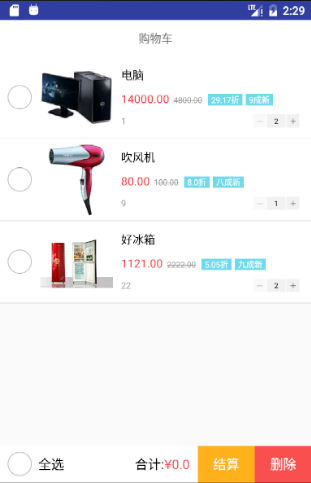 Android 購物車功能實作:清單渲染、全選單選與結算刪除
最近在商城 App 中實作了「購物車」這個常見模組,把過程與關鍵程式碼記錄下來。 效果與需求 核心需求可以拆成四塊:商品清單渲染、單品勾選與數量增減、全選與單選的狀