

編輯:關於 Android 程式設計
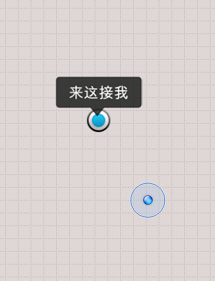
本文要實現的效果是:使用百度地圖先自動定位到當前起始位置(以小圓點標示),並在手機移動時持續自動更新所在位置。
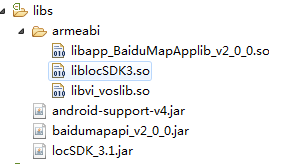
百度 API 不同版本在使用上略有差異,本例引入的類庫如下:
該類負責初始化 BMapManager、管理授權 Key,並統一處理常見的網路錯誤與授權驗證錯誤。
public class MyApplication extends Application { static MyApplication myApplication; BMapManager mBMapManager = null; String mStrKey = "7ZfuRcOx1G3oZ8TKuTNGm4sO"; boolean m_bKeyRight = true; // 授權Key正確,驗證通過 private List<Activity> activityList = new LinkedList<Activity>(); @Override public void onCreate() { myApplication = this; initEngineManager(this); super.onCreate(); } public void initEngineManager(Context context) { if (mBMapManager == null) { mBMapManager = new BMapManager(context); Toast.makeText(MyApplication.getInstance().getApplicationContext(), "BMapManager 初始化SUCSUC!", Toast.LENGTH_LONG).show(); } if (!mBMapManager.init(mStrKey, new MyGeneralListener())) { Toast.makeText(MyApplication.getInstance().getApplicationContext(), "BMapManager 初始化錯誤!", Toast.LENGTH_LONG).show(); } } public static MyApplication getInstance() { if (myApplication == null) { myApplication = new MyApplication(); } return myApplication; } public void addActivity(Activity activity) { activityList.add(activity); } public void exit() { for (Activity activity : activityList) { activity.finish(); } System.exit(0); } // 常用事件監聽,用來處理通常的網絡錯誤,授權驗證錯誤等 static class MyGeneralListener implements MKGeneralListener { public void onGetNetworkState(int iError) { if (iError == MKEvent.ERROR_NETWORK_CONNECT) { Toast.makeText( MyApplication.getInstance().getApplicationContext(), "您的網絡出錯啦!", Toast.LENGTH_LONG).show(); } else if (iError == MKEvent.ERROR_NETWORK_DATA) { Toast.makeText( MyApplication.getInstance().getApplicationContext(), "輸入正確的檢索條件!", Toast.LENGTH_LONG).show(); } // ... } public void onGetPermissionState(int iError) { if (iError == MKEvent.ERROR_PERMISSION_DENIED) { // 授權Key錯誤: Toast.makeText( MyApplication.getInstance().getApplicationContext(), "請輸入正確的授權Key!", Toast.LENGTH_LONG).show(); MyApplication.getInstance().m_bKeyRight = false; } } } }
主程式負責初始化地圖、啟動定位客戶端,並在位置更新時把經緯度回寫到地圖上。
public class MainActivity extends Activity { public MyApplication app; static MapView mMapView = null; public MKMapViewListener mMapListener = null; MyLocationOverlay myLocationOverlay = null; // 定位相關 LocationClient mLocClient; public NotifyLister mNotifyer = null; public MyLocationListenner myListener = new MyLocationListenner(); LocationData locData = null; private MapController mMapController = null; static MKSearch mkSerach; Handler mHandler = new Handler() { public void handleMessage(android.os.Message msg) { Toast.makeText(MainActivity.this, "msg:" + msg.what, Toast.LENGTH_SHORT).show(); }; }; static TextView showAddr; @Override protected void onCreate(Bundle savedInstanceState) { super.onCreate(savedInstanceState); setContentView(R.layout.activity_main); showAddr = (TextView) findViewById(R.id.showAddr); MyIcon mi = new MyIcon(this); //在屏幕中心點添加接我圖標 getWindow().addContentView( mi, new LayoutParams(LayoutParams.FILL_PARENT, LayoutParams.FILL_PARENT)); MyIcon2 m2 = new MyIcon2(this); getWindow().addContentView( m2, new LayoutParams(LayoutParams.FILL_PARENT, LayoutParams.FILL_PARENT)); mMapView = (MapView) findViewById(R.id.bmapsView); mMapController = mMapView.getController(); initMapView(); app = MyApplication.getInstance(); mLocClient = new LocationClient(this); mLocClient.registerLocationListener(myListener); //搜索初始化 mkSerach = new MKSearch(); mkSerach.init(app.mBMapManager, new MKSearchListener() { @Override public void onGetWalkingRouteResult(MKWalkingRouteResult arg0, int arg1) { // TODO Auto-generated method stub } @Override public void onGetTransitRouteResult(MKTransitRouteResult arg0, int arg1) { // TODO Auto-generated method stub } @Override public void onGetSuggestionResult(MKSuggestionResult arg0, int arg1) { // TODO Auto-generated method stub } @Override public void onGetPoiResult(MKPoiResult arg0, int arg1, int arg2) { // TODO Auto-generated method stub } @Override public void onGetPoiDetailSearchResult(int arg0, int arg1) { // TODO Auto-generated method stub } @Override public void onGetDrivingRouteResult(MKDrivingRouteResult arg0, int arg1) { // TODO Auto-generated method stub } @Override public void onGetBusDetailResult(MKBusLineResult arg0, int arg1) { // TODO Auto-generated method stub } @Override public void onGetAddrResult(MKAddrInfo info, int arg1) { showAddr.setText(info.strAddr); } }); //設置地圖相關 LocationClientOption option = new LocationClientOption(); option.setOpenGps(true); option.setCoorType("bd09ll"); option.setScanSpan(300000); mLocClient.setLocOption(option); mLocClient.start(); mMapView.getController().setZoom(16); mMapView.getController().enableClick(true); mMapView.displayZoomControls(true); mMapListener = new MKMapViewListener() { public void onMapMoveFinish() { } public void onClickMapPoi(MapPoi mapPoiInfo) { // TODO Auto-generated method stub String title = ""; if (mapPoiInfo != null) { title = mapPoiInfo.strText; Toast.makeText(MainActivity.this, title, Toast.LENGTH_SHORT) .show(); } } }; mMapView.regMapViewListener(MyApplication.getInstance().mBMapManager, mMapListener); myLocationOverlay = new MyLocationOverlay(mMapView); locData = new LocationData(); myLocationOverlay.setData(locData); mMapView.getOverlays().add(myLocationOverlay); myLocationOverlay.enableCompass(); mMapView.refresh(); } private void initMapView() { mMapView.setLongClickable(true); } /** * 監聽函數,又新位置的時候,格式化成字符串,輸出到屏幕中 */ public class MyLocationListenner implements BDLocationListener { public void onReceiveLocation(BDLocation location) { if (location == null) return; locData.latitude = location.getLatitude(); locData.longitude = location.getLongitude(); locData.direction = 2.0f; locData.accuracy = location.getRadius(); locData.direction = location.getDerect(); Log.d("loctest", String.format("before: lat: %f lon: %f", location.getLatitude(), location.getLongitude())); myLocationOverlay.setData(locData); mMapView.refresh(); mMapController .animateTo(new GeoPoint((int) (locData.latitude * 1e6), (int) (locData.longitude * 1e6)), mHandler .obtainMessage(1)); } public void onReceivePoi(BDLocation poiLocation) { if (poiLocation == null) { return; } } } public class NotifyLister extends BDNotifyListener { public void onNotify(BDLocation mlocation, float distance) { } } @Override protected void onPause() { mMapView.onPause(); super.onPause(); } @Override protected void onResume() { mMapView.onResume(); super.onResume(); } @Override protected void onSaveInstanceState(Bundle outState) { super.onSaveInstanceState(outState); mMapView.onSaveInstanceState(outState); } @Override protected void onRestoreInstanceState(Bundle savedInstanceState) { super.onRestoreInstanceState(savedInstanceState); mMapView.onRestoreInstanceState(savedInstanceState); } public static void getPosition(GeoPoint g) { mkSerach.reverseGeocode(g); showAddr.setText("獲取位置中..."); } }
對應的 XML 布局:
<LinearLayout xmlns:android="https://schemas.android.com/apk/res/android" xmlns:tools="https://schemas.android.com/tools" android:layout_width="fill_parent" android:layout_height="fill_parent" android:orientation="vertical" > <TextView android:id="@+id/showAddr" android:gravity="center" android:layout_width="fill_parent" android:layout_height="wrap_content" android:text="選擇地點" android:textSize="20dp" /> <com.baidu.mapapi.map.MapView android:id="@+id/bmapsView" android:layout_width="fill_parent" android:layout_height="fill_parent" android:clickable="true" /> </LinearLayout>
透過自定義的 MyIcon 與 MyIcon2 兩個 View,分別在 onDraw 中繪製中心點圖標與指示器圖標。
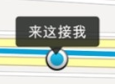
public class MyIcon extends View { public static int w; public static int h; public static Bitmap mBitmap; public MyIcon(Context context) { super(context); mBitmap = BitmapFactory.decodeResource(getResources(), R.drawable.me); } @Override protected void onDraw(Canvas canvas) { super.onDraw(canvas); w = this.getWidth() / 2 - mBitmap.getWidth() / 2; h = this.getHeight() / 2 - mBitmap.getHeight() / 2; canvas.drawBitmap(mBitmap, w, h, null); } } public class MyIcon2 extends View{ public static int w; public static int h; private Bitmap mBitmap; public MyIcon2(Context context) { super(context); mBitmap = BitmapFactory.decodeResource(getResources(), R.drawable.jiewo); } @Override protected void onDraw(Canvas canvas) { super.onDraw(canvas); w = this.getWidth() / 2 - mBitmap.getWidth() / 2; h = (this.getHeight() / 2 - mBitmap.getHeight() / 2) - ( MyIcon.mBitmap.getHeight()/2); canvas.drawBitmap(mBitmap, w, h, null); } }
以上就是基於百度地圖實現移動定位與自動追蹤的完整知識,希望對大家有所幫助。
 Android 入門基礎入門指南(一):從環境到佈局
一、歷史回顧 伴隨科技突飛猛進,我們已全面邁入 4G 時代,5G 時代也近在眼前。Android 版本迭代飛速,如今已走到 6.0。不時能看到手機深刻影響著當代生活的種種
 Android 樣式與主題入門:從 Style 到 Theme 的完整流程
寫 Android 時我們的注意力多半被功能牽著走,但介面和外觀的重要性完全不亞於功能。調整外觀大致有兩條路:一是直接在 XML 裡逐個修改 View 屬性;二是建立自訂
 Android 開發:仿微信傳送位置功能(百度地圖篇・前篇)
本文示範如何做出與微信「傳送位置」幾乎一致的效果:一張地圖、一個釘選的圖釘、一個可搜尋的清單,選好之後把經緯度與地址回傳給聊天頁面。專案架構沿用 MVP,並搭配自撰基礎
 Android 執行緒池詳解:從 ThreadPoolExecutor 參數到自訂 FIFO/LIFO 佇列
一、直接 new Thread 的問題 需要執行耗時任務時,最直覺的寫法是: new Thread(new Runnable() { @Override