

編輯:關於 Android 程式設計
方法一
InputMethodManager imm = (InputMethodManager) getSystemService(Context.INPUT_METHOD_SERVICE);
imm.showSoftInput(m_receiverView(接收軟鍵盤輸入的視圖 View), InputMethodManager.SHOW_FORCED(提供當前操作的標記,SHOW_FORCED 表示強制顯示));
方法二
InputMethodManager m=(InputMethodManager) getSystemService(Context.INPUT_METHOD_SERVICE); m.toggleSoftInput(0, InputMethodManager.HIDE_NOT_ALWAYS); (這個方法可以實現輸入法在窗口上切換顯示,如果輸入法在窗口上已經顯示,則隱藏,如果隱藏,則顯示輸入法到窗口上)
((InputMethodManager)getSystemService(INPUT_METHOD_SERVICE)).hideSoftInputFromWindow(WidgetSearchActivity.this.getCurrentFocus().getWindowToken(), InputMethodManager.HIDE_NOT_ALWAYS); (WidgetSearchActivity是當前的Activity)
InputMethodManager imm = (InputMethodManager)getSystemService(Context.INPUT_METHOD_SERVICE); boolean isOpen=imm.isActive(); isOpen若返回true,則表示輸入法打開
補充一:隱藏軟鍵盤
((InputMethodManager)getSystemService(INPUT_METHOD_SERVICE)).hideSoftInputFromWindow(WidgetSearchActivity.this.getCurrentFocus().getWindowToken(), InputMethodManager.HIDE_NOT_ALWAYS);
補充二:顯示軟鍵盤(控制項 ID 可以是 EditText、TextView 等)
((InputMethodManager)getSystemService(INPUT_METHOD_SERVICE)).showSoftInput(控件ID, 0);
補充三:不讓鍵盤自動彈出
帶有 EditText 的畫面在首次顯示時,往往會自動取得焦點並彈出鍵盤。如果不想讓它自動彈出,有兩種做法:
方法一:在 manifest 檔案中為對應的 Activity 設定
android:windowSoftInputMode="stateHidden" 或 android:windowSoftInputMode="stateUnchanged"。
方法二:在佈局中放一個隱藏的 TextView,並在 onCreate 時呼叫 requestFocus。
要注意的是,這個 TextView 不要設為 Visible=gone,否則會失效。也就是在佈局中放一個隱藏的 TextView,然後在 onCreate 時 requestFocus。
<TextView android:id="@+id/text_notuse" android:layout_width="wrap_content" android:layout_height="wrap_content" android:focusable="true" android:focusableInTouchMode="true" /> TextView textView = (TextView)findViewById(R.id.text_notuse); textView.requestFocus();
 Android App 耗電優化實戰指南
可能造成耗電的一些原因 網絡請求耗電,而且用手機數據網絡發 HTTP 請求比用無線網更耗電,因為數據網絡會調用一些底層硬件模塊,就像 GPS 一樣,一旦開啟就會啟動硬件模
 用原生 GridView 做一個九宮格功能頁
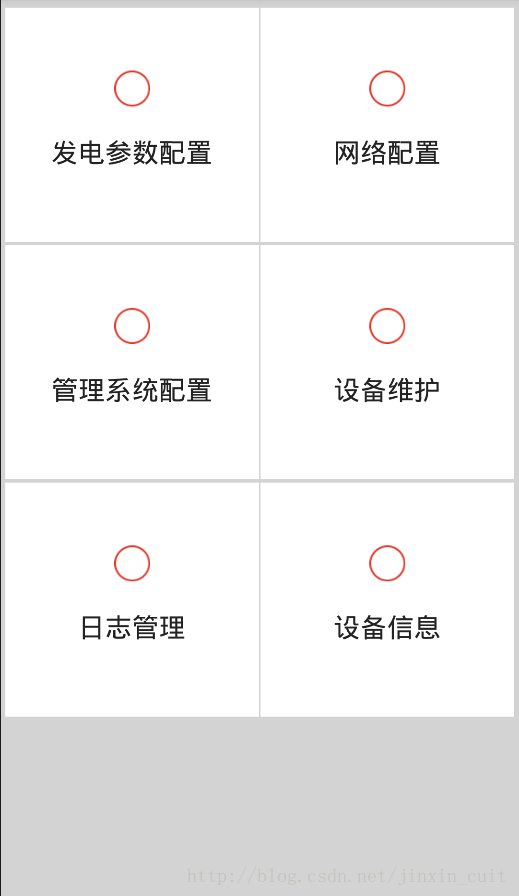
需求背景 新專案有個頁面要做成九宮格:每個 Item 上方一張圖片、下方一行文字說明,點擊後跳到對應的功能頁。與其去找第三方庫,不如直接用 Android 原生的 Gri
 MPAndroidChart 源碼系列(五):LineChart 實戰與繪製流程剖析
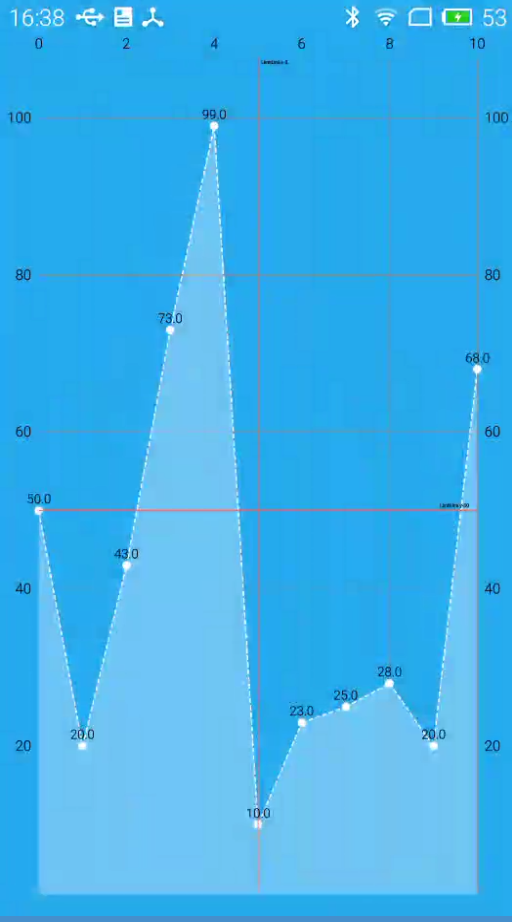
本篇聚焦 LineChart 的實戰用法,並對其關鍵源碼做簡單剖析。看源碼终究不如自己動手做一遍,建議邊看邊寫 Demo。 一、運行效果 有些屬性設定之後視覺效果並不
 Android Paint MaskFilter:BlurMaskFilter 與 EmbossMaskFilter 效果解析
MaskFilter 是 Paint 中用來處理邊緣與視覺效果的機制。常見的應用包含模糊與浮雕。本文整理 BlurMaskFilter 與 EmbossMaskFilte