

編輯:關於 Android 程式設計
在做錄音、語音輸入等應用時,往往需要實時獲取當前的音量分貝值,用於展示波形或音量條。這可以借助 MediaRecorder 的 getMaxAmplitude() 方法來實現。下面是完整代碼:
public class MediaRecorderDemo {
    private final String TAG = "MediaRecord";
    private MediaRecorder mMediaRecorder;
    public static final int MAX_LENGTH = 1000 * 60 * 10; // 最大錄音時長
    private String filePath;

    public MediaRecorderDemo(){
        this.filePath = "/dev/null";
    }

    public MediaRecorderDemo(File file) {
        this.filePath = file.getAbsolutePath();
    }

    private long startTime;
    private long endTime;

    /** 開始錄音,使用 amr 格式 */
    public void startRecord() {
        if (mMediaRecorder == null)
            mMediaRecorder = new MediaRecorder();
        try {
            // 設置音頻源為麥克風
            mMediaRecorder.setAudioSource(MediaRecorder.AudioSource.MIC);
            // 設置輸出格式
            mMediaRecorder.setOutputFormat(MediaRecorder.OutputFormat.DEFAULT);
            // 設置音頻編碼為 AMR_NB
            mMediaRecorder.setAudioEncoder(MediaRecorder.AudioEncoder.AMR_NB);

            mMediaRecorder.setOutputFile(filePath);
            mMediaRecorder.setMaxDuration(MAX_LENGTH);
            mMediaRecorder.prepare();
            mMediaRecorder.start();

            startTime = System.currentTimeMillis();
            updateMicStatus();
            Log.i("ACTION_START", "startTime" + startTime);
        } catch (IllegalStateException e) {
            Log.i(TAG, "call startAmr failed!" + e.getMessage());
        } catch (IOException e) {
            Log.i(TAG, "call startAmr failed!" + e.getMessage());
        }
    }

    /** 停止錄音 */
    public long stopRecord() {
        if (mMediaRecorder == null) return 0L;
        endTime = System.currentTimeMillis();
        mMediaRecorder.stop();
        mMediaRecorder.reset();
        mMediaRecorder.release();
        mMediaRecorder = null;
        Log.i("ACTION_LENGTH", "Time" + (endTime - startTime));
        return endTime - startTime;
    }

    private final Handler mHandler = new Handler();
    private Runnable mUpdateMicStatusTimer = new Runnable() {
        public void run() {
            updateMicStatus();
        }
    };

    private int BASE = 1;
    private int SPACE = 100; // 間隔取樣時間(毫秒)

    /** 更新話筒狀態 */
    private void updateMicStatus() {
        if (mMediaRecorder != null) {
            double ratio = (double) mMediaRecorder.getMaxAmplitude() / BASE;
            double db = 0; // 分貝
            if (ratio > 1) db = 20 * Math.log10(ratio);
            Log.d(TAG, "分貝值:" + db);
            mHandler.postDelayed(mUpdateMicStatusTimer, SPACE);
        }
    }
}
關鍵在於定時調用 getMaxAmplitude() 拿到當前最大振幅,再通過 20*log10(振幅/參考值) 的公式換算成分貝,就能實時得到音量大小了。
 React Native 環境建置筆記:Mac 與 Android 篇
本文記錄在 Mac 上建置 React Native Android 開發環境的流程,包含 Homebrew、Node.js、React Native CLI、Andro
 自定義相機加貼紙實戰:SurfaceView 截圖難題的破解思路
想做的效果 替自己的 App 裝一台相機,是個頗有性價比的功能。想像一下:預覽畫面開著,臉上即時疊上一對卡通眼睛或一段趣味標籤,按下快門,一張已經合成好的照片直接生成,順
 用自訂 ListView 打造 QQ 風格聯繫人列表
本文示範如何用自訂的 Adapter 實作一個類似 QQ 的聯繫人列表:每一行有頭像、暱稱與簽名,點擊頭像還會跳出提示。相較系統的 SimpleAdapter,自訂 Ad
 自定義 View 繪製水波載入進度條的完整實作
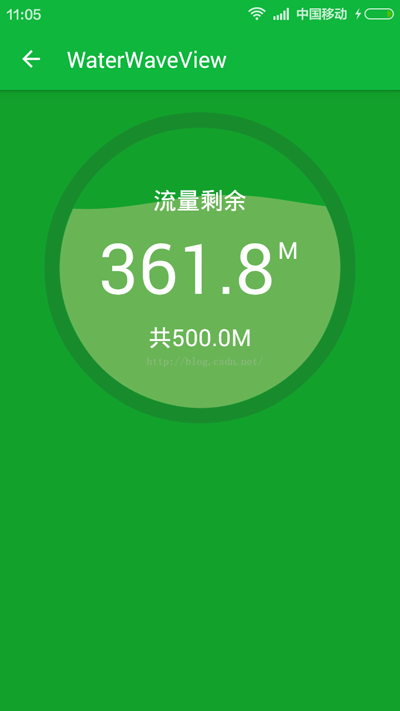
水波式的進度顯示比傳統的環形或線性進度條更有畫面感,常用於流量監控、電量顯示這類場景。本文示範如何只用 Canvas 與 Path 完成一個會自動橫向流動的水波元件。