

編輯:關於 Android 程式設計
在 Android 开发中,读取本地文本文件(尤其是包含中文的内容)是常见需求。中文涉及编码问题,稍有不慎就会出现乱码。本文将系统梳理读取中文文件的多种方法,以及 Android 中各类文件读写的实现方式。
private String readUserAgreementFromAsset(String assetName) {
    String content = "";
    try {
        InputStream is = getAssets().open(assetName);
        if (is != null) {
            DataInputStream dIs = new DataInputStream(is);
            int length = dIs.available();
            byte[] buffer = new byte[length];
            dIs.read(buffer);
            content = EncodingUtils.getString(buffer, "UTF-8");
            is.close();
        }
    } catch (IOException e) {
        e.printStackTrace();
    }
    return content;
}先逐行读取并加上换行符,最后用 StringBuilder 拼接成完整字符串。
A. 先读取再转码 UTF-8:
private String readUserAgreementFromAsset(String assetName) {
    StringBuilder sb = new StringBuilder("");
    String content = "";
    try {
        InputStream is = getAssets().open(assetName);
        if (is != null) {
            BufferedReader d = new BufferedReader(new InputStreamReader(is));
            while (d.ready()) {
                sb.append(d.readLine() + "\n");
            }
            content = EncodingUtils.getString(sb.toString().getBytes(), "UTF-8");
            is.close();
        }
    } catch (IOException e) {
        e.printStackTrace();
    }
    return content;
}
B. 在 InputStreamReader 中直接指定 UTF-8 编码读取:
private String readUserAgreementFromAsset(String assetName) {
    StringBuilder sb = new StringBuilder("");
    String content = "";
    try {
        InputStream is = getAssets().open(assetName);
        if (is != null) {
            BufferedReader d = new BufferedReader(new InputStreamReader(is, "UTF-8"));
            while (d.ready()) {
                sb.append(d.readLine() + "\n");
            }
            content = sb.toString();
            is.close();
        }
    } catch (IOException e) {
        e.printStackTrace();
    }
    return content;
}
此外,UTF-8 转码也可以用 new String(buffer, "utf-8") 来完成。
把 license.txt 的内容放进 string 资源里:
<string name="license_content">用户协议
\n
一、服务条款的确认和接纳
\n…
</string>
需要注意的是,string 里需要手动加上 \n 作为换行符,原 txt 文件里的换行符在读取 string 后是无效的。
因为汉字可能被截断,导致 4096 倍数附近的中文出现乱码,所以这种做法不可取。
private String readUserAgreementFromAsset(String assetName) {
    StringBuilder sb = new StringBuilder("");
    String content = "";
    try {
        InputStream is = getAssets().open(assetName);
        if (is != null) {
            DataInputStream dIs = new DataInputStream(is);
            byte[] buffer = new byte[1024 * 4];
            int length = 0;
            while ((length = dIs.read(buffer)) > 0) {
                content = EncodingUtils.getString(buffer, 0, length, "UTF-8");
                sb.append(content);
            }
            is.close();
        }
    } catch (IOException e) {
        e.printStackTrace();
    }
    return sb.toString();
}String res = "";
try {
InputStream in = getResources().openRawResource(R.raw.test);
int length = in.available();
byte[] buffer = new byte[length];
in.read(buffer);
res = EncodingUtils.getString(buffer, "UTF-8"); // 选择合适的编码,否则会乱码
in.close();
} catch (Exception e) {
e.printStackTrace();
}与 raw 文件夹类似,只是获取方式改为:
InputStream is = getAssets().open("test.txt");使用 openFileOutput 写文件:
public void writeFileData(String fileName, String message) {
    try {
        FileOutputStream fout = openFileOutput(fileName, MODE_PRIVATE);
        byte[] bytes = message.getBytes();
        fout.write(bytes);
        fout.close();
    } catch (Exception e) {
        e.printStackTrace();
    }
}
使用 openFileInput 读文件:
public String readFileData(String fileName) {
    String str = "";
    try {
        FileInputStream fin = openFileInput(fileName);
        int length = fin.available();
        byte[] bytes = new byte[length];
        fin.read(bytes);
        str = EncodingUtils.getString(bytes, "UTF-8");
        fin.close();
    } catch (Exception e) {
        e.printStackTrace();
    }
    return str;
}使用 FileOutputStream 写文件:
public void writeFile2Sdcard(String fileName, String message) {
    try {
        FileOutputStream fout = new FileOutputStream(fileName);
        byte[] bytes = message.getBytes();
        fout.write(bytes);
        fout.close();
    } catch (Exception e) {
        e.printStackTrace();
    }
}
使用 FileInputStream 读文件:
public String readFileFromSdcard(String fileName) {
    String res = "";
    try {
        FileInputStream fin = new FileInputStream(fileName);
        int length = fin.available();
        byte[] buffer = new byte[length];
        fin.read(buffer);
        res = EncodingUtils.getString(buffer, "UTF-8");
        fin.close();
    } catch (Exception e) {
        e.printStackTrace();
    }
    return res;
}
掌握这几种读取方式,就能应对绝大多数本地文件操作场景了。选择哪种方法,关键看文件大小、编码格式以及对性能的要求。
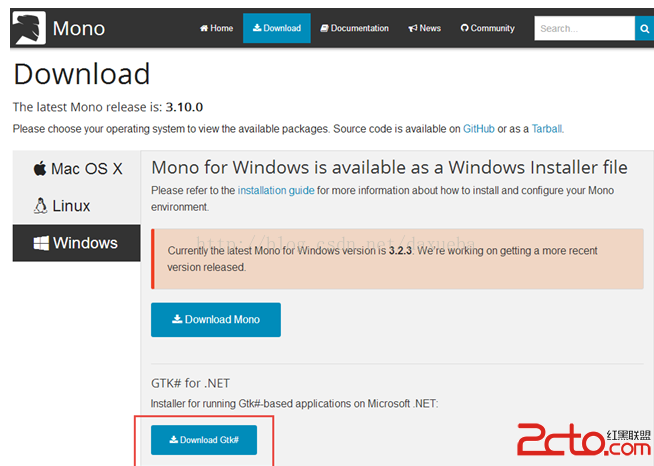 Xamarin Android 開發教程——下載與安裝 Xamarin 全流程
Xamarin Android 開發教程之下載安裝 Xamarin 早期版本的 Xamarin 在安裝時會檢查系統中是否已具備前置環境,而後來的版本則只提供安裝步驟引導,
 Android 塗鴉與刮刮樂實作解析:Canvas 與觸摸事件的妙用
概述 一直很想研究一下 Android 中的塗鴉功能。說「研究」其實有點誇張,因為它靠的都是一些相對基礎的知識點。下面就用畫布(Canvas)搭配觸摸事件(onTouch
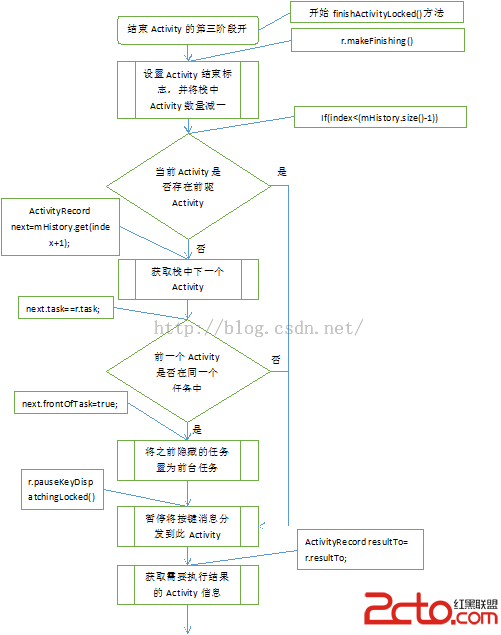 深入四大組件(八):ActivityManagerService 如何結束一個 Activity
啟動 Activity 的流程已經梳理過,那反過來——當我們呼叫 finish() 時,ActivityManagerService 到底做了哪些事?本文分兩部分:結束
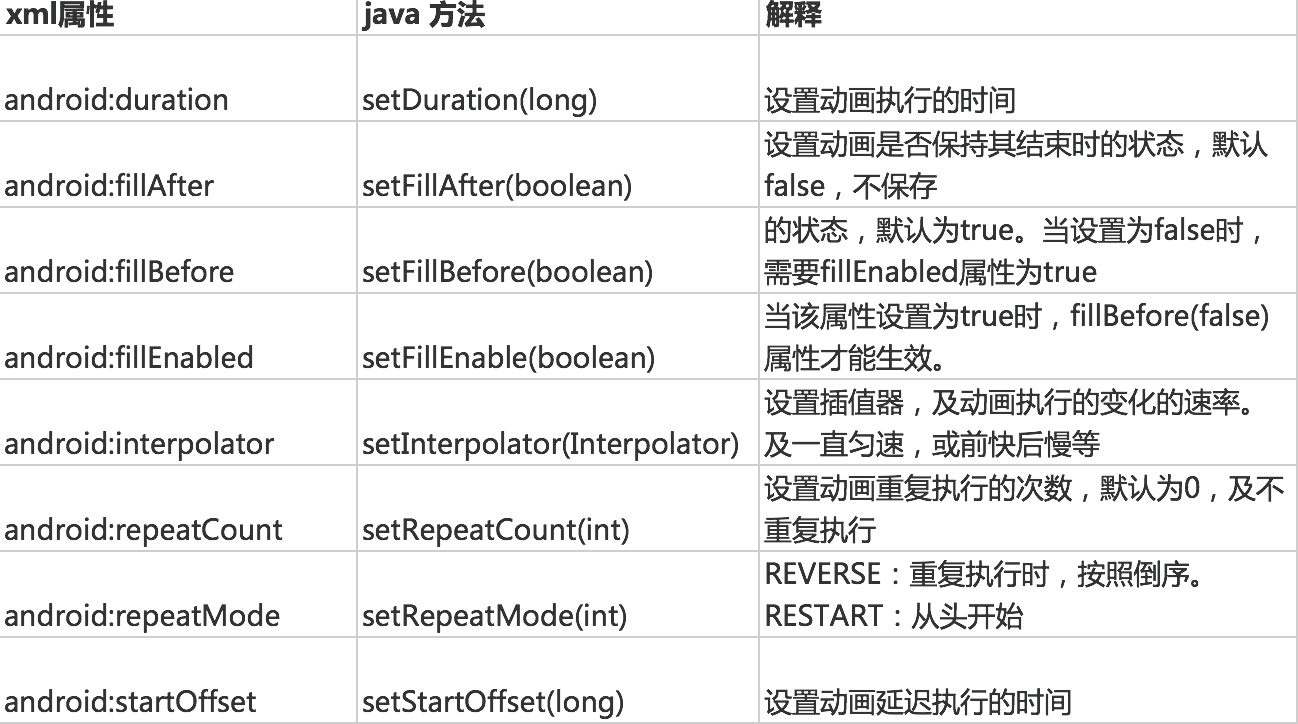 Android 動畫全解:變換動畫、幀動畫與佈局動畫
面試中經常被問到的一個問題是:Android 一共有哪幾類動畫?先記住這份清單——變換動畫(透明度、縮放、平移、旋轉)、逐幀動畫、佈局動畫、屬性動畫。 一、變換動畫(V