

編輯:關於 Android 程式設計
OOM 全名為 OutOfMemoryError,代表應用程式嘗試配置記憶體時,可用空間不足。在 Android 中,OOM 常與記憶體洩漏、圖片載入過多、物件重複建立等因素有關。
Cursor、InputStream、OutputStream、Bitmap 等資源若使用後未釋放,可能造成記憶體持續占用。建議在 finally 區塊中關閉串流,或在 Activity 結束時回收不再使用的資源。
非靜態內部類會隱式持有外部類別參考。若內部類生命週期長於 Activity,例如 Handler、AsyncTask 或執行緒,就可能延遲 Activity 回收,造成記憶體洩漏。
Activity 的 Context 生命週期較短,不適合被長時間保存。若非必要,可優先使用 Application Context。若需要與 Activity 生命週期綁定,則應避免靜態變數或長效快取持有 Activity。
Bitmap 是 Android 記憶體消耗的大宗。載入高解析度圖片前,若未進行縮放或壓縮,很容易造成 OOM。
常用方式包括設定 inSampleSize 縮放比例,以及選擇合適的解碼格式。載入圖片前,可先透過 inJustDecodeBounds 讀取圖片尺寸,再決定是否縮放。
BitmapFactory.Options options = new BitmapFactory.Options();
options.inJustDecodeBounds = true;
BitmapFactory.decodeResource(getResources(), R.drawable.sample, options);

int imageHeight = options.outHeight;
int imageWidth = options.outWidth;
取得原始尺寸後,可依目標顯示大小計算 inSampleSize。
public static int calculateInSampleSize(
        BitmapFactory.Options options,
        int reqWidth,
        int reqHeight) {

    final int height = options.outHeight;
    final int width = options.outWidth;
    int inSampleSize = 1;

    if (height > reqHeight) {
        final int heightRatio = Math.round((float) height / (float) reqHeight);
        final int widthRatio = Math.round((float) width / (float) reqWidth);
        inSampleSize = heightRatio;
    }

    return inSampleSize;
}
第二次解析時,將 inJustDecodeBounds 設為 false,並套用計算後的 inSampleSize,即可得到縮放後的 Bitmap。
public static Bitmap decodeSampledBitmapFromResource(
        Resources res,
        int resId,
        int reqWidth,
        int reqHeight) {

    final BitmapFactory.Options options = new BitmapFactory.Options();
    options.inJustDecodeBounds = true;
    BitmapFactory.decodeResource(res, resId, options);

    options.inSampleSize = calculateInSampleSize(options, reqWidth, reqHeight);
    options.inJustDecodeBounds = false;

    return BitmapFactory.decodeResource(res, resId, options);
}
在 ListView、GridView 或 ViewPager 等大量使用圖片的畫面中,LruCache 能有效減少重複載入。它會保存最近使用的物件,並在快取接近上限時移除最久未使用的項目。
private LruCache memoryCache;

@Override
protected void onCreate(Bundle savedInstanceState) {
    super.onCreate(savedInstanceState);

    int maxMemory = (int) (Runtime.getRuntime().maxMemory() / 1024);
    int cacheSize = maxMemory / 8;

    memoryCache = new LruCache(cacheSize) {
        @Override
        protected int sizeOf(String key, Bitmap bitmap) {
            return bitmap.getByteCount() / 1024;
        }
    };
}
快取大小不宜無限擴大。通常可從可用記憶體的一定比例開始嘗試,再依實際效能與 OOM 狀況調整。
OOM 並非單一原因造成,而是記憶體管理、資源釋放與圖片處理等多重因素綜合的結果。若能掌握 Bitmap 壓縮、快取策略與生命週期管理,就能大幅降低 Android 應用發生 OOM 的機率。
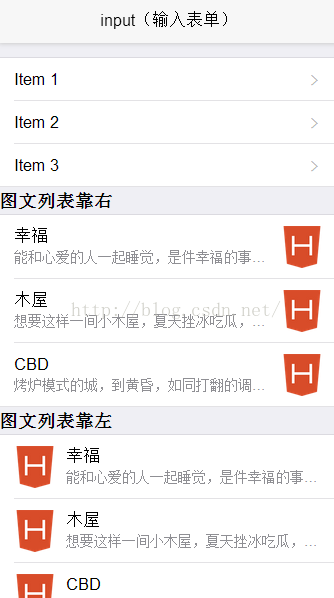 MUI組件詳解(三):列表、遮罩蒙版、數字輸入框、側滑導航與彈出菜單
本篇聚焦MUI的五個常用組件:列表、遮罩蒙版、數字輸入框、側滑導航和彈出菜單,逐一說明其結構與用法。 一、List(列表) 列表是最常用的UI控件之一。MUI封裝的列表很
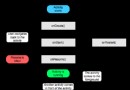 Android Activity 生命週期深度整理:從 onCreate 到 onDestroy 的完整流程
Activity 是 Android 應用中最常見的介面容器,其生命週期由系統統一調度。開發者不需要手動建立或銷毀 Activity,只要覆寫合適的 callback,就
 Android 中使用 DownloadManager 下載並安裝 APK
DownloadManager 是 Android 提供的系統下載服務,適合處理長時間的 HTTP 下載。它會在背景執行下載,並處理失敗重試、網路切換與重新開機後的續傳情
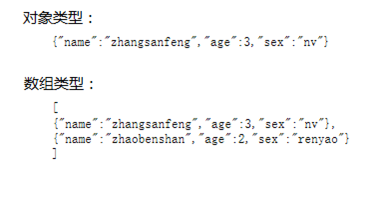 JSON 解析與 XML 解析對比:結構、流程與適用場景
JSON 和 XML 是移動端最常見的兩種數據交換格式,目前 JSON 的佔有率明顯更高。本文在 Android 環境下對兩者的解析方式做一組對照,幫助你在接口對接時做出