

編輯:關於 Android 程式設計
專案裡需要一個類似「跑馬燈公告」的元件,但手上現成的開源控件幾乎都只支援單行顯示。需求卻是多行、每頁顯示數條、定時往上翻。既然找不到合適的,就自己動手做一個——順便補上一直想練的自訂 View。
最終在既有思路上加了幾件事:數據分頁顯示、每條文字前面可掛 Left Drawable、手指按下時暫停滾動、以及 3D 翻轉動畫。

整個元件的骨架是一個 FrameLayout,內部放多個 LinearLayout,每個 LinearLayout 代表「一頁」,頁內再放若干 TextView。切頁的方式不是捲動,而是讓舊頁淡出、新頁淡入,並額外提供一組 3D 旋轉動畫作為翻牌效果。
滾動的驅動靠 Handler。用一個 Runnable 不斷 postDelayed 自己,每次執行就把當前頁設為 INVISIBLE、頁碼加一(到底則歸零)、顯示下一頁,然後排下一次。觸摸事件回傳時暫停排程,抬手後恢復,這樣使用者手指按在公告上時不會被換頁打斷閱讀。
public class RollingView extends FrameLayout implements OnClickListener {

    private static final int ANIMATION_DURATION = 1000;

    private long mDuration = 3000;              // 換頁間隔
    private int mTextColor = 0xff000000;
    private int mClickColor = 0xff0099ff;
    private float mTextSize = 14;
    private int mTextPadding = 10;

    private Paint mPaint;
    private int mPageSize = 3;                  // 每頁幾條
    private int mUpLimited = mPageSize;
    private int mCurrentPage = 0;
    private int mPageCount;

    private int mLeftDrawable;                  // 每條前面的小圖示
    private List<LinearLayout> mRollingPages;

    private AnimationSet mEnterAnimSet;
    private AnimationSet mExitAnimSet;
    private RollingRunnable mRunnable;
    private Handler mHandler;
    private OnItemClickListener mClickListener;

    private LayoutParams mFrameParams;
    private LinearLayout.LayoutParams mLinearParams;

    private Rotate3dAnimation mEnterDownAnim;
    private Rotate3dAnimation mExitUpAnim;
    private Rotate3dAnimation mEnterUpAnim;
    private Rotate3dAnimation mExitDownAnim;

    public RollingView(Context context, AttributeSet attrs) {
        super(context, attrs);

        TypedArray array = getContext().obtainStyledAttributes(
                attrs, R.styleable.RollingView);
        mTextSize = array.getDimension(R.styleable.RollingView_textSize, mTextSize);
        mTextColor = array.getColor(R.styleable.RollingView_textColor, mTextColor);
        array.recycle();

        createEnterAnimation();
        createExitAnimation();

        mPaint = new TextPaint();
        mHandler = new Handler(Looper.getMainLooper());

        mEnterDownAnim = createAnim(-90, 0, true, true);
        mExitUpAnim    = createAnim(0, 90, false, true);
        mEnterUpAnim   = createAnim(90, 0, true, false);
        mExitDownAnim  = createAnim(0, -90, false, false);
    }

    private Rotate3dAnimation createAnim(float start, float end,
                                        boolean turnIn, boolean turnUp) {
        final Rotate3dAnimation rotation =
                new Rotate3dAnimation(start, end, turnIn, turnUp);
        rotation.setDuration(300);
        rotation.setFillAfter(false);
        rotation.setInterpolator(new AccelerateInterpolator());
        return rotation;
    }
}
setRollingText() 是對外的主要入口。它先用商與餘數算出總頁數,逐頁建立容器,最後一頁只放剩下的不足一頁的條數:
public void setRollingText(List<String> array) {
    if (array == null || array.isEmpty()) return;

    this.removeAllViews();
    if (mRollingPages == null) {
        mRollingPages = new ArrayList<>();
    }
    mRollingPages.clear();

    int quotient = array.size() / mPageSize;
    int remainder = array.size() % mPageSize;
    mPageCount = remainder == 0 ? quotient : quotient + 1;

    for (int i = 0; i < mPageCount; i++) {
        LinearLayout container = createContainer();
        if (i == mPageCount - 1) {
            mUpLimited = remainder == 0 ? mPageSize : remainder;
        }
        for (int n = 0; n < mUpLimited; n++) {
            TextView textView = createTextView(array.get(mPageSize * i + n));
            container.addView(textView);
        }
        mRollingPages.add(container);
        this.addView(container);
    }

    mCurrentPage = 0;
    mRollingPages.get(mCurrentPage).setVisibility(VISIBLE);
    setVisibility(mRollingPages.get(mCurrentPage));
}
每條文字建立時,初始設為 INVISIBLE,等輪到該頁才由 setVisibility() 逐一顯影。單行加上 TextUtils.TruncateAt.END 避免文字撐破版面,Left Drawable 則透過 setCompoundDrawables() 掛上並以 setBounds() 指定 10×10 的顯示尺寸。
public class RollingRunnable implements Runnable {
    @Override
    public void run() {
        LinearLayout currentView = mRollingPages.get(mCurrentPage);
        currentView.setVisibility(INVISIBLE);
        if (mExitAnimSet != null) {
            currentView.startAnimation(mExitAnimSet);
        }

        mCurrentPage++;
        if (mCurrentPage >= mPageCount) {
            mCurrentPage = 0;
        }

        LinearLayout nextView = mRollingPages.get(mCurrentPage);
        nextView.setVisibility(VISIBLE);
        setVisibility(nextView);
        if (mEnterAnimSet != null) {
            nextView.startAnimation(mEnterAnimSet);
        }

        mHandler.postDelayed(this, mDuration);
    }
}

@Override
public boolean onTouchEvent(MotionEvent event) {
    switch (event.getAction()) {
        case MotionEvent.ACTION_DOWN:
            pause();
            break;
        case MotionEvent.ACTION_MOVE:
        case MotionEvent.ACTION_UP:
        case MotionEvent.ACTION_CANCEL:
            resume();
            break;
    }
    return true;
}

public void resume() {
    if (mPageCount < 1) return;
    if (mRunnable == null) {
        mRunnable = new RollingRunnable();
    } else {
        mHandler.removeCallbacks(mRunnable);
    }
    mHandler.postDelayed(mRunnable, mDuration);
}

public void pause() {
    if (mRunnable != null) {
        mHandler.removeCallbacks(mRunnable);
    }
}
翻牌效果靠自訂的 Rotate3dAnimation,本質上是用 Camera 做 X 軸旋轉,再依方向做平移,讓畫面看起來像卡片被翻過去:
public class Rotate3dAnimation extends Animation {
    private final float mFromDegrees;
    private final float mToDegrees;
    private final boolean mTurnIn;
    private final boolean mTurnUp;
    private float mCenterX;
    private float mCenterY;
    private Camera mCamera;

    public Rotate3dAnimation(float fromDegrees, float toDegrees,
                             boolean turnIn, boolean turnUp) {
        mFromDegrees = fromDegrees;
        mToDegrees = toDegrees;
        mTurnIn = turnIn;
        mTurnUp = turnUp;
    }

    @Override
    public void initialize(int width, int height, int parentWidth, int parentHeight) {
        super.initialize(width, height, parentWidth, parentHeight);
        mCamera = new Camera();
        mCenterY = getHeight() / 2;
        mCenterX = getWidth() / 2;
    }

    @Override
    protected void applyTransformation(float interpolatedTime, Transformation t) {
        float degrees = mFromDegrees + ((mToDegrees - mFromDegrees) * interpolatedTime);
        final Camera camera = mCamera;
        final Matrix matrix = t.getMatrix();
        final int direction = mTurnUp ? 1 : -1;

        camera.save();
        if (mTurnIn) {
            camera.translate(0.0f, direction * mCenterY * (interpolatedTime - 1.0f), 0.0f);
        } else {
            camera.translate(0.0f, direction * mCenterY * interpolatedTime, 0.0f);
        }
        camera.rotateX(degrees);
        camera.getMatrix(matrix);
        camera.restore();

        matrix.preTranslate(-mCenterX, -mCenterY);
        matrix.postTranslate(mCenterX, mCenterY);
    }
}
元件預設走淡入淡出的 mEnterAnimSet/mExitAnimSet,若想用翻牌效果,把 Runnable 裡呼叫的動畫換成 mEnterDownAnim/mExitUpAnim 即可,程式碼中已預留切換位置。
onMeasure() 裡刻意不把高度設成 textSize,而是取字型 metrics 的 bottom 減 top。原因是文字本身帶有上下行距,直接用字級當高度會讓版面顯得局促:
@Override
protected void onMeasure(int widthMeasureSpec, int heightMeasureSpec) {
    super.onMeasure(widthMeasureSpec, heightMeasureSpec);

    int exceptWidth = 300;
    int exceptHeight = 0;

    if (MeasureSpec.getMode(heightMeasureSpec) != MeasureSpec.EXACTLY) {
        if (mTextSize > 0) {
            mPaint.setTextSize(mTextSize);
            Paint.FontMetrics fontMetrics = mPaint.getFontMetrics();
            exceptHeight = (int) (fontMetrics.bottom - fontMetrics.top);
        }
    }

    setMeasuredDimension(
            resolveSize(exceptWidth, widthMeasureSpec),
            resolveSize(exceptHeight, heightMeasureSpec));
}
List<String> haowaiArray = new ArrayList<>();
haowaiArray.add("[母嬰天地] 買尿不濕送嬰兒手口濕巾");
haowaiArray.add("[利民商店] 滿100免費配送");
haowaiArray.add("[果之家] 泰國金枕榴蓮8元/kg");
haowaiArray.add("[戶外運動] 戶外運動專業裝備搜集");
haowaiArray.add("[天天特價] 只要9.9還包郵");
haowaiArray.add("[尖端潮品] 折疊電動車");
haowaiArray.add("[黑科技] 智能VR帶你裝13");
haowaiArray.add("[旅行必備] 太陽能充電寶-永不斷電");

mRollingView.setPageSize(4);
mRollingView.setClickColor(0xff888888);
mRollingView.setLeftDrawable(R.drawable.drawable_red_dot);
mRollingView.setRollingText(haowaiArray);
mRollingView.setOnItemClickListener(this);

@Override
public void onResume() {
    super.onResume();
    mRollingView.resume();
}

@Override
public void onPause() {
    super.onPause();
    mRollingView.pause();
}
最後一點提醒:Handler 的排程一定要在 onPause() 裡 pause() 掉。自訂 View 若持有 Handler 訊息卻沒在生命週期對應時機清除,頁面離開後仍會持續換頁,是常見的效能與記憶體問題來源。點擊回呼的部分也建議在 Activity 側做去抖,避免連續觸發。
 如何修改 Android 系統 Dialog 標題欄與分隔線的顏色
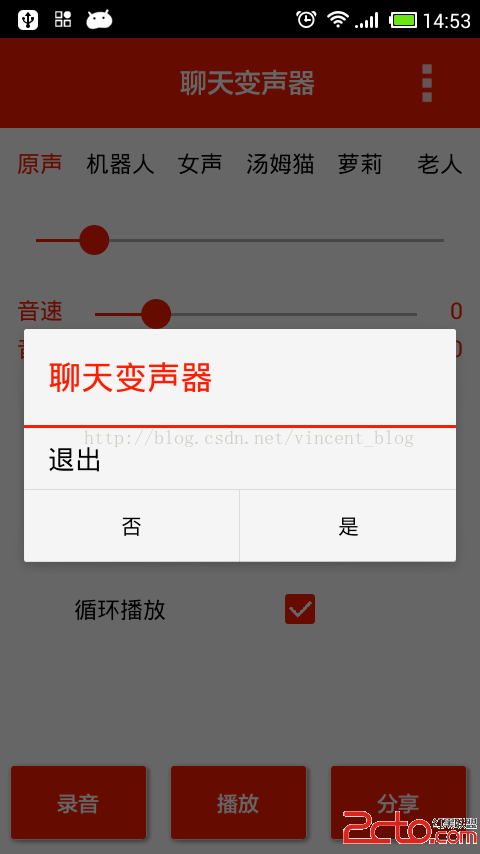
先來看效果。系統對話框的標題文字是藍色的,下面還有一根藍色的分隔線。做主題換膚時,這兩個顏色往往必須一起改;但又實在懶得為此定制一整套 Dialog,於是有了下面這個取巧
 安卓右鍵工具完整指南:反編譯、回編譯、簽名與 APK 資訊查詢一鍵完成
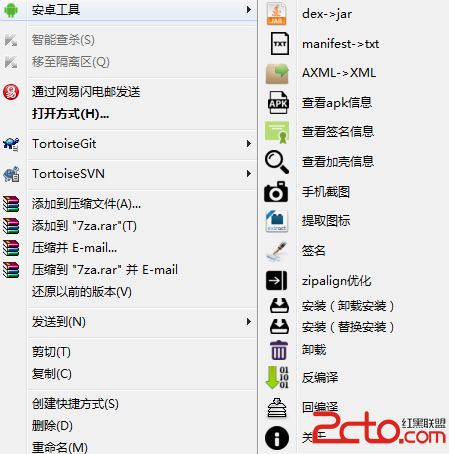
安卓右鍵工具把 APK 分析與修改中最常用的一堆瑣碎操作,全部整合進 Windows 的檔案總管右鍵選單:dex 轉 jar、二進位 XML 檢視、APK 資訊查詢、圖標
 微信帳號怎麼註銷?解綁、清空到卸載的四個步驟
微信裡的人越來越雜,被推銷、被拉群、被陌生人加好友,有些人乾脆想整個註銷掉。這裡要先說一個關鍵事實:騰訊的機制下,微信無法像手機號那樣真正註銷。你能做的是解除綁定、清空資
 Android 插件化學習筆記:Activity 啟動流程 Hook 入門
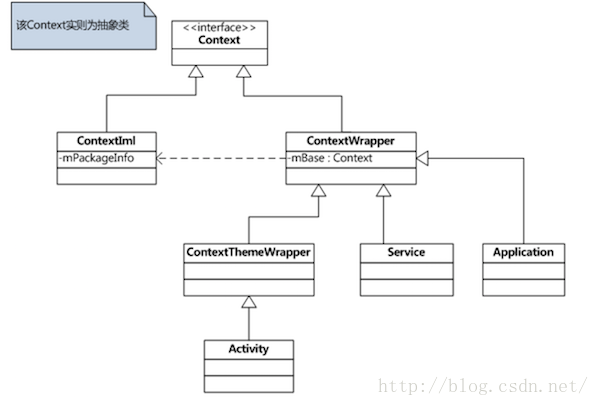
Android 插件化學習筆記:Activity 啟動流程 Hook 本文記錄在 Activity 自身跳轉中進行 Hook 的實作思路,重點在於理解 Context 繼