

編輯:關於 Android 程式設計
Fastboot 是 Android 預設的一種除錯方式,其優點在於可以於進入 Linux kernel 之前進行操作。本文說明如何在 Fastboot 中註冊並實作自訂命令。
Fastboot 預設支援的命令如下:
usage: fastboot [ <option> ] <command>
commands:
    update <filename>              reflash device from update.zip
    flashall                       flash boot + recovery + system
    flash <partition> [ <filename> ] write a file to a flash partition
    erase <partition>              erase a flash partition
    format <partition>             format a flash partition
    getvar <variable>              display a bootloader variable
    boot <kernel> [ <ramdisk> ]      download and boot kernel
    flash:raw boot <kernel> [ <ramdisk> ] create bootimage and flash it
    devices                        list all connected devices
    continue                       continue with autoboot
    reboot                         reboot device normally
    reboot-bootloader              reboot device into bootloader
    help                           show this help message
options:
    -w                 erase userdata and cache
    -u                 do not first erase partition before formatting
    -s <specific device> specify device serial number or path to device port
    -l                 with "devices", lists device paths
    -p <product>         specify product name
    -c <cmdline>         override kernel commandline
    -i <vendor id>       specify a custom USB vendor id
    -b <base_addr>       specify a custom kernel base address
    -n <page size>       specify the nand page size. default: 2048
    -S <size>[K|M|G]    automatically sparse files greater than size. 0 to disable
Fastboot 另外提供了擴充命令的機制,格式如下:
fastboot oem command args
以下以 fastboot oem hello test 為例,說明擴充的三個步驟。
在 bootable/bootloader/lk/app/mt_boot/fastboot.c 的 fastboot_init 函式中加入註冊:
// 第一個參數是命令的名稱
// 第二個參數是命令的執行函式
// 第三個參數表示在 security IC 中是否仍提供此命令
fastboot_register("oem hello", cmd_oem_hello, FALSE);
void cmd_oem_hello(const char *arg, void *data, unsigned size) {
    // 注意 args 是以 command 結束處開始,即 " args"
    if (!strncmp(arg, " OK", strlen(" OK"))) {
        fastboot_okey("OK");
    } else {
        fastboot_fail("Not OK");
    }
}
可使用以下三個已定義好的函式與 PC 端溝通:
fastboot_okey(const char* result);
fastboot_fail(const char* reason);
fastboot_info(const char* reason);
需特別注意,這三個函式所輸出的字串長度皆不可超過 64-1-4 = 59 個字元。
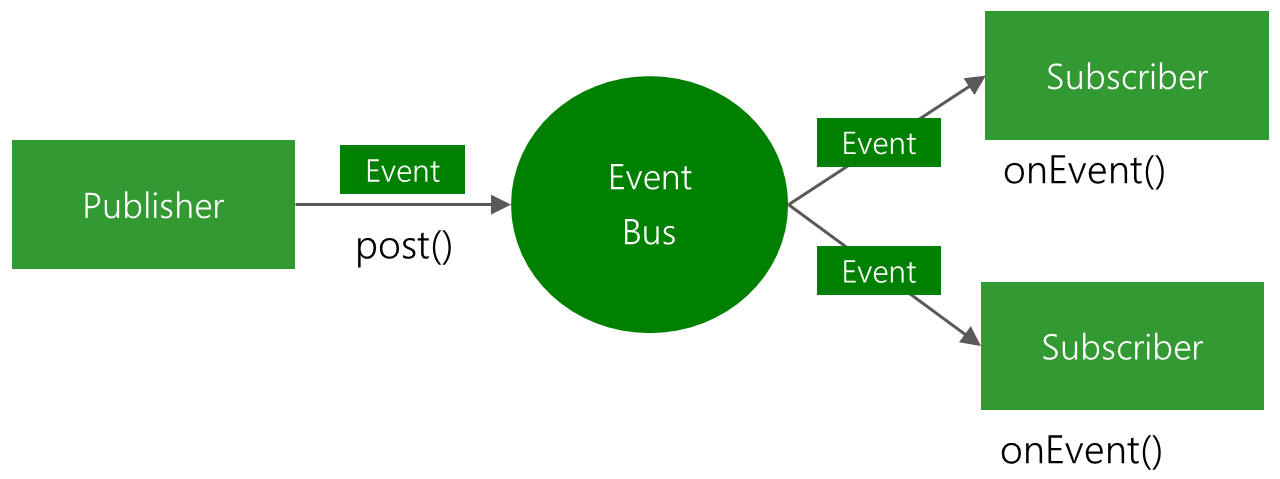 EventBus 源碼剖析:從註冊到事件分發的完整鏈路
上一篇我們走過了 EventBus 的基本用法,這次深入源碼,看看「事件總線」四個字背後到底做了什麼。開始之前先補一塊前置知識。 一、Java 反射機制速覽 定義:反射
 Android 透明狀態欄與導航欄設計:4.4 到 5.0 實作解析
自 Android 4.4 與 5.0 之後,越來越多應用會把狀態欄或導航欄設計成透明、半透明,或讓其顏色與 App 主題一致。這類效果能提升視覺完整性,但需要理解 An
 自訂 View 繪製多等級信號強度指示器
等級式狀態指示器在 Android 系統中隨處可見:手機右上角那個經典的電池圖示就是最典型的例子,電量不同會呈現不同的填滿比例,快沒電時有些機型還會閃爍提醒使用者充電。地
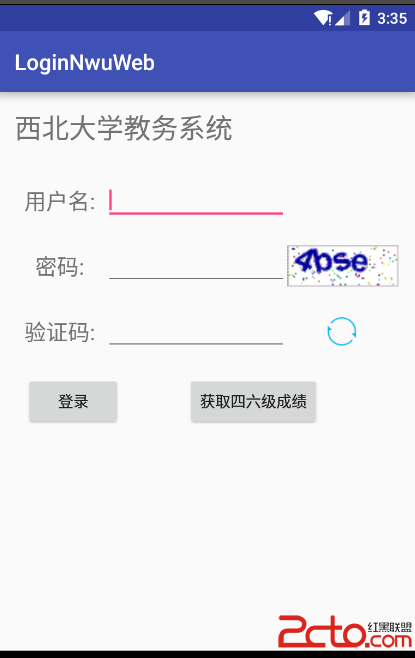 Android 登入客戶端實戰:驗證碼抓取、網頁資料解析與 HttpWatch 抓包
大家好,我是 M1ko。在這個處處都要連網的時代,一個完全沒有網路能力的 App 很難有長但它的生命週期,所以 Android 網路程式設計是每個開發者的必修課。我本身是