

編輯:關於 Android 程式設計
在 Android 應用中,如何控制螢幕軟鍵盤的彈出與收起,是一個實用但常被忽略的技巧。本文示範兩個常見操作:切換軟鍵盤的顯示狀態,以及強制隱藏輸入法鍵盤。核心都在於 InputMethodManager 這個系統服務。
package cc.c; import android.os.Bundle; import android.view.View; import android.view.View.OnClickListener; import android.view.inputmethod.InputMethodManager; import android.widget.Button; import android.widget.EditText; import android.app.Activity; import android.content.Context; /** * Demo描述: * 1 軟鍵盤狀態的切換 * 2 強制隱藏輸入法鍵盤 */ public class MainActivity extends Activity { private EditText mEditText; private Button mButton; private Context mContext; @Override protected void onCreate(Bundle savedInstanceState) { super.onCreate(savedInstanceState); setContentView(R.layout.main); init(); } private void init(){ mContext=this; mEditText=(EditText) findViewById(R.id.editText); mButton=(Button) findViewById(R.id.button); mButton.setOnClickListener(new OnClickListener() { @Override public void onClick(View v) { //toggleInput(mContext); hideInput(mContext,mEditText); } }); } /** * 切換軟鍵盤的狀態 * 如當前為收起變為彈出,若當前為彈出變為收起 */ private void toggleInput(Context context){ InputMethodManager inputMethodManager = (InputMethodManager)context.getSystemService(Context.INPUT_METHOD_SERVICE); inputMethodManager.toggleSoftInput(0, InputMethodManager.HIDE_NOT_ALWAYS); } /** * 強制隱藏輸入法鍵盤 */ private void hideInput(Context context,View view){ InputMethodManager inputMethodManager = (InputMethodManager)context.getSystemService(Context.INPUT_METHOD_SERVICE); inputMethodManager.hideSoftInputFromWindow(view.getWindowToken(), 0); } }
切換鍵盤狀態:透過 toggleSoftInput(0, InputMethodManager.HIDE_NOT_ALWAYS),可以讓鍵盤在「彈出」與「收起」之間來回切換——目前若是收起的就彈出,目前若是彈出的就收起。第二個參數 HIDE_NOT_ALWAYS 用於控制隱藏行為的旗標。
強制隱藏鍵盤:透過 hideSoftInputFromWindow(view.getWindowToken(), 0),可以針對特定 View 強制把輸入法鍵盤收起來。這裡需要傳入該 View 的 window token,才能正確定位要關閉的輸入法視窗。
版面配置很簡單,就是一個輸入框搭配一個按鈕:
<RelativeLayout xmlns:android="https://schemas.android.com/apk/res/android" xmlns:tools="https://schemas.android.com/tools" android:layout_width="match_parent" android:layout_height="match_parent" android:paddingBottom="@dimen/activity_vertical_margin" android:paddingLeft="@dimen/activity_horizontal_margin" android:paddingRight="@dimen/activity_horizontal_margin" android:paddingTop="@dimen/activity_vertical_margin" tools:context=".MainActivity" > <EditText android:id="@+id/editText" android:layout_width="wrap_content" android:layout_height="wrap_content" android:layout_centerInParent="true" android:hint="Input here" /> <Button android:id="@+id/button" android:layout_width="wrap_content" android:layout_height="wrap_content" android:layout_above="@id/editText" android:layout_centerHorizontal="true" android:layout_marginBottom="15dp" android:hint="Button" /> </RelativeLayout>
只要把 onClick 中呼叫的方法在 toggleInput 與 hideInput 之間切換,就能輕鬆實作鍵盤的切換與強制隱藏效果。掌握 InputMethodManager,你就能在需要時精準地控制使用者鍵盤的行為。
 Android 5.0 CoordinatorLayout 完全指南:滾動動畫、Toolbar 收放與視差折疊
CoordinatorLayout 承擔了眾多 Material Design 滾動效果的實現工作。目前這套框架提供了幾種「不用親手寫動畫程式碼」就能生效的玩法,主要包括
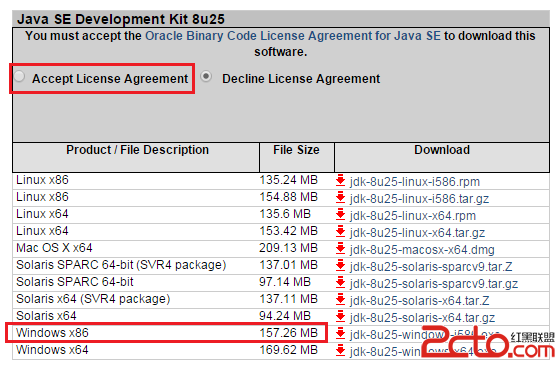 從零快速架設 Android 開發環境(ADT-Bundle)並跑起 Hello World
要開始寫 Android,第一步永遠是同一件事:把環境裝起來。本文以 ADT-Bundle 為主軸,從 JDK 安裝、環境變數設定,一路走到建立 AVD 並跑起第一個 H
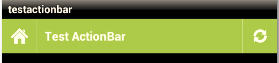 Android 自訂 ActionBar 實作教學
本文以實例說明如何打造一個自訂的 ActionBar,供大家參考。 Android 3.0 以上已內建 ActionBar API,也能透過引入 support pack
 Android 開源源碼:火車車次與航班資訊查詢(含收藏功能)
本專案示範一個同時支援火車車次與航班查詢的 Android 應用,輸入出發城市與目的地城市後即可列出對應班次,查詢結果可加入收藏清單以便日後快速查閱。車次與航班資料由 w