

編輯:關於 Android 程式設計
監聽器在 Java 裡無所不在。寫自定義控制項時,往往需要對外通報某些狀態變化,這時就得自己定義監聽器。它與 C++ 的回呼函式概念相通:初始化時把函式交出去,事件發生時由控制項回呼;兩個類別之間的資料溝通,也常靠這條路徑完成。
定義監聽器的第一步永遠是宣告一個介面,具體行為則由設定監聽器的那一方實作。
package com.example.listviewitem.widgets;

import android.content.Context;
import android.graphics.Canvas;
import android.util.AttributeSet;
import android.view.MotionEvent;
import android.view.View;

/** 自定義 View:對外提供三個監聽器 */
public class MyView extends View {

    private OnDownActionListener mDown = null;
    private OnMoveActionListener mMove = null;
    private OnUpActionListener mUp = null;

    public MyView(Context context) {
        super(context);
    }

    public MyView(Context context, AttributeSet attrs) {
        super(context, attrs);
    }

    @Override
    protected void onDraw(Canvas canvas) {
        super.onDraw(canvas);
    }

    @Override
    public boolean onTouchEvent(MotionEvent event) {
        int x = (int) event.getX();
        int y = (int) event.getY();

        if (event.getAction() == MotionEvent.ACTION_DOWN) {
            if (mDown != null) {
                mDown.OnDown(x, y);
            }
            return true; // 傳回 true,後續的 move 與 up 才會送到這裡
        } else if (event.getAction() == MotionEvent.ACTION_MOVE) {
            if (mMove != null) {
                mMove.OnMove(x, y);
            }
        } else if (event.getAction() == MotionEvent.ACTION_UP) {
            if (mUp != null) {
                mUp.OnUp(x, y);
            }
        }
        return super.onTouchEvent(event);
    }

    public void setOnDownActionListener(OnDownActionListener down) {
        mDown = down;
    }

    public void setOnMoveActionListener(OnMoveActionListener move) {
        mMove = move;
    }

    public void setOnUpActionListener(OnUpActionListener up) {
        mUp = up;
    }

    public interface OnDownActionListener {
        void OnDown(int x, int y);
    }

    public interface OnMoveActionListener {
        void OnMove(int x, int y);
    }

    public interface OnUpActionListener {
        void OnUp(int x, int y);
    }
}
<?xml version="1.0" encoding="utf-8"?>
<LinearLayout xmlns:android="https://schemas.android.com/apk/res/android"
    android:layout_width="match_parent"
    android:layout_height="match_parent"
    android:orientation="vertical" >

    <com.example.listviewitem.widgets.MyView
        android:id="@+id/my_view"
        android:layout_width="wrap_content"
        android:layout_height="wrap_content"
        android:background="@drawable/area_point_bg" />
</LinearLayout>
public class TestListener extends Activity {

    private MyView view;

    @Override
    protected void onCreate(Bundle savedInstanceState) {
        super.onCreate(savedInstanceState);
        setContentView(R.layout.listener);
        view = (MyView) findViewById(R.id.my_view);

        view.setOnDownActionListener(new OnDownActionListener() {
            @Override
            public void OnDown(int x, int y) {
                System.out.println("down x = " + x + " y = " + y);
            }
        });

        view.setOnMoveActionListener(new OnMoveActionListener() {
            @Override
            public void OnMove(int x, int y) {
                System.out.println("move x = " + x + " y = " + y);
            }
        });

        view.setOnUpActionListener(new OnUpActionListener() {
            @Override
            public void OnUp(int x, int y) {
                System.out.println("up x = " + x + " y = " + y);
            }
        });
    }
}
執行後在控制台觀察輸出:

三組座標都按順序印了出來,代表自定義的監聽器已經正常運作。這裡唯一要留意的是 ACTION_DOWN 必須回傳 true,否則後續的 move 與 up 事件不會再送進來。
 Android View 拖拽全解析:從移動原理到 ViewDragHelper 的實戰應用
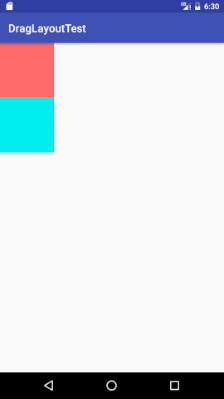
畫面上擺放著兩個方塊,我們不妨為它設定幾個互動需求來驅動後續的探討: 1. 拖動其中一個方塊時,它(也就是子 View)要能緊跟手指移動。 2. 拖動一個方塊的同時,另
 淺談 Android Service 的啟動、綁定與生命週期
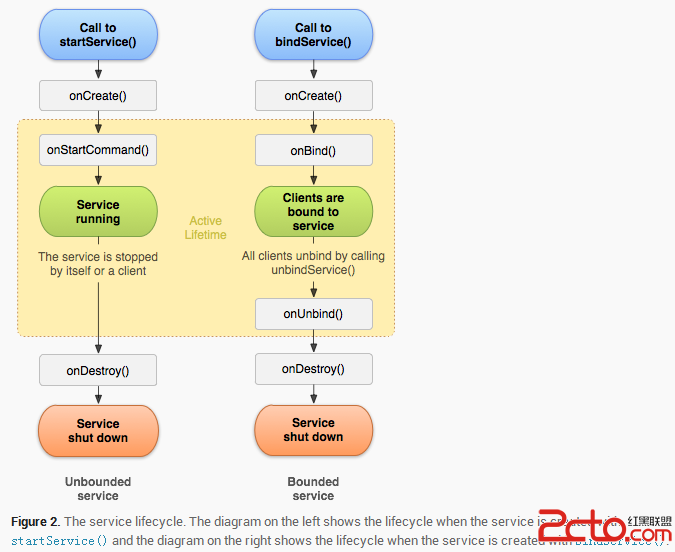
Service 的兩種主要使用方式 Service 可以在背景執行不需要使用者互動的任務。常見方式有 startService 與 bindService,兩者在使用情境
 Android 自定義 ViewGroup 佈局:onMeasure 與 onLayout 的實作要點
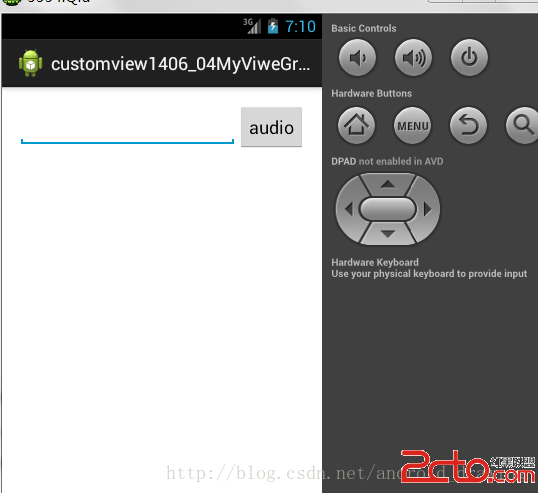
當系統內建的 LinearLayout、RelativeLayout 都無法滿足排列需求時,就得自己繼承 ViewGroup 寫一個佈局。自定義 ViewGroup 的核
 Android 監聽 EditText 內容變化的實現方法
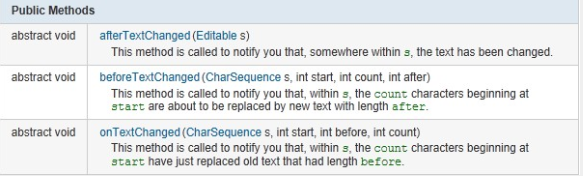
本文介紹如何監聽 EditText 中文本內容的變化,供大家參考。 EditText 並沒有直接的 setOnxxxx 方法來監聽內容變化。查資料後發現,它提供了一個