

編輯:關於 Android 程式設計
開啟 ProGuard 之後專案突然出現上百個 warning 導致建置失敗,是每個 Android 開發者都會遇到的一關。本文整理它的運作方式、四個輸出檔案的用途、一份可直接套用的基礎規則,以及那些錯誤訊息到底在說什麼。
在 project.properties(或現行專案的 build.gradle)中加上:
proguard.config=proguard.cfg
Gradle 建置下則是在 release 的 buildTypes 中設定 minifyEnabled true 並指定 proguardFiles。
混淆器執行後會在輸出目錄產生四份檔案,各自用途不同:
a.b.c(),必須靠它反譯回可讀的類別與方法名。每次上線版本都要各自保存一份,對錯版本就無法還原。# 關閉優化(遇到複雜專案時可先關閉以排除問題)
-dontoptimize
# 保留泛型簽名資訊,否則 Gson/Jackson 這類反射庫會出錯
-keepattributes Signature
-keepattributes *Annotation*
# 保留原始碼行號,讓線上堆疊能對回實際行數
-keepattributes SourceFile,LineNumberTable
# 不要跳過非公開的 library 類別與成員
-dontskipnonpubliclibraryclassmembers
-dontskipnonpubliclibraryclasses
# 明確宣告第三方 JAR 的位置
-libraryjars libs/android-support-v4.jar
# 不混淆第三方套件
-keep class android.support.v4.** { *; }
-dontwarn android.support.v4.**
[proguard] Note: there were 1 references to unknown classes.
[proguard] Warning: there were 269 unresolved references to classes or interfaces.
[proguard] You may need to specify additional library jars (using '-libraryjars'),
[proguard] or perhaps the '-dontskipnonpubliclibraryclasses' option.
[proguard] Warning: there were 57 unresolved references to program class members.
[proguard] Your input classes appear to be inconsistent.
[proguard] You may need to recompile them and try again.
[proguard] Warning: there were 269 unresolved references...
BUILD FAILED
Please correct the above warnings first.
逐條翻譯成人話:
臨時應急可以用 -dontwarn 套件名.** 把警告壓下去,但這只是遮住症狀。正確做法是補上缺的 -libraryjars 或 -keep 規則。
這是最實用的一段經驗——凡是「透過名稱被間接存取」的東西,都必須顯式保留:
關於「專案引入的第三方 JAR 要不要設定混淆」,答案是:分兩類處理。純第三方(如 support library)建議 -keep 不混淆,因為它們靠名稱反射的內部結構你無法掌握;而自己擁有原始碼、會動態產生 JAR 的模組,通常可以正常混淆,除非其中有上述「靠名稱存取」的設計。
參考資料:Android 官方 ProGuard 說明頁、ProGuard 官方網站,以及 Gson 打包問題的相關討論。
 Material Design 進階:自定義 Behavior 支持任意 View
本文分享如何打造一個能支持所有 View 的自定義 Behavior,供需要時參考。一、效果展示右下角這顆浮動元素的動畫可以有各種變化,也能放在畫面任何位置。但 v7 包
 Android 報錯解析:java.lang.RuntimeException: Unable to instantiate application
問題現象 啟動應用時直接崩潰,Logcat 拋出: java.lang.RuntimeException: Unable to instantiate applicati
 Android Handler 入門:第一個訊息傳遞範例
這是一個最簡單的 Handler 範例,目的只是讓初學者對 Handler 有個初步的認識。範例在布局上放了一個按鈕,點擊後透過 Handler 傳送資料並列印出來(全部
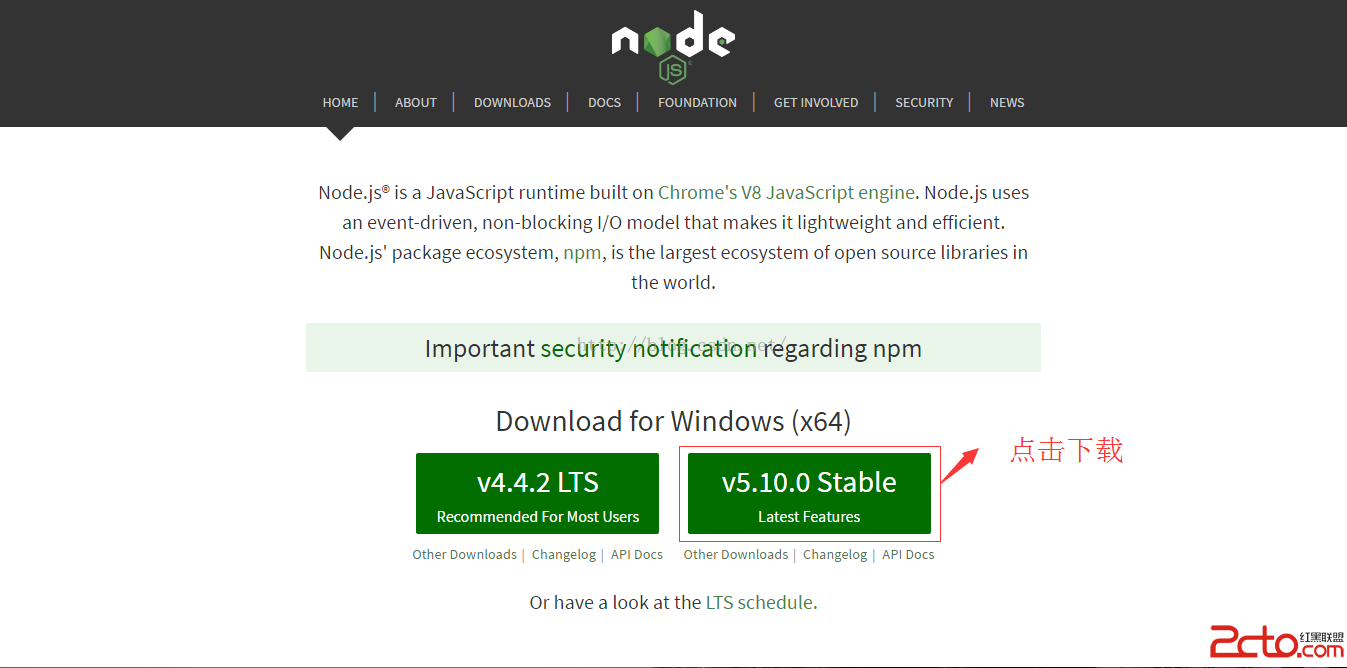 用 Node.js、Ionic、Cordova 與 IntelliJ IDEA 建置 Web App 開發環境
工具與安裝包準備 第一次搭建 Node.js、Ionic、Cordova 與 IntelliJ IDEA 的 Web App 開發環境,最容易卡住的就是依賴與環境變數。建