

編輯:關於 Android 程式設計
官方對 SlidingDrawer 的解釋是:它會把內容隱藏在螢幕之外,並允許使用者拖動 handle 把內容拉出到螢幕上。一個 SlidingDrawer 由兩個子 View 組成——一個「handle」(把手)與一個「content」(內容)。要注意的是,SlidingDrawer 在 API 17 中已被棄用。
以下透過一個簡單範例來學習這個控件。先來看效果圖:

<?xml version="1.0" encoding="utf-8"?>
<SlidingDrawer xmlns:android="https://schemas.android.com/apk/res/android"
    android:id="@+id/sliding_drawer"
    android:layout_width="match_parent"
    android:layout_height="match_parent"
    android:orientation="horizontal"
    android:content="@+id/content"
    android:handle="@+id/handle" >
    <ImageView android:id="@+id/handle"
        android:layout_width="15dip"
        android:layout_height="50dip"
        android:src="@drawable/seek_bar_style" />
    <LinearLayout android:id="@+id/content"
        android:layout_width="match_parent"
        android:layout_height="match_parent" >
        <ImageView android:layout_width="match_parent"
            android:layout_height="match_parent"
            android:src="@drawable/seek_bar_thum" />
    </LinearLayout>
</SlidingDrawer>
這裡用到了 seek_bar_style 與 seek_bar_thum,具體定義請參考「一步一步學 Android 控件(二十五)—— SeekBar」。
Activity 部分只加上一句 setContentView:
package com.xy.zt.selfdefinewieget;

import android.app.Activity;
import android.os.Bundle;
import android.view.MotionEvent;
import android.view.View;
import android.view.View.OnTouchListener;

public class WidgetsSlidingDrawerActivity extends Activity implements OnTouchListener {
    @Override
    public void onCreate(Bundle savedInstanceState) {
        super.onCreate(savedInstanceState);
        setContentView(R.layout.widget_sliding_drawer);
    }
    public boolean onTouch(View v, MotionEvent event) {
        return false;
    }
}
public static final int SLISING_DRAWER_ID = QUICK_CONTACT_BADGE_ID + 1;
public static final String SLIDING_DRAWER_NAME = "SlidingDrawer";
private static final ViewData mSlidingDraer = new ViewData(SLIDING_DRAWER_NAME, SLISING_DRAWER_ID);
View_Datas.add(mSlidingDraer);
並在 WidgetsAdapter 的 handleItemClicked 中補上:
case ViewData.SLISING_DRAWER_ID:
    intent.setClass(mContext, WidgetsSlidingDrawerActivity.class);
    mContext.startActivity(intent);
    break;
以上就是 SlidingDrawer 控件的全部內容,下一個控件將介紹 ViewFlipper。
 Android Canvas 練習(7):手繪歐冠八強數據對比環圖
在網易數據酷的〈足壇「斧頭幫」!瘋狂馬競打爆巴薩〉中看到一幅圖,視覺設計非常有特色。因為最近用 Canvas 畫了不少圖表,就起心動念用程式碼把這張圖重現出來。 大體上
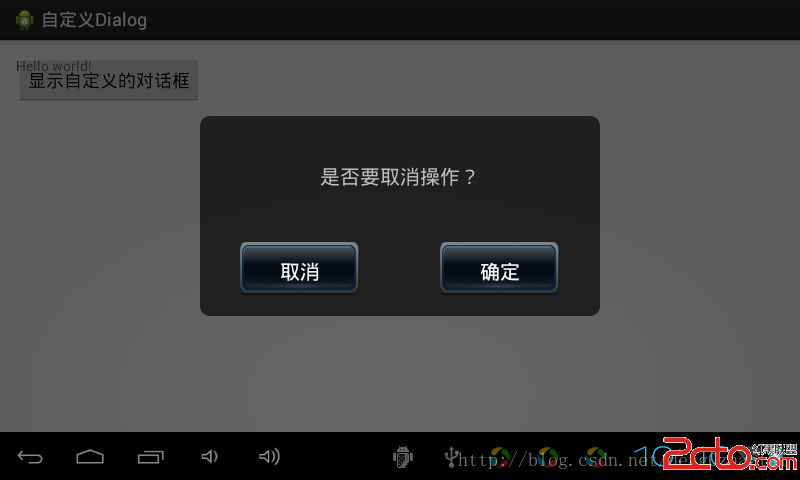 Android 自定義提示框實作教學
為什麼要自定義提示框Android 系統內建的提示框雖然方便,但在視覺風格、按鈕樣式與互動細節上未必符合產品需求。若希望提示框更貼近品牌設計,或需要更靈活的控制項,可以透
 兩天速成 RecyclerView:從原理到瀑布流與增刪動畫的實戰筆記
RecyclerView 是 Android 5.0 之後推出的全新 View 組件,功能相比 ListView 只強不弱,相信在往後的學習與工作中都會派上用場。這兩天筆
 Android View 繪製與螢幕顯示原理解析
顯示流程概覽 Android 應用畫面顯示可概括為:應用將測量、布局與繪製後的 Surface 交給 SurfaceFlinger,再由系統渲染到螢幕。SurfaceFl