

編輯:關於 Android 程式設計
要在 EditText 的左側放一個小圖示,用複合 Drawable 是最省事的做法,不需要額外排一層 LinearLayout。
Bitmap bitmap = mWebView.getFavicon();
Drawable drawable = new BitmapDrawable(bitmap);
// edit.setCompoundDrawables(drawable, null, null, null);

drawable = this.getResources().getDrawable(R.drawable.history);
edit.setCompoundDrawablesWithIntrinsicBounds(drawable, null, null, null);
edit.setText(cur_url);
// edit.setMaxLines(1);setCompoundDrawables 會嚴格按照 drawable.setBounds() 所設定的寬高來繪製,所以官方才會特別警告「The Drawables must already have had setBounds(Rect) called.」——不先呼叫就會拿到尺寸為 0 的圖,什麼都看不到。
setCompoundDrawablesWithIntrinsicBounds 則直接使用 Drawable 自身的固有尺寸,也就是透過 getIntrinsicWidth() 與 getIntrinsicHeight() 取得的值,因此文件寫的是「The Drawables' bounds will be set to their intrinsic bounds.」。從原始碼就能看得很清楚:
public void setCompoundDrawablesWithIntrinsicBounds(Drawable left, Drawable top,
        Drawable right, Drawable bottom) {

    if (left != null) {
        left.setBounds(0, 0, left.getIntrinsicWidth(), left.getIntrinsicHeight());
    }
    if (right != null) {
        right.setBounds(0, 0, right.getIntrinsicWidth(), right.getIntrinsicHeight());
    }
    if (top != null) {
        top.setBounds(0, 0, top.getIntrinsicWidth(), top.getIntrinsicHeight());
    }
    if (bottom != null) {
        bottom.setBounds(0, 0, bottom.getIntrinsicWidth(), bottom.getIntrinsicHeight());
    }
    setCompoundDrawables(left, top, right, bottom);
}換句話說,setCompoundDrawablesWithIntrinsicBounds 只是幫你把 setBounds 這一步自動做掉了。實務上的選擇很單純:直接用資源 ID 或 Drawable 物件時,用 IntrinsicBounds 版本最方便;需要精確控制圖示顯示尺寸(例如想把一張大圖縮小顯示)時,才走 setBounds 加 setCompoundDrawables 的組合。此外,這個方法也有接受資源 ID 的重載版本 setCompoundDrawablesWithIntrinsicBounds(int left, int top, int right, int bottom),能省掉手動 getDrawable() 的麻煩。
 高仿微信風格的網頁載入進度條:SlowlyProgressBar 實作
一、為什麼說是「真正的高仿」? 先說明這個問題。網路上搜尋「仿微信打開網頁的進度條效果」,可以找到大量類似文章,但它們有個共同點:實作方式幾乎一模一樣,而且都忽略了微信載
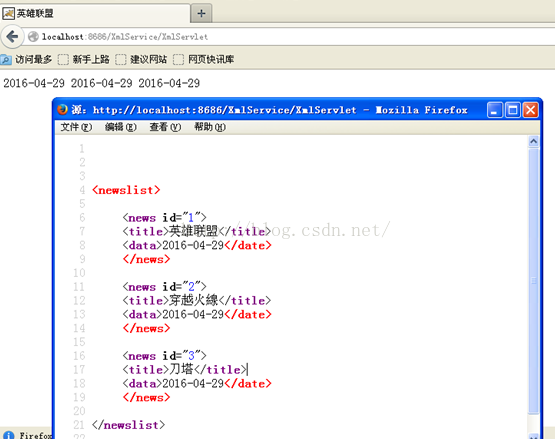 Android 客戶端與伺服器互動實戰:JSON 解析、Pull 解析與資料回傳
一、以 JSON 從伺服器解析資料 客戶端原本拿到的資料長這樣: [{id:1,title:馬雲,publishTime:Sat May 14 15:31:11 CST
 Android WindowManager解析與原理實踐(附Window機制完整梳理)
近來在網上看到有人提交了一個有趣的案例:應用可以開啟一個後台Service,偵測當前頂部應用,若為QQ或相關應用,就彈出一個自定義Window來誘騙使用者輸入帳號密碼。這
 Android 學習小 Demo(18):仿 QQ 滑動刪除待辦任務
一般情況下,若想為 ListView 上的 ListItem 實現滑動刪除、或仿 QQ 的滑動顯示刪除按鈕效果,只需繼承 ListView 並自定義一個即可。不過由於之前