

編輯:關於 Android 程式設計
多執行緒斷點續傳下載是 Android 中相當實用的技巧。本文先說明原理,再逐步拆解程式的各個組成部分,幫助你完整理解並動手實作。
在發出請求協議時加上 Range 參數,即可定位下載檔案的起始與結束位置。下載過程中,記錄每條執行緒已下載的資料量與執行緒 id,並以檔案的 URL 作為下載識別,將下載資訊做持久化(可存入資料庫、檔案或網路,本例採用 SQLite 資料庫)。
開始下載時,先檢查資料庫中是否已有該下載位址的記錄:若沒有,就從頭開始下載;若有,則計算其執行緒數。若先前下載的執行緒數與本次任務一致,重送請求時便可使用 Range 參數,其對應值即為起始與結束位置,例如:
conn.setRequestProperty("Range", "bytes=" + startPosition + "-" + endPosition);
此處要注意:主執行緒(UI 執行緒)負責畫面更新,而資料由子執行緒提供,兩者透過 Handler 溝通。
package com.itcast.activity;

import java.io.File;
import java.io.IOException;

import android.app.Activity;
import android.os.Bundle;
import android.os.Environment;
import android.os.Handler;
import android.os.Message;
import android.view.Menu;
import android.view.View;
import android.widget.Button;
import android.widget.EditText;
import android.widget.ProgressBar;
import android.widget.TextView;
import android.widget.Toast;

import com.itcast.download.DownloadPropressListener;
import com.itcast.download.FileDownLoader;
import com.itcast.download.R;

public class MainActivity extends Activity {
    private EditText downloadPath;
    private ProgressBar progressBar;
    private TextView resultText;
    private Button download;
    private Button stop;
    private FileDownLoader downLoader;

    // 當 handler 被創建時,會關聯到創建他的當前線程的消息隊列,
    // 消息的運行代碼是運行在 ui 線程裡的
    private Handler handler = new Handler() {
        @Override
        public void handleMessage(Message msg) {
            switch (msg.what) {
                case 1:
                    int downloadSize = msg.getData().getInt("downloadSize");
                    progressBar.setProgress(downloadSize);
                    float num = (float) progressBar.getProgress() / (float) progressBar.getMax();
                    int result = (int) (num * 100);
                    resultText.setText(result + "%");
                    if (progressBar.getProgress() == progressBar.getMax()) {
                        Toast.makeText(MainActivity.this, R.string.success, Toast.LENGTH_SHORT).show();
                        download.setEnabled(true);
                        stop.setEnabled(false);
                    }
                    break;
                case -1:
                    Toast.makeText(MainActivity.this, R.string.error, Toast.LENGTH_SHORT).show();
                    break;
            }
        }
    };

    @Override
    public void onCreate(Bundle savedInstanceState) {
        super.onCreate(savedInstanceState);
        setContentView(R.layout.activity_main);
        downloadPath = (EditText) findViewById(R.id.urlPath);
        resultText = (TextView) findViewById(R.id.result);
        progressBar = (ProgressBar) findViewById(R.id.progress);
        download = (Button) findViewById(R.id.down);
        stop = (Button) findViewById(R.id.stop);
        ButtonClickListener buttonListener = new ButtonClickListener();
        download.setOnClickListener(buttonListener);
        stop.setOnClickListener(buttonListener);
    }

    public void download(final String path, final File saveFileDir) throws IOException {
        new Thread(new Runnable() {
            @Override
            public void run() {
                try {
                    downLoader = new FileDownLoader(MainActivity.this, path, saveFileDir, 3);
                    progressBar.setMax(downLoader.getFileSize());
                    downLoader.startThread();
                    downLoader.downLoad(new DownloadPropressListener() {
                        @Override
                        public void onDownloadSize(int downloadSize) {
                            Message msg = new Message();
                            msg.what = 1;
                            msg.getData().putInt("downloadSize", downloadSize);
                            handler.sendMessage(msg);
                        }
                    });
                } catch (Exception e) {
                    Message msg = new Message();
                    msg.what = -1;
                    handler.sendMessage(msg);
                    e.printStackTrace();
                }
            }
        }).start();
    }

    public void stop() {
        if (downLoader != null) {
            downLoader.stopThread();
            Toast.makeText(MainActivity.this, "線程已停止下載", Toast.LENGTH_SHORT).show();
            stop.setEnabled(false);
            download.setEnabled(true);
        } else {
            download.setEnabled(true);
            Toast.makeText(MainActivity.this, "線程未開啟", Toast.LENGTH_SHORT).show();
        }
    }

    public class ButtonClickListener implements View.OnClickListener {
        @Override
        public void onClick(View v) {
            switch (v.getId()) {
                case R.id.down:
                    try {
                        String urlPath = downloadPath.getText().toString();
                        if (Environment.getExternalStorageState().equals(android.os.Environment.MEDIA_MOUNTED)) {
                            download(urlPath, Environment.getExternalStorageDirectory());
                            stop.setEnabled(true);
                            download.setEnabled(false);
                        } else {
                            Toast.makeText(MainActivity.this, R.string.sdCarderror, Toast.LENGTH_SHORT).show();
                        }
                    } catch (IOException e) {
                        e.printStackTrace();
                    }
                    break;
                case R.id.stop:
                    stop();
                    break;
                default:
                    break;
            }
        }
    }
}
每條執行緒負責下載檔案的其中一段,並透過 Range 標頭指定範圍,再以 RandomAccessFile 定位寫入位置:
package com.itcast.download;

import java.io.File;
import java.io.IOException;
import java.io.InputStream;
import java.io.RandomAccessFile;
import java.net.HttpURLConnection;
import java.net.URL;

import android.util.Log;

public class DownloadThread extends Thread {
    private static final String TAG = "DownloadThread";
    private File saveFile;      // 下載文件後的保存文件位置
    private URL url;            // 下載地址
    private int dataLength;     // 線程開始下載的位置
    private int threadId;       // 線程id
    private boolean finish = false; // 是否已經下載完成
    private FileDownLoader downLoader; // 下載工具類
    private int downLength;     // 已經下載文件的長度
    private boolean exit;       // 控制線程停止下載

    public DownloadThread(FileDownLoader downLoader, URL url, File saveFile,
            int dataLength, Integer downLength, Integer threadId) {
        this.url = url;
        this.saveFile = saveFile;
        this.dataLength = dataLength;
        this.threadId = threadId;
        this.downLoader = downLoader;
        this.downLength = downLength;
    }

    @Override
    public void run() {
        if (downLength < dataLength) { // 如果是未完成下載
            try {
                HttpURLConnection conn = (HttpURLConnection) url.openConnection();
                conn.setReadTimeout(5 * 1000);
                conn.setRequestMethod("GET");
                conn.setRequestProperty("Charser", "UTF-8");
                conn.setRequestProperty("Referer", url.toString());
                int startPosition = dataLength * (threadId - 1) + downLength; // 加上之前下載數據量
                int endPosition = dataLength * threadId - 1;                  // 當前線程結束的位置
                conn.setRequestProperty("Range", "bytes=" + startPosition + "-" + endPosition);
                InputStream inputStream = conn.getInputStream();
                byte[] buffer = new byte[1024];
                int len = 0;
                Log.i(TAG, "thread " + this.threadId + " start download from position " + startPosition);
                RandomAccessFile accessFile = new RandomAccessFile(this.saveFile, "rwd");
                accessFile.seek(startPosition); // 設置寫入該文件的開始位置
                while ((len = inputStream.read(buffer)) != -1 && this.exit != true) {
                    downLength += len;                          // 累加下載的數據量
                    downLoader.update(this.threadId, downLength); // 更新當前線程已下載的數據量
                    downLoader.append(len);                     // 累計下載文件大小
                }
                accessFile.close();
                inputStream.close();
                this.finish = true;
                Log.i(TAG, "thread " + this.threadId + " download finish");
            } catch (IOException e) {
                this.downLength = -1;
                e.printStackTrace();
                Log.i(TAG, "thread " + this.threadId + " download error:" + e.toString());
            }
        }
    }

    public boolean isFinish() {
        return this.finish;
    }

    public int getDownLength() {
        return this.downLength;
    }

    public void stopThread() {
        this.exit = true;
    }

    public boolean getStopThread() {
        return this.exit;
    }

    public void startThread() {
        this.exit = false;
    }
}
FileDownLoader 負責協調多條執行緒、計算檔案大小、讀寫下載記錄,並在全部完成後清理資料:
package com.itcast.download;

import java.io.File;
import java.io.IOException;
import java.io.RandomAccessFile;
import java.net.HttpURLConnection;
import java.net.URL;
import java.util.HashMap;
import java.util.Map;

import android.content.Context;
import android.util.Log;

import com.itcast.service.FileService;

public class FileDownLoader {
    public static final String TAG = "FileDownLoader";
    private Context context;
    private FileService fileService;
    private int downloadSize;   // 已下載文件數據的長度
    private int fileSize;       // 原始文件長度
    private DownloadThread[] threads;
    private File saveFile;      // 保存到本地的文件
    private Map<Integer, Integer> data; // 保存每個線程id和已下載的數據量
    private int dataLength;     // 每個線程下載數據的長度
    private String downloadUrl; // 下載路徑

    public FileDownLoader(Context context, String downloadUrl, File saveFileDir, int threadCount) throws IOException {
        this.context = context;
        this.downloadUrl = downloadUrl;
        this.data = new HashMap<Integer, Integer>();
        this.fileService = new FileService(this.context);
        if (!saveFileDir.exists()) {
            saveFileDir.mkdirs();
        }
        URL url = new URL(this.downloadUrl);
        this.threads = new DownloadThread[threadCount];
        HttpURLConnection conn = (HttpURLConnection) url.openConnection();
        conn.setReadTimeout(5 * 1000);
        conn.setRequestMethod("GET");
        conn.setConnectTimeout(5 * 1000);
        conn.setRequestProperty("Accept-Language", "zh-CN");
        conn.setRequestProperty("Referer", this.downloadUrl);
        conn.setRequestProperty("Charset", "UTF-8");
        conn.setRequestProperty("Connection", "Keep-Alive");
        conn.connect();
        if (conn.getResponseCode() == 200) {
            this.fileSize = conn.getContentLength();
            if (this.fileSize == 0) {
                throw new RuntimeException("文件大小未知:unknown file size");
            }
            String fileName = getFileName(conn);
            this.saveFile = new File(saveFileDir, fileName);
            Map<Integer, Integer> dataLog = this.fileService.getData(this.downloadUrl);
            if (dataLog.size() > 0) {
                for (Integer i : dataLog.keySet()) {
                    this.data.put(i, dataLog.get(i));
                }
            }
            if (this.data != null && (this.data.size() == this.threads.length)) {
                for (int i = 0; i < this.threads.length; i++) {
                    this.downloadSize += this.data.get(i + 1);
                    Log.i(TAG, "Thread: " + (i + 1) + " 已經下載 " + this.data.get(i + 1));
                }
                Log.i(TAG, "當前總下載:  " + this.downloadSize);
            }
            this.dataLength = this.fileSize % threadCount == 0
                    ? this.fileSize / threadCount : this.fileSize / threadCount + 1;
        } else {
            throw new RuntimeException("服務器沒有響應:server no respone");
        }
    }

    private String getFileName(HttpURLConnection conn) {
        return this.downloadUrl.substring(this.downloadUrl.lastIndexOf("/") + 1);
    }

    public int downLoad(DownloadPropressListener listener) throws Exception {
        try {
            RandomAccessFile randOutFile = new RandomAccessFile(this.saveFile, "rwd");
            if (this.fileSize > 0) {
                randOutFile.setLength(this.fileSize); // 設置隨機生成的文件與下載文件一樣大小
            }
            randOutFile.close();
            URL url = new URL(this.downloadUrl);
            if (this.data != null && this.data.size() != this.threads.length) {
                this.data.clear();
                for (int i = 0; i < this.threads.length; i++) {
                    this.data.put(i + 1, 0);
                }
            }
            for (int i = 0; i < this.threads.length; i++) {
                int downLength = this.data.get(i + 1);
                if (downLength < this.dataLength && this.downloadSize < this.fileSize) {
                    this.threads[i] = new DownloadThread(this, url, this.saveFile,
                            this.dataLength, this.data.get(i + 1), i + 1);
                    this.threads[i].setPriority(7);
                    this.threads[i].start();
                } else {
                    this.threads[i] = null;
                }
            }
            this.fileService.save(downloadUrl, this.data);
            boolean isFinish = true;
            while (isFinish) {
                Thread.sleep(500);
                isFinish = false;
                for (int i = 0; i < this.threads.length; i++) {
                    if (this.threads[i] != null && !this.threads[i].isFinish()) {
                        isFinish = true;
                        if (this.threads[i].getDownLength() == -1) {
                            this.threads[i] = new DownloadThread(this, url, this.saveFile,
                                    this.dataLength, this.data.get(i + 1), i + 1);
                            this.threads[i].setPriority(7);
                            this.threads[i].start();
                        }
                    }
                }
                if (listener != null) {
                    listener.onDownloadSize(this.downloadSize);
                }
            }
            if (this.downloadSize == this.fileSize) {
                this.fileService.delete(this.downloadUrl);
            }
        } catch (Exception e) {
            Log.i(TAG, e.toString());
            e.printStackTrace();
            throw new Exception("file download fail");
        }
        return this.downloadSize;
    }

    // 更新線程下載的數據量,注意 synchronized 關鍵字,避免多線程同時操作單例資料庫時報錯
    public synchronized void update(int threadId, int downLength) {
        this.data.put(threadId, downLength);
        this.fileService.update(this.downloadUrl, this.data);
    }

    // 累計文件下載長度,注意 synchronized 關鍵字
    public synchronized void append(int len) {
        this.downloadSize += len;
    }

    public int getFileSize() {
        return this.fileSize;
    }

    public void stopThread() {
        for (int i = 0; i < this.threads.length; i++) {
            if (this.threads[i] != null) {
                this.threads[i].stopThread();
            }
        }
    }

    public void startThread() {
        for (int i = 0; i < this.threads.length; i++) {
            if (this.threads[i] != null) {
                this.threads[i].startThread();
            }
        }
    }
}
用於建立下載記錄表,記錄每條執行緒的 id 與已下載長度:
package com.itcast.util;

import android.content.Context;
import android.database.sqlite.SQLiteDatabase;
import android.database.sqlite.SQLiteDatabase.CursorFactory;
import android.database.sqlite.SQLiteOpenHelper;

public class DBHelper extends SQLiteOpenHelper {
    private static final String BABASENAME = "dowmload.db";
    private static final int DATABASEVERSION = 1;

    public DBHelper(Context context, CursorFactory factory, int version) {
        super(context, BABASENAME, null, DATABASEVERSION);
    }

    public DBHelper(Context context) {
        super(context, BABASENAME, null, DATABASEVERSION);
    }

    @Override
    public void onCreate(SQLiteDatabase db) {
        // downpath 下載路徑  threadid 現在線程id  downlength 已經下載的長度
        db.execSQL("create table if not exists filedownlog(id integer primary key autoincrement, downpath varchar(80), threadid integer, downlength integer)");
    }

    @Override
    public void onUpgrade(SQLiteDatabase db, int oldVersion, int newVersion) {
        db.execSQL("drop table if exists filedownlog");
        onCreate(db);
    }
}
負責下載記錄的讀取、保存、更新與刪除。由於多條執行緒可能同時更新,這裡特別使用 synchronized 關鍵字避免資料庫被並發操作而報錯:
package com.itcast.service;

import java.util.HashMap;
import java.util.Map;

import android.content.Context;
import android.database.Cursor;
import android.database.sqlite.SQLiteDatabase;

import com.itcast.util.DBHelper;

public class FileService {
    private DBHelper dbHelper;

    public FileService(Context context) {
        this.dbHelper = new DBHelper(context);
    }

    public Map<Integer, Integer> getData(String path) {
        SQLiteDatabase db = dbHelper.getReadableDatabase();
        Cursor cursor = db.rawQuery("select threadid,downlength from filedownlog where downpath=?",
                new String[] { path });
        Map<Integer, Integer> data = new HashMap<Integer, Integer>();
        while (cursor.moveToNext()) {
            Integer threadid = cursor.getInt(cursor.getColumnIndex("threadid"));
            Integer downlength = cursor.getInt(cursor.getColumnIndex("downlength"));
            data.put(threadid, downlength);
        }
        cursor.close();
        db.close();
        return data;
    }

    public void save(String path, Map<Integer, Integer> data) {
        SQLiteDatabase db = dbHelper.getWritableDatabase();
        db.beginTransaction();
        try {
            for (Integer i : data.keySet()) {
                db.execSQL("insert into filedownlog(downpath,threadid,downlength) values(?,?,?)",
                        new Object[] { path, i, data.get(i) });
            }
            db.setTransactionSuccessful();
        } finally {
            db.endTransaction();
        }
        db.close();
    }

    public void update(String path, Map<Integer, Integer> data) {
        SQLiteDatabase db = dbHelper.getWritableDatabase();
        db.beginTransaction();
        try {
            for (Integer i : data.keySet()) {
                db.execSQL("update filedownlog set downlength=? where downpath=? and threadid=?",
                        new Object[] { data.get(i), path, i });
            }
            db.setTransactionSuccessful();
        } finally {
            db.endTransaction();
        }
        db.close();
    }

    public void delete(String path) {
        SQLiteDatabase db = dbHelper.getWritableDatabase();
        db.execSQL("delete from filedownlog where downpath=?", new Object[] { path });
        db.close();
    }
}
本例的關鍵知識點在於:子執行緒如何透過 Handler 與 Message 更新 UI 執行緒的畫面資料。當 Handler 被創建時,會關聯到建立它的執行緒的消息佇列,訊息由該執行緒內部處理,其運行程式碼即運行於 UI 執行緒;只要重寫 handleMessage,就能在其中執行自訂邏輯。此外,主執行緒不能執行下載這類耗時任務,否則容易造成 ANR,因此長時間的運算都應另開執行緒處理。
 Android 自定義 CircleImageView:一步做出圓形頭像與彩色邊框
圓形頭像幾乎是每個 App 的標配。雖然現在有 Glide 的 CircleCrop、CardView 等現成方案,但自己實作一遍,能徹底理解 BitmapShader
 打造強大的 Android 日誌工具類 LogUtils
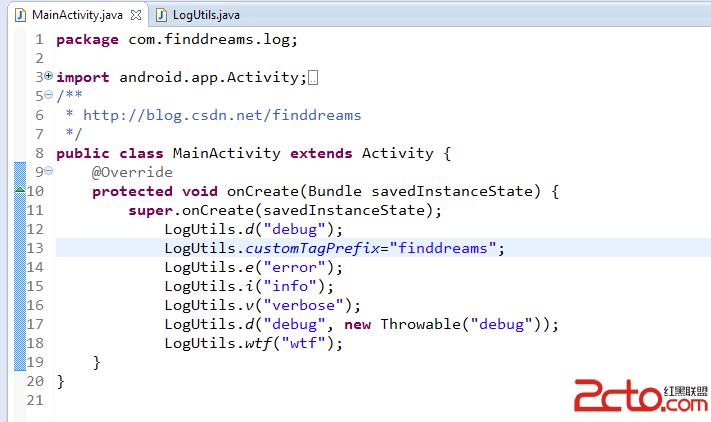
在開發中,我們常常透過打印 log 來調試應用。Java 中常用 System.out.println() 在控制台輸出日誌,而 Android 則提供了專門的 Log
 Android 基礎知識(二):事件處理機制詳解
在應用開發中,需要處理最多的莫過於使用者操作,也就是要為使用者的動作提供響應,這種機制就稱為事件處理。Android 提供了兩套事件處理機制: 基於監聽的事件處理:為介面
 Android ListView 常見用法全面解析(從基礎到多選與點擊事件)
ListView 是 Android 開發中最常被使用的列表控件之一。本文整理了 ListView 的常見用法,從最基本的步驟到多選模式與事件回應,一次帶你完整走過,供大