

編輯:關於 Android 程式設計
Android 的文件讀寫分幾種常見場景:應用私有目錄(/data/data/包名/files)、SD 卡(/mnt/sdcard)、raw 資源目錄以及 assets 目錄。下面用一個工具類把這些操作統一封裝起來。
package com.wirelessqa.helper;

import java.io.FileInputStream;
import java.io.FileOutputStream;
import java.io.InputStream;

import org.apache.http.util.EncodingUtils;
import android.app.Activity;

public class FileAccess extends Activity {

    // 一、私有目錄下的讀寫(/data/data/包名/files)
    public void writeFileData(String fileName, String message) {
        try {
            FileOutputStream fout = openFileOutput(fileName, MODE_PRIVATE);
            fout.write(message.getBytes());
            fout.close();
        } catch (Exception e) {
            e.printStackTrace();
        }
    }

    public String readFileData(String fileName) {
        String res = "";
        try {
            FileInputStream fin = openFileInput(fileName);
            byte[] buffer = new byte[fin.available()];
            fin.read(buffer);
            res = EncodingUtils.getString(buffer, "UTF-8");
            fin.close();
        } catch (Exception e) {
            e.printStackTrace();
        }
        return res;
    }

    // 二、SD 卡目錄下的讀寫(/mnt/sdcard/)
    // 注意:SD 卡要用 FileOutputStream/FileInputStream,不能用 openFileOutput
    public void writeFileSdcard(String fileName, String message) {
        try {
            FileOutputStream fout = new FileOutputStream(fileName);
            fout.write(message.getBytes());
            fout.close();
        } catch (Exception e) {
            e.printStackTrace();
        }
    }

    public String readFileSdcard(String fileName) {
        String res = "";
        try {
            FileInputStream fin = new FileInputStream(fileName);
            byte[] buffer = new byte[fin.available()];
            fin.read(buffer);
            res = EncodingUtils.getString(buffer, "UTF-8");
            fin.close();
        } catch (Exception e) {
            e.printStackTrace();
        }
        return res;
    }

    // 三、從 raw 資源讀取(只讀)
    public String readFromRaw(int fileInRaw) {
        String res = "";
        try {
            InputStream in = getResources().openRawResource(fileInRaw);
            byte[] buffer = new byte[in.available()];
            in.read(buffer);
            res = EncodingUtils.getString(buffer, "GBK");
            in.close();
        } catch (Exception e) {
            e.printStackTrace();
        }
        return res;
    }

    // 四、從 assets 讀取(只讀)
    public String readFromAsset(String fileName) {
        String res = "";
        try {
            InputStream in = getResources().getAssets().open(fileName);
            byte[] buffer = new byte[in.available()];
            in.read(buffer);
            res = EncodingUtils.getString(buffer, "UTF-8");
        } catch (Exception e) {
            e.printStackTrace();
        }
        return res;
    }
}
幾個要點:私有目錄用 openFileOutput/openFileInput 最方便;SD 卡則必須用文件流,並提前申請 WRITE_EXTERNAL_STORAGE 權限;raw 與 assets 裡的資源只能讀不能寫,讀取時還要注意編碼(示例中 raw 用 GBK、其餘用 UTF-8,需按實際文件編碼調整)。
 Android 日誌管理框架 NativeLogger 介紹
日誌是任何專案開發中的必備組件,它能記錄系統行為,幫助開發者排錯、優化效能、調整系統行為。既然日誌能做這麼多分析,開發者自然有各種定製需求,例如在不同環境過濾不同等級的
 Android Studio 代碼錯誤提示的查看方法
Android Studio 的自動代碼檢測在錯誤提示方式上和 Eclipse 差別很大,剛上手的人可能會不太適應。Eclipse 檢測到某個資源檔找不到或有誤時,會直接
 手機藍牙怎麼用?配對與傳輸檔案的設定步驟
藍牙雖然不像過去那樣是主要的傳輸方式,但在連接耳機、喇叭、車機或臨時傳幾張照片時仍然方便,而且不需要網路。以下以兩支手機互傳為例說明完整流程。第一步:完成配對1. 開啟手
 Android 筆記 - Binder 之請求注冊 Service 組件
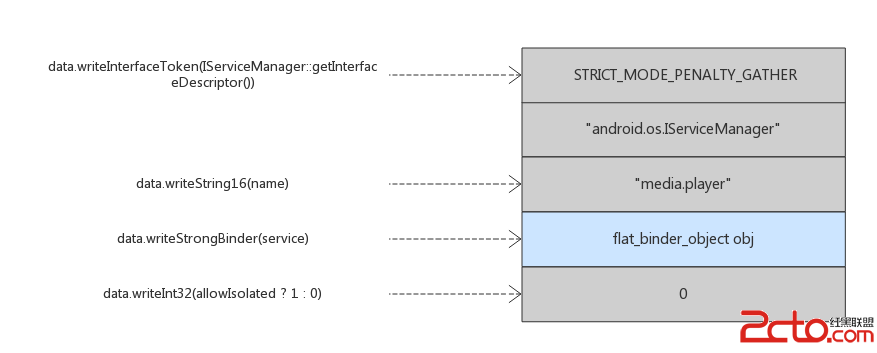
Android 系統大量採用了組件化的設計思路,將眾多核心服務以 Service 組件的形式對外提供。Service 只有注冊到 servicemanager 後,Cli